
Community listing page, reviews here may not be monitored by the author.
AsyncParticles


No reviews yet
Async particle ticking/rendering.
Community voices
Reviews
No reviews yet. Be the first to review this project!
Get it on
Available Platforms
Compatibility
Supported Environments
Runs entirely on the client. Works on vanilla servers.
About
Project Details
For authors
Embed Badge
If you're the author of this project, you can embed a live badge anywhere that supports HTML or Markdown. It updates automatically whenever ratings change.
Use HTML for any page that supports it, or Markdown for README files and Markdown-based descriptions.
Identifiers
Platform IDs
About
Description
AsyncParticles
- It will remain in the beta stage in the future to alert potential mod conflict issues.
- Now compatible with Particle Core(v20.1+).
- Now compatible with Valkyrien Skies v2.4.
- Please read the 'Troubleshooting' first.
Core Features
GPU Acceleration
- Offloading partricle vertex transformations to the GPU reduces per-frame data uploads to the GPU, lowers CPU load, and improves frame rates.
- This essentially replaces the previous async partricle vertex extraction while also improving compatibility (async partricle extraction is now disabled by default).
- Fill 1331 campfires (16,000+ particles, you can change the limit via config screen):
Tested on: Ultra5 225H + RTX 5060 Laptop, 1080p.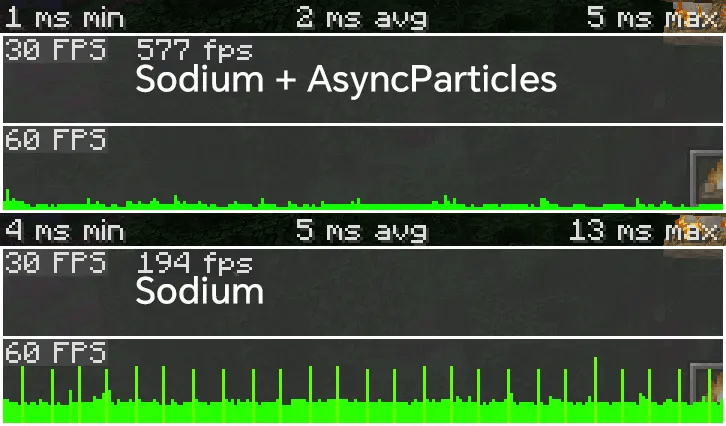
Create Integrations
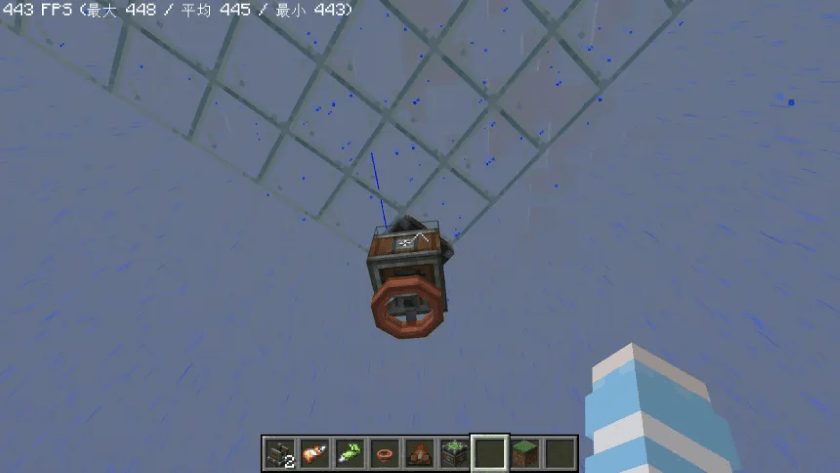
- Create contraptions can now block vanilla weather.(v20.1.0a+)
- Will move this to a new mod when I have time.
- Particles can now collide with contraptions.
Other Features
- Flexible mixin options.
- Minecraft
- Particle culling.
- Async particle tick.
- Async particle light cache.
- Delayed texture tick by one frame to reduce client tick duration.
Configuration
Settings can be accessed via the ModList/ModMenu.
Troubleshooting
Use with Polytone/Subtle Effects
- Disable
Async Animate Tick.
Use with Bosses Rise
- Enable
GPU Only Async Particle Tick.
Use with BadOptimizations
- Set
enable_particle_manager_optimization: falseinbadoptimizations.txt - Fixed since
20.1.1.0/21.1.1.0.
Crash with C2ME
- Set
enforceSafeWorldRandomAccess = "false"inc2me.toml- Only set this if you are experiencing crashes.
Crash with LodestoneLib
- Set
buffer_particles = falseinlodestone-client.toml.
Crashes related to ClassInstanceMultiMap or Level.getEntities(...)
- Please share the logs or crash report on the GitHub issue.
- As a workaround, enable the option:
Mixin→Make 'ClassInstanceMultiMap' Thread-Safe
Crashes related to Level.getBlockEntity(...)
- Please share the logs or crash report on the GitHub issue.
- As a workaround, enable the option:
Mixin→Make 'LevelChunk#blockEntities' Thread-Safe
ConcurrentModificationException
The Most Common Cause
This exception typically occurs when particle rendering and ticking concurrently access the same thread-unsafe container.
How to Fix
- Add the fully qualified particle class names to both
particle$lockProviderandparticle$lockRequiredin the mod's Mixin settings.
See the configuration guide for details
Note: This enables fine-grained locking for specific particle types, allowing safe asynchronous execution between the
tick()andrender()methods.
Other Potential Causes
Starting in vX.4.0, the default particle rendering mode has been changed to SYNCHRONOUSLY to prevent rare ConcurrentModificationExceptions when used with mods that access external thread-unsafe containers (e.g., global maps or lists) during particle rendering.
- If you're using an older version (≤ vX.3.0), consider manually setting the mode to
SYNCHRONOUSLYin the config screen for improved stability. - For modpack authors: If you’d like to test whether
FASTESTprovides a noticeable FPS boost in your setup, you can switch to it in the config screen—but use with caution, as it may trigger crashes with incompatible mods.
Need Help?
If you’re unsure how to identify or fix the issue, please open a GitHub Issue or start a Discussion.
- In version x.4.0, changed the default particle rendering mode to
SYNCHRONOUSLYto avoid rare and confusingConcurrentModificationExceptions when used with certain mods.- If you're still using an older version (≤ x.3.0), you may want to manually set it to
SYNCHRONOUSLYin the config screen. - If you're a modpack author or want to test whether a different rendering mode (e.g.,
ASYNCHRONOUSLY) provides a noticeable FPS boost in your modpack, you can manually select another enum value in the config screen—use with caution.
- If you're still using an older version (≤ x.3.0), you may want to manually set it to
Mods Recommended
- ModernFix
- Sodium/Embeddium
- Flerovium
- Startlight/ScalableLux
Mod Compatability
✅ Compatible (Proactively)
- Sodium/Embeddium
- Flerovium
- Iris/Oculus
- Create
- Create: Aeronautics
- Valkyrien Skies
- Particle Rain
- Simple Weather
- Particle Core
- …
❌ Incompatible
- OptiFine
- MadParticle
Credits
AsyncParticles
- It will remain in the beta stage in the future to alert potential mod conflict issues.
- Now compatible with Particle Core(v20.1+).
- Now compatible with Valkyrien Skies v2.4.
Core Features
GPU Acceleration
- Offloading partricle vertex transformations to the GPU reduces per-frame data uploads to the GPU, lowers CPU load, and improves frame rates.
- This essentially replaces the previous async partricle vertex extraction while also improving compatibility (async partricle extraction is now disabled by default).
- Fill 1331 campfires (16,000+ particles, you can change the limit via config screen):
Tested on: Ultra5 225H + RTX 5060 Laptop, 1080p.
Create Integrations
- Create contraptions can now block vanilla weather.(v20.1.0a+)
- Will move this to a new mod when I get free time.
- Particles can now collide with contraptions.

Other Features
- Flexible mixin options.
- Minecraft
- Particle culling.
- Async particle tick.
- Async particle light cache.
- Delayed texture tick by one frame to reduce client tick duration.
Configuration
Settings can be accessed via the ModList/ModMenu.
Troubleshooting
- We've introduced
Diagnostics, not applying the recommended settings usually won't cause a crash, you'll get a prompt in the chat bar to change them.
Use with Bosses Rise
- Enable
GPU Only Async Particle Tick.
Use with BadOptimizations
- Set
enable_particle_manager_optimization: falseinbadoptimizations.txt - Fixed since
20.1.1.0/21.1.1.0.
Crash with C2ME
- Set
enforceSafeWorldRandomAccess = "false"inc2me.toml- Only set this if you are experiencing crashes.
Crash with LodestoneLib
- Set
buffer_particles = falseinlodestone-client.toml.
Crashes related to ClassInstanceMultiMap or Level.getEntities(...)
- Please share the logs or crash report on the GitHub issue.
- As a workaround, enable the option:
Mixin→Make 'ClassInstanceMultiMap' Thread-Safe
Crashes related to Level.getBlockEntity(...)
- Please share the logs or crash report on the GitHub issue.
- As a workaround, enable the option:
Mixin→Make 'LevelChunk#blockEntities' Thread-Safe
ConcurrentModificationException
The Most Common Cause
This exception typically occurs when particle rendering and ticking concurrently access the same thread-unsafe container.
How to Fix
- Add the fully qualified particle class names to both
particle$lockProviderandparticle$lockRequiredin the mod's Mixin settings.
See the configuration guide for details
Note: This enables fine-grained locking for specific particle types, allowing safe asynchronous execution between the
tick()andrender()methods.
Other Potential Causes
Starting in vX.4.0, the default particle rendering mode has been changed to SYNCHRONOUSLY to prevent rare ConcurrentModificationExceptions when used with mods that access external thread-unsafe containers (e.g., global maps or lists) during particle rendering.
- If you're using an older version (≤ vX.3.0), consider manually setting the mode to
SYNCHRONOUSLYin the config screen for improved stability. - For modpack authors: If you’d like to test whether
FASTESTprovides a noticeable FPS boost in your setup, you can switch to it in the config screen—but use with caution, as it may trigger crashes with incompatible mods.
Need Help?
If you’re unsure how to identify or fix the issue, please open a GitHub Issue or start a Discussion.
Mods Recommended
- ModernFix
- Sodium/Embeddium
- Flerovium
- Startlight/ScalableLux
Mod Compatability
✅ Compatible (Proactively)
- Sodium/Embeddium
- Flerovium
- Iris/Oculus
- Create
- Create: Aeronautics
- Valkyrien Skies
- Particle Rain
- Particle Core
- ...
❌ Incompatible
- OptiFine
- MadParticle
Credits
Screenshots
Gallery
Versions
Files
Relations
Project Relations
More like this
Similar Mods
Suggestions use data such as tags, dependencies, dependents, descriptions, titles, and more to rank how much they overlap with this mod.
On ModDex
Community snapshot
By the numbers
Statistics
Want to reach Minecraft players?
We're looking for a server hosting partner to feature here and other parts of the site. Interested? Send us a message!
Get in touchGet it on
Available Platforms
On ModDex
Community snapshot
By the numbers