Community listing page, reviews here may not be monitored by the author.
ATiers Tagger


No reviews yet
Tiertagger for atiers.net Minecraft CIS Tierlist
Community voices
Reviews
No reviews yet. Be the first to review this project!
Get it on
Available Platforms
Compatibility
Supported Environments
Runs entirely on the client. Works on vanilla servers.
About
Project Details
For authors
Embed Badge
If you're the author of this project, you can embed a live badge anywhere that supports HTML or Markdown. It updates automatically whenever ratings change.
Use HTML for any page that supports it, or Markdown for README files and Markdown-based descriptions.
Identifiers
Platform IDs
Resources
External Links
About
Description
TierTagger: EN VERSION
Dependencies
This mod requires owo-lib to work!
Make sure it is installed before launching.
What is TierTagger?
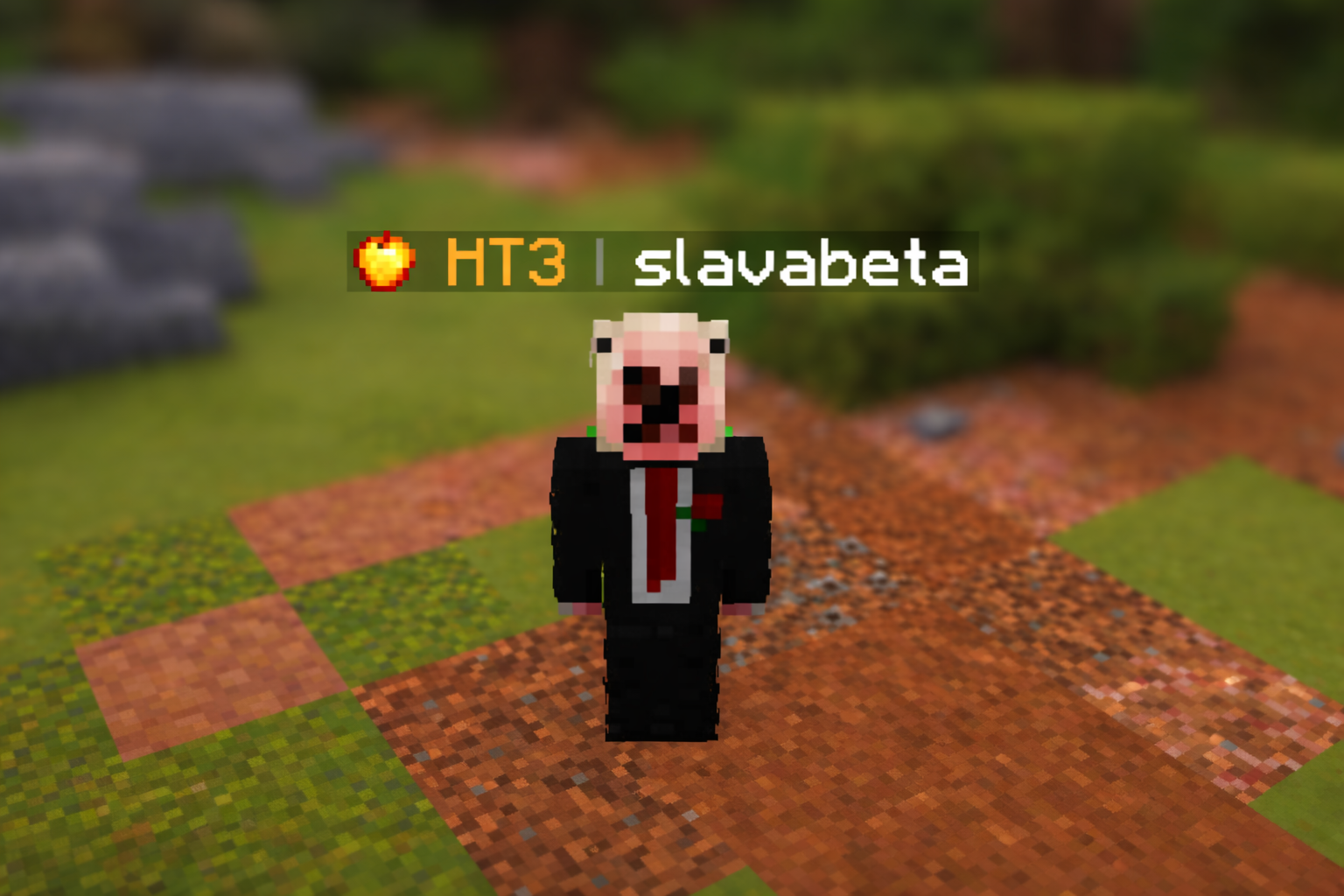
TierTagger displays a player's PvP Tier directly in their nametag — above their head and in the Tab player list.
The mod fetches ranking data in real time from ATiers and displays it as a clean, color-coded tag with a matching game mode icon.
Player Profile Screen
TierTagger includes a built-in player profile viewer.
You can open it by:
- Shift + Right-Clicking a player
- or by using the command:
/atiers profile <nickname>
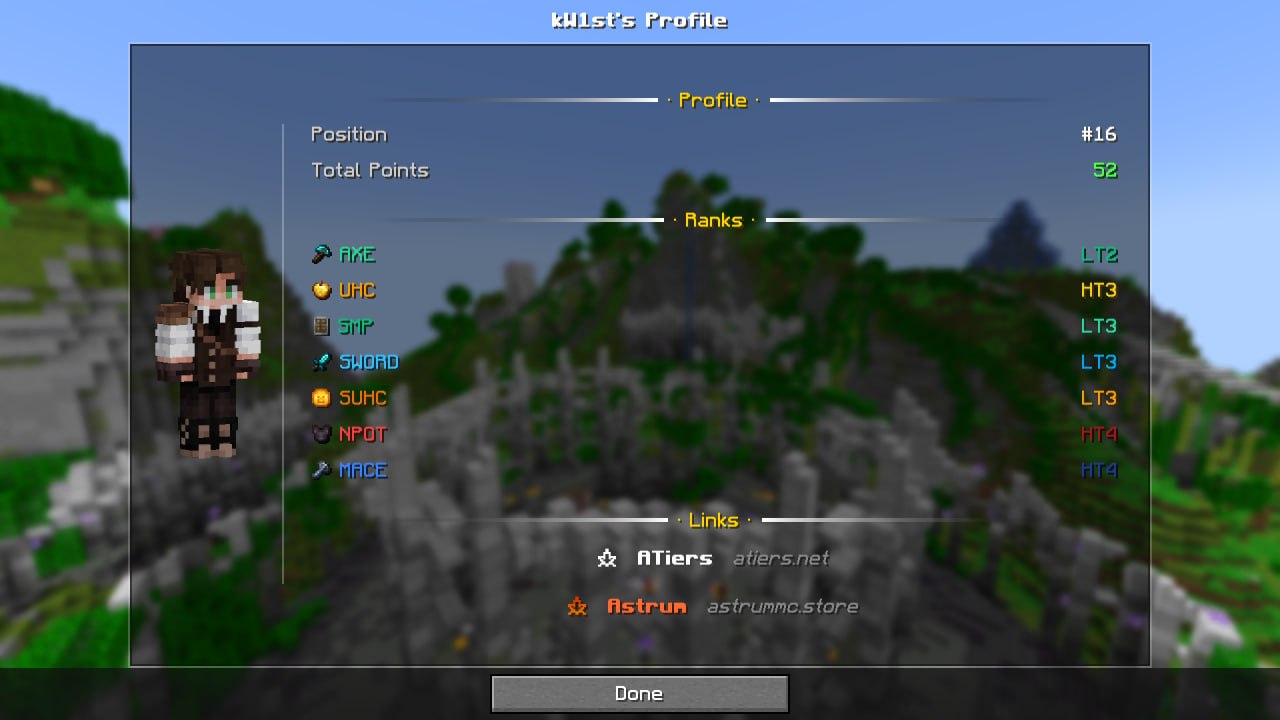
The profile screen shows:
- a full player skin render;
- rankings across all game modes;
- overall position and total points;
- two available themes:
- Default — dark theme;
- Astrum — animated fiery theme.
Configuration
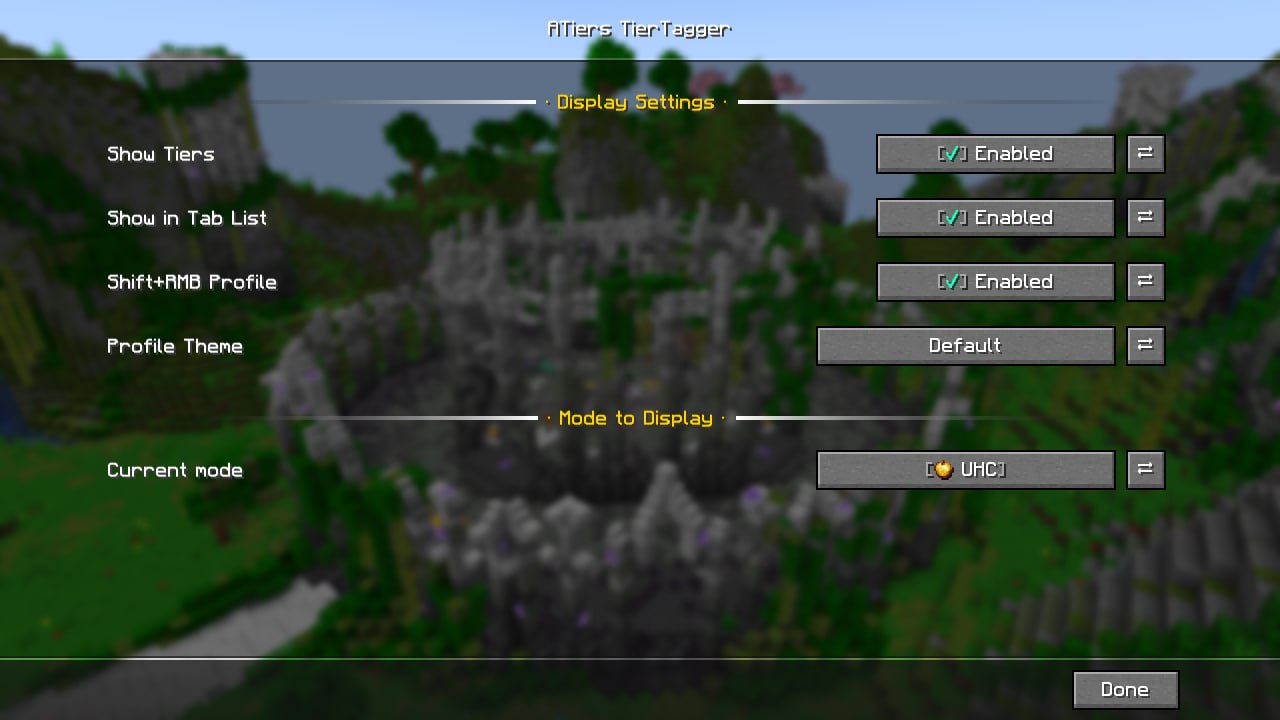
All settings can be configured in-game through Mod Menu.
| Option | Description |
|---|---|
| Enabled | Enables or disables tier tags |
| Show in Tab List | Displays tiers in the Tab player list |
| Shift+Click Profile | Enables or disables opening the profile with Shift + RMB |
| Selected Mode | Chooses which game mode tier is displayed |
| Profile Theme | Switches the profile theme |
TierTagger: RU VERSION
Зависимости
Этот мод требует owo-lib для работы!
Убедитесь, что он установлен перед запуском.
Что такое TierTagger?
TierTagger отображает PvP-тир игрока прямо в его никнейме — над головой и в списке игроков (Tab).
Мод получает данные рангов в реальном времени с нашего сайта atiers.net и показывает их в виде тега с иконкой соответствующего игрового режима.
Экран профиля игрока
В TierTagger встроен просмотр профиля игрока.
Открыть его можно:
- Shift + ПКМ по игроку
- или командой:
/atiers profile <nickname>
Экран профиля показывает:
- полный рендер скина игрока;
- ранги по всем игровым режимам;
- общую позицию и количество очков;
- две темы оформления:
- Default — тёмная тема;
- Astrum — цвета в стиле аструма.
Настройки
Все параметры можно настроить прямо в игре через Mod Menu или вызвать командой /atiers config.
| Параметр | Описание |
|---|---|
| Enabled | Включает или отключает отображение тиров |
| Show in Tab List | Показывает тиры в списке игроков |
| Shift+Click Profile | Включает или отключает открытие профиля через Shift + ПКМ |
| Selected Mode | Позволяет выбрать игровой режим для отображаемого тира |
| Profile Theme | Переключает тему профиля |
TierTagger
Зависимости
Этот мод требует owo-lib для работы!
Убедитесь, что он установлен перед запуском.
Что такое TierTagger?
TierTagger отображает PvP-тир игрока прямо в его никнейме — над головой и в списке игроков (Tab).
Мод получает данные рангов в реальном времени с нашего сайта atiers.net и показывает их в виде тега с иконкой соответствующего игрового режима.
Экран профиля игрока
В TierTagger встроен просмотр профиля игрока.
Открыть его можно:
- Shift + ПКМ по игроку
- или командой:
/atiers profile <nickname>
Экран профиля показывает:
- полный рендер скина игрока;
- ранги по всем игровым режимам;
- общую позицию и количество очков;
- две темы оформления:
- Default — тёмная тема;
- Astrum — цвета в стиле аструма.
Настройки
Все параметры можно настроить прямо в игре через Mod Menu или вызвать командой /atiers config.
| Параметр | Описание |
|---|---|
| Enabled | Включает или отключает отображение тиров |
| Show in Tab List | Показывает тиры в списке игроков |
| Shift+Click Profile | Включает или отключает открытие профиля через Shift + ПКМ |
| Selected Mode | Позволяет выбрать игровой режим для отображаемого тира |
| Profile Theme | Переключает тему профиля |
Dependencies
This mod requires owo-lib to work!
Make sure it is installed before launching.
What is TierTagger?
TierTagger displays a player's PvP Tier directly in their nametag — above their head and in the Tab player list.
The mod fetches ranking data in real time from ATiers and displays it as a clean, color-coded tag with a matching game mode icon.
Player Profile Screen
TierTagger includes a built-in player profile viewer.
You can open it by:
- Shift + Right-Clicking a player
- or by using the command:
/atiers profile <nickname>
The profile screen shows:
- a full player skin render;
- rankings across all game modes;
- overall position and total points;
- two available themes:
- Default — dark theme;
- Astrum — animated fiery theme.
Configuration
All settings can be configured in-game through Mod Menu.
| Option | Description |
|---|---|
| Enabled | Enables or disables tier tags |
| Show in Tab List | Displays tiers in the Tab player list |
| Shift+Click Profile | Enables or disables opening the profile with Shift + RMB |
| Selected Mode | Chooses which game mode tier is displayed |
| Profile Theme | Switches the profile theme |
Screenshots
Gallery
-
 Profile Page
 -
 In-game preview
 -
 Config screen
Versions
Files
Relations
Project Relations
More like this
Similar Mods
Suggestions use data such as tags, dependencies, dependents, descriptions, titles, and more to rank how much they overlap with this mod.
On ModDex
Community snapshot
By the numbers
Statistics
Want to reach Minecraft players?
We're looking for a server hosting partner to feature here and other parts of the site. Interested? Send us a message!
Get in touchGet it on
Available Platforms
On ModDex
Community snapshot
By the numbers
Statistics
Resources