
Community listing page, reviews here may not be monitored by the author.
Attributes UI

No reviews yet
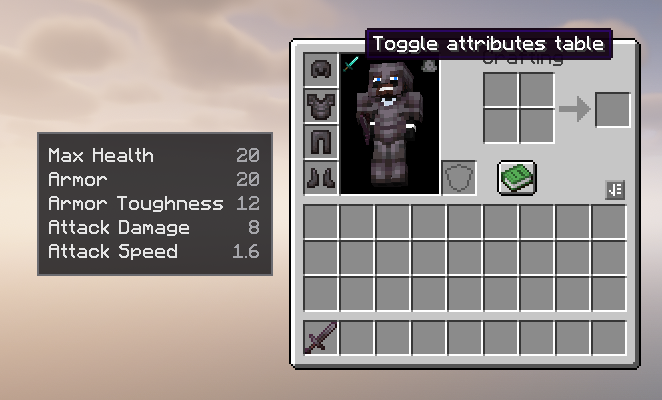
Adds a configurable attributes table to the player inventory, with custom attribute support, display transforms, separators, and an in-inventory toggle.
Community voices
Reviews
No reviews yet. Be the first to review this project!
Get it on
Available Platforms
Compatibility
Supported Environments
Runs entirely on the client. Works on vanilla servers.
About
Project Details
For authors
Embed Badge
If you're the author of this project, you can embed a live badge anywhere that supports HTML or Markdown. It updates automatically whenever ratings change.
Use HTML for any page that supports it, or Markdown for README files and Markdown-based descriptions.
Identifiers
Platform IDs
Resources
External Links
About
Description
Attributes UI
Attributes UI is a client-side NeoForge mod that adds a clean, configurable attributes table to the left side of the player inventory.
It is designed for modded setups where players need to see both vanilla and custom attributes without opening extra menus or relying on hardcoded compatibility.
Features
- Shows player attributes directly from the inventory screen
- Supports vanilla and custom modded attributes
- Configurable rows through
config/attributesui-client.toml - Toggle button inside the inventory player model area
- Toggle state persists across inventory reopens and game restarts
- Automatically hides rows when their value is not above the configured threshold
- Supports blank separator rows for grouping sections
- Supports plain numbers and percent-style display
- Supports display-only value transforms with
Deduct,Divide, andMultiply - Client-side only; it does not change actual player attributes
Default Attributes
The default generated config includes:
generic.max_healthgeneric.armorgeneric.armor_toughnessgeneric.attack_damagegeneric.attack_speed
Configuration
After launching the game once, edit:
config/attributesui-client.toml
Each attribute entry is an object:
attributes = [
  { Name = "Max Health", Attribute = "generic.max_health", Deduct = 0.0, Divide = 0.0, Multiply = 0.0, ShowAbove = 0.0, Type = "plain" },
  { Name = "Armor", Attribute = "generic.armor", Deduct = 0.0, Divide = 0.0, Multiply = 0.0, ShowAbove = 0.0, Type = "plain" }
]
Custom Attribute Example
attributes = [
  { Name = "Ability Haste", Attribute = "spell_power:haste", Deduct = 100.0, Divide = 0.0, Multiply = 0.0, ShowAbove = 100.0, Type = "percent" },
  { },
  { Name = "Arcane Spell Power", Attribute = "spell_power:arcane", Deduct = 0.0, Divide = 0.0, Multiply = 0.0, ShowAbove = 1.0, Type = "plain" },
  { Name = "Spell Critical Damage", Attribute = "spell_power:critical_damage", Deduct = 0.0, Divide = 0.0, Multiply = 100.0, ShowAbove = 150.0, Type = "percent" }
]
Config Fields
Name: Display name shown in the tableAttribute: Attribute id to read from the playerDeduct: Subtracts from the shown value onlyDivide: Divides the shown value when greater than0Multiply: Multiplies the shown value when greater than0ShowAbove: Shows the row only when the real attribute value is greater than this numberType:plainorpercent{ }: Adds a blank separator row in the UI
Display Transforms
Transforms are visual only. The mod never changes the real attribute value.
The display value is calculated as:
display = raw - Deduct
if Divide > 0: display = display / Divide
if Multiply > 0: display = display * Multiply
If Type is percent, the mod adds % after the final displayed value.
For example, if a custom attribute returns 105 and the config has Deduct = 100 and Type = "percent", the UI shows 5%.
Compatibility
Attributes UI reads attributes by id, so it can support custom attributes from other mods as long as they are registered as normal Minecraft attributes.
The mod is client-side and intended for NeoForge 1.21.1.
Screenshots
Gallery
Versions
Files
Relations
Project Relations
More like this
Similar Mods
Suggestions use data such as tags, dependencies, dependents, descriptions, titles, and more to rank how much they overlap with this mod.
On ModDex
Community snapshot
By the numbers
Statistics

Want to reach Minecraft players?
We're looking for a server hosting partner to feature here and other parts of the site. Interested? Send us a message!
Get in touchGet it on
Available Platforms
On ModDex
Community snapshot
By the numbers
Statistics
Resources