Community listing page, reviews may not be monitored by the author.
AttributesLib

No reviews yet
The attributesLib module offers an attribute interface, modifies the original armor reduction calculation formula, provides enchantment tooltip, attribute formatting and attribute expansion.

Community voices
Reviews
No reviews yet. Be the first to review this project!
Get it on
Available Platforms
About
Project Details
For authors
Embed Badge
If you're the author of this project, you can embed a live badge anywhere that supports HTML or Markdown. It updates automatically whenever ratings change.
Use HTML for any page that supports it, or Markdown for README files and Markdown-based descriptions.
Identifiers
Platform IDs
Resources
External Links
About
Description
Overview
AttributesLib is a library mod, derived from Apothic Attributes. Its functionality is primarily related to attributes.
Attributes Screen
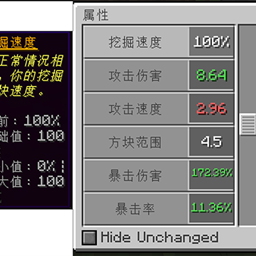
AttributesLib provides an attributes GUI, accessible via the sword button in the character inventory. This GUI displays all attributes attached to the player.
You can filter the displayed attributes to show only modified ones — that is, attributes that differ from vanilla. Hovering over an attribute shows its description and detailed information.
Armor Calculation
To support armor penetration, armor shredding, protection penetration, and protection shredding, AttributesLib changes the way armor and protection damage reduction is calculated.
In vanilla, armor determines the amount of damage reduction based on your armor toughness value and the incoming damage value, which makes damage reduction a non-linear function of armor. The mod restores the formula to a linear one, namely DR = 50 / (50 + armor), where the denominator (50 + armor) is the part that has been made linear.
However, the formula as a whole is not linear — in fact, it is not even inversely proportional.
The armor toughness attribute reduces the effectiveness of enemy armor shredding and armor penetration, but does not reduce the damage taken.
Enchantment Tooltips
Another feature is the change to enchantment tooltips. Descriptions are added to potion items that provide potion effects rather than simply providing attribute modifiers. When you hover your cursor over a potion effect's icon, these descriptions (along with the attribute modifiers — that is, the resulting attribute changes) are shown in the tooltip.
Attribute Formatting
AttributesLib allows attributes to set a custom format for their own tooltips. The most notable examples of attributes with custom formats are percentage-based attributes, which always display their values as percentages regardless of their modifier type. For example, the vanilla attributes movement speed and knockback resistance are displayed in a percentage-based format.
Another part of this feature is additional tooltip information. Enabling advanced tooltips (F3+H) will display additional information about modifier types and base values.
Attribute Expansion
AttributesLib expands many attributes, including but not limited to dodge chance, armor penetration, life steal, and more. All of these can be seen in the in-game attributes screen.
If developers want to use these attributes, they can depend on this library and reference the relevant attributes; see GitHub for details.
Screenshots
Gallery
Versions
Files
Relations
Project Relations
More like this
Similar Mods
Suggestions use data such as tags, dependencies, dependents, descriptions, titles, and more to rank how much they overlap with this mod.
On ModDex
Community snapshot
By the numbers
Statistics

Get it on
Available Platforms
On ModDex
Community snapshot
By the numbers
Statistics
Resources