
Forgot your password again? Have to think of a password for /register again? Well this mod fixes that, adding auto register, and auto login!
No ratings yet
Be the first to rate it.
Community listing page
Community listing page, reviews may not be monitored by the author.

Community voices
Reviews
No reviews yet. Be the first to review this project!
Get it on
Available Platforms
Compatibility
Supported Environments
Runs entirely on the client. Works on vanilla servers.
About
Project Details
For authors
Embed Badge
If you're the author of this project, you can embed a live badge anywhere that supports HTML or Markdown. It updates automatically whenever ratings change.
Use HTML for any page that supports it, or Markdown for README files and Markdown-based descriptions.
Identifiers
Platform IDs
About
Description

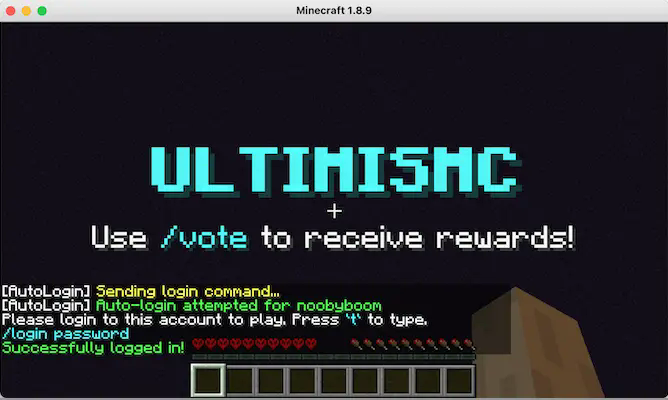
Forgot your password again? Have to think of a password for /register again? Well this mod fixes that.
Features
• Auto Login Detection - Automatically detects login prompts and logs you in
• Password Storage - Saves your passwords per server/username combination (in plain text currently)
• Auto Registration - Generates random passwords when you need to register (configurable context + password length)
• Manual Commands - Use .autologin and .autoregister commands to manually register/login if auto detection failed or disabled
• Configurable Patterns - Customize login/register auto detection patterns (so it can work in a specific server)
Configuration
Setup
The mod creates a config/autologininfo folder in your Minecraft directory containing:
config.txt- All mod settings and patternsplayerstoredinfo.txt- password storage (server:username:password format)
Manual Commands:
.autologin- Forces immediate login attempt using saved password.autoregister- Forces immediate registration with new generated password
Configuration Options
Delay Settings:
usedelay=true/false- Enable/disable delay before auto-logindelayseconds=1- Seconds to wait before attempting login
Detection Patterns:
loginpattern="login"- Text to detect login promptsregisterpattern="register"- Text to detect registration promptsautodetectloginprompt=true/false- Enable auto-login detectionautodetectregister=true/false- Enable auto-registration detection
Command Formats:
commandformatlogin="/login $p"- Login command template ($p = password)commandformatregister="/register $p $p"- Register command template
Password Generation:
passwordlength=6- Length of generated passwordscontentpallet="abcdefghijklmnopqrstuvwxyz0123456789"- Characters to use
Behavior Controls:
disableonceloggedin=true/false- Stop checking after successful logindisableonceregistered=true/false- Stop checking after successful registrationshowdebugmessages=false- Enable/disable all mod messages in chat
Auto-Save:
autosave=true/false- Automatically save passwords from manual commands

Forgot your password again? Have to think of a password for /register again? Well this mod fixes that.
Features
• Auto Login Detection - Automatically detects login prompts and logs you in
• Password Storage - Saves your passwords per server/username combination (in plain text currently)
• Auto Registration - Generates random passwords when you need to register (configurable context + password length)
• Manual Commands - Use .autologin and .autoregister commands to manually register/login if auto detection failed or disabled
• Configurable Patterns - Customize login/register auto detection patterns (so it can work in a specific server)
Configuration
Setup
The mod creates a config/autologininfo folder in your Minecraft directory containing:
config.txt- All mod settings and patternsplayerstoredinfo.txt- password storage (server:username:password format)
Manual Commands:
.autologin- Forces immediate login attempt using saved password.autoregister- Forces immediate registration with new generated password
Configuration Options
Delay Settings:
usedelay=true/false- Enable/disable delay before auto-logindelayseconds=1- Seconds to wait before attempting login
Detection Patterns:
loginpattern="login"- Text to detect login promptsregisterpattern="register"- Text to detect registration promptsautodetectloginprompt=true/false- Enable auto-login detectionautodetectregister=true/false- Enable auto-registration detection
Command Formats:
commandformatlogin="/login $p"- Login command template ($p = password)commandformatregister="/register $p $p"- Register command template
Password Generation:
passwordlength=6- Length of generated passwordscontentpallet="abcdefghijklmnopqrstuvwxyz0123456789"- Characters to use
Behavior Controls:
disableonceloggedin=true/false- Stop checking after successful logindisableonceregistered=true/false- Stop checking after successful registrationshowdebugmessages=false- Enable/disable all mod messages in chat
Auto-Save:
autosave=true/false- Automatically save passwords from manual commands
Screenshots
Gallery
Versions
Files
Relations
Project Relations
More like this
Similar Mods
Suggestions use data such as tags, dependencies, dependents, descriptions, titles, and more to rank how much they overlap with this mod.
Stats
- Downloads
-
1k
 <1,000
 <1,000
- Used in
- 0 modpacks
- Followers
- 0
- In stacks
- 0
- Created
-
- Last synced
-
Oct 14, 2026 6:11 PM UTC
New file updates sync automatically.
When ModDex last fully re-synced this project from CurseForge or Modrinth. A new file release triggers a resync usually within minutes, and every project is also re-synced on a schedule. Edits that don't ship a file, such as a new description or screenshots, are checked every few hours and can appear before this date changes.
How syncing works
External Links

Stats
- Downloads
-
1k
<1,000
<1,000
- Used in
- 0 modpacks
- Followers
- 0
- In stacks
- 0
- Created
-
- Last synced
-
Oct 14, 2026 6:11 PM UTC
New file updates sync automatically.
When ModDex last fully re-synced this project from CurseForge or Modrinth. A new file release triggers a resync usually within minutes, and every project is also re-synced on a schedule. Edits that don't ship a file, such as a new description or screenshots, are checked every few hours and can appear before this date changes.
How syncing works