
Community listing page, reviews may not be monitored by the author.
Auto Window Size

No reviews yet
Minecraft 1.20.1 / Forge client mod. Auto window sizing + centering, min-size lock, fixed size, 60 presets + custom input, borderless, always-on-top, keybinds, auto-fullscreen — keeps modpack UI consistent.

Community voices
Reviews
No reviews yet. Be the first to review this project!
Get it on
Available Platforms
About
Project Details
For authors
Embed Badge
If you're the author of this project, you can embed a live badge anywhere that supports HTML or Markdown. It updates automatically whenever ratings change.
Use HTML for any page that supports it, or Markdown for README files and Markdown-based descriptions.
Identifiers
Platform IDs
About
Description
Auto Window Size
A Minecraft 1.20.1 / Forge client-side mod — auto window sizing, centering, minimum-size lock, fixed window size, borderless mode, always-on-top, and auto-fullscreen on launch.
⚠ Platform notice: this mod only supports desktop Minecraft (Windows / macOS / Linux). It does not work on mobile / Bedrock.
📮 About the source: the author is new to GitHub / Git and once caused some messy repository state during an update. If the source you downloaded does not match the released jar, email [email protected] for the correct source.
What it does
When building a modpack you spend ages arranging mod GUIs exactly right — then a player launches on a different resolution, the window resizes, and every layout breaks. Auto Window Size turns "game window size" from a lucky accident into a deliberate choice: on launch it sizes the window to your resolution and centers it, can lock a minimum size, fully freeze the window size, center it in one click, and even start fullscreen. It only touches the OS-level window and almost never conflicts with other mods.
- Auto window sizing on launch: after a configurable delay (default 1.5s) it sets the window to your configured resolution (default 1280×720) and centers it, without stretching the loading screen.
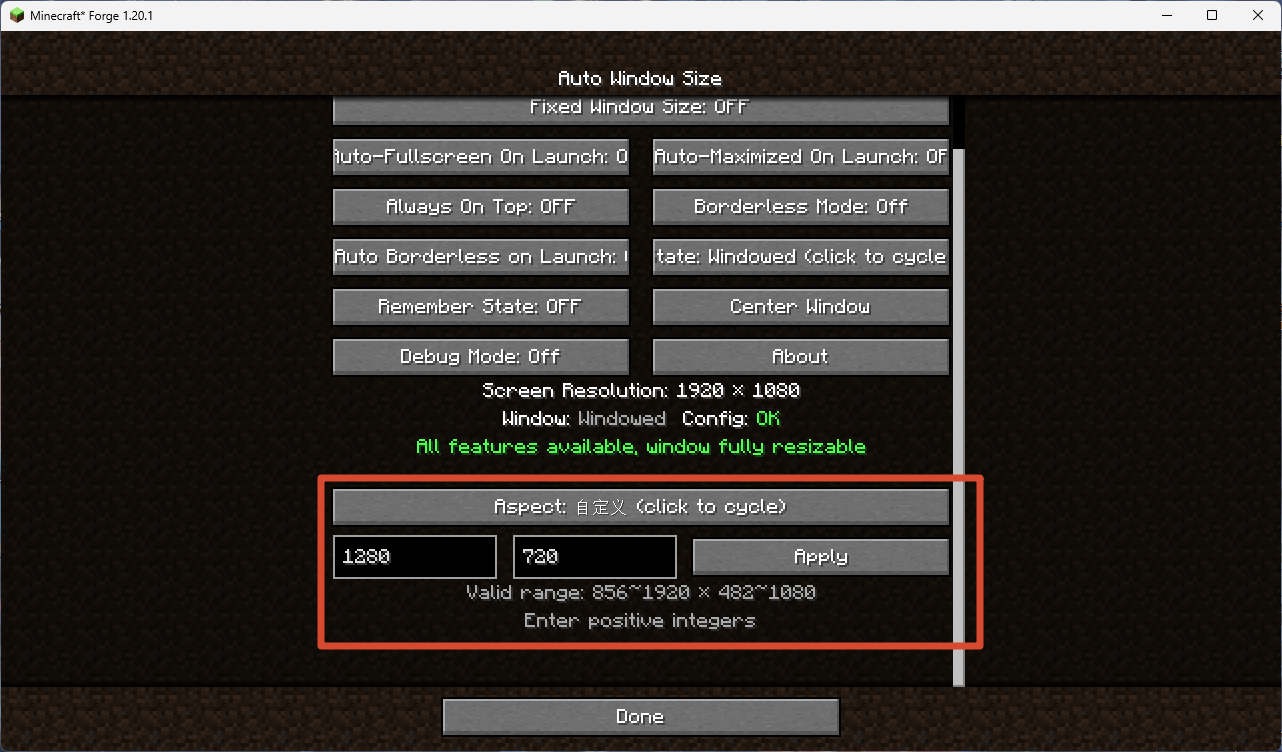
- Resolution presets: grouped by aspect ratio (16:9 / 16:10 / 4:3 / 5:4 / 21:9) with 12 one-click presets per ratio, plus a custom resolution input; presets larger than your screen, smaller than the configured minimum, or matching the current size are auto-disabled.
- Minimum size lock: the window can grow freely but cannot shrink below the configured size, keeping tuned UI layouts intact.
- Fixed window size: freezes the window at its current size; the maximize button is disabled at the OS level, so a "fake maximized" state is impossible.
- Center window: one-click centering on whichever monitor the window is on.
- Borderless mode: removes the window title bar and borders; works in windowed, maximized, and fullscreen (pseudo-fullscreen) states.
- Always-on-top: three modes — off, normal (GLFW floating), and force (re-claims focus every frame, can override other always-on-top windows like classroom monitoring software).
- Auto-fullscreen / auto-maximize / auto-borderless on launch: players can persistently toggle "start fullscreen", "start maximized", or "start borderless" on next launch; modpack authors can set a one-time onboarding flag.
- Window position memory: optionally save and restore the window position and size across launches instead of forcing center; compatible with auto-fullscreen / auto-maximize.
- Cycle window state: one button / keybind to cycle through windowed → maximized → fullscreen.
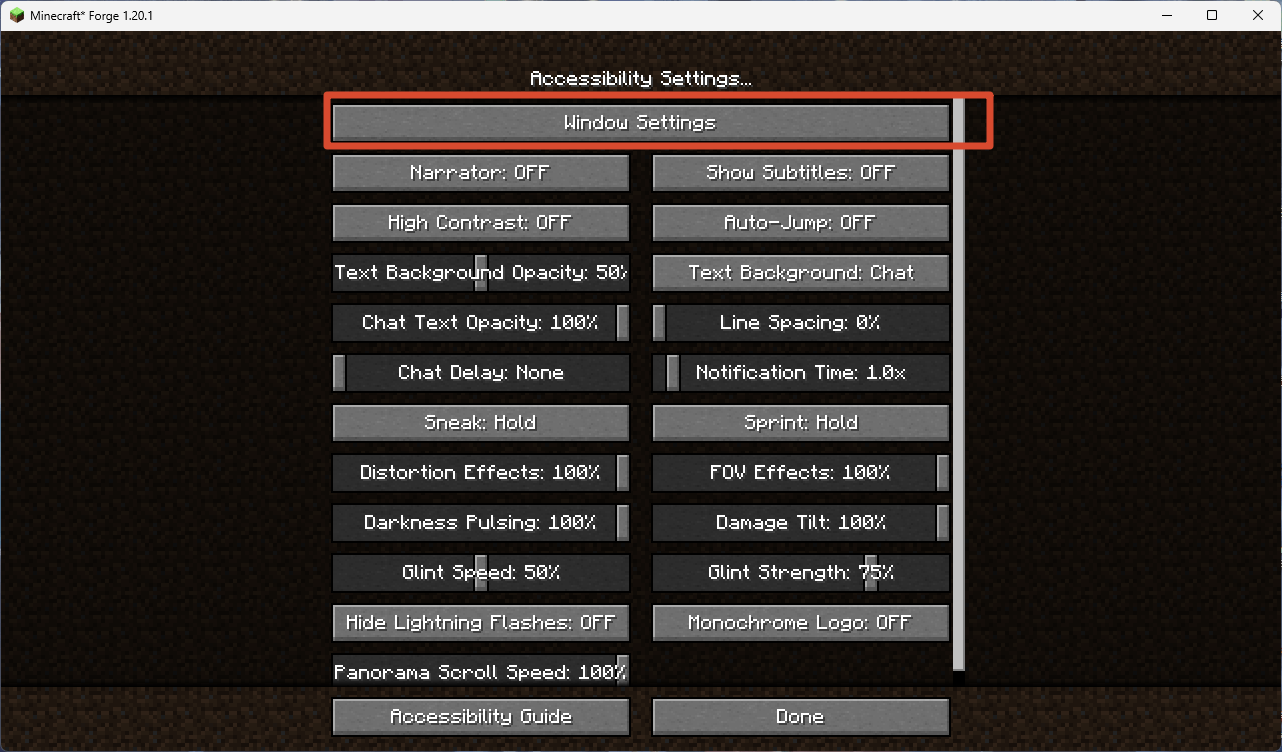
- Native entry point: a "Window Settings" button in Options → Accessibility Settings (moved from Video Settings to stay compatible with mods like Embeddium that replace the video settings screen).
- Client-side only, no server install; works out of the box at 1280×720.
Quick Start
- Install Minecraft 1.20.1 with Forge (47.x or newer).
- Drop
autowindowsize-1.1.0.jarinto your.minecraft/mods/folder. - Launch the game. The window will automatically resize to 1280×720 and center after 1.5 seconds.
- Open Options → Accessibility Settings → Window Settings to configure everything.
Usage
Opening the settings screen
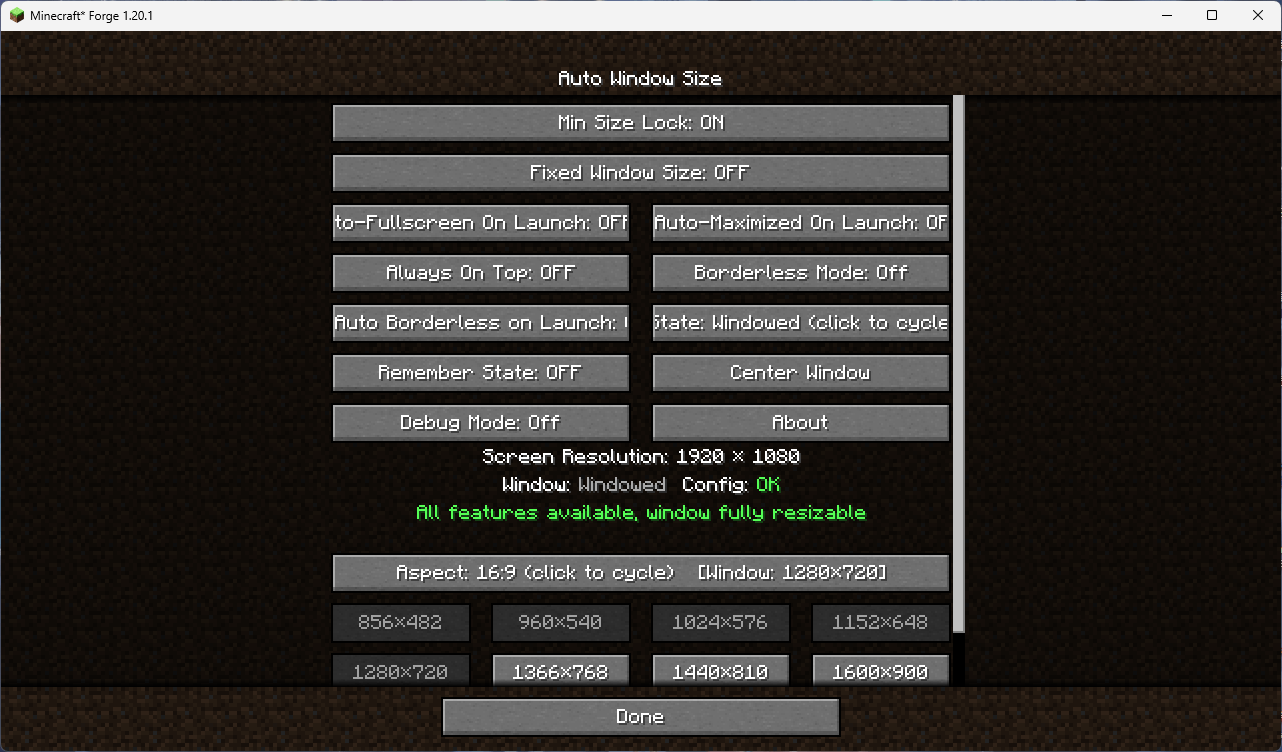
Go to Options → Accessibility Settings, then click the Window Settings button at the top of the list.
Core features at a glance
| Feature | What it does |
|---|---|
| Auto window size | On launch, sets the window to your configured resolution and centers it |
| Minimum size lock | Prevents the window from being resized below the configured minimum |
| Fixed window size | Completely locks the window size (maximize button disabled at OS level) |
| Center window | One-click centering on the current monitor |
| Borderless mode | Removes window decorations (title bar + borders) |
| Always-on-top | Keeps the window above other windows (3 modes) |
| Remember position | Saves/restores window position and size across launches |
| Resolution presets | 60 presets across 5 aspect ratios, plus custom input |
| Cycle state | Cycles windowed → maximized → fullscreen |
💡 Tip: Hover over any button in the settings screen for a detailed tooltip explaining what it does.
Commands
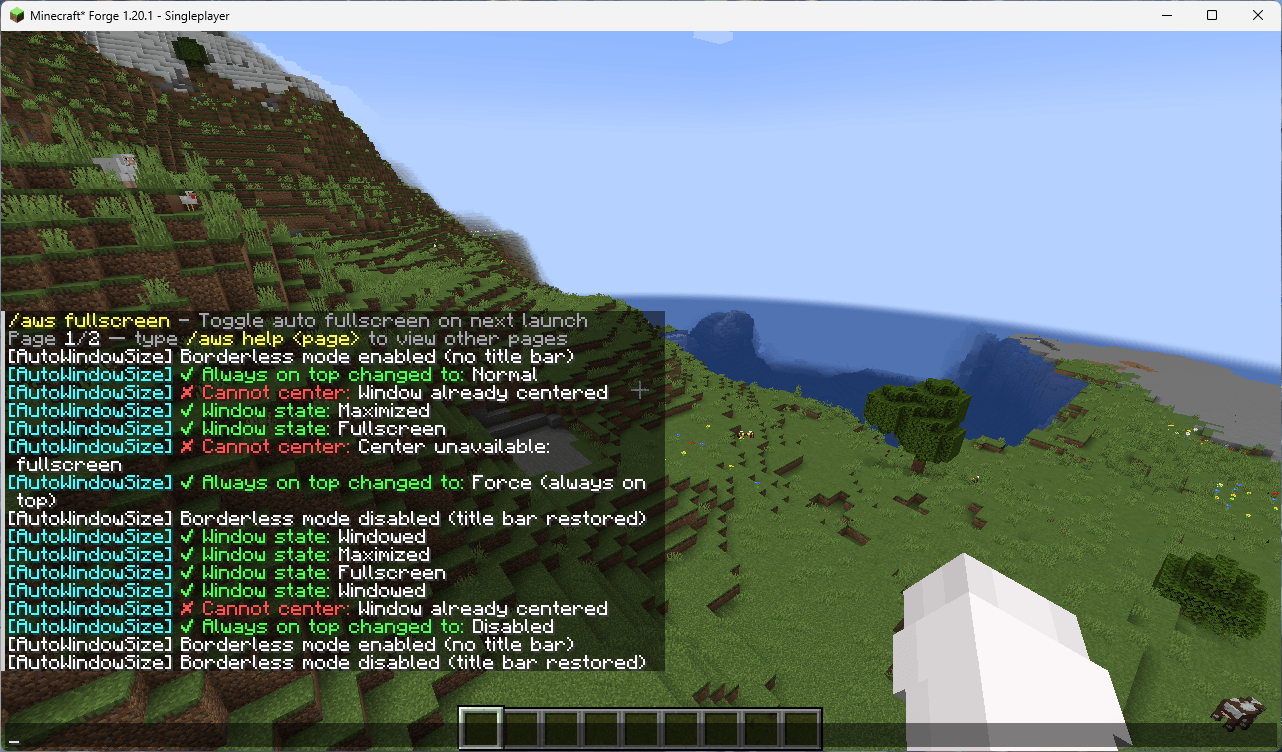
All commands use the /aws prefix. Type /aws help in-game for the full list with pagination.
| Command | Description |
|---|---|
/aws help [page] |
Show the command list (2 pages, 8 commands per page) |
/aws gui |
Open the Window Settings screen |
/aws status |
Show current window state, config status, and resolution |
/aws toggle |
Toggle minimum size lock on/off |
/aws lock |
Enable minimum size lock |
/aws unlock |
Disable minimum size lock |
/aws fixed |
Toggle fixed window size on/off |
/aws center |
Center the window on the current monitor |
/aws fullscreen |
Toggle fullscreen on/off |
/aws maximize |
Toggle maximized on/off |
/aws remember |
Toggle window position memory on/off |
/aws top |
Cycle always-on-top mode (off → normal → force) |
/aws debug |
Toggle debug logging on/off |
/aws borderless [auto] |
Toggle borderless mode; auto subcommand toggles auto-borderless on launch |
/aws resolution [ratio] <width> <height> |
Set window resolution; supports ratio+preset (e.g. 16:9 1920x1080) or custom width/height |
💡 Tip:
/aws resolutionsupports tab-completion. Type a ratio (e.g.16:9) and press Tab to see available presets.
Key Bindings
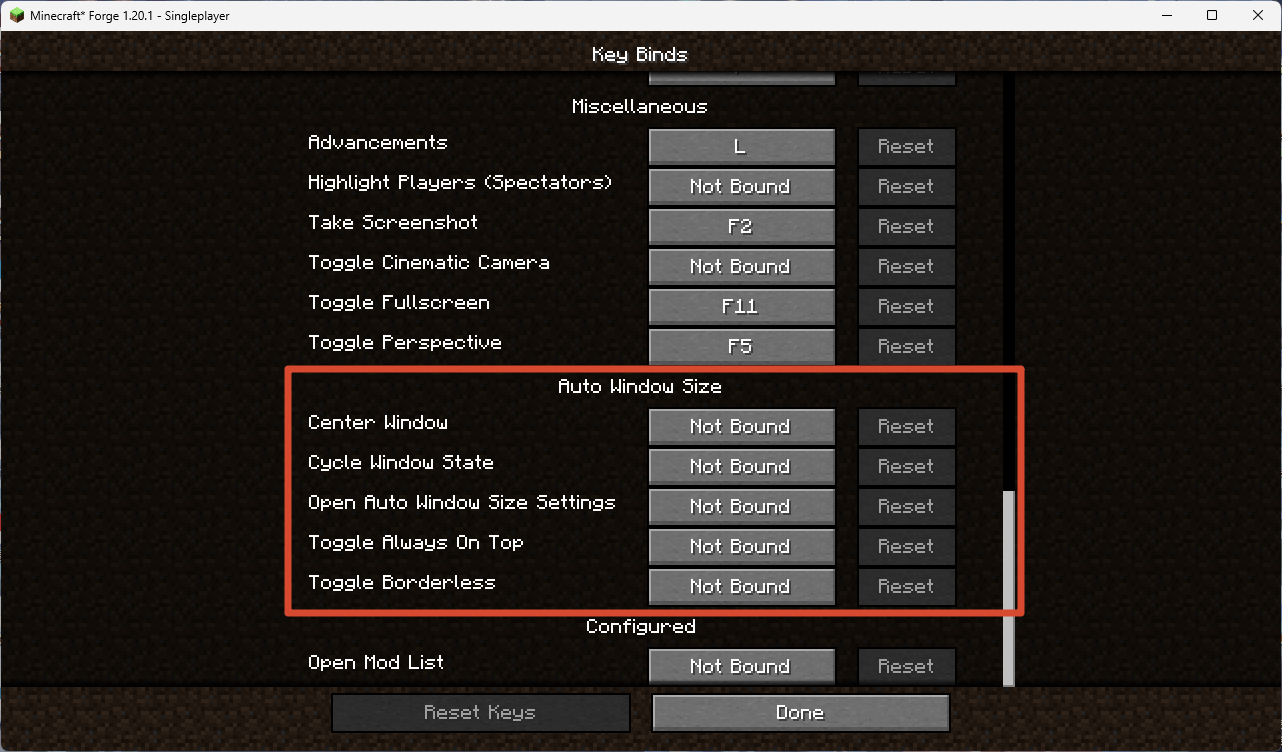
All keybinds are unbound by default. Set them in Options → Controls → Auto Window Size.
| Keybind | Default | Description |
|---|---|---|
| Open Window Settings | None | Open the Window Settings screen |
| Center Window | None | Center the window on the current monitor |
| Toggle Borderless | None | Toggle borderless mode on/off |
| Cycle Window State | None | Cycle windowed → maximized → fullscreen |
| Toggle Always-on-Top | None | Cycle always-on-top mode (off → normal → force) |
💡 All keybinds give chat feedback when pressed (e.g. "Window centered", "Borderless mode enabled").
Config Files
All config files live in .minecraft/config/AutoWindowSize/:
| File | Purpose |
|---|---|
config.toml |
Main configuration (window size, lock, auto-fullscreen, etc.) |
window.json |
Saved window position/size (only used when "Remember position" is enabled) |
Main config options (config.toml)
| Option | Default | Range | Description |
|---|---|---|---|
windowWidth |
1280 | 856–7680 | Default window width on launch |
windowHeight |
720 | 482–4320 | Default window height on launch |
startupDelay |
1.5 | 0.5–10.0 | Seconds to wait before applying window size on launch |
autoFullscreen |
false | — | Start in fullscreen on next launch |
autoMaximize |
false | — | Start maximized on next launch |
autoBorderless |
false | — | Start in borderless mode on next launch |
lockEnabled |
false | — | Enable minimum size lock |
fixedEnabled |
false | — | Enable fixed window size |
rememberPosition |
false | — | Save/restore window position and size |
alwaysOnTopMode |
0 | 0–2 | Always-on-top mode (0=off, 1=normal, 2=force) |
borderless |
false | — | Enable borderless mode |
debug |
false | — | Enable debug logging |
💡 You can also edit these in-game via a config-screen mod (e.g. Configured, Cloth Config). Config option names and tooltips follow the game language.
Downloads
Prefer GitHub Releases. Other platforms (CurseForge / Modrinth / MC Baike / MCBBS / BBSMC / KLBBS / HIMCBBS) may lag behind by a few days due to review or sync delays.
- GitHub Releases (always latest, recommended): https://github.com/3270728922/AutoWindowSize/releases
- CurseForge: https://www.curseforge.com/minecraft/mc-mods/auto-window-size
- Modrinth: https://modrinth.com/mod/autowindowsize
- MC Baike: https://www.mcmod.cn/class/30769.html
- MCBBS: https://www.mcbbs.co/thread-6322-1-1.html
- BBSMC: https://bbsmc.net/mod/autowindowsize
- KLBBS: https://klpbbs.com/thread-173769-1-1.html
- HIMCBBS: https://www.himcbbs.com/resources/1499/
Notes
- When upgrading this mod, manually delete the old config folder:
.minecraft/config/AutoWindowSize/(and the old.minecraft/config/autowindowsize-client.tomlif upgrading from pre-1.0.9). Due to changes in config entries and file layout, Forge won't rewrite an existing file; deleting it and launching generates a fresh one. Client-side only; desktop Minecraft (Windows/macOS/Linux), not mobile.
Wiki
Detailed feature explanations, design decisions, and troubleshooting live in the Wiki:
- English Wiki: WIKI.md
- 中文 Wiki: WIKI_ZH-CN.md
Feedback
- Issues / Bug reports: https://github.com/3270728922/AutoWindowSize/issues
- Discussions: https://github.com/3270728922/AutoWindowSize/discussions
- Author email: [email protected]
Latest: v1.1.0
- Borderless mode: removes window title bar and borders; supports windowed, maximized, and fullscreen (pseudo-fullscreen) states; auto-borderless on launch option.
- Always-on-top: three modes — off, normal (GLFW floating), and force (re-claims focus every frame, can override other always-on-top windows).
- Window state cycle button: one click to cycle windowed → maximized → fullscreen.
- 5 keybinds: Open Settings, Center, Toggle Borderless, Cycle State, Toggle Always-on-Top (all unbound by default, with chat feedback).
- About page: in-game info screen with mod purpose, usage, downloads, feedback, and author info (20 languages).
- Settings entry moved to Accessibility Settings (compatible with Embeddium and other mods that replace the video settings screen).
- 15 commands total: added
/aws borderless,/aws top,/aws debug,/aws gui,/aws status,/aws toggle;/aws helpnow has pagination (2 pages, 8 commands per page). - Resolution presets: presets smaller than the configured minimum are now auto-disabled (in addition to larger-than-screen and matching-current).
- Custom resolution input: live validation with hover tooltip showing valid range; apply button disabled when input is invalid.
- Config files unified in
config/AutoWindowSize/(config.toml + window.json); config screen supports 20 languages. - 20 languages supported.
- Various bug fixes: scroll position preservation, button highlight overflow, aspect ratio sync, preset disabling logic, window state detection in borderless mode, and more.
Full changelog: CHANGELOG.md · CHANGELOG_ZH-CN.md
Screenshots
Gallery
-
 en-accessibility-entry.png en-accessibility-entry.png
 -
 en-borderless-mode.png en-borderless-mode.png
 -
 en-commands-chat.png en-commands-chat.png
 -
 en-custom-resolution.png en-custom-resolution.png
 -
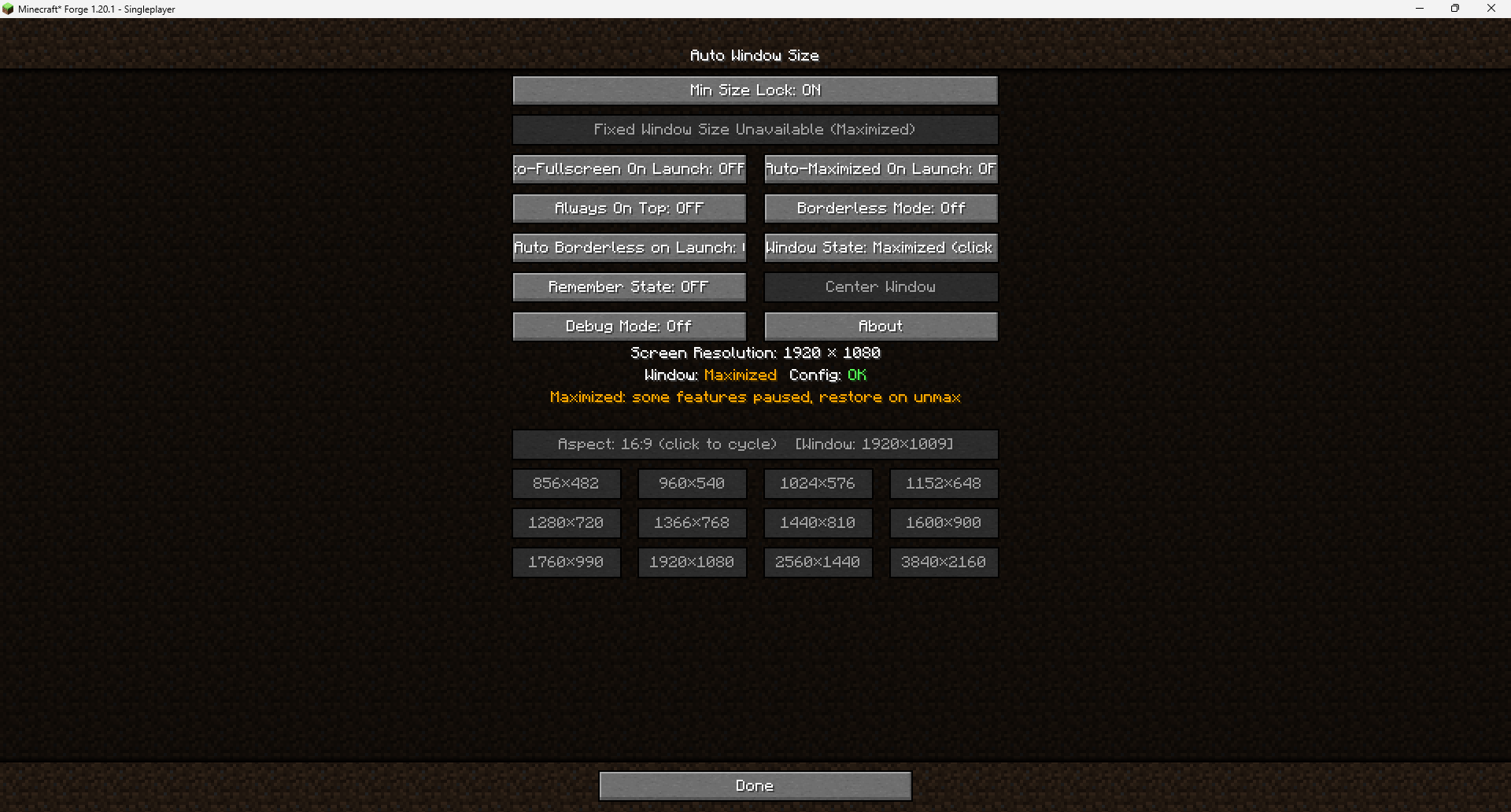 image-attachment_d9047e6f-86a9-4a72-8cc4-c6cb39281c13.png
 -
 en-settings-main.png en-settings-main.png
Versions
Files
Relations
Project Relations
More like this
Similar Mods
Suggestions use data such as tags, dependencies, dependents, descriptions, titles, and more to rank how much they overlap with this mod.
On ModDex
Community snapshot
By the numbers
Statistics

Get it on
Available Platforms
On ModDex
Community snapshot
By the numbers