Community listing page, reviews here may not be monitored by the author.
AutoLoad


No reviews yet
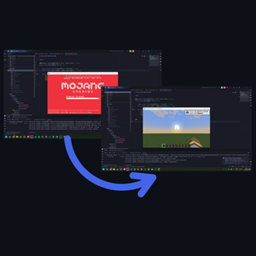
Automatic singleplayer world re-opening, intended for minecraft modders

Community voices
Reviews
No reviews yet. Be the first to review this project!
Get it on
Available Platforms
Compatibility
Supported Environments
Runs entirely on the client. Works on vanilla servers.
About
Project Details
For authors
Embed Badge
If you're the author of this project, you can embed a live badge anywhere that supports HTML or Markdown. It updates automatically whenever ratings change.
Use HTML for any page that supports it, or Markdown for README files and Markdown-based descriptions.
Identifiers
Platform IDs
Resources
External Links
About
Description
Save a second, a thousand times
Instead of having to re-open your singleplayer world every time you stop runClient, just have it reopen your world!

During game loading, just hold F5 and it will skip the autoload process!
Getting started
For Neoforge 1.21.1, you can just add the jar to your local mods folder. However, it can be helpful to add it as a dev dependency, meaning all developers will get it automatically.
First, include the azmod maven (https://maven.azmod.net/):
maven {
    name = 'azmod-maven'
    url = "https://maven.azmod.net/releases"
}
Then, add the dependency:
dependencies {
    //Include the latest 1.0.0 or newer version of autoloader for neoforge 1.21.1, other supported versions may be available, check CF or MR for availability
    implementation("com.cake.autoload:autoload-neoforge-1.21.1:1.+")
}
Configurable
By default, it only opens worlds you were playing on at the time that Minecraft stops, as if you reopened the game where you were either in menus or in a world (given that you dont hold F5 to skip).
If you saved and closed the world, you will just return to the main screen. Autoloader will let you know if you weren't on a world when you closed the game.
If you just want to always load the last world no matter what, then the config option is there.
Save a second, a thousand times
Instead of having to re-open your singleplayer world every time you stop runClient, just have it reopen your world!
During game loading, just hold F5 and it will skip the autoload process!
Getting started
For Neoforge 1.21.1, you can just add the jar to your local mods folder. However, it can be helpful to add it as a dev dependency, meaning all developers will get it automatically.
First, include the azmod maven (https://maven.azmod.net/):
maven {
    name = 'azmod-maven'
    url = "https://maven.azmod.net/releases"
}
Then, add the dependency (Versioning is +):
dependencies {
    //Include the latest 1.0.0 or newer version of autoloader for neoforge 1.21.1, other supported versions may be available, check CF or MR for availability
    implementation("com.cake.autoload:autoload-neoforge-1.21.1:1.+")
}
Configurable
By default, autoload always reopens the last world. If you want autoloader to only reopen worlds you were actively playing, the option is there!
Screenshots
Gallery
Versions
Files
Relations
Project Relations
More like this
Similar Mods
Suggestions use data such as tags, dependencies, dependents, descriptions, titles, and more to rank how much they overlap with this mod.
On ModDex
Community snapshot
By the numbers
Statistics
 (opens in a new tab)
Get it on
Available Platforms
On ModDex
Community snapshot
By the numbers
Statistics
Resources