Community listing page, reviews here may not be monitored by the author.
AutoText

No reviews yet
A simple tool that allows you to automate chat messages with a single click.
Community voices
Reviews
No reviews yet. Be the first to review this project!
Get it on
Available Platforms
About
Project Details
For authors
Embed Badge
If you're the author of this project, you can embed a live badge anywhere that supports HTML or Markdown. It updates automatically whenever ratings change.
Use HTML for any page that supports it, or Markdown for README files and Markdown-based descriptions.
Identifiers
Platform IDs
Resources
External Links
About
Description
AutoText
5 customizable macro slots to send commands or chat messages instantly with a single keypress.
Tired of typing /spawn, /home, or /warp shop over and over? AutoText lets you bind up to 5 commands or chat messages to any keyboard key or mouse button. Press the key → the command fires immediately. No menus, no delays.
✨ Features
- 5 Macro Slots — Each with its own command and independent keybind
- Keyboard & Mouse Support — Bind any key (A-Z, 0-9, F1-F12) or mouse button (LMB, RMB, MMB, side buttons 4 & 5)
- Smart Execution — Macros only fire when you're actually in-game. Won't execute while your inventory, settings, chest, or any other menu is open
- Duplicate Prevention — Assigning a key to a new macro automatically clears it from the old one
- Mod Menu Integration — Open the configuration screen directly from Mod Menu
- Persistent Storage — All macros are saved to
config/autotext.jsonand persist across game restarts - Clean UI — Dark-themed interface with no blur shader for crisp, readable text
🎮 How to Use
- Press
P(configurable in Controls) to open the AutoText menu - Type your command in the text field (e.g.,
/spawnorHello everyone!) - Click the
N O N Ebutton on the right → it turns to? ? ? - Press any key or mouse button to bind it
- Close the menu with
ESCand press your bound key in-game to execute!
To clear a keybind: Click the bind button, then press ESC — it resets to N O N E.
📦 Requirements
- Fabric Loader 0.16+
- Fabric API
- Minecraft 1.21.4
- Java 21
- Mod Menu (optional, for in-mod-menu configuration)
- FalconMods
⚠️ Server Anti-Cheat Notice
AutoText is completely safe and does NOT trigger anti-cheat systems. It uses the exact same chat methods as vanilla Minecraft — servers cannot tell the difference between AutoText and manual typing.
Screenshots
Gallery
-
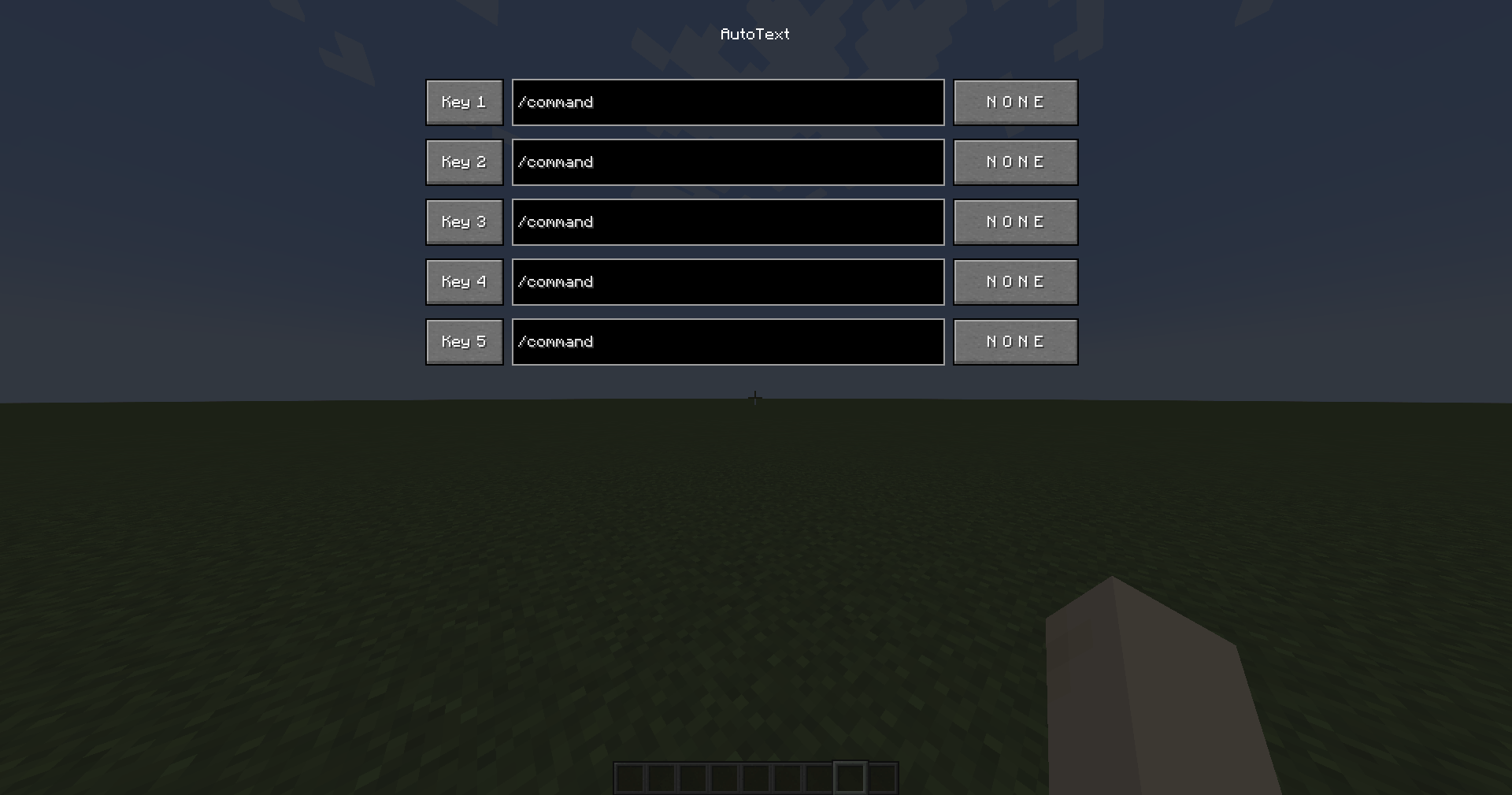 In-game Configuration Men A preview of the clean, dark-themed user interface to bind your custom macros and keys.
Versions
Files
Relations
Project Relations
More like this
Similar Mods
Suggestions use data such as tags, dependencies, dependents, descriptions, titles, and more to rank how much they overlap with this mod.
On ModDex
Community snapshot
By the numbers
Statistics
Want to reach Minecraft players?
We're looking for a server hosting partner to feature here and other parts of the site. Interested? Send us a message!
Get in touchGet it on
Available Platforms
On ModDex
Community snapshot
By the numbers
Statistics
Resources