
Community listing page, reviews here may not be monitored by the author.
Auxilio


No reviews yet
Mouse and inventory management utilities and ergonomics
Community voices
Reviews
No reviews yet. Be the first to review this project!
Get it on
Available Platforms
Compatibility
Supported Environments
Runs entirely on the client. Works on vanilla servers.
About
Project Details
For authors
Embed Badge
If you're the author of this project, you can embed a live badge anywhere that supports HTML or Markdown. It updates automatically whenever ratings change.
Use HTML for any page that supports it, or Markdown for README files and Markdown-based descriptions.
Identifiers
Platform IDs
About
Description

Auxilio
Means help or assist in Latin.
Focuses on mouse/item interaction quality-of-life in inventory and crafting screens.
Features
All options can be toggled on/off via in-game mod config menu, or root Minecraft directory config file
Esc > Mods > Auxilio config
minecraft_root/config/auxilio-common.toml
Middle click sort in crafting grid:
Middle click on any crafting slot (2x2 or 3x3) and it will sort the grid.
Single-item-type grids are spread as evenly as possible across all valid crafting slots.

Mixed-item grids use type-local balancing: each type is equalized within the slots that already contain that type.

Shift + double left-click bulk transfer:
Shift + double left-click on a player-inventory slot quick-moves all matching items from player inventory into the currently open container (for example chest or crafting table inventory), as allowed by slot rules.
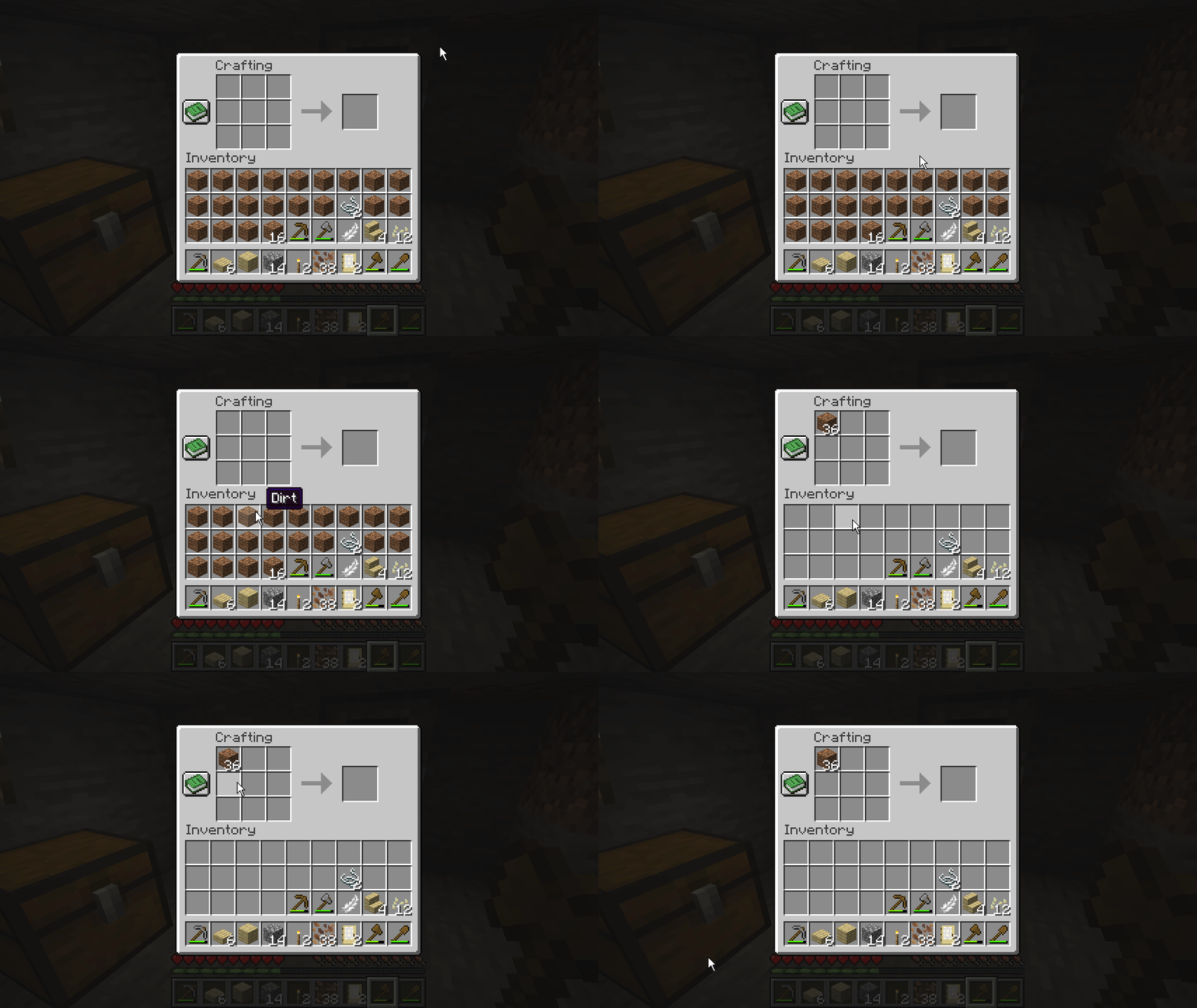
Shift + drag quick move:
Hold Shift and drag left-click across slots to quick-move hovered stacks. Each hovered slot is clicked at most once per drag stroke to avoid repeated click spam.

Scroll transfer:
Scroll up: move 1 item from hovered slot toward the opposite inventory side.
Scroll down: move 1 item from hovered non-player slot into player inventory.

Repeat right-drag:
Config option: enableRepeatRightDrag (default true).
When enabled, RMB drag replaces vanilla drag behavior.
Re-entering a slot during the same drag places another item there.

Debug logging:
- Config option:
debugMouseTweaks. - When enabled, detailed mouse tweak traces are logged with
[MouseTweaks]inrun/logs/latest.log.
[15:52:22] [FileWatcher-1-thread-1/DEBUG] [ne.ne.fm.co.ConfigWatcher/CONFIG]: Config file auxilio-common.toml changed, re-loading
[15:52:25] [Render thread/INFO] [co.ja.au.Auxilio/]: [MouseTweaks] scrollUp moved one item from slot 30 to slot 0
[15:52:25] [Render thread/INFO] [co.ja.au.Auxilio/]: [MouseTweaks] scrollUp moved one item from slot 30 to slot 0
[15:52:25] [Render thread/INFO] [co.ja.au.Auxilio/]: [MouseTweaks] scrollUp moved one item from slot 30 to slot 0
[15:52:25] [Render thread/INFO] [co.ja.au.Auxilio/]: [MouseTweaks] scrollUp moved one item from slot 30 to slot 0
Auxilio
Means help or assist in Latin.
Focuses on mouse/item interaction quality-of-life in inventory and crafting screens.
Features
All options can be toggled on/off via in-game mod config menu, or root Minecraft directory config file
Esc > Mods > Auxilio config
minecraft_root/config/auxilio-common.toml
Middle click sort in crafting grid:
Middle click on any crafting slot (2x2 or 3x3) and it will sort the grid.
Single-item-type grids are spread as evenly as possible across all valid crafting slots.
Mixed-item grids use type-local balancing: each type is equalized within the slots that already contain that type.
Shift + double left-click bulk transfer:
Shift + double left-click on a player-inventory slot quick-moves all matching items from player inventory into the currently open container (for example chest or crafting table inventory), as allowed by slot rules.
Shift + drag quick move:
Hold Shift and drag left-click across slots to quick-move hovered stacks. Each hovered slot is clicked at most once per drag stroke to avoid repeated click spam.
Scroll transfer:
Scroll up: move 1 item from hovered slot toward the opposite inventory side.
Scroll down: move 1 item from hovered non-player slot into player inventory.
Furnace fuel scroll
Scrolling items into furnaces will deposit almost anything into the top slot. Shift scroll up will scroll items into the fuel slot instead

Repeat right-drag:
Config option: enableRepeatRightDrag (default true).
When enabled, RMB drag replaces vanilla drag behavior.
Re-entering a slot during the same drag places another item there.
Debug logging:
- Config option:
debugMouseTweaks. - When enabled, detailed mouse tweak traces are logged with
[MouseTweaks]inrun/logs/latest.log.
[15:52:22] [FileWatcher-1-thread-1/DEBUG] [ne.ne.fm.co.ConfigWatcher/CONFIG]: Config file auxilio-common.toml changed, re-loading
[15:52:25] [Render thread/INFO] [co.ja.au.Auxilio/]: [MouseTweaks] scrollUp moved one item from slot 30 to slot 0
[15:52:25] [Render thread/INFO] [co.ja.au.Auxilio/]: [MouseTweaks] scrollUp moved one item from slot 30 to slot 0
[15:52:25] [Render thread/INFO] [co.ja.au.Auxilio/]: [MouseTweaks] scrollUp moved one item from slot 30 to slot 0
[15:52:25] [Render thread/INFO] [co.ja.au.Auxilio/]: [MouseTweaks] scrollUp moved one item from slot 30 to slot 0
Screenshots
Gallery
Versions
Files
Relations
Project Relations
More like this
Similar Mods
Suggestions use data such as tags, dependencies, dependents, descriptions, titles, and more to rank how much they overlap with this mod.
On ModDex
Community snapshot
By the numbers
Statistics
Want to reach Minecraft players?
We're looking for a server hosting partner to feature here and other parts of the site. Interested? Send us a message!
Get in touchGet it on
Available Platforms
On ModDex
Community snapshot
By the numbers