
Community listing page, reviews may not be monitored by the author.
AxisLock


No reviews yet
Axis Lock is a mod that prevents you from placing blocks out of a given axis.

Community voices
Reviews
No reviews yet. Be the first to review this project!
Get it on
Available Platforms
Compatibility
Supported Environments
Runs entirely on the client. Works on vanilla servers.
About
Project Details
For authors
Embed Badge
If you're the author of this project, you can embed a live badge anywhere that supports HTML or Markdown. It updates automatically whenever ratings change.
Use HTML for any page that supports it, or Markdown for README files and Markdown-based descriptions.
Identifiers
Platform IDs
About
Description
Tired of wobbly lines and uneven floors? This client-side mod lets you lock block placement to the X, Y, or Z axis for perfectly straight walls, flat floors, and aligned structures.
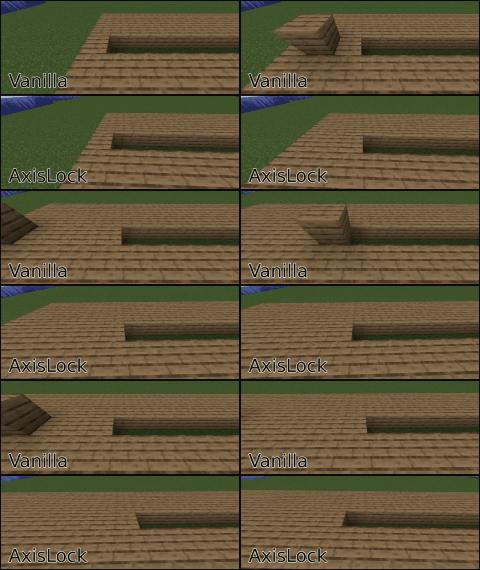
This mod uses Architectury API and Cloth Config API. If you're using fabric or quilt, you may also need Mod Menu
How to Use:
- Activate AxisLock:
Press R (default) to toggle the mod on/off. Or, assign a key in settings to hold for temporary lock. - Select Axis: Press Y (default) to cycle through X, Y, or Z.
- Place First Block: This sets the reference point on your chosen axis.
- Build Straight: While holding your "place block" key (right-click), axislock will prevent you from placing blocks out of the selected axis coordinate!
Manual Reference Point
- AxisLock now allows you to manually set a specific block as the reference point by pressing the assigned key (default: B). Once set, this block will remain as the fixed reference point even after releasing the mouse button, allowing for more precise and consistent locking. To clear or update the reference point, press the reference point key again.
AxisLock Modes
- By using the Cycle Mode Key (default: N) you can choose to block block placement, block breaking or both.
Client-side only. Before using this mod on servers check the server rules or ask a moderator. Use at your own risk.
AxisLock is a Fabric (Quilt compatible) and NeoForge mod. There probably won't be a build for Forge until it supports Architectury API in 1.21
It is recommended to use this mod together with accurate block placement or an autoclicker.
AxisLock is now feature complete. This doesn't mean It won't get any more features anymore. But by now I will only update It to fix bugs or when new Minecraft versions come out
Tired of wobbly lines and uneven floors? This client-side mod lets you lock block placement to the X, Y, or Z axis for perfectly straight walls, flat floors, and aligned structures.
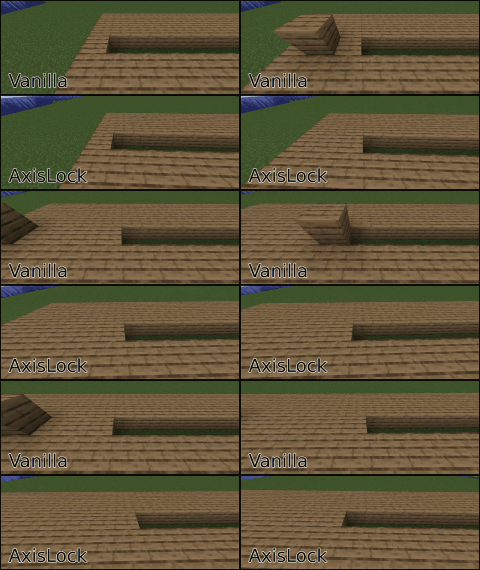
How to Use:
- Activate AxisLock: Press R (default) to toggle the mod on/off. Or, assign a key in settings to hold for temporary lock.
- Select Axis: Press Y (default) to cycle through X, Y, or Z.
- Place First Block: This sets the reference point on your chosen axis.
- Build Straight: While holding your "place block" key (right-click), axislock will prevent you from placing blocks out of the selected axis coordinate!
This mod uses Architectury API and Cloth Config API. If you're using fabric or quilt, you may also need Mod Menu
Manual Reference Point
- AxisLock now allows you to manually set a specific block as the reference point by pressing the assigned key (default: B). Once set, this block will remain as the fixed reference point even after releasing the mouse button, allowing for more precise and consistent locking. To update the reference point, press the reference point key again.
- You can reset the reference point, look at the air and press the key or press the key quickly twice.
AxisLock Modes
- By using the Cycle Mode Key (default: N) you can choose to block block placement, block breaking or both.
Client-side only. Before using this mod on servers check the server rules or ask a moderator. Use at your own risk.
It is recommended to use this mod together with accurate block placement or an autoclicker.
AxisLock is now feature complete. This doesn't mean It won't get any more features anymore. But by now I will only update It to fix bugs or when new Minecraft versions come out.
Screenshots
Gallery
-
axislock (4).gif axislock (4).gif
-
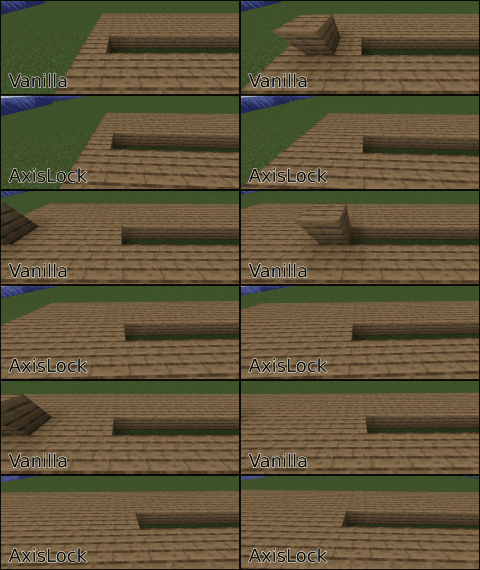 Mod example
Versions
Files
Relations
Project Relations
More like this
Similar Mods
Suggestions use data such as tags, dependencies, dependents, descriptions, titles, and more to rank how much they overlap with this mod.
On ModDex
Community snapshot
By the numbers
Statistics
 (opens in a new tab)
Get it on
Available Platforms
On ModDex
Community snapshot
By the numbers