Community listing page, reviews may not be monitored by the author.
Battle Cache

No reviews yet
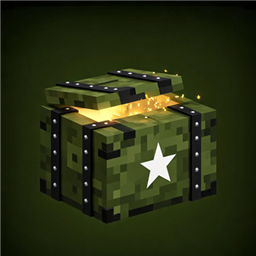
Supply caches generate across the overworld. Walk up to one, right-click its front, and the lid pops open — loot bursts out and lands flat on the ground. After a full day-night cycle the crate reseals itself and restocks, ready for the next run.

Community voices
Reviews
No reviews yet. Be the first to review this project!
Get it on
Available Platforms
About
Project Details
For authors
Embed Badge
If you're the author of this project, you can embed a live badge anywhere that supports HTML or Markdown. It updates automatically whenever ratings change.
Use HTML for any page that supports it, or Markdown for README files and Markdown-based descriptions.
Identifiers
Platform IDs
Resources
External Links
About
Description
Features
Find caches in the wild
Caches generate naturally on the surface of overworld biomes (oceans and rivers excluded).
Default density: roughly one cache per 6 chunks (configurable from 1 per chunk to very rare).
Each cache is a 1×2 military crate with a hinged lid and a stencilled star.
Crack it open
Right-click the front of the crate (the latch side). Aiming from the sides or back does nothing.
The lid animates open and loot bursts out towards the player, then lies flat on the ground like a supply drop.
Synthesized opening thud + rattling nut sounds; everything is server-authoritative.
Reseal and restock
After
refreshTicks(default 24000 ticks = one full Minecraft day / 20 real minutes) the crate closes, reseals, and rolls fresh loot.Restock state is stored in the left half's block entity and survives world reloads.
Creative loot editor (F8)
Press F8 in creative mode at any time. No cache needs to be targeted.
Two tabs:
This Cache — a custom loot list that replaces the loot table roll for that crate.
Global Pool — a pool shared by every save, dimension and player on the installation, stored in
config/battlecache-global-pool.dat.
Aiming at a cache opens its per-cache tab; aiming at nothing opens the global pool tab.
Search every registered item, filter by creative tab, or import your inventory — imported stacks keep their full NBT/components (enchants, custom names, potions, mod data).
Both lists hold up to 54 entries.
Weighted loot
Every entry has a weight from 1 to 999. Weights are relative: a weight of 10 is ten times as likely as a weight of 1.
Hover a configured slot and scroll the mouse wheel to change the weight ( Shift = ±10 ). The slot shows a small
w12badge and the tooltip shows the exact value.Each open draws 2–4 entries by weight (duplicates allowed) and rolls a quantity between 1 and the entry's stored count.
Loot priority: this cache's custom list → global pool → built-in loot table.
Legacy worlds and pool files load unchanged; old entries simply get weight 1.
Replace chests (optional)
replaceVanillaChests(default true): naturally generated vanilla chests and trapped chests become supply caches.The cache inherits the chest's loot table, so structure loot is preserved.
replaceModdedChests(default false): also replaces chests from other mods whose block entity stores a loot table.protectNamedChests(default true): never replaces an anvil-renamed chest, protecting player bases.
Break it down
- Breaking a crate destroys it and its contents — no crate item, no loot spill. This is intentional: caches are one-shot supply drops, not storage.
How to use
- Explore the surface until you spot a crate (or craft nothing — they only spawn in the world).
- Stand in front of it and right-click to open.
- Collect the loot. The crate reseals after about one in-game day and can be opened again.
- As a creative player, press F8 to edit loot: wheel over a configured item to change its weight, or import items from your inventory.
Screenshots
Gallery
Versions
Files
Relations
Project Relations
More like this
Similar Mods
Suggestions use data such as tags, dependencies, dependents, descriptions, titles, and more to rank how much they overlap with this mod.
On ModDex
Community snapshot
By the numbers
Statistics

Get it on
Available Platforms
On ModDex
Community snapshot
By the numbers
Statistics
Resources