
Community listing page, reviews here may not be monitored by the author.
Super Battle Music


No reviews yet
Plays your imported music during intense mob/PVP battles. No resource pack needed. Easy drag and drop setup!
Community voices
Reviews
No reviews yet. Be the first to review this project!
Get it on
Available Platforms
Compatibility
Supported Environments
Runs entirely on the client. Works on vanilla servers.
About
Project Details
For authors
Embed Badge
If you're the author of this project, you can embed a live badge anywhere that supports HTML or Markdown. It updates automatically whenever ratings change.
Use HTML for any page that supports it, or Markdown for README files and Markdown-based descriptions.
Identifiers
Platform IDs
About
Description
Minecraft Battle Music Mod
This mod plays your imported music during mob/PVP battles. No resource pack needed!
Check the Setup section to see how to get started.
Features
- Configurable everything: detection range, thresholds, fade times, pools, and more, editable in-game (req. ModMenu and Cloth Config) or via the JSON config.
- Mob battles: starts when 5 hostile mobs are aggroed on you.
- Heavy mode: changes to a separate "heavy" playlist when the health drops low, many mobs are attacking or fighting a boss. Smoothly crossfades from the regular playlist!
- PvP trigger: Taking a set number damage from another player starts combat music (by default plays the Heavy playlist).
- Boss detection: Starts playing the heavy playlist when bosses are in range, plus optional mini-bosses (Elder Guardian, Ravager, Evoker, Piglin Brute) and any extra entity IDs configured.
- Battle resume: if a new fight starts right after the last, it picks the track back up where it faded.
Dependencies
Fabric
- Fabric Loader
- Fabric API
- (optional, very recommended) Mod Menu with Cloth Config - lets you edit settings in-game.
Forge / NeoForge
- (optional, very recommended) Cloth Config - lets you edit settings in-game.
Setup
Adding your music
On first launch the mod makes a battlemusic folder inside your Minecraft instance directory with two subfolders:
Regular Battle/
Heavy Battle/
Add your music corresponding to the folder (see below what both of these folders mean.) No restart needed. Requires Vorbis (.ogg) audio files.
This folder can be opened from ModMenu too!
You can tweak the settings to your liking further in the Modmenu. Below are the default settings.
Music play conditions
- Regular battle starts when a number of mobs (default 5) in the detection radius (default 25) are attacking the player.
- Heavy battle crossfades when your health is at/below a threshold (default 6HP / 3 hearts), or a boss is nearby. Once heavy, it stays heavy until the whole fight ends.
- PvP: receiving damage (default 6HP / 3 hearts) within a time windows (default 5 seconds) plays combat music (the default music pool is heavy, configurable to regular, heavy or both). The timer resets every hit + the configured timeout for all battles (default 15s)
- When there is no detected battle activity, the music continues to play for a set amount of time (default 15s) before beginning to fade out.
Please submit any issues on the mod's Github issue tracker!
License
MIT
Minecraft Battle Music Mod
This mod plays your imported music during mob/PVP battles. No resource pack needed!
Check the Setup section to see how to get started.
Features
- Configurable everything: detection range, thresholds, fade times, pools, and more, editable in-game (req. ModMenu and Cloth Config) or via the JSON config.
- Mob battles: starts when 5 hostile mobs are aggroed on you.
- Heavy mode: changes to a separate "heavy" playlist when the health drops low, many mobs are attacking or fighting a boss. Smoothly crossfades from the regular playlist!
- PvP trigger: Taking a set number damage from another player starts combat music (by default plays the Heavy playlist).
- Boss detection: Starts playing the heavy playlist when bosses are in range, plus optional mini-bosses (Elder Guardian, Ravager, Evoker, Piglin Brute) and any extra entity IDs configured.
- Battle resume: if a new fight starts right after the last, it picks the track back up where it faded.
Dependencies
Fabric
- Fabric Loader
- Fabric API
- (optional, very recommended) Mod Menu with Cloth Config - lets you edit settings in-game.
Forge / NeoForge
- (optional, very recommended) Cloth Config - lets you edit settings in-game.
Setup

Adding your music
On first launch the mod makes a battlemusic folder inside your Minecraft instance directory with two subfolders:
Regular Battle/
Heavy Battle/
Add your music corresponding to the folder (see below what both of these folders mean.) No restart needed. Requires Vorbis (.ogg) audio files. Vorbis!!!!!
This folder can be opened from ModMenu too!
You can tweak the settings to your liking further in the Modmenu. Below are the default settings.
Music play conditions
- Regular battle starts when a number of mobs (default 5) in the detection radius (default 25) are attacking the player.
- Heavy battle crossfades when your health is at/below a threshold (default 6HP / 3 hearts), or a boss is nearby. Once heavy, it stays heavy until the whole fight ends.
- PvP: receiving damage (default 6HP / 3 hearts) within a time windows (default 5 seconds) plays combat music (the default music pool is heavy, configurable to regular, heavy or both). The timer resets every hit + the configured timeout for all battles (default 15s)
- When there is no detected battle activity, the music continues to play for a set amount of time (default 15s) before beginning to fade out.
Please submit any issues on the mod's Github issue tracker!
License
MIT
Screenshots
Gallery
-
 the beautiful icon waow.... awesome
 -
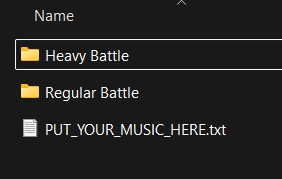 The folder. Put .ogg music here (go to .minecraft) or open the folder through ModMenu
Versions
Files
Relations
Project Relations
More like this
Similar Mods
Suggestions use data such as tags, dependencies, dependents, descriptions, titles, and more to rank how much they overlap with this mod.
On ModDex
Community snapshot
By the numbers
Statistics
Want to reach Minecraft players?
We're looking for a server hosting partner to feature here and other parts of the site. Interested? Send us a message!
Get in touchGet it on
Available Platforms
On ModDex
Community snapshot
By the numbers