
Community listing page, reviews here may not be monitored by the author.
Bedrock Golem

No reviews yet
Adds Bedrock Golem in minecraft without replacing the original iron golem.
Community voices
Reviews
No reviews yet. Be the first to review this project!
Get it on
Available Platforms
About
Project Details
For authors
Embed Badge
If you're the author of this project, you can embed a live badge anywhere that supports HTML or Markdown. It updates automatically whenever ratings change.
Use HTML for any page that supports it, or Markdown for README files and Markdown-based descriptions.
Identifiers
Platform IDs
About
Description
OptiFine is required
Introduction:
This datapack aims to add Bedrock Golem in minecraft without replacing the original iron golem and it supports versions from 1.16.2 to 1.21.4.
Bedrock Golem's Stats:
- HP ♥: 1024 (512 hearts)
- AP 🛡: 30 (15 armor with 20 units of toughness)
- Behaviour : Passive (Default), Neutral, or Hostile, can be configured from toggle menu (see admin commands).
- Super Powers 🦸♂️:
- Super Swift (or Super Jump) : Bedrock Golem uses its Super Swift Power to attack flying mobs. It even uses super swift
- Void Slowness : Bedrock Golem uses the power of void to slow down nearby enemies.
Admin Commands:
/function summon:bedrock_golem
Summons Bedrock Golem/function give:spawn_egg/bedrock_golem
Gives Bedrock Golem Spawn Egg./function toggles:bedrock_golem
Opens Toggle Menu:- Bedrock Golem's behaviour : Toggles Bedrock Golem's natural behaviour.
/function kill:bedrock_golem
Kills Bedrock Golem/function uninstall:bedrock_golem
Uninstalls the datapack
My Socials:
License:

This work is licensed under a
Creative Commons Attribution-NonCommercial-NoDerivatives 4.0 International License.
Conditions that apply:
- You must give appropriate credit to the creator if you publicly showcase this work.
- You may not use this work for commercial/business purposes. (this does not include having the datapack installed in your server)
- You may modify this work, but may not distribute the modified work.
Installation:
Open your .minecraft directory. Put the datapack into the saves/world_name/datapacks directory.
Screenshots
Gallery
-
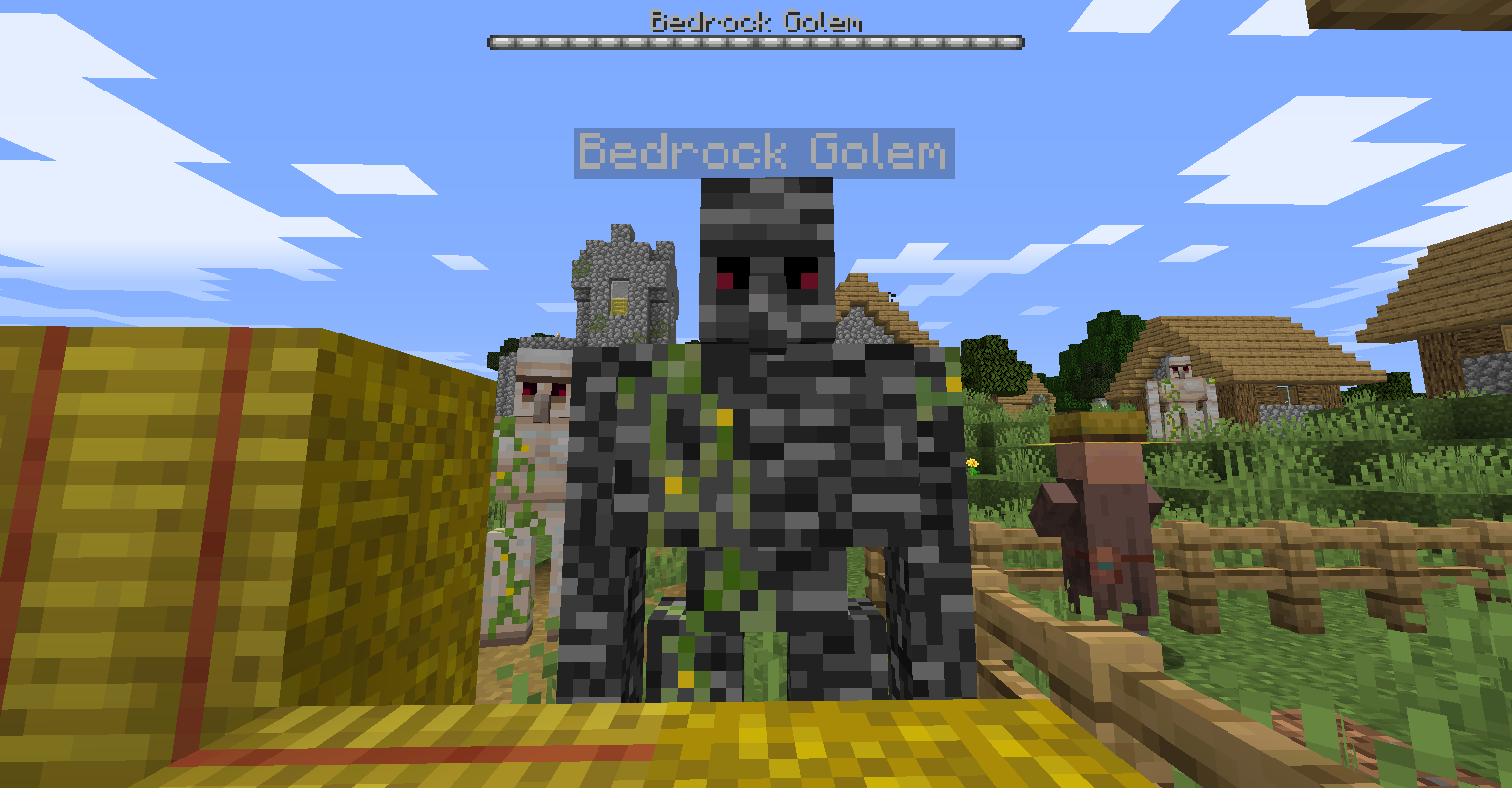 Bedrock Golem It does not naturally spawn. You have to use commands listed in the description.
 -
 Toggleable features of bedrock golem You can set bedrock golem's behaviour to be either passive, neutral, and hostile.
Versions
Files
Relations
Project Relations
More like this
Similar Mods
Suggestions use data such as tags, dependencies, dependents, descriptions, titles, and more to rank how much they overlap with this mod.
On ModDex
Community snapshot
By the numbers
Statistics

Want to reach Minecraft players?
We're looking for a server hosting partner to feature here and other parts of the site. Interested? Send us a message!
Get in touchGet it on
Available Platforms
On ModDex
Community snapshot
By the numbers