Community listing page, reviews here may not be monitored by the author.
Belph Chat

No reviews yet
Customizable, role‑colored chat for Forge 1.20.1 with in‑game templates for join/leave, death, advancements, and player chat.
Community voices
Reviews
No reviews yet. Be the first to review this project!
Get it on
Available Platforms
About
Project Details
For authors
Embed Badge
If you're the author of this project, you can embed a live badge anywhere that supports HTML or Markdown. It updates automatically whenever ratings change.
Use HTML for any page that supports it, or Markdown for README files and Markdown-based descriptions.
Identifiers
Platform IDs
Resources
External Links
About
Description
Belph Chat - role‑aware, fully customizable chat (Forge 1.20.1)
Belph Chat lets you take full control of Minecraft chat. Replace vanilla join/leave, death (with or without killer), advancement, and normal player chat with template-driven messages and role tags that have their own colors.
Includes an in-game template editor, live preview, roles manager, users screen for quick role assignment, and now Default Role support.
Built to be lightweight, server-friendly, and designed to work smoothly in any modpack.

Highlights
- Template editor in-game – Toggle each message type on/off, live “Test” preview (OP-only), and a one-click Reset to defaults.
- Role system – Create roles, pick a color, and assign one role per player from the Users screen. Role tags are auto-colored.
- Default Role support –
-
- Comes with a built-in
Memberrole (white) automatically assigned to new players. - Only one default role can exist at a time.
- Comes with a built-in
-
- Message types covered – Join, Leave, Death (killer), Death (no killer), Advancement, and Player chat (
%mplaceholder for message body). - Clean display – When a type is enabled, Belph Chat replaces vanilla messages; when disabled, the message is hidden entirely.
- Client & server support – Works on both; install on the server so everyone sees the same formatting.
Template placeholders & colors
- Placeholders:
%p– Target player%f– Killer / source%role– Role tag%a– Advancement title%m– Player chat message
Placeholders work only in system messages – typing them in chat does nothing.
- Colors:
%red%yellow%pink%blue%black%purple%green%gray%aqua%white%orange%dark_red%dark_green%dark_blue%dark_aqua
(Close with/%%color%e.g./%%red%. If not closed, the color continues until the end of the message.)
Tip: Use \\n in templates to add a line break.
Feedback & requests
Have a complaint, feature request, or an idea for a management/admin mod you’d like to see? Reach out freely I’m happy to take suggestions and build what the community needs.
Requirements
- Forge 1.20.1
- Client & server recommended (server install ensures everyone sees the same formatting)
Screenshots
Gallery
-
 Chat_Pic.png Chat_Pic.png
 -
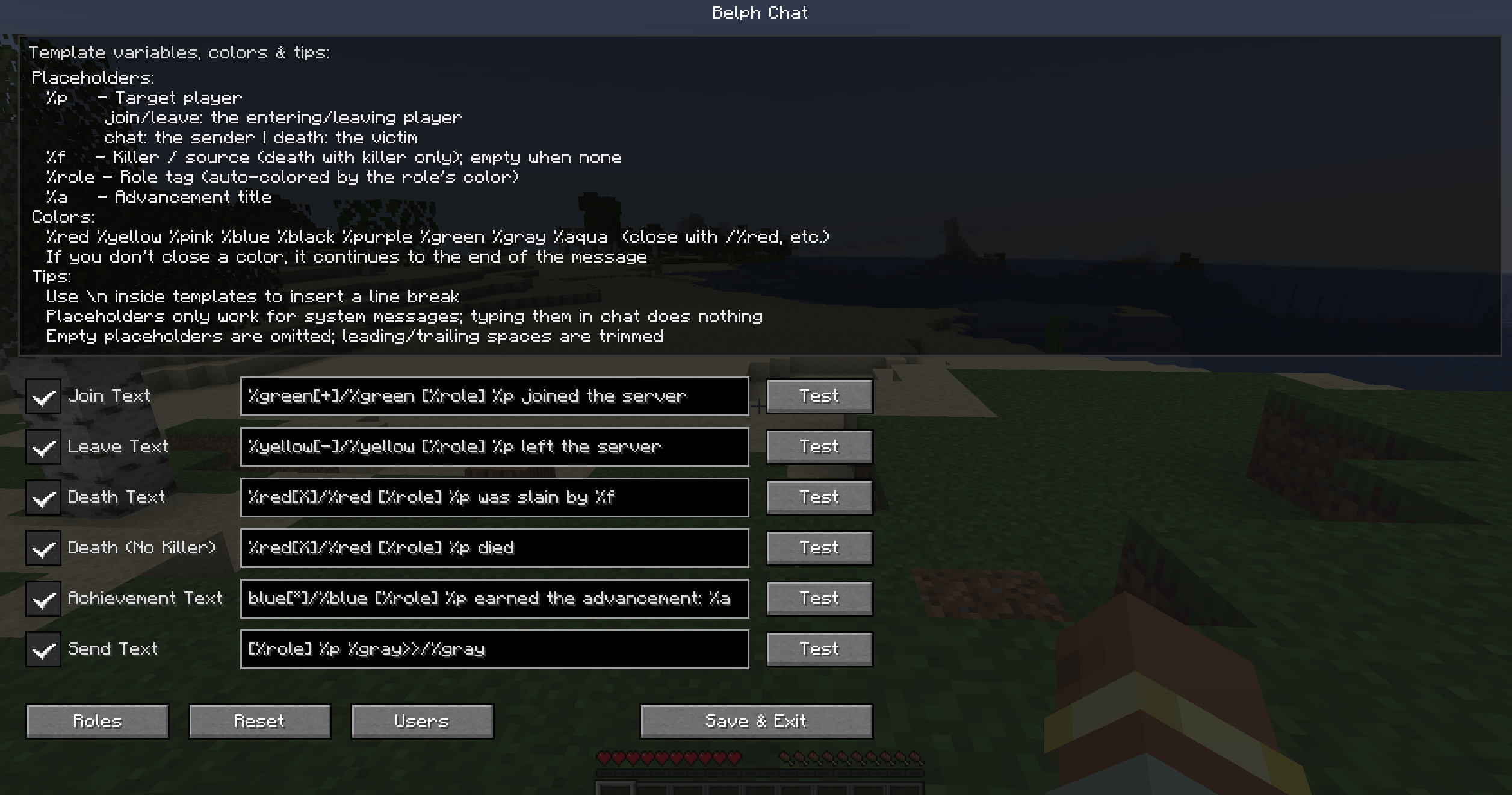 Settings_Pic.png Settings_Pic.png
Versions
Files
Relations
Project Relations
More like this
Similar Mods
Suggestions use data such as tags, dependencies, dependents, descriptions, titles, and more to rank how much they overlap with this mod.
On ModDex
Community snapshot
By the numbers
Statistics
Want to reach Minecraft players?
We're looking for a server hosting partner to feature here and other parts of the site. Interested? Send us a message!
Get in touchGet it on
Available Platforms
On ModDex
Community snapshot
By the numbers
Statistics
Resources