
Community listing page, reviews may not be monitored by the author.
Bestiary Compendium

No reviews yet
A dynamic bestiary with built in support for JEI, L2Hostility, Mob Scaling, and Champions.

Community voices
Reviews
No reviews yet. Be the first to review this project!
Get it on
Available Platforms
About
Project Details
For authors
Embed Badge
If you're the author of this project, you can embed a live badge anywhere that supports HTML or Markdown. It updates automatically whenever ratings change.
Use HTML for any page that supports it, or Markdown for README files and Markdown-based descriptions.
Identifiers
Platform IDs
Resources
External Links
About
Description
📖 Bestiary Compendium
The Ultimate Universal Monster Codex & Live Scaling Simulator for Minecraft Forge 1.20.1
Inspired by Terraria's Bestiary — rebuilt from the ground up for modern modded Minecraft.
🌟 Overview
Have you ever wandered into a new biome, encountered a terrifying modded monster, and had no idea what its stats were, what it drops, or how dangerous it actually is? Have you ever wondered how leveling mods like L2 Hostility, Champions, or Apotheosis scale an endgame boss's health and armor?
Bestiary Compendium is a dynamic, all-in-one in-game encyclopedia that automatically catalogues every single creature across all your installed mods with zero manual configuration required.
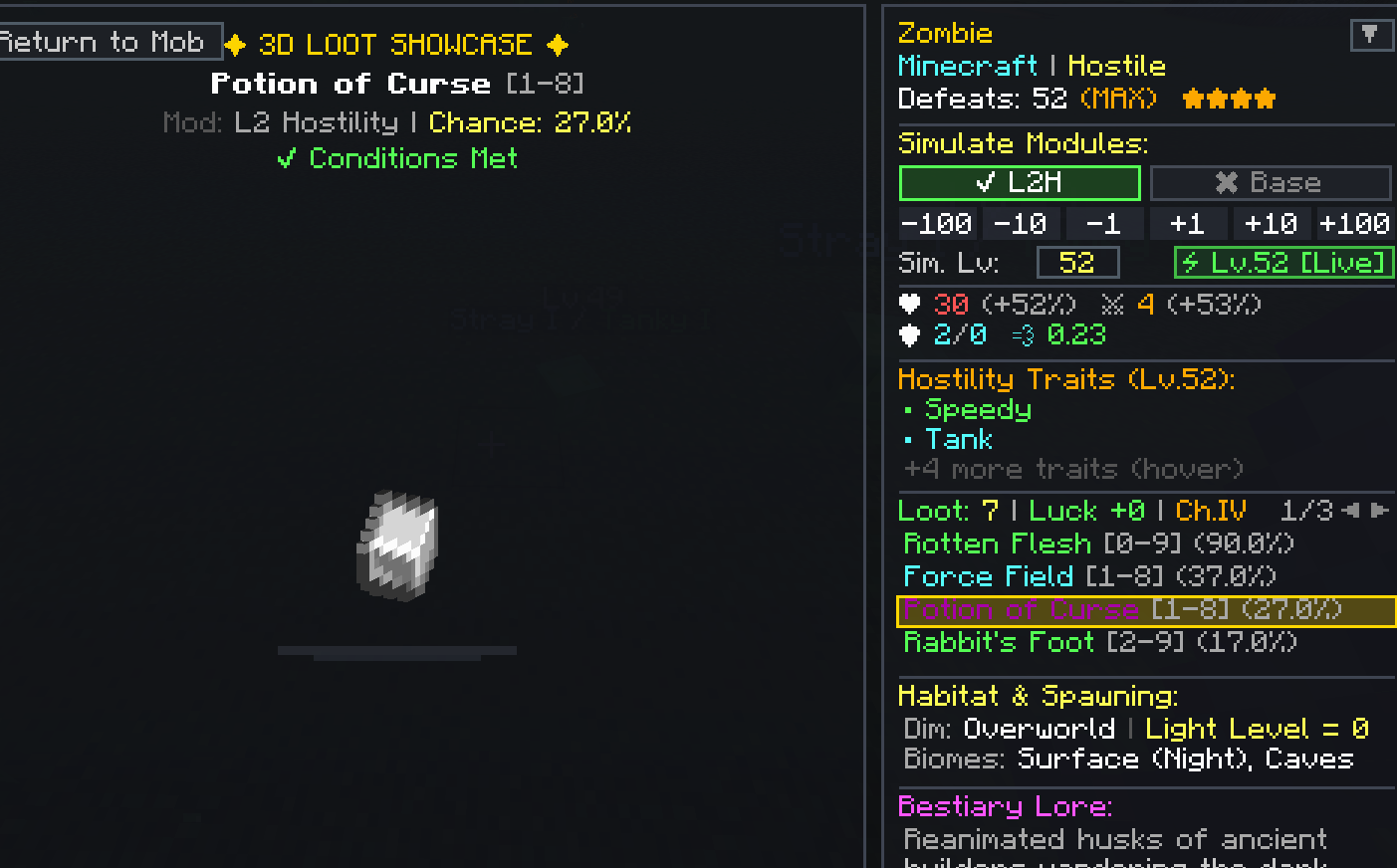
Featuring an interactive 3D entity viewer, a 4-tier defeat-based progression system, deep Just Enough Items (JEI) integration, and a real-time stat & scaling simulator, Bestiary Compendium turns mob hunting into an exciting, rewarding adventure.
✨ Key Features
🔍 1. Universal Automatic Discovery
- Plug & Play: Automatically detects and registers every mob from vanilla Minecraft and all installed mods (e.g., Alex's Mobs, Cataclysm, Born in Chaos, Mowzie's Mobs, Aquamirae, The Twilight Forest, Mutant Monsters, and hundreds more).
- Smart Multipart Filtering: Multi-segmented bosses (like the Ender Dragon's wings/neck, Void Worm body segments, Centipede parts, Hydra heads) are automatically mapped to their master entities—no cluttered duplicate entries!
- Accurate Boss Detection: Genuine bosses are automatically placed in a dedicated Bosses category, while standard elites and regular mobs stay neatly organized in Hostile, Neutral, Passive, Ambient, or Water categories.
- Fast Search & Mod Filtering: Search instantly by entity name, or type
@modid(e.g.,@cataclysm,@alexsmobs) to filter mobs by their originating mod.
🏆 2. Defeat-Based 4-Tier Progression
Defeating monsters in combat unlocks deeper layers of knowledge in their Compendium entry:
| Tier | Requirement | Unlocked Knowledge |
|---|---|---|
| ★ Tier 1 | 1 Defeat | Creature Stats & World Scaling: Base & scaled Health, Attack Damage, Armor, Armor Toughness, Movement Speed, and Knockback Resistance. |
| ★★ Tier 2 | 10 Defeats | Comprehensive Item Drops & Loot Pool: Exact percentage chances, drop quantities, player Looting and Luck bonuses, and special drop conditions. |
| ★★★ Tier 3 | 25 Defeats | Habitat & Spawning: Native dimensions, spawn biomes, light-level requirements, and environmental criteria. |
| ★★★★ Tier 4 | 50 Defeats | Lore & Mastery: Detailed community lore descriptions (only for vanilla mobs) and full creature mastery badge. |
(All defeat thresholds are completely customizable in config/universal_bestiary-common.toml!)
🎮 3. Interactive 3D Entity Viewer & Drop Showcase
- Full 3D Model Inspection: Click and drag to smoothly rotate any creature in 3D space, with full support for custom animations and models.
- Vocal Sound Player: Click the sound button in the viewer to preview the creature's native ambient and growl sounds in-game!
- Dynamic Mob Variants: Inspect alternate entity states and variants from a sleek dropdown menu:
- Charged Creepers
- Slime & Magma Cube sizes (Tiny, Medium, Large, Giant)
- Dyed Sheep wool variants & Wolf collar states
- Variant-specific stat overrides & custom drop tables!
- 3D Drop Showcase: Left-click any mob drop row to pin a spinning 3D item showcase above the mob, revealing all craftable recipes and uses!
⚔️ 4. Live Leveling & Scaling Simulator
Bestiary Compendium includes the most comprehensive leveling and difficulty simulation engine ever created for Minecraft:
- Seamless Leveling Mod Support:
- L2 Hostility: Dynamic trait list, rank toggles (Rank I – V), Curse of Greed / Envy / Gluttony drop multipliers, and relic charm requirements.
- Champions: Champion ranks (Rank I – V), affix breakdowns, and precise HP/Attack multipliers (+35% HP / +50% ATK per rank).
- Apotheosis: Boss tiers (Common, Uncommon, Rare, Epic, Mythic, Ancient), stat bonuses, and affix forecasts.
- Auto Leveling / Scaling Health / Majrusz's Difficulty: Distance-from-spawn scaling and world difficulty factors.
- Interactive Level Controls:
- Step buttons (
-100,-10,-1,+1,+10,+100) or direct numerical text entry. - "Snap to Live Encounter": One click matches the simulator directly to your exact live world position, distance from world spawn, and dimension!
- Difficulty Badge: Click to cycle between Easy, Normal, Hard, and Hardcore to preview difficulty-adjusted stats.
- Step buttons (
📦 5. Deep Just Enough Items (JEI) Integration
- Direct Hotkey Support: Hover over any mob drop or craftable item in the Compendium and press:
[R]to view Recipes for that item.[U]to view Uses for that item.
- One-Click JEI Lookup: Right-click or Shift-click any mob drop row to jump straight into JEI's recipe viewer.
- In-GUI Recipe Popup: Hover over any craftable use to open an instant mini crafting recipe matrix right inside the Bestiary GUI, complete with multi-page navigation arrows!
🎯 6. Target-Lock Quick Open (Look-at-Mob)
- Looking directly at any creature in the world? Simply press the Bestiary keybind (Default:
B) while looking at it, and the Compendium will instantly open directly to that specific creature's page!
🗂️ 7. Collapsible & Customizable UI
- Tidy, Clutter-Free Layout: Click on any Tier header (Tier 1, Tier 2, Tier 3, Tier 4) or sub-module (Simulate Modules, Hostility Traits, Apotheosis Boss Tiers, Champions Ranks) to collapse or expand it.
- Persistent Preferences: Your collapsed preferences are automatically remembered across game sessions and restarts via
config/bestiary_compendium_ui.properties. - Dynamic Mod Filter Tabs: Filter loot drops by originating mod (Minecraft, L2 Hostility, Apotheosis, Mystical Agriculture, Iron's Spells, etc.) with available vs. locked counter badges.
⌨️ Controls & Keybindings
| Key / Action | Default | Function |
|---|---|---|
| Open Bestiary | B |
Opens the Bestiary Compendium GUI (configurable in Controls menu). |
| Look-at-Mob Quick Open | B (while aiming at a mob) |
Instantly opens the Bestiary focused on that exact creature! |
| Rotate 3D Creature | Left-Click + Drag | Smoothly rotates the creature model in 3D. |
| Pin Drop Showcase | Left-Click (on drop row) | Pins the 3D spinning item showcase and shows craftable uses. |
| View JEI Uses | Right-Click / Shift-Click | Directly queries JEI to show recipe uses. |
| JEI Hotkeys | R (Recipes) / U (Uses) |
Works when hovering over any drop or craftable slot. |
| Cycle Difficulty | Left-Click on [World: ...] |
Cycles preview scaling (Easy / Normal / Hard / Hardcore). |
| Collapse / Expand Tier | Left-Click on any Tier Header | Toggles section visibility to streamline your workspace. |
⚙️ Configuration
Bestiary Compendium provides comprehensive server and client configuration options:
Server / Common Configuration (config/universal_bestiary-common.toml)
- Configure defeat requirements for each tier:
tier1_defeats: Defeats required to unlock stats (Default:1)tier2_defeats: Defeats required to unlock item drops (Default:10)tier3_defeats: Defeats required to unlock habitat & spawning (Default:25)tier4_defeats: Defeats required to unlock lore (Default:50)
- Blacklist specific entity types or debug mob mappings.
Client UI Configuration (config/bestiary_compendium_ui.properties)
- Automatically stores and remembers your collapsed/expanded section preferences across game restarts.
🧩 Compatibility & Integrations
Bestiary Compendium is built with native, plug-and-play compatibility with:
- ✅ Just Enough Items (JEI) (Full recipe & use querying, hotkeys, in-GUI mini recipe matrix)
- ✅ L2 Hostility (Full trait calculations, rank scaling, relic charm drop conditions, curse drop multipliers)
- ✅ Champions (Rank I–V tier scaling, affixes breakdown)
- ✅ Apotheosis (Boss tier simulation, affix forecasts, stat bonuses)
- ✅ Auto Leveling / Scaling Health / Majrusz's Progressive Difficulty (Distance & world level scaling)
- ✅ Curios API (Looting charms, Ring of the Seven Curses, luck bonuses)
- ✅ Cataclysm, Alex's Mobs, Mowzie's Mobs, Born in Chaos, Twilight Forest, Aquamirae, and virtually all entity-adding mods!
❓ Frequently Asked Questions (FAQ)
Q: Do I need to manually configure modded mobs?
A: No! Bestiary Compendium automatically inspects Minecraft's internal entity registry, loot tables, and biome spawning rules at runtime. Any mob from any mod will appear automatically.
Q: Is Bestiary Compendium required on both client and server?
A: For multiplayer servers, installing it on both server and client allows defeat statistics to synchronize across players. If played in singleplayer, everything functions seamlessly out of the box.
Q: Does it cause lag or FPS drops?
A: No. The GUI uses optimized, lazy-evaluated caching, hardware-accelerated scissor clipping, and entity dummy rendering that respects performance limits.
Q: Can I use this mod in my modpack?
A: Yes, absolutely! Bestiary Compendium is released under the MIT License. You are free to include it in any CurseForge, Modrinth, or custom modpack.
📜 Credits & License
- Developer: xXxaccessionxXx
- License: MIT License
- Feedback & Bug Reports: Please report any issues or suggestions on our Discord page!
Screenshots
Gallery
-
 Screenshot 2026-10-15 123321.png Screenshot 2026-10-15 123321.png
Versions
Files
Relations
Project Relations
More like this
Similar Mods
Suggestions use data such as tags, dependencies, dependents, descriptions, titles, and more to rank how much they overlap with this mod.
On ModDex
Community snapshot
By the numbers
Statistics
 (opens in a new tab)
Get it on
Available Platforms
On ModDex
Community snapshot
By the numbers
Statistics
Resources