Community listing page, reviews may not be monitored by the author.
Better AE2

No reviews yet
Adds a searchable AE2 network sidebar to container screens while carrying a usable wireless terminal.

Community voices
Reviews
No reviews yet. Be the first to review this project!
Get it on
Available Platforms
About
Project Details
For authors
Embed Badge
If you're the author of this project, you can embed a live badge anywhere that supports HTML or Markdown. It updates automatically whenever ratings change.
Use HTML for any page that supports it, or Markdown for README files and Markdown-based descriptions.
Identifiers
Platform IDs
Resources
External Links
About
Description
Better AE2
Access your ME network from the inventory and container screens you already use. Carry a usable AE2 wireless terminal, open a container, and the searchable storage sidebar is ready to help.
Inspired by Better Beyond Dimensions, with the same convenient sidebar workflow adapted to Applied Energistics 2.
Features
- Searchable network storage: browse items beside your inventory, crafting table, chest, and other supported container screens.
- Quick transfers: withdraw items or deposit held stacks without opening a separate terminal screen.
- Independent Shift-click controls: choose whether player inventory slots and container slots send items into the network.
- One-click deposits: deposit the main inventory or container contents. The inventory action leaves the hotbar alone.
- Terminal protection: wireless terminals are excluded from network deposits, so your access item will not disappear into storage.
- AE2 access rules: only a linked, usable terminal enables the sidebar. AE2's native network, range, access, and power checks still apply.
- Curios support, optional: terminals can stay in the inventory or be worn in a Curios slot. Curios is not required.
- Immediate refresh: picking up the terminal hides the sidebar; putting it back restores it without reopening the UI.
- Vanilla-style interface: familiar recessed slots, searchable items, and configurable sidebar placement and visibility.
- Optional JEI integration: recipe interactions are supported when JEI is present.
Controls
Use the Player and Cont. buttons to toggle Shift-click routing. Put Inv. deposits your main inventory, and Put Cont. deposits the open container.
The container-deposit key defaults to Z. Inventory deposit is unbound by default; assign it in Minecraft's Controls menu.
Client settings are stored in config/better_ae2-settings.json.
Requirements
- Minecraft 1.20.1 / Forge with Applied Energistics 2 15.4+.
- Minecraft 1.21.1 / NeoForge with Applied Energistics 2 19.2+.
- Install Better AE2 and AE2 on both the client and server.
- Curios and JEI are optional.
Better AE2 is an independent addon and is not an official Applied Energistics 2 release.
Links
中文说明
把 AE2 网络侧边栏带到背包与容器界面:搜索网络物品、快速存取、独立开关玩家/容器 Shift-click、一键存背包与容器。
仅在持有或佩戴已链接且可用的无线终端时启用,遵循 AE2 原生可用性与能量检查。拿起终端隐藏侧边栏,放回后立即恢复。 存背包会保留快捷栏,所有网络存入操作都会保护无线终端自身。Curios 饰品栏兼容为可选功能,无需强制安装 Curios。
支持 Forge 1.20.1 与 NeoForge 1.21.1,客户端与服务端均需安装本模组和 AE2。
Screenshots
Gallery
-
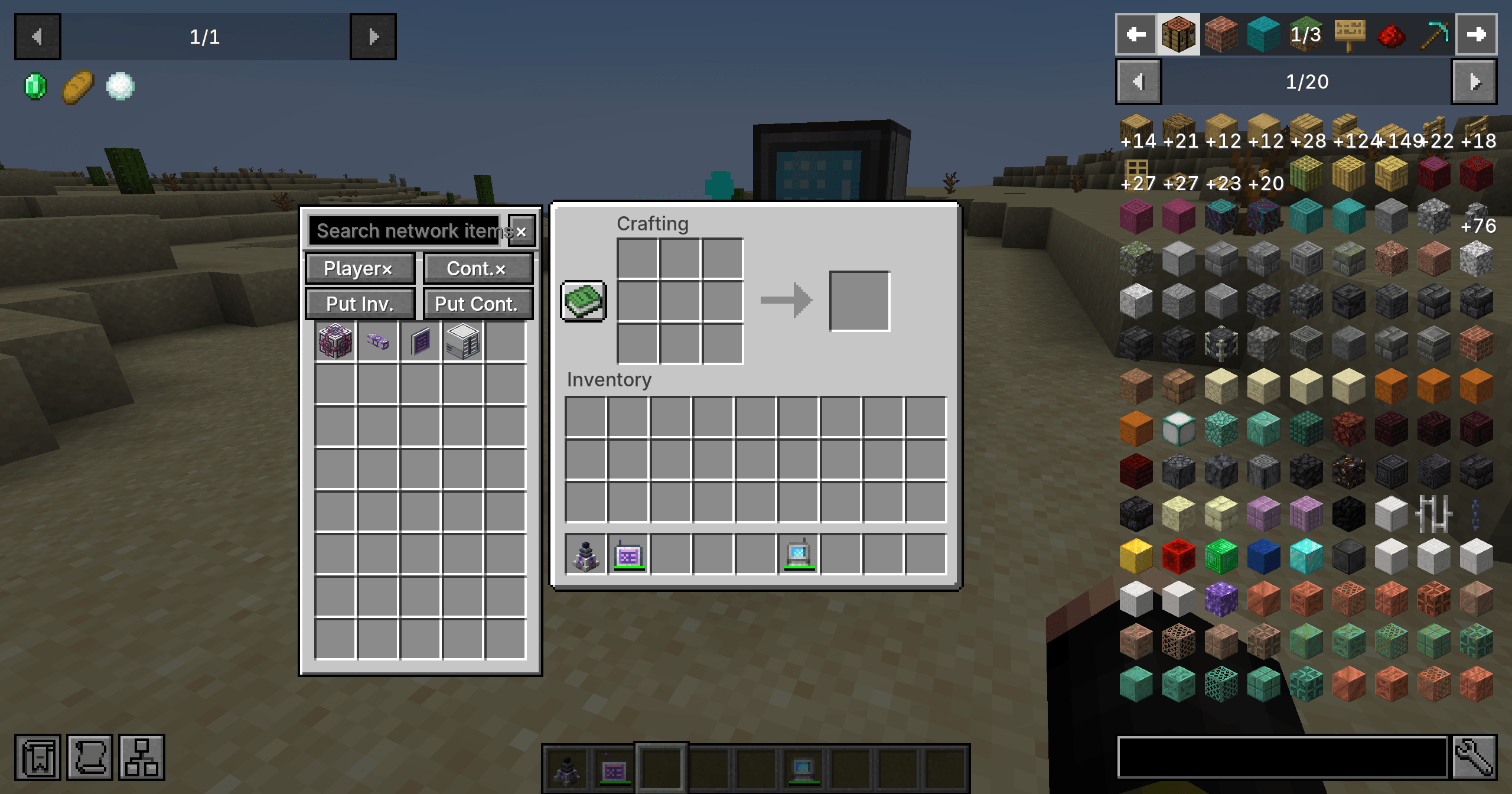 AE2 network sidebar in a crafting screen Browse ME network items alongside a vanilla crafting screen while carrying a usable AE2 wireless terminal.
Versions
Files
Relations
Project Relations
More like this
Similar Mods
Suggestions use data such as tags, dependencies, dependents, descriptions, titles, and more to rank how much they overlap with this mod.
On ModDex
Community snapshot
By the numbers
Statistics

Get it on
Available Platforms
On ModDex
Community snapshot
By the numbers
Statistics
Resources