Community listing page, reviews here may not be monitored by the author.


Community voices
Reviews
No reviews yet. Be the first to review this project!
Get it on
Available Platforms
Compatibility
Supported Environments
Runs entirely on the client. Works on vanilla servers.
Must be installed on both the client and the server.
Varies by version.
About
Project Details
For authors
Embed Badge
If you're the author of this project, you can embed a live badge anywhere that supports HTML or Markdown. It updates automatically whenever ratings change.
Use HTML for any page that supports it, or Markdown for README files and Markdown-based descriptions.
Identifiers
Platform IDs
About
Description
Better Books
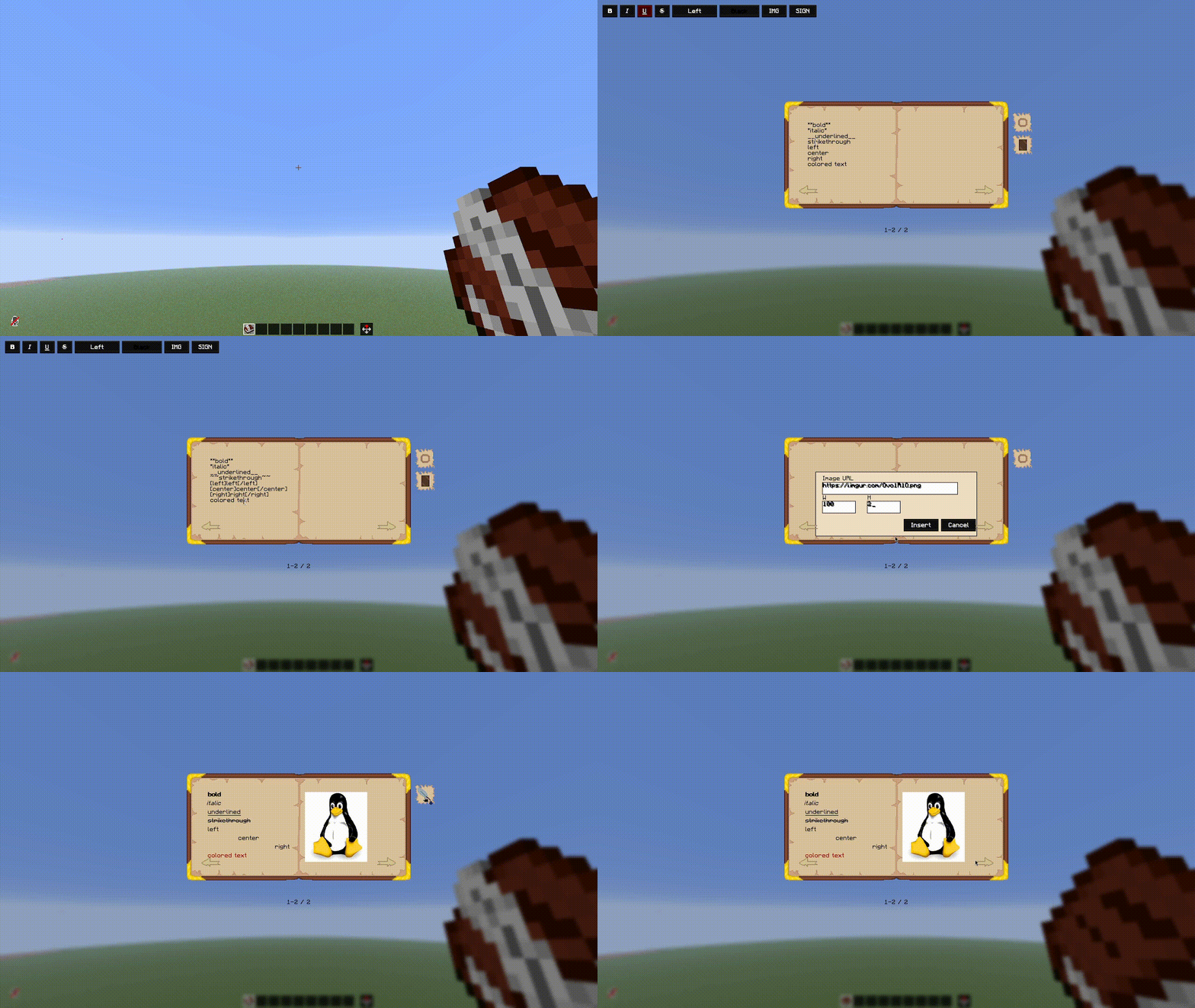
Better Books is a Fabric mod for Minecraft that completely replaces the vanilla book-and-quill workflow with an advanced, custom two-page editor. It enhances the in-game reading and writing experience by introducing rich text formatting, alignment settings, and the ability to view remote images directly on the book pages.
Preview
Features
- Advanced Two-Page Editor: Replaces the standard book-and-quill screen with an open-book interface featuring two fully editable pages. Text smoothly flows from the left page to the right page as you type.
- Rich Text Formatting: Easily format text using standard options like bold, italic, underline, and strikethrough.
- Customization Controls: Align text (left, center, right) and change text colors on the fly using dedicated interface selectors.
- Image Integration: Embed external images onto book pages using web links. Images are automatically sized to fit nicely within the page boundaries.
- Preview & Reading Modes: Review your layout using a dedicated preview mode before finalizing your work. Once signed, books become read-only and can be shared with other players.
Usage
Simply open a standard book and quill to access the new editor. Use the on-screen buttons to format your text, insert image URLs, or jump between page spreads. When you are done, sign the book to protect it from further changes, or close it to save your current progress as a draft.
Credits & Thanks
DVORSS - Huge thanks for creating the beautiful textures!
Better Books
Better Books is a Fabric mod for Minecraft that completely replaces the vanilla book-and-quill workflow with an advanced, custom two-page editor. It enhances the in-game reading and writing experience by introducing rich text formatting, alignment settings, and the ability to view remote images directly on the book pages.
Preview
Features
- Advanced Two-Page Editor: Replaces the standard book-and-quill screen with an open-book interface featuring two fully editable pages. Text smoothly flows from the left page to the right page as you type.
- Rich Text Formatting: Easily format text using standard options like bold, italic, underline, and strikethrough.
- Customization Controls: Align text (left, center, right) and change text colors on the fly using dedicated interface selectors.
- Image Integration: Embed external images onto book pages using web links. Images are automatically sized to fit nicely within the page boundaries.
- Preview & Reading Modes: Review your layout using a dedicated preview mode before finalizing your work. Once signed, books become read-only and can be shared with other players.
Usage
Simply open a standard book and quill to access the new editor. Use the on-screen buttons to format your text, insert image URLs, or jump between page spreads. When you are done, sign the book to protect it from further changes, or close it to save your current progress as a draft.
Credits & Thanks
DVORSS - Huge thanks for creating the beautiful textures!
Screenshots
Gallery
Versions
Files
Relations
Project Relations
More like this
Similar Mods
Suggestions use data such as tags, dependencies, dependents, descriptions, titles, and more to rank how much they overlap with this mod.
- Better Enchanted Books (Fabric)
- Better Books
- Better Recipe Books (+ Smithing Tables, Brewing Stands)
- Enchanted Book Redesign
- Mars's Enchanted Book Textures
- Better Chiseled Bookshelf
- Better Text Editor (BTE)
- Better sword(更好的剑-更多附魔)
- Villager trade-trade
- Better Book and Quill
- Better Book Reader
- Better Recipe Book (Adorable♡Girl aVa Seriously Extended)
On ModDex
Community snapshot
By the numbers
Statistics
Want to reach Minecraft players?
We're looking for a server hosting partner to feature here and other parts of the site. Interested? Send us a message!
Get in touchGet it on
Available Platforms
On ModDex
Community snapshot
By the numbers