
Community listing page, reviews here may not be monitored by the author.
Better F3 Reborn


No reviews yet
A highly customizable and modular debug HUD overhaul for 1.12.2, inspired by BetterF3.
Community voices
Reviews
No reviews yet. Be the first to review this project!
Get it on
Available Platforms
Compatibility
Supported Environments
Runs entirely on the client. Works on vanilla servers.
About
Project Details
For authors
Embed Badge
If you're the author of this project, you can embed a live badge anywhere that supports HTML or Markdown. It updates automatically whenever ratings change.
Use HTML for any page that supports it, or Markdown for README files and Markdown-based descriptions.
Identifiers
Platform IDs
About
Description
Better F3 Reborn
A modern, feature-rich debug HUD overhaul for Minecraft 1.12.2 – bringing Better F3's clean design to the golden age of modding!
Better F3 Reborn is a faithful reconstruction of the modern debug experience, specifically optimized for the 1.12.2 modding community. It replaces the cluttered vanilla F3 screen with organized, color-coded modules and a high-performance framework.
Join our Discord for support and suggestions: https://discord.gg/gVHefyjsRg
🚀 New in Version 2.1.0+ (The Framework Update)
- 🏗️ Architectural Overhaul: The mod has been rewritten from a monolithic renderer into a modular framework. This ensures better performance, stability, and easier integration for other mods.
- 🖥️ Optimized System Info: Drastically cleaned up GPU strings. Long, cluttered information (especially on Linux/Mesa drivers and Ryzen APUs) is now intelligently shortened for a clean look.
- 📏 Global Scaling: Added a
userScaleoption in the config (0.1x to 2.0x) to perfectly fit any screen resolution. - 📐 Improved Spacing: New default X/Y offsets of 8 for a professional, "less cramped" appearance.
- 🌍 Full Localization: Complete translation support for German (de_de) and English (en_us) for all menus and keybindings.
- 🔌 Expanded Mod Support: Native real-time tracking for Thaumcraft, Botania, Blood Magic, and Astral Sorcery.
✨ Key Features
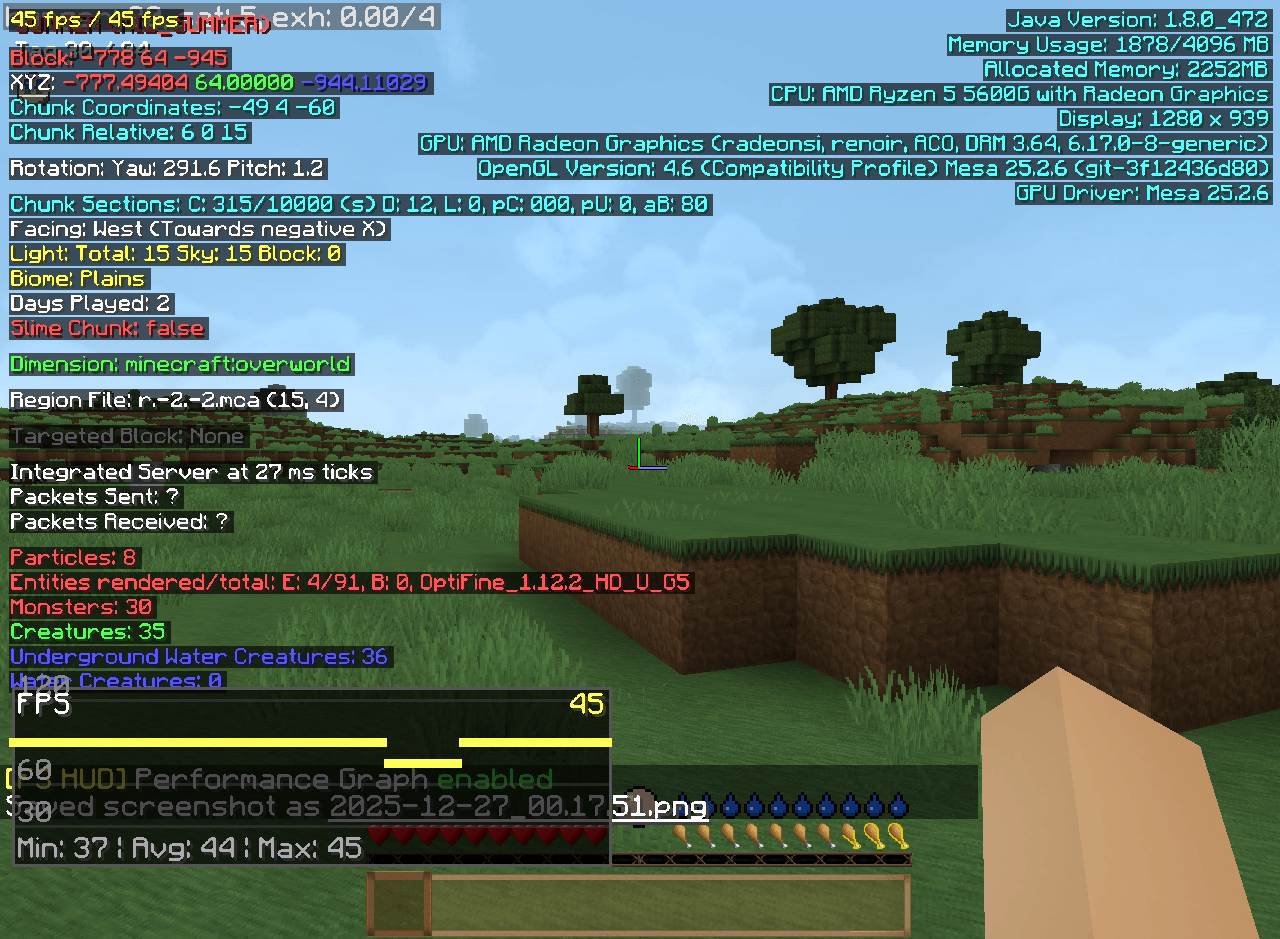
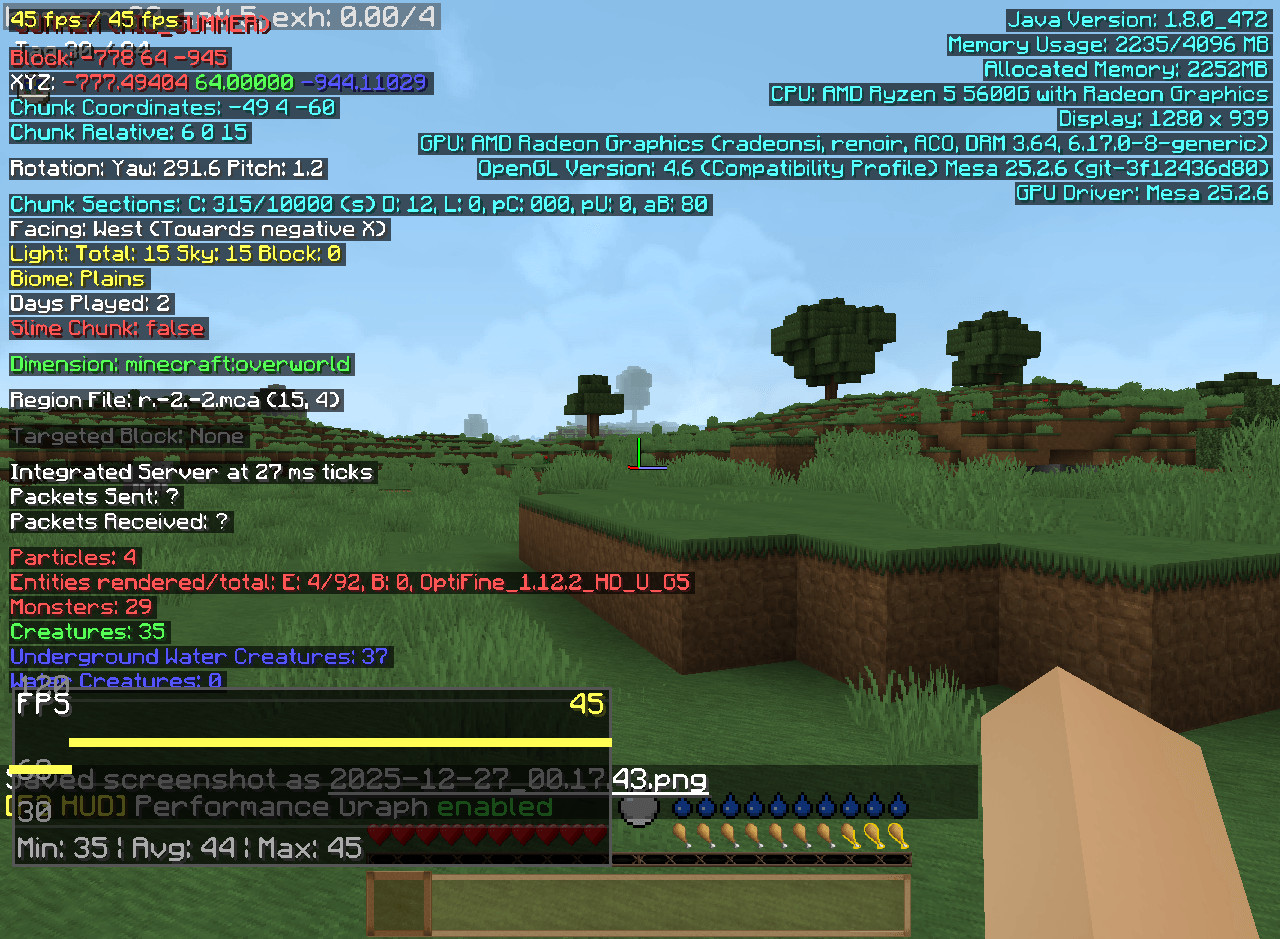
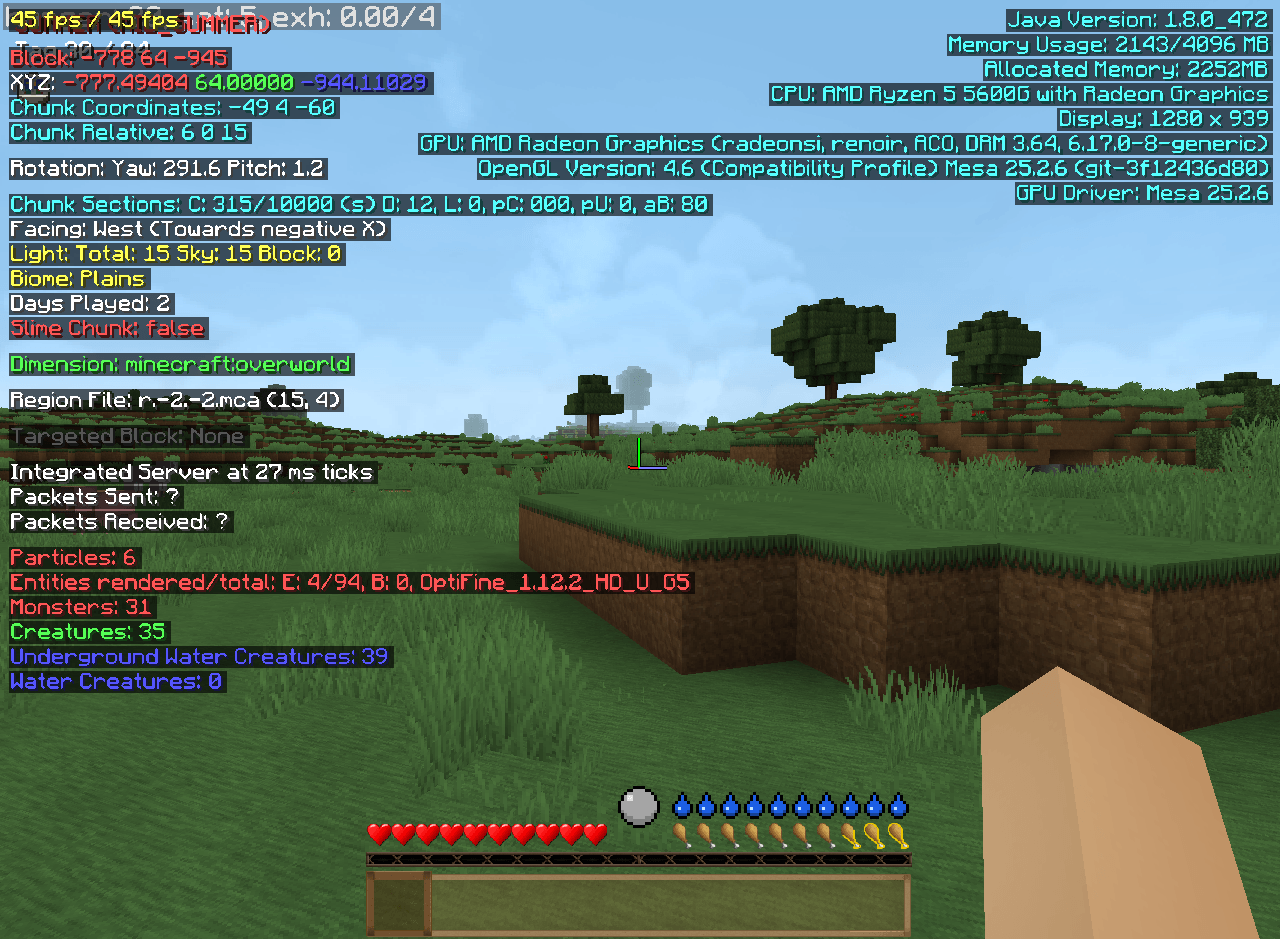
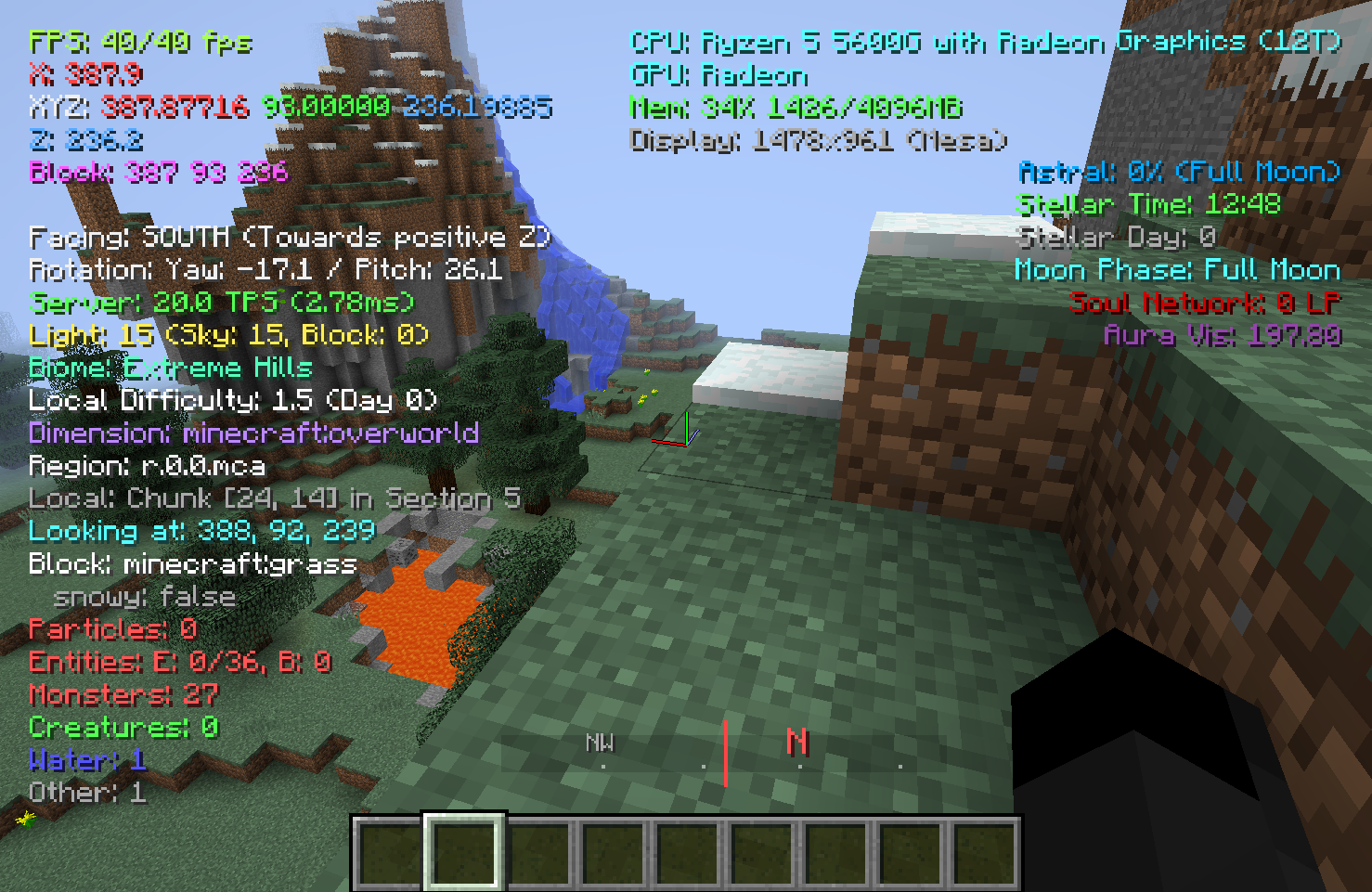
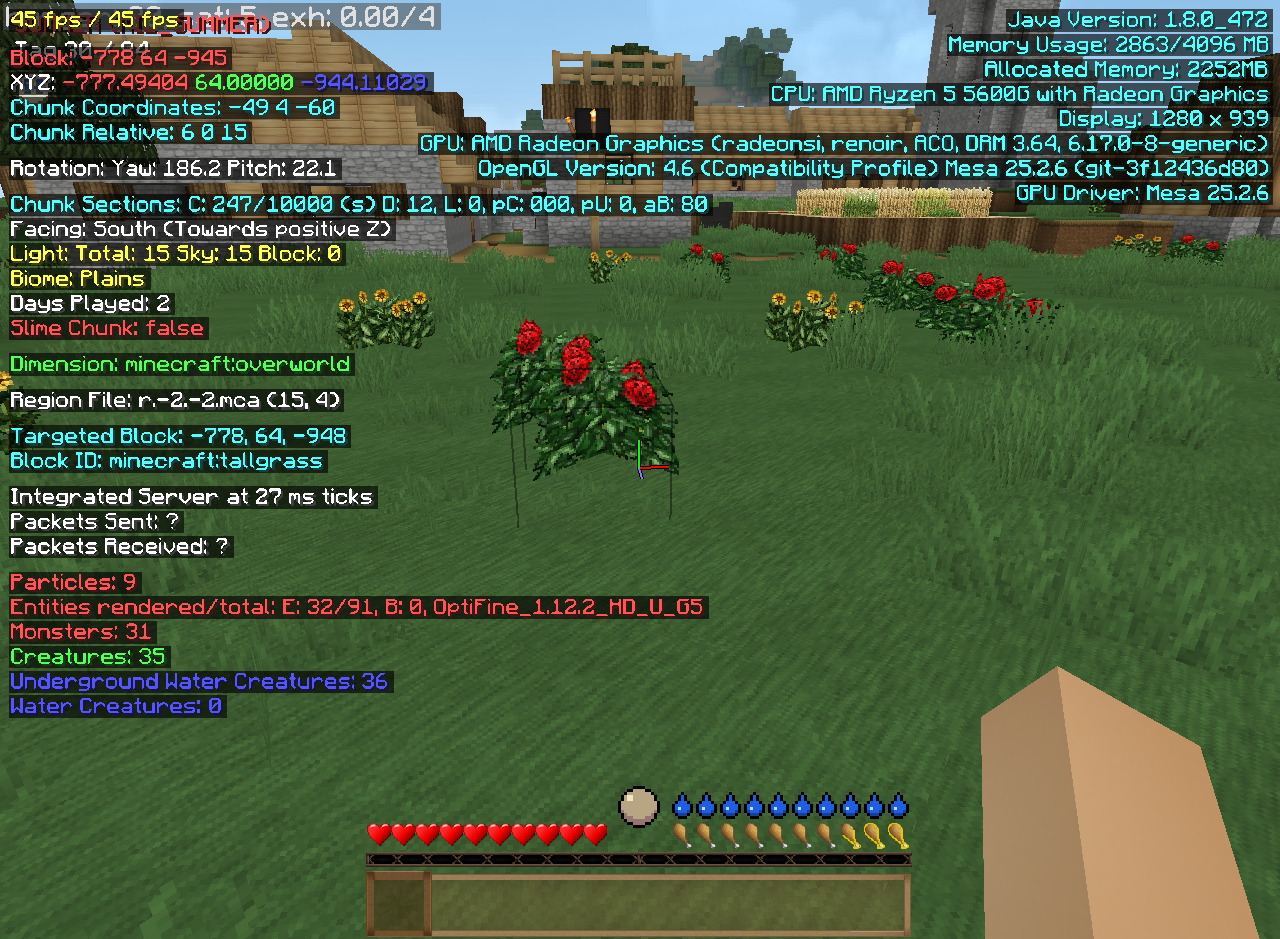
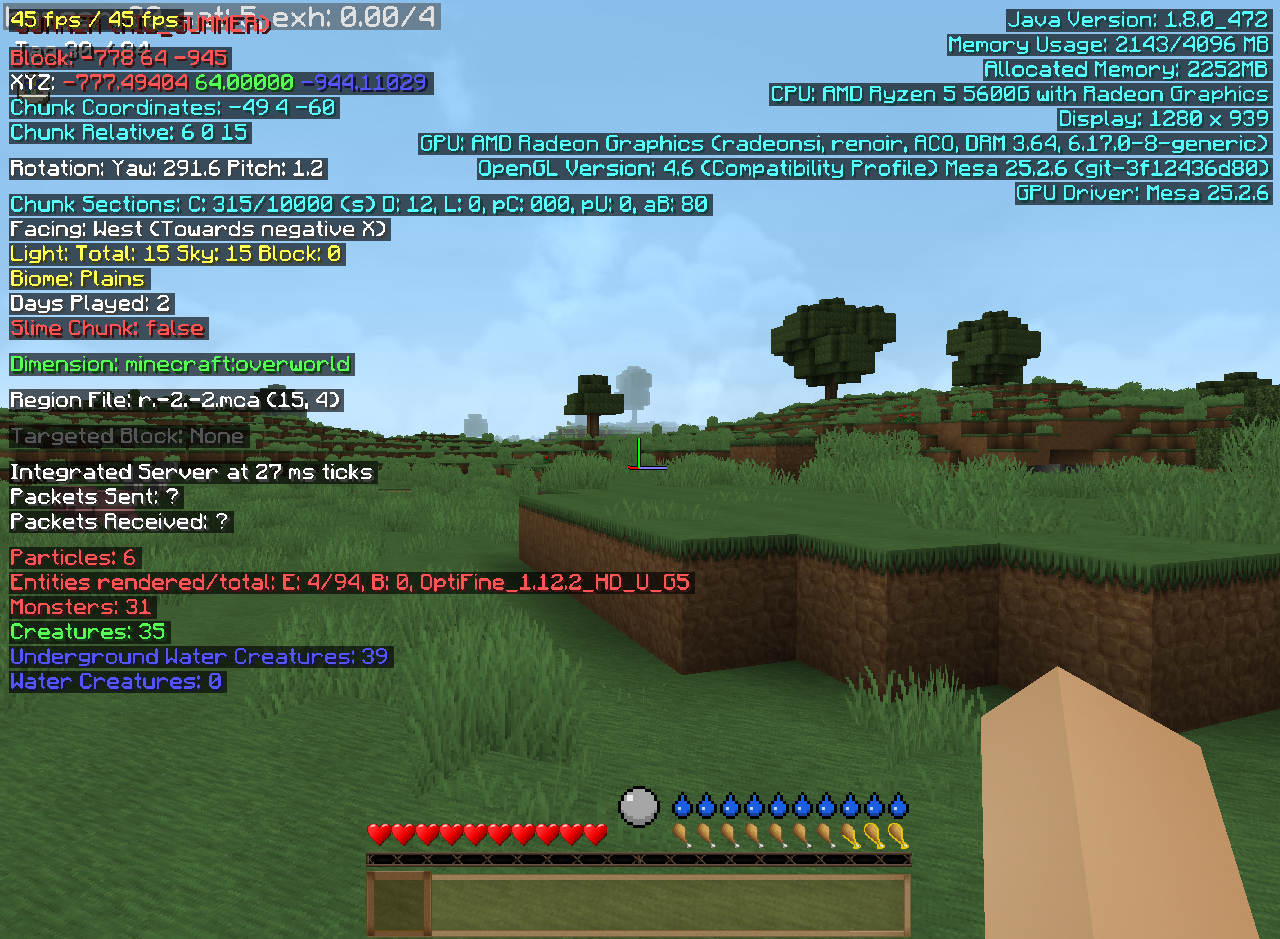
🎨 Clean Two-Column Layout
- Left Side: Game information (coordinates, world data, entities).
- Right Side: System information (Java, CPU, GPU, memory).
- Smooth slide-in animations from both sides for a modern feel.
📊 Performance Graph
- Real-time FPS tracking with a high-precision visual curve.
- Color-coded performance indicators (Green: 60+, Yellow: 30-60, Red: <30).
- Detailed Min/Avg/Max statistics.
- Toggle with F3 + X or F3 + G (Locks the HUD open for monitoring).
🎮 Information Modules
- Coordinates: Block position, XYZ, Chunk coordinates, Slime chunks.
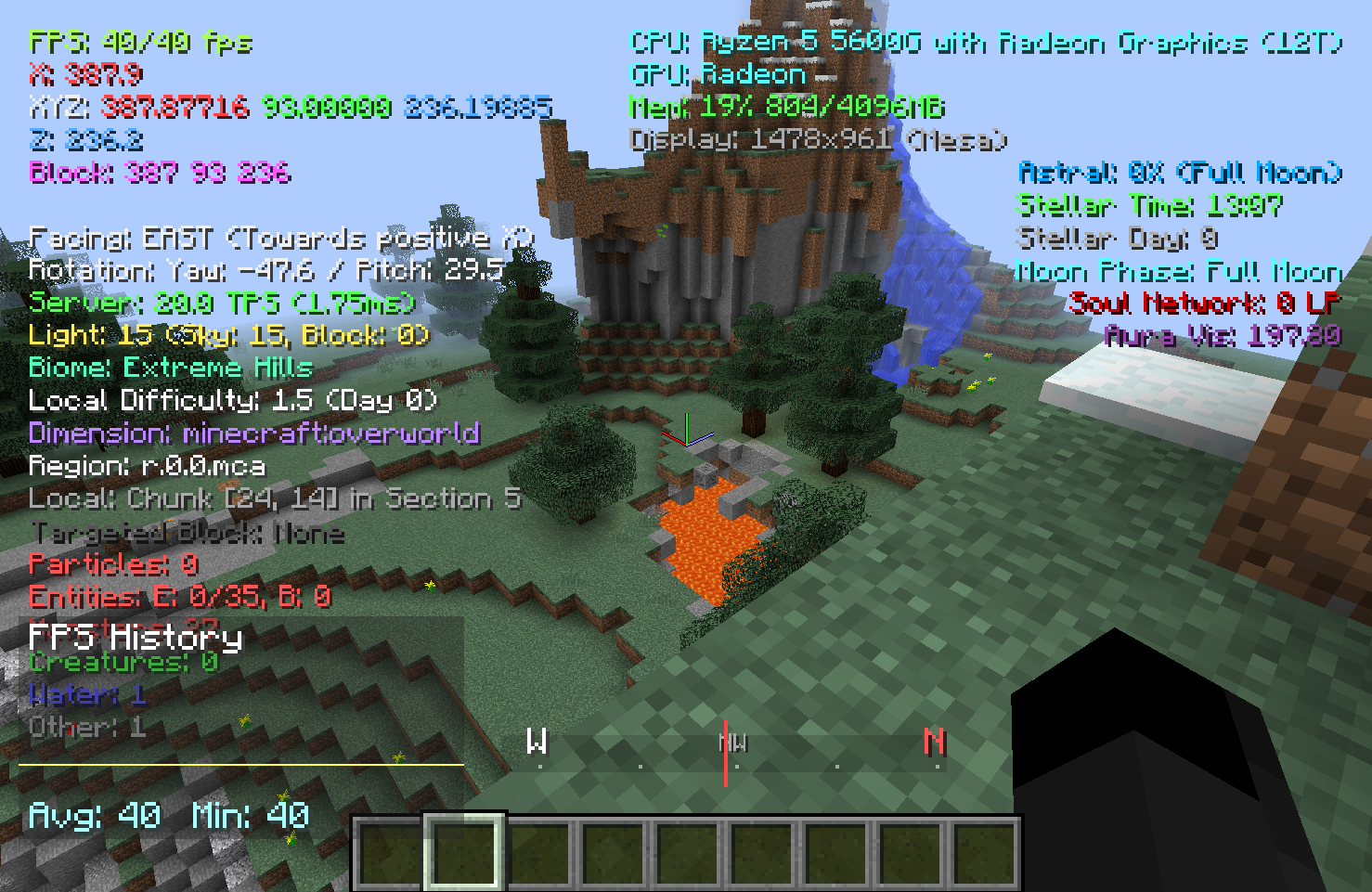
- World Info: Facing direction, light levels, biome colors, days played, and weather.
- System Info: Java version, RAM usage, CPU/GPU details, and OpenGL version.
- Targeted Block: Detailed technical info about the block you are looking at.
- Server Metrics: Integrated TPS and MSPT (Milliseconds Per Tick) tracking.
- ⌨️ Native Keybinds
All F3-shortcuts are now registered as native Minecraft keybindings. You can rebind every toggle (Coordinates, FPS, System, Magic Modules, etc.) in the standard Controls menu!
⚙️ Configuration
Edit config/betterf3reborn.cfg or use the in-game config menu to:
- Enable/disable every single module.
- Customize all colors via RGB Hex format.
- Adjust Scale, Offsets, and Animation Speed.
- Change background transparency (
backgroundAlpha).
📥 Installation
-
Requirement: Minecraft Forge 1.12.2 (Recommended: 14.23.5.2859).
-
Place the
.jarfile in yourmodsfolder. -
Note: It is highly recommended to delete your old
betterf3reborn.cfgto apply the new optimized defaults.
📜 Credits & License
- Inspired by Better F3 by cominixo.
- Licensed under the MIT License.
- Developed for the 1.12.2 technical and modding community.
Better F3 Reborn
A modern, feature-rich debug HUD overhaul for Minecraft 1.12.2 – bringing Better F3's clean design to the golden age of modding!
Better F3 Reborn is a faithful reconstruction of the modern debug experience, specifically optimized for the 1.12.2 modding community. It replaces the cluttered vanilla F3 screen with organized, color-coded modules and a high-performance framework.
🚀 New in Version 2.1.0+ (The Framework Update)
-
🏗️ Architectural Overhaul: The mod has been rewritten from a monolithic renderer into a modular framework. This ensures better performance, stability, and easier integration for other mods.
-
🖥️ Optimized System Info: Drastically cleaned up GPU strings. Long, cluttered information (especially on Linux/Mesa drivers and Ryzen APUs) is now intelligently shortened for a clean look.
-
📏 Global Scaling: Added a userScale option in the config (0.1x to 2.0x) to perfectly fit any screen resolution.
-
📐 Improved Spacing: New default X/Y offsets of 8 for a professional, "less cramped" appearance.
-
🌍 Full Localization: Complete translation support for German (de_de) and English (en_us) for all menus and keybindings.
-
🔌 Expanded Mod Support: Native real-time tracking for Thaumcraft, Botania, Blood Magic, and Astral Sorcery.
✨ Key Features
-
🎨 Clean Two-Column Layout
-
Left Side: Game information (coordinates, world data, entities).
-
Right Side: System information (Java, CPU, GPU, memory).
-
Smooth slide-in animations from both sides for a modern feel.
📊 Performance Graph
-
Real-time FPS tracking with a high-precision visual curve.
-
Color-coded performance indicators (Green: 60+, Yellow: 30-60, Red: <30).
-
Detailed Min/Avg/Max statistics.
-
Toggle with F3 + X or F3 + G (Locks the HUD open for monitoring).
🎮 Information Modules
-
Coordinates: Block position, XYZ, Chunk coordinates, Slime chunks.
-
World Info: Facing direction, light levels, biome colors, days played, and weather.
-
System Info: Java version, RAM usage, CPU/GPU details, and OpenGL version.
-
Targeted Block: Detailed technical info about the block you are looking at.
-
Server Metrics: Integrated TPS and MSPT (Milliseconds Per Tick) tracking.
⌨️ Native Keybinds
All F3-shortcuts are now registered as native Minecraft keybindings. You can rebind every toggle (Coordinates, FPS, System, Magic Modules, etc.) in the standard Controls menu!
⚙️ Configuration
Edit config/betterf3reborn.cfg or use the in-game config menu to:
-
Enable/disable every single module.
-
Customize all colors via RGB Hex format.
-
Adjust Scale, Offsets, and Animation Speed.
-
Change background transparency (backgroundAlpha).
📥 Installation
Requirement: Minecraft Forge 1.12.2 (Recommended: 14.23.5.2859).
Place the .jar file in your mods folder.
Note: It is highly recommended to delete your old betterf3reborn.cfg to apply the new optimized defaults.
📜 Credits & License
Inspired by Better F3 by cominixo.
Licensed under the MIT License.
Developed for the 1.12.2 technical and modding community.
Join our Discord for support and suggestions: https://discord.gg/gVHefyjsRg
Screenshots
Gallery
-
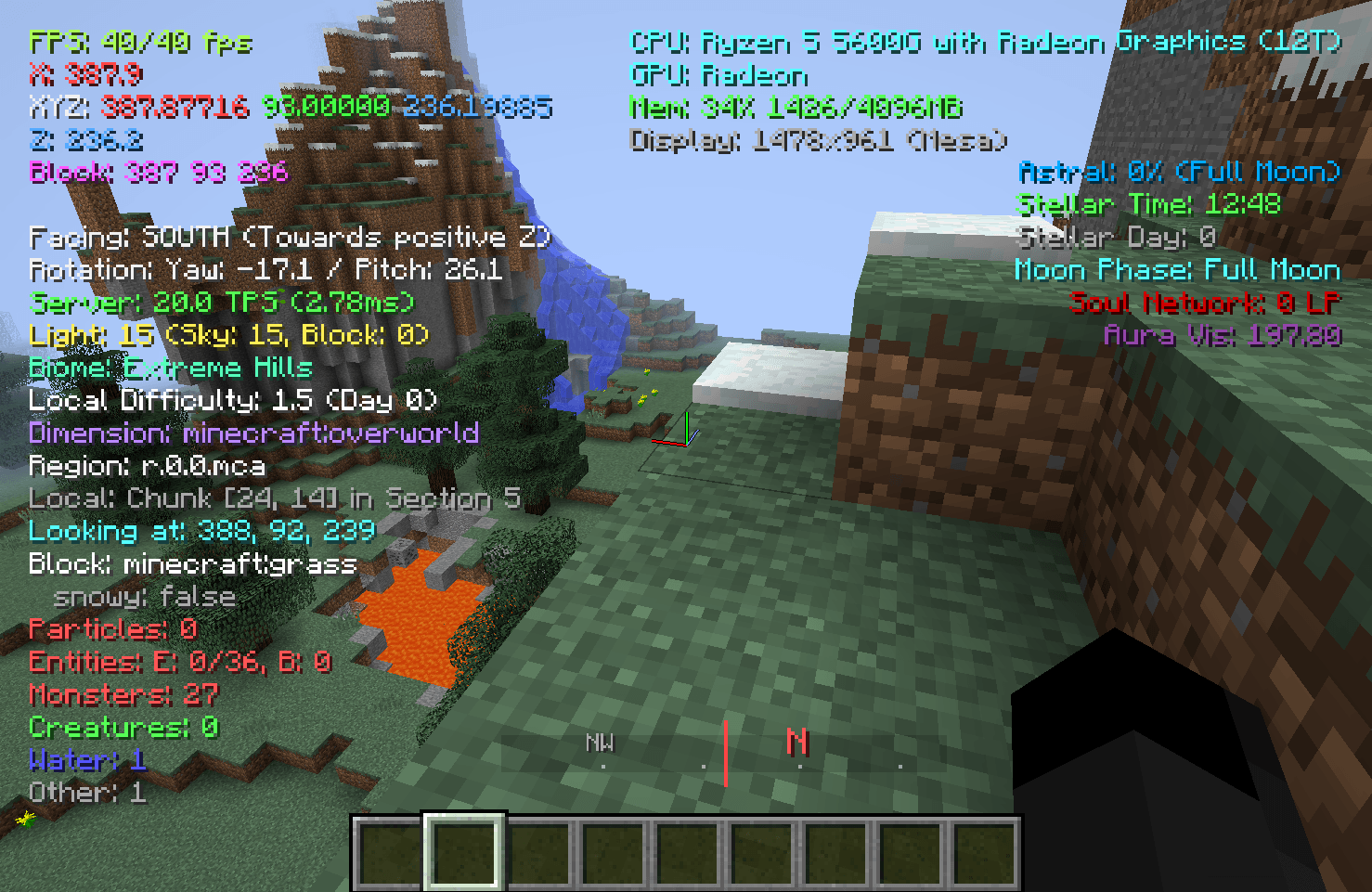 Version 2.1.0 Version 2.1.0
 -
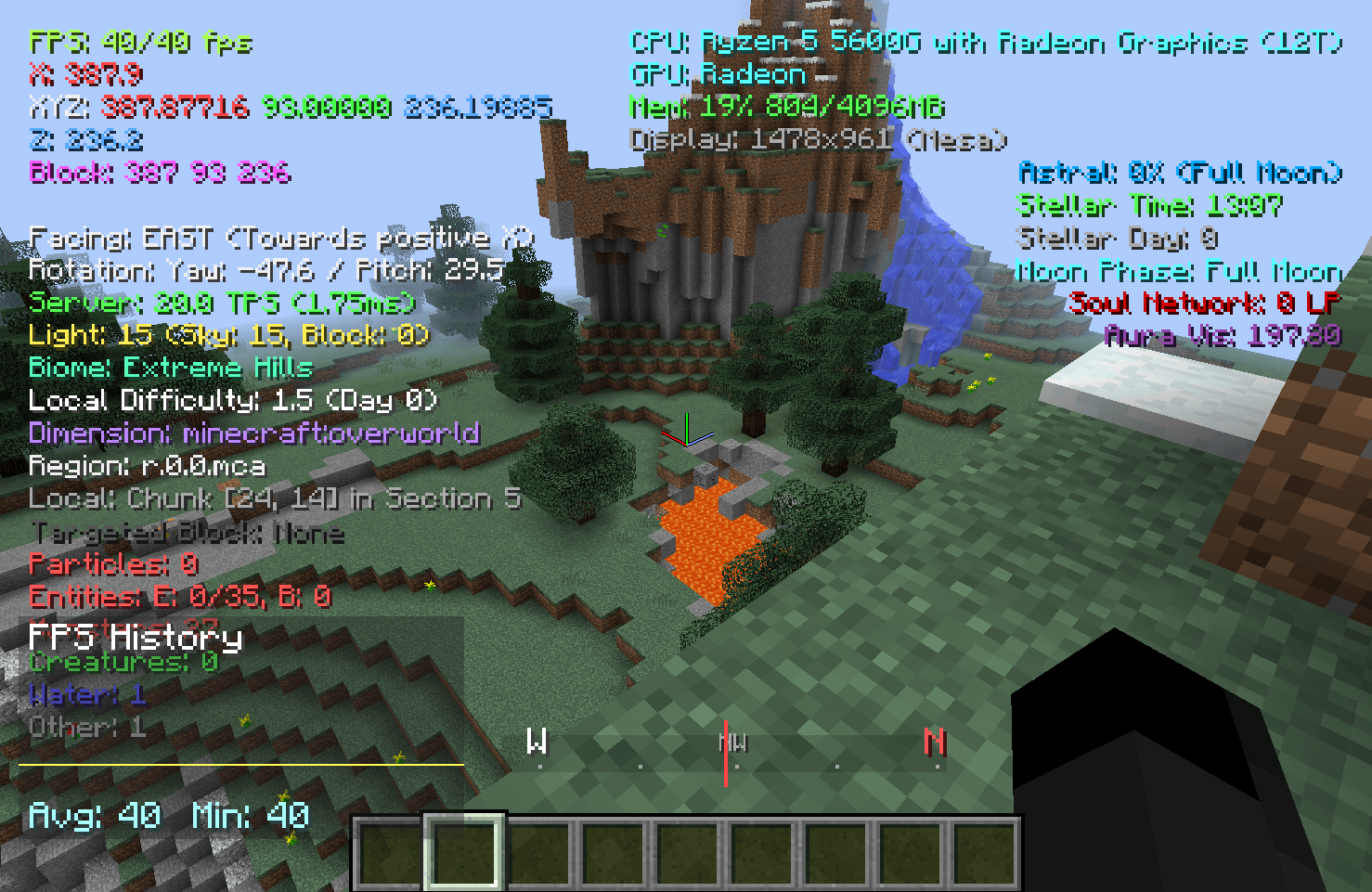 Version 2.1.0 with graph
 -
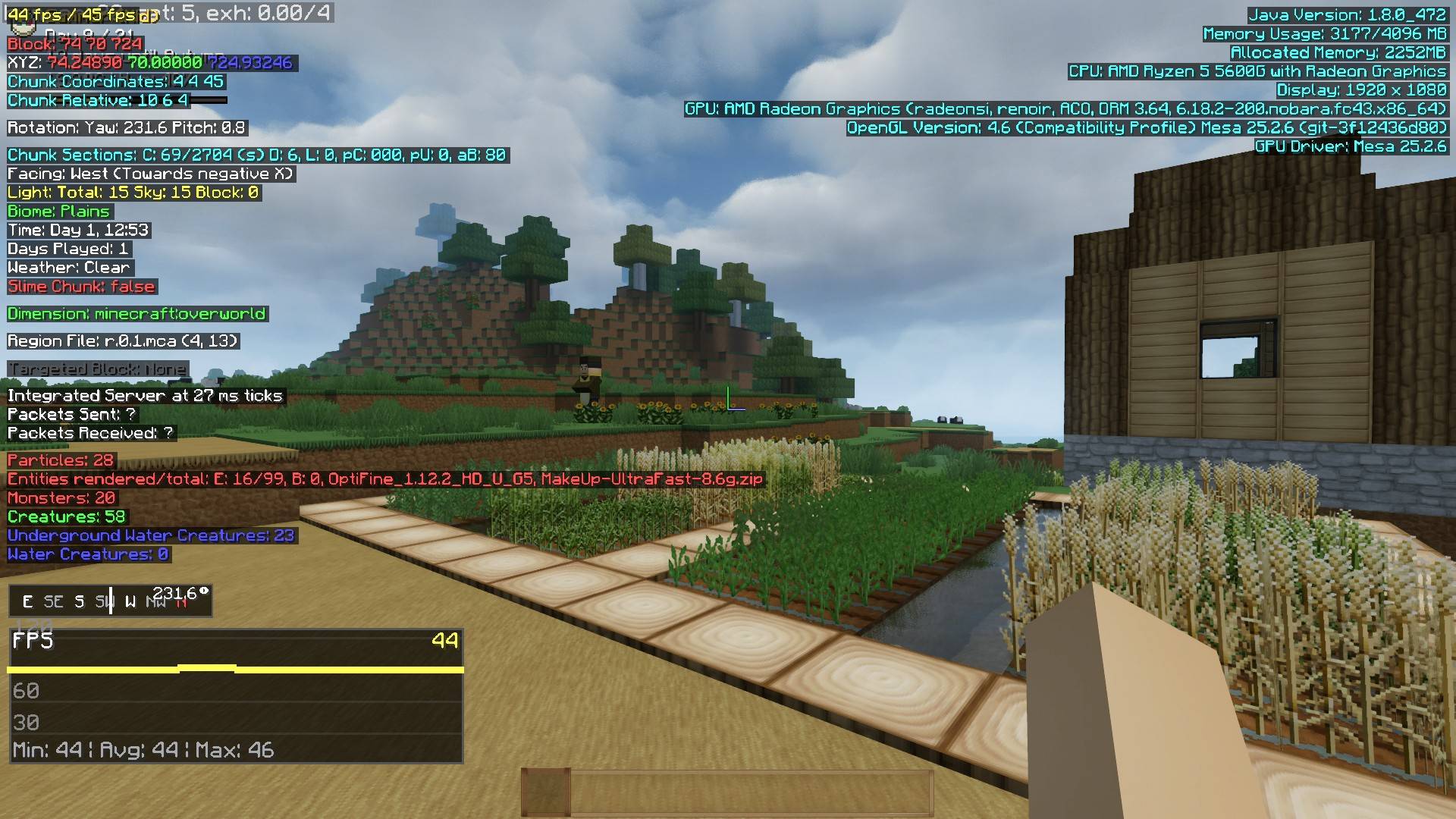 Version 1.0.1 Version 1.0.1 - New Features: Time of Day, Compass, Weather Display, Colored Bioms, some code clean-up
 -
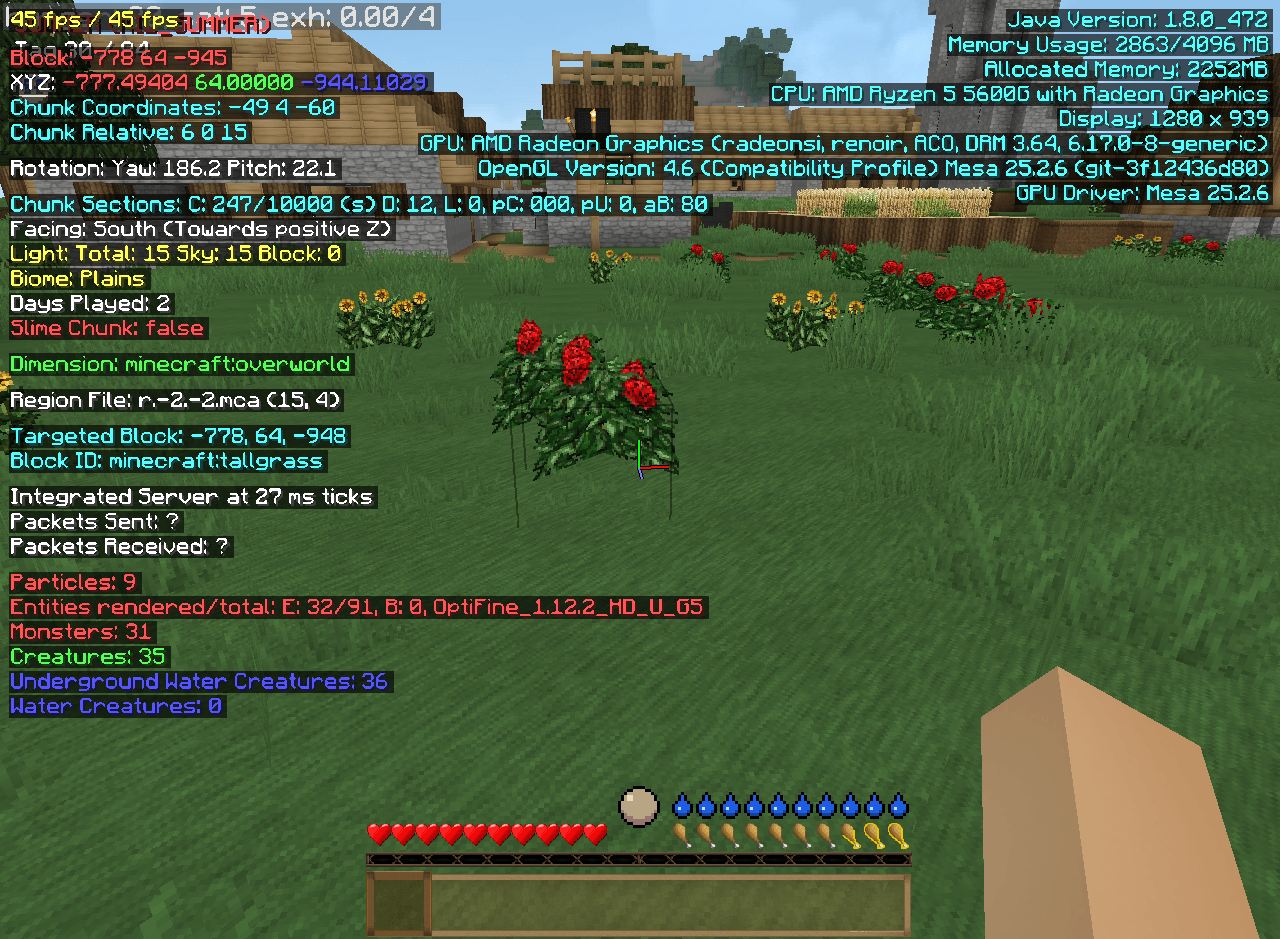 2025-12-27_00.18.08.png 2025-12-27_00.18.08.png
 -
 2025-12-27_00.17.55.png 2025-12-27_00.17.55.png
 -
 2025-12-27_00.17.51.png 2025-12-27_00.17.51.png
 -
 2025-12-27_00.17.43.png 2025-12-27_00.17.43.png
-
 Version 2.1.0 New version 2.1.0 with Graph
 -
 Version 2.1.0 Massive code change to modern framework style.
 -
-
Versions
Files
Relations
Project Relations
More like this
Similar Mods
Suggestions use data such as tags, dependencies, dependents, descriptions, titles, and more to rank how much they overlap with this mod.
On ModDex
Community snapshot
By the numbers
Statistics
Want to reach Minecraft players?
We're looking for a server hosting partner to feature here and other parts of the site. Interested? Send us a message!
Get in touchGet it on
Available Platforms
On ModDex
Community snapshot
By the numbers