
Community listing page, reviews here may not be monitored by the author.
Better /help


No reviews yet
Replaces /help with a clearer, interactable, paginated list. Adds descriptions for commands and arguments, plus optional metadata from other mods.
Community voices
Reviews
No reviews yet. Be the first to review this project!
Get it on
Available Platforms
Compatibility
Supported Environments
Runs entirely on the server. Also works in singleplayer.
About
Project Details
For authors
Embed Badge
If you're the author of this project, you can embed a live badge anywhere that supports HTML or Markdown. It updates automatically whenever ratings change.
Use HTML for any page that supports it, or Markdown for README files and Markdown-based descriptions.
Identifiers
Platform IDs
About
Description

A Minecraft mod that replaces /help with a clearer, interactable, paginated list. Adds descriptions for commands and arguments, plus optional metadata from other mods.


✨ Features
Vanilla /help throws a hard-to-read wall of text at you with almost no useful detail. Better /help replaces it with something players can actually use.
- Clear, paginated command list: browse commands page by page instead of scrolling through a wall of text
- Interactive output: hover for details and click to navigate pages
- Descriptions for commands and arguments: most vanilla commands are covered, and arguments can have their own descriptions too
- Easy to integrate with: other mods can add descriptions and metadata (like homepage links) using only their language files
- Attribution: when a description comes from another mod, players can see which mod the command is from
- Suggestions:
/help <command...>autocompletes like typing the command itself, unlike vanilla/help
⌨️ Usage
| Command | What it does |
|---|---|
/help |
Displays the paginated command list |
/help <command...> |
Shows help for a command or argument |
Examples:
/help
/help gamemode
/help advancement grant @s everything
💻 For mod developers
You can add descriptions and other metadata with language files (for example assets/<mod_id>/lang/en_us.json). Better /help scans installed mods for those keys on server startup. Translations are resolved server-side.
Command or argument descriptions
When you add a command description, Better /help attributes that command to your mod:
{
  "examplemod.commands.examplecommand.description": "Description of your command."
}
Replace examplemod with your mod's id, and examplecommand with your command's name.
You can omit the mod id prefix, but that is not recommended because of translation key conflicts:
{
  "commands.examplecommand.description": "Description of your command."
}
You can also describe nested literals and arguments. Path segments are Brigadier node names (the same strings you pass to Commands.literal("name") and Commands.argument("name", ...), not what the player types):
{
  "examplemod.commands.examplecommand.targets.description": "Who the command applies to."
}
For example, an EntityArgument registered as Commands.argument("targets", EntityArgument.players()) uses targets in the translation key, not @s, @a, or a player name.
Examples from Better /help:
{
  "commands.advancement.grant.description": "Grants player advancements.",
  "commands.advancement.grant.targets.everything.description": "Grants all advancements to players.",
  "commands.advancement.grant.targets.only.description": "Grants one specified advancement to players."
}
Homepage link
When set, the mod name in /help <command...> output can become a clickable link:
{
  "betterhelp.homepage.examplemod": "https://example.com"
}
Replace examplemod with your mod's id.
You can omit the mod id suffix, but that is not recommended because of translation key conflicts:
{
  "betterhelp.homepage": "https://example.com"
}
More details are in the documentation.
❓ FAQ
If Better /help is installed on a server, do players also need to install it?
No. It is a server-side mod. Clients do not need it.
Does it work in singleplayer?
Yes.
Will commands from other mods still show if the developer did not integrate with Better /help?
Yes, but without their descriptions or other metadata. Usage is still shown.
Can I include it in a modpack?
Yes. No need to ask for permission.

A Minecraft mod that replaces /help with a clearer, interactable, paginated list.
Adds descriptions for commands and arguments, plus optional metadata from other mods.


✨ Features
Vanilla /help throws a hard-to-read wall of text at you with almost no useful detail. Better /help replaces it with something players can actually use.
-
Clear, paginated command list: browse commands page by page instead of scrolling through a wall of text
-
Interactive output: hover for details and click to navigate pages
-
Descriptions for commands and arguments: most vanilla commands are covered, and arguments can have their own descriptions too
-
Easy to integrate with: other mods can add descriptions and metadata (like homepage links) using only their language files
-
Attribution: when a description comes from another mod, players can see which mod the command is from
-
Suggestions:
/help <command...>autocompletes like typing the command itself, unlike vanilla/help
⌨️ Usage
| Command | What it does |
|---|---|
/help |
Displays the paginated command list |
/help <command...> |
Shows help for a command or argument |
Examples:
/help
/help gamemode
/help advancement grant @s everything
💻 For mod developers
You can add descriptions and other metadata with language files (for example assets/<mod_id>/lang/en_us.json).
Better /help scans installed mods for those keys on server startup. Translations are resolved server-side.
Command or argument descriptions
When you add a command description, Better /help attributes that command to your mod:
{
  "examplemod.commands.examplecommand.description": "Description of your command."
}
Replace examplemod with your mod's id, and examplecommand with your command's name.
You can omit the mod id prefix, but that is not recommended because of translation key conflicts:
{
  "commands.examplecommand.description": "Description of your command."
}
You can also describe nested literals and arguments. Path segments are Brigadier node names (the same strings you pass to Commands.literal("name") and Commands.argument("name", ...), not what the player types):
{
  "examplemod.commands.examplecommand.targets.description": "Who the command applies to."
}
For example, an EntityArgument registered as Commands.argument("targets", EntityArgument.players()) uses targets in the translation key, not @s, @a, or a player name.
Examples from Better /help:
{
  "commands.advancement.grant.description": "Grants player advancements.",
  "commands.advancement.grant.targets.everything.description": "Grants all advancements to players.",
  "commands.advancement.grant.targets.only.description": "Grants one specified advancement to players."
}
Homepage link
When set, the mod name in /help <command...> output can become a clickable link:
{
  "betterhelp.homepage.examplemod": "https://example.com"
}
Replace examplemod with your mod's id.
You can omit the mod id suffix, but that is not recommended because of translation key conflicts:
{
  "betterhelp.homepage": "https://example.com"
}
More details are in the documentation.
❓ FAQ
If Better /help is installed on a server, do players also need to install it?
No. It is a server-side mod. Clients do not need it.
Does it work in singleplayer?
Yes.
Will commands from other mods still show if the developer did not integrate with Better /help?
Yes, but without their descriptions or other metadata. Usage is still shown.
Can I include it in a modpack?
Yes. No need to ask for permission.
Screenshots
Gallery
-
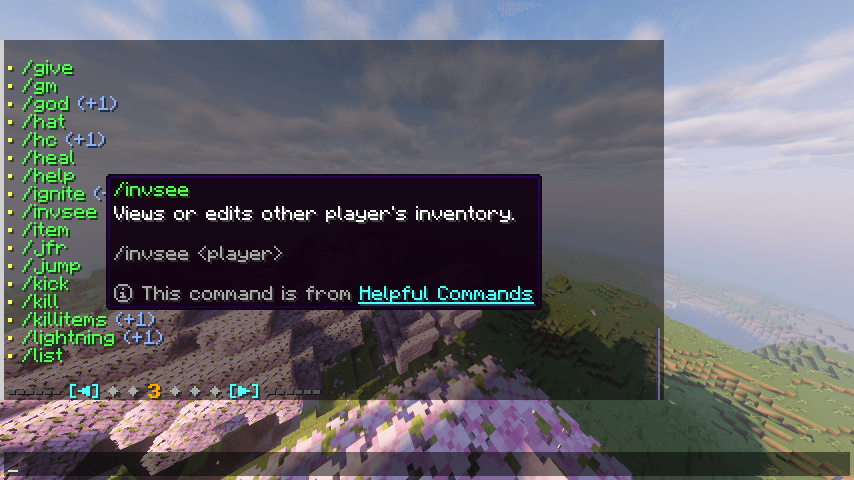 /help command Paginated command list with hover details: description, usage, aliases, and mod attribution.
 -
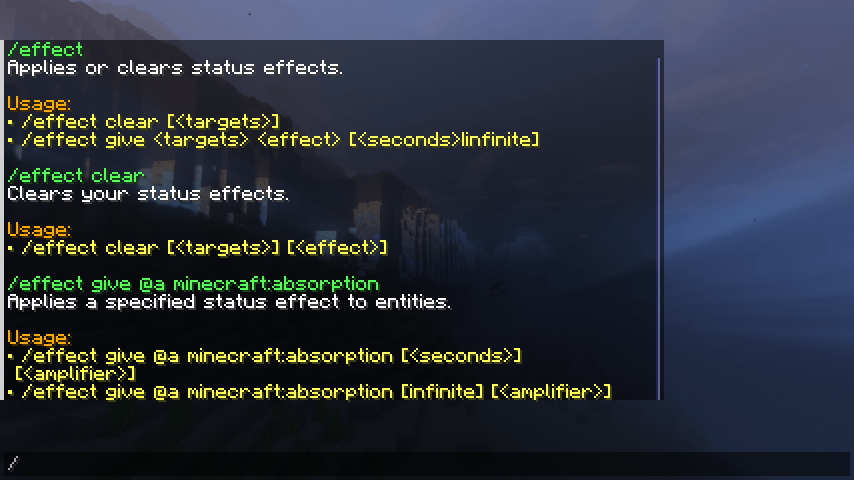 Descriptions for arguments Arguments can have their own descriptions.
 -
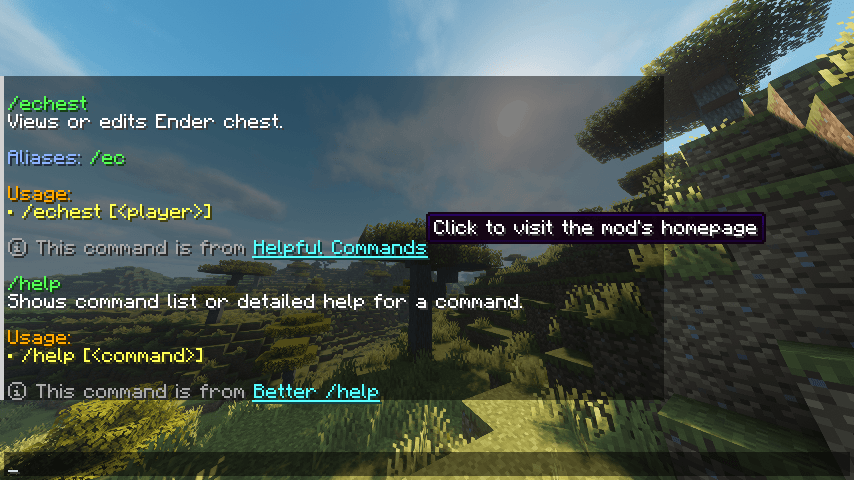 Mod attribution Shows which mod a command is from (when available)
-
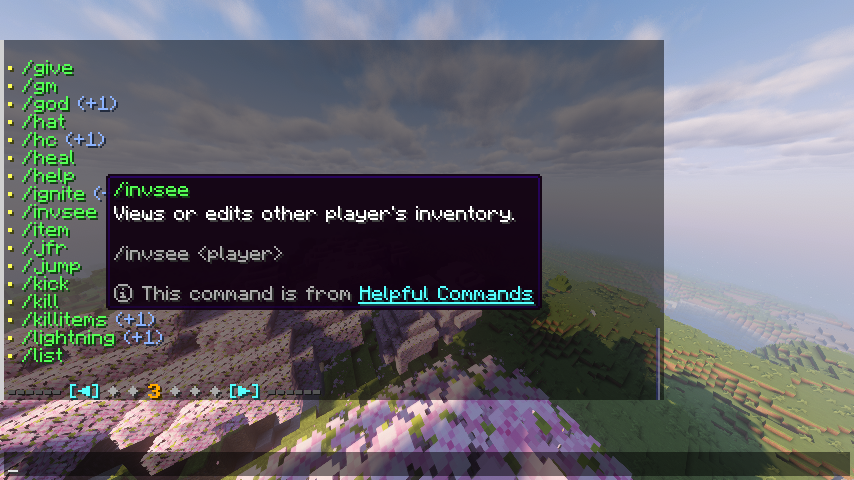 /help command Paginated command list with hover details: description, usage, aliases, and mod attribution.
 -
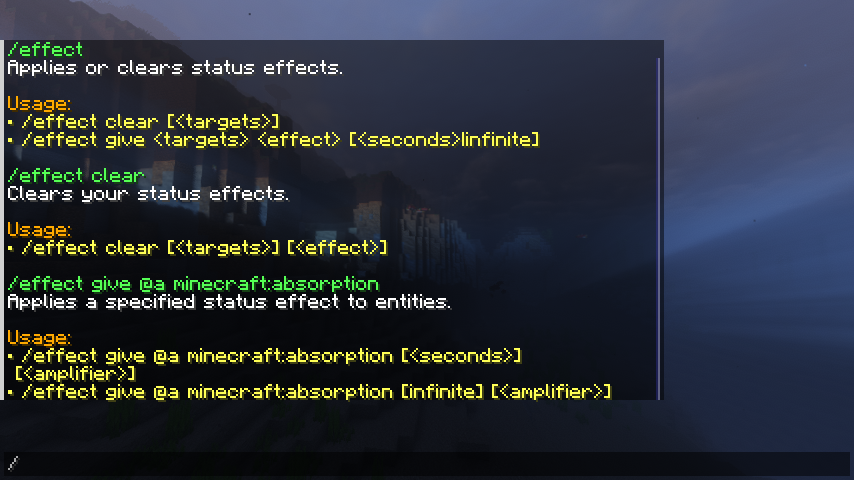 Descriptions for arguments Arguments can have their own descriptions.
 -
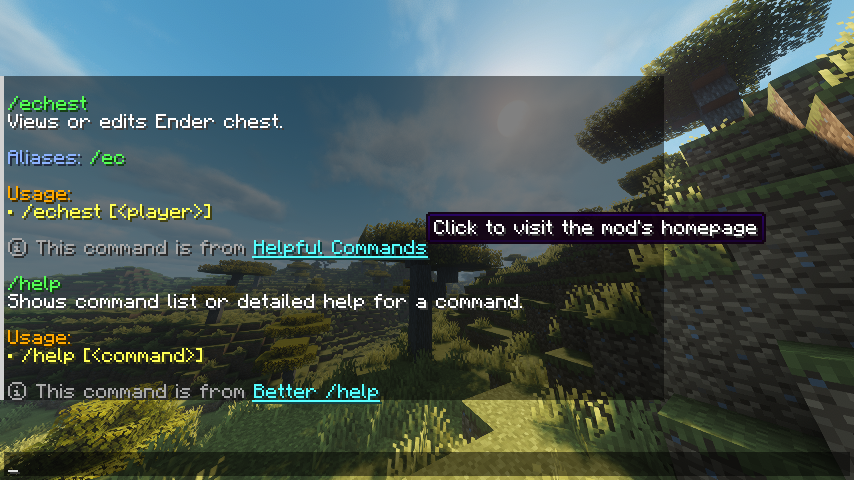 Mod attribution Shows which mod a command is from (when available)
Versions
Files
Relations
Project Relations
More like this
Similar Mods
Suggestions use data such as tags, dependencies, dependents, descriptions, titles, and more to rank how much they overlap with this mod.
On ModDex
Community snapshot
By the numbers
Statistics
Want to reach Minecraft players?
We're looking for a server hosting partner to feature here and other parts of the site. Interested? Send us a message!
Get in touchGet it on
Available Platforms
On ModDex
Community snapshot
By the numbers