Community listing page, reviews here may not be monitored by the author.
Better Paint


No reviews yet
Enhances Minecraft's painting system with selection GUI, locking, and transformations.
Community voices
Reviews
No reviews yet. Be the first to review this project!
Get it on
Available Platforms
Compatibility
Supported Environments
Must be installed on both the client and the server.
About
Project Details
For authors
Embed Badge
If you're the author of this project, you can embed a live badge anywhere that supports HTML or Markdown. It updates automatically whenever ratings change.
Use HTML for any page that supports it, or Markdown for README files and Markdown-based descriptions.
Identifiers
Platform IDs
Resources
External Links
About
Description
Better Painting
Better Painting is a Fabric mod for Minecraft 1.21.1 that enhances the painting system with a selection GUI, locking mechanism, and transformation tools.
Features
Painting Selection GUI
Hold a painting and press Ctrl + Right-click on a wall to open the painting selection GUI.
- Paintings are grouped by size (e.g., 1x1, 2x2, 4x4)
- Each painting shows a large preview
- Click any preview to place the selected painting at the target position
- If there isn't enough space, a red message will appear in the action bar
Painting Lock System
Lock a painting to preserve its artwork when broken and placed again.
- Lock: Hold a glass pane and right-click on a placed painting
- Unlock: Hold any axe and right-click on a locked painting
- Locked paintings display a
[Locked]indicator in the inventory tooltip - Locked paintings can still be changed via Ctrl + Right-click to open the selection GUI
Painting Transformations
In the painting selection GUI, you can transform the painting before placing it:
- Rotation: Click the Rotate button to rotate 90° clockwise each time
- Horizontal Mirror: Flip the painting left-right
- Vertical Mirror: Flip the painting up-down
- Reset: Revert all transformations to the original orientation
Requirements
- Minecraft 1.21.1
- Fabric Loader 0.16.0 or higher
- Fabric API
Installation
- Install Fabric Loader for Minecraft 1.21.1
- Download Fabric API and place it in the
modsfolder - Download Better Painting and place it in the
modsfolder - Launch Minecraft with the Fabric profile
License
This project is licensed under the MIT License.
Better Painting
Better Painting is a Fabric mod for Minecraft 1.21.1 that enhances the painting system with a selection GUI, locking mechanism, and transformation tools.
Features
Painting Selection GUI
Hold a painting and press Ctrl + Right-click on a wall to open the painting selection GUI.
- Paintings are grouped by size (e.g., 1x1, 2x2, 4x4)
- Each painting shows a large preview
- Click any preview to place the selected painting at the target position
- If there isn't enough space, a red message will appear in the action bar
Painting Lock System
Lock a painting to preserve its artwork when broken and placed again.
- Lock: Hold a glass pane and right-click on a placed painting
- Unlock: Hold any axe and right-click on a locked painting
- Locked paintings display a
[Locked]indicator in the inventory tooltip - Locked paintings can still be changed via Ctrl + Right-click to open the selection GUI
Painting Transformations
In the painting selection GUI, you can transform the painting before placing it:
- Rotation: Click the Rotate button to rotate 90° clockwise each time
- Horizontal Mirror: Flip the painting left-right
- Vertical Mirror: Flip the painting up-down
- Reset: Revert all transformations to the original orientation
Requirements
- Minecraft 1.21.1
- Fabric Loader 0.16.0 or higher
- Fabric API
Installation
- Install Fabric Loader for Minecraft 1.21.1
- Download Fabric API and place it in the
modsfolder - Download Better Painting and place it in the
modsfolder - Launch Minecraft with the Fabric profile
License
This project is licensed under the MIT License.
Screenshots
Gallery
-
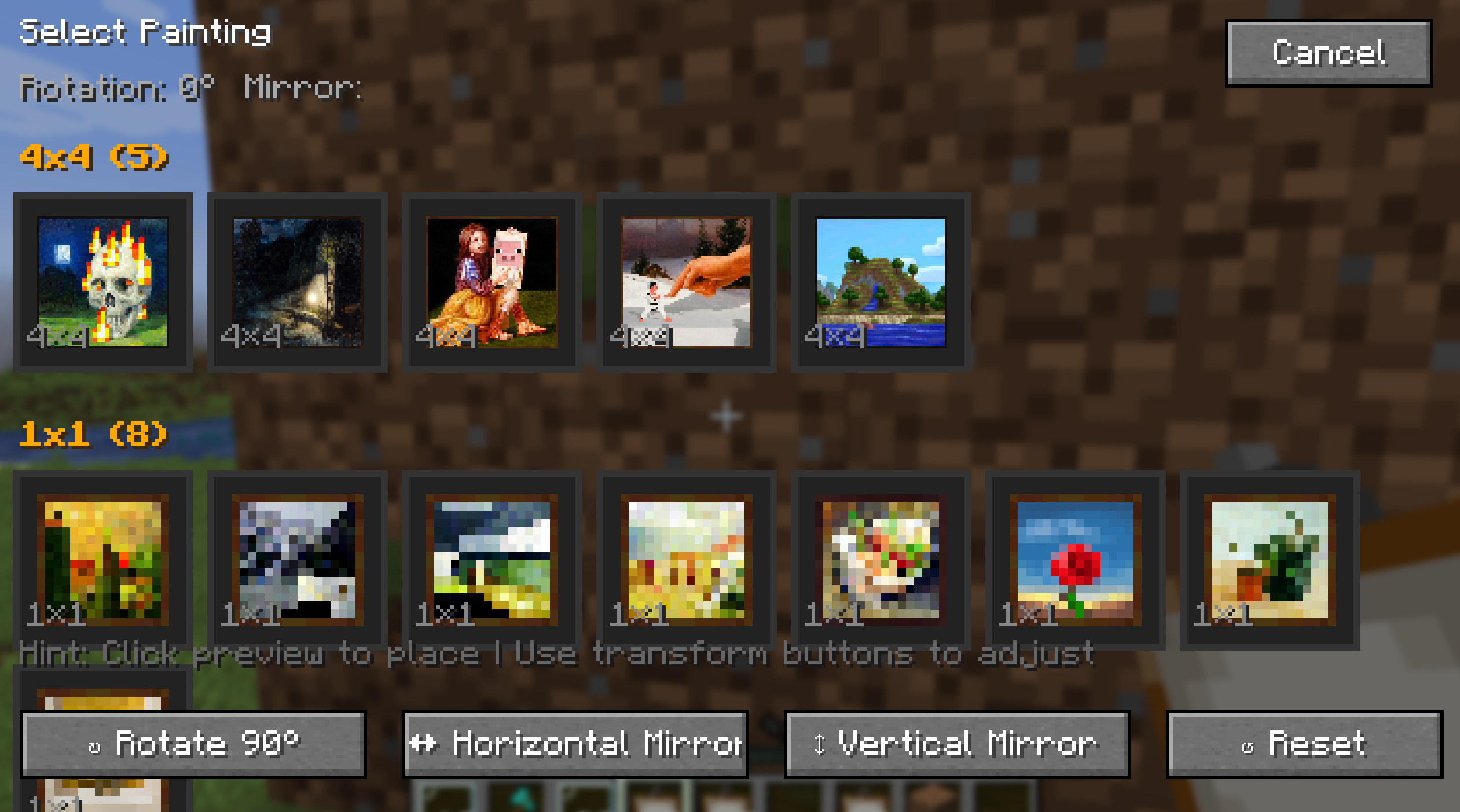 GUI this is mod's GUI
Versions
Files
Relations
Project Relations
More like this
Similar Mods
Suggestions use data such as tags, dependencies, dependents, descriptions, titles, and more to rank how much they overlap with this mod.
On ModDex
Community snapshot
By the numbers
Statistics
Want to reach Minecraft players?
We're looking for a server hosting partner to feature here and other parts of the site. Interested? Send us a message!
Get in touchGet it on
Available Platforms
On ModDex
Community snapshot
By the numbers
Statistics
Resources