Community listing page, reviews may not be monitored by the author.
Better X-ray (Xray / ESP)

No reviews yet
A lightweight and highly configurable X-Ray mod that includes Mob & Player ESP. Works with Sodium, modded Blocks and Shaders!

Community voices
Reviews
No reviews yet. Be the first to review this project!
Get it on
Available Platforms
About
Project Details
For authors
Embed Badge
If you're the author of this project, you can embed a live badge anywhere that supports HTML or Markdown. It updates automatically whenever ratings change.
Use HTML for any page that supports it, or Markdown for README files and Markdown-based descriptions.
Identifiers
Platform IDs
Resources
External Links
About
Description

See what really matters.
Better X-Ray makes common terrain blocks like stone, deepslate and dirt transparent while keeping ores and selected blocks fully visible. The surrounding terrain remains faintly visible (configurable 0 % to 80 % opacity), so you never lose your orientation underground.
Choose exactly which blocks you want to see using the built-in configuration menu. Search the block registry, add or remove blocks or whole block tags, adjust terrain opacity, and control water and lava visibility.
The mod also includes a Highlight Mode with configurable tracers pointing directly to highlighted blocks. Adjacent ores can be grouped into veins, and every block can get its own color.
On top of that, Mob ESP, Player ESP and Item ESP help you spot entities through terrain, with plenty of customization options.
Easily find caves with Cave-Find, and locate villages, temples, strongholds and more with the Structure Finder (singleplayer only).
Prefer typing? All important settings can also be changed with the client-side /betterxray command.
Better X-Ray is fully client-side, is available for Fabric, NeoForge and Forge, supports the vanilla renderer, Sodium and Embeddium, and also works with most modded blocks.
Features:
- 3 different, configurable and renamable X-ray Presets
- Block tag support: one entry like
#c:oresselects every ore, including modded ones - Configurable terrain opacity (0 % to 80 %)
- Show or hide water and lava
- Fullbright
- Cave-Find
- Highlight Mode with Tracers, vein grouping, per-block colors and adjustable range
- Highly configurable Mob ESP, Player ESP (name and health) and Object/Item ESP
- ESP Tracers
- Structure Finder (singleplayer only)
- Client commands (
/betterxrayor/bxray) - Support for the most used shaders!
- Update checker (can be turned off)
Default keybinds:
| Key | Action |
|---|---|
| X | Toggle X-ray |
| L | Toggle Fullbright |
| G | Open config menu |
| J | Toggle Mob/Player ESP |
| K | Toggle ESP-Tracers |
| H | Toggle Highlight |
| U | Toggle Cave-Find (1.2.0+) |
| Unbound | Toggle Highlight-Tracers |
| Unbound | Add Looked-at-Block to X-ray Preset |
| Unbound | Cycle X-ray Preset |
All keybinds can be changed through Minecraft's Controls menu (category "Better X-Ray").
Features explained:
X-ray:
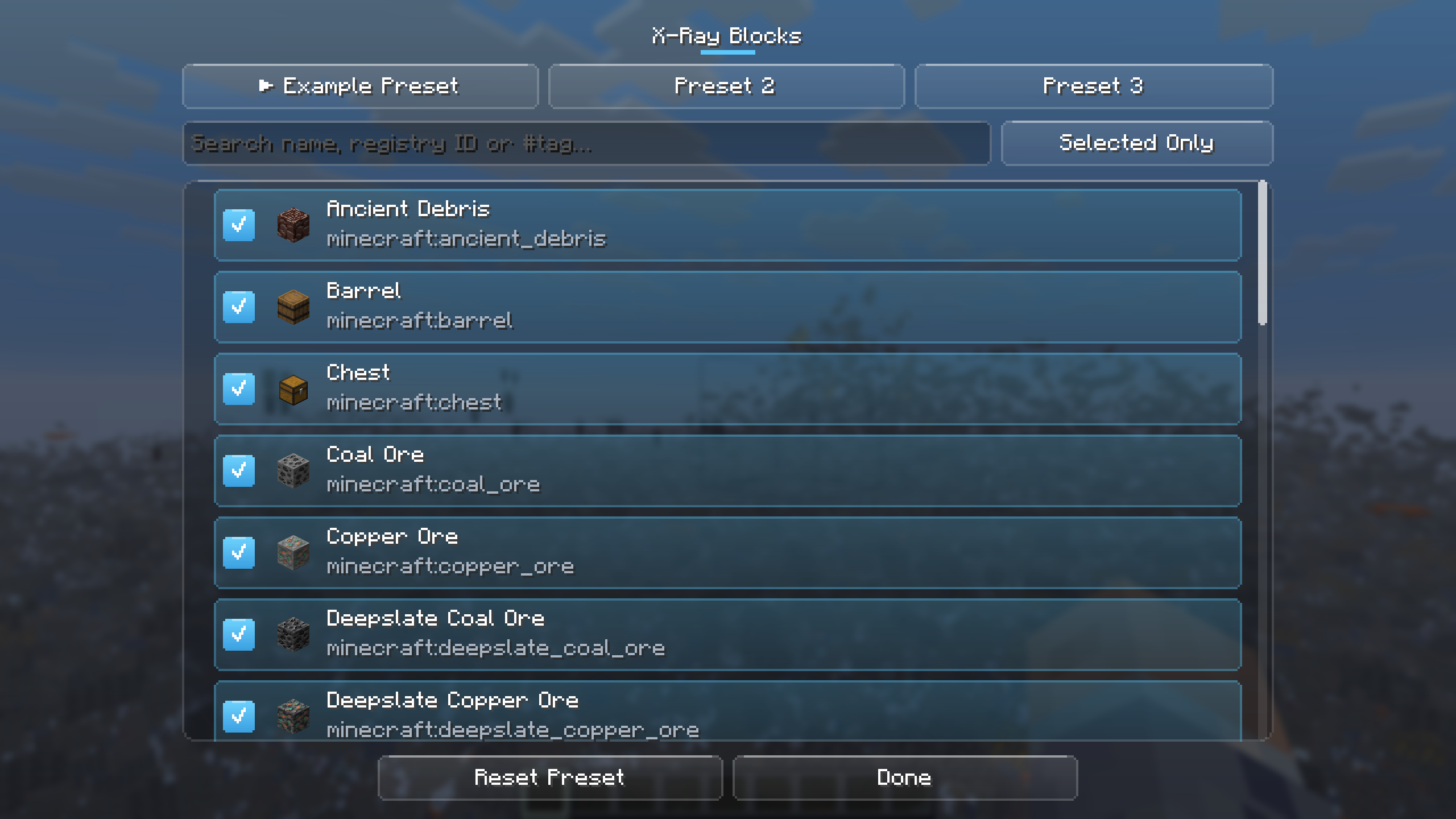
Open the X-ray menu with the Hotkey (Default: G). Choose one of the 3 Presets. Preset 1 comes pre configured with the most important blocks (all major ores, spawners, trial spawners, vaults, chests and barrels). You can reset or rename all 3 presets with the buttons in the menu. You can also choose the Terrain opacity from 0 % to 80 % as well as select whether to show or hide water and lava when using X-ray from the main menu. Click on the "X-Ray Blocks" Button to see a list of all available blocks. Search for blocks with the search bar and click on a block, to add or remove it from the Preset. All selected blocks will be visible when using X-ray.
You can also add block tags to a preset (1.3.0+). A tag like #c:ores covers every block it lists, including blocks of other mods, so one entry selects all ores of a modpack. Searching for "ore" also shows matching tags, and a search starting with # lists only tags. Blocks that are covered by a selected tag show "via #tag".
With the "Add Looked-at-Block to X-ray Preset" keybind, you can add the block you are looking at to the active preset without opening the menu. "Cycle X-ray Preset" switches between the 3 presets.
Fullbright:
Fullbright makes everything fully lit, no matter if X-ray is on or off. Toggle it with L or in the X-ray menu.
Cave-Find (Mod version 1.2.0+):
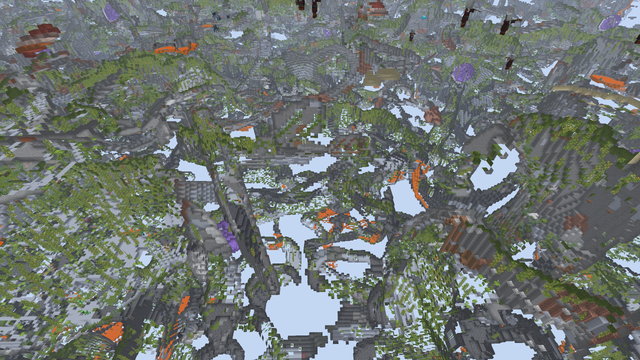
Press U or use the "Cave-Find" button in the X-ray menu. Every block face that borders underground air stays solid and fully lit, so caves, ravines and hidden rooms show up as hollow shapes through the terrain. All other terrain follows the terrain opacity (set it to 0 % to see only the caves). Cave-Find on its own shows only caves. Turn X-ray on as well to see your preset blocks together with the caves. Caves filled with water or lava are not marked.
Mob and Player ESP:
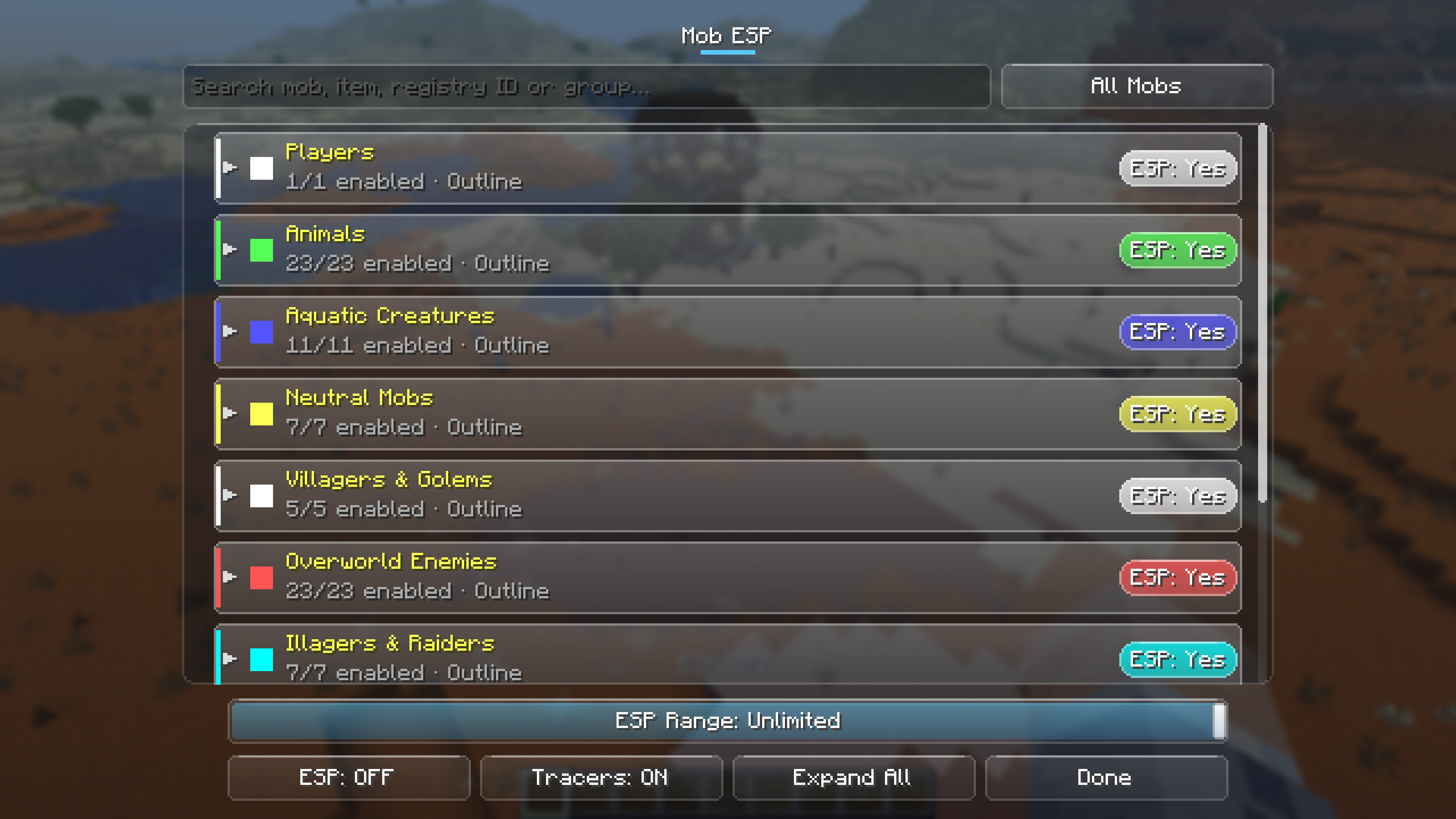
In the X-ray menu, click on "Mob ESP". You can expand or collapse the ESP groups with the button at the bottom. Above the button, you can choose the range for the ESP (8 to 512 blocks or unlimited). In the list, you can enable or disable the ESP for a whole group by clicking on the Button "ESP: Yes" or "ESP: No" on the right side. Clicking on a group will bring up a menu to choose a general colour and ESP style for this group. Here, you can also choose whether or not to enable tracers for this group of mobs (Mod version 1.2.0+ only). For style, you can choose between outline and box. When clicking on the small arrow at the front of a group, the group will expand or collapse and you can configure the ESP for each single entry in the specific group. You can set custom colours or enable and disable ESP just for that specific type of mob. "Reset Mob Overrides" makes all mobs of a group follow the group settings again.
The groups are: Players, Animals, Aquatic Creatures, Neutral Mobs, Villagers & Golems, Overworld Enemies, Illagers & Raiders, Nether Enemies, End Mobs, Other Mobs (modded mobs) and Objects (armor stands, minecarts, boats, dropped items, item frames, TNT, projectiles and more).
When clicking on the "Players" group, you can choose whether or not Player ESP should show the name of the player and the health as well as tracers for players. For health, you can choose between Bar, Numbers & Bar, Numbers and Off.
The "ESP: ON/OFF" and "Tracers: ON/OFF" buttons (or J and K) turn all ESP or all ESP-Tracers off and on again without changing your group and mob settings.
Item ESP (Mod version 1.3.0+):
In the "Objects" group, click on the arrow of the "Item" row (or "Pick Items…" in the Item settings) to open the Item ESP list. It has its own search and a filter for enabled items. Each item can be enabled individually and gets the same settings as a mob. Example: to see only diamonds and emeralds on the ground, enable Objects, disable the Item row and enable just those two items.
Highlight Blocks:
Highlight Blocks works independently of X-ray and is basically an ESP for certain blocks. You can choose which blocks (or block tags) should be highlighted in the list below. You can also enable or disable tracers for the highlighted blocks and set the highlight range (8 blocks up to your render distance).
Since version 1.3.0:
- Group Veins: adjacent blocks of the same kind are merged into one vein with one box and one tracer. Deepslate ores count as their stone variant. Can be turned off.
- Block colors: the RGB sliders set the global color. Click the color square at the end of a block row to give that block its own color. "Use Global Color" and "Reset Block Colors" undo this.
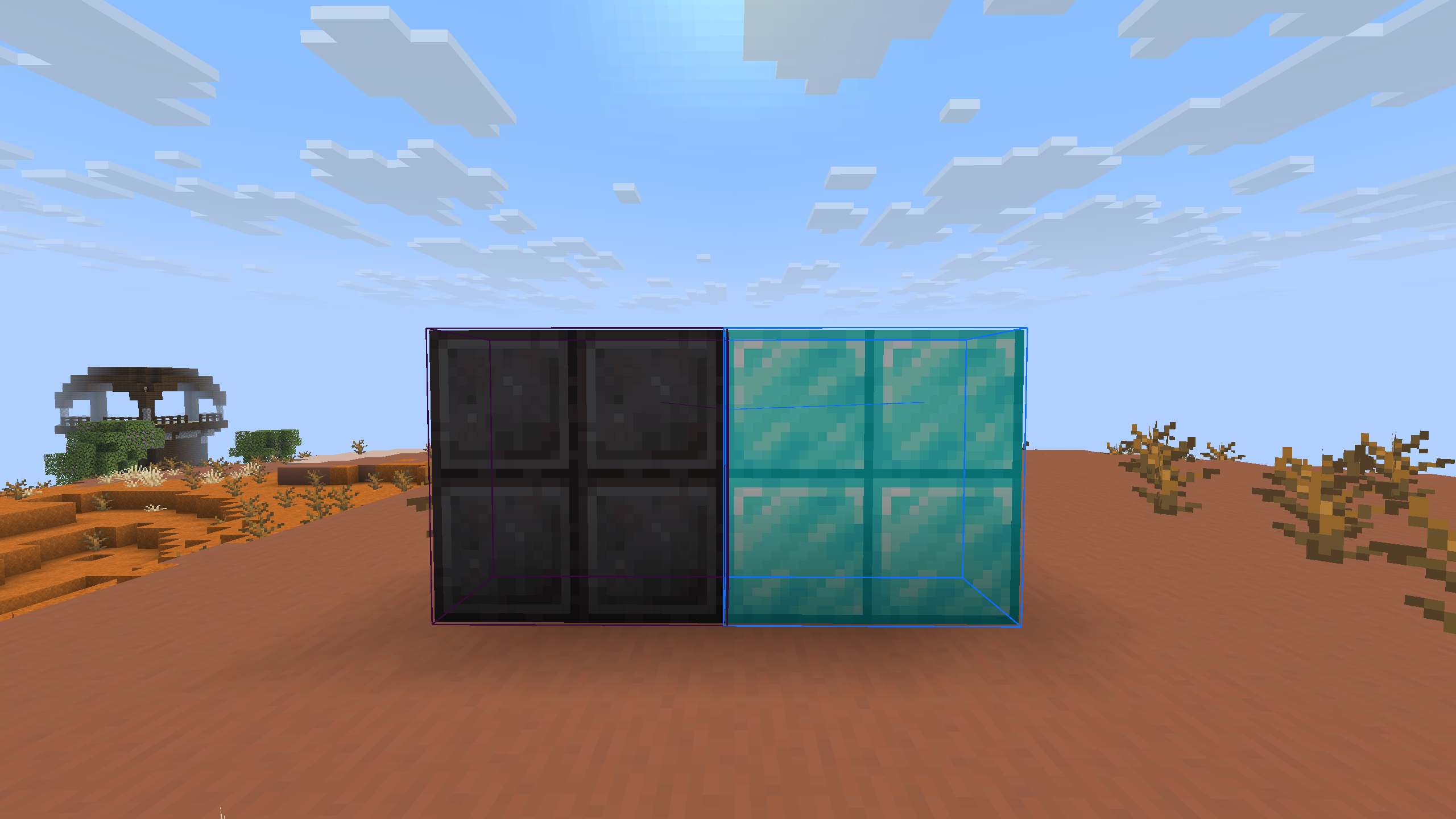
Structure Finder (Mod version 1.3.0+, singleplayer only):
Click on "Structure Finder" in the X-ray menu. Select the structures you want to find (villages, temples, mineshafts, strongholds, ancient cities, trial chambers, Nether fortresses, bastions, end cities, modded structures and many more). A box is drawn around every selected structure in the loaded chunks, optionally with a tracer to its center. Each structure can have its own color. Structure positions only exist on the server, so this only works in singleplayer (and in worlds opened to LAN).
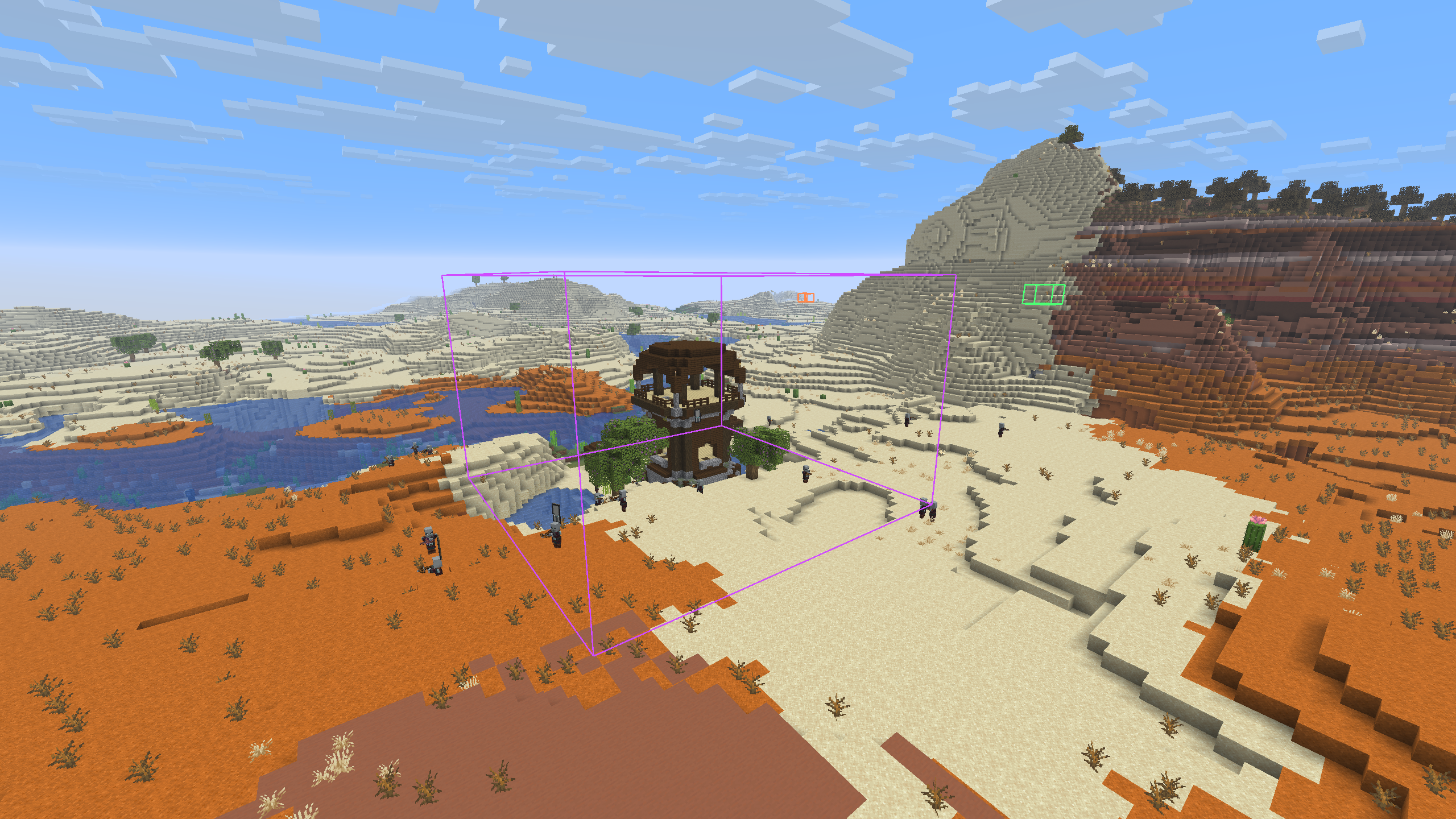
Commands (1.3.0+):
/betterxray (or the short alias /bxray) changes the settings without opening the menu. The commands run on your client only and are never sent to the server. All answers appear only in your own chat. Tab completion is supported.
| Command | Effect |
|---|---|
/betterxray on, off, toggle |
Switch X-ray |
/betterxray add <block or #tag> ... |
Add one or more blocks/tags (separated by spaces) to the active preset |
/betterxray remove <block or #tag> ... |
Remove blocks/tags from the active preset |
/betterxray list, clear |
Show or empty the active preset |
/betterxray preset [1-3] |
Show the presets or switch to another one |
/betterxray preset rename <name>, preset reset |
Rename or reset the active preset |
/betterxray opacity <0-80> |
Set the terrain opacity in percent |
/betterxray water [on/off] |
Show or hide water |
/betterxray lava [on/off] |
Show or hide lava |
/betterxray fullbright [on/off] |
Switch Fullbright |
/betterxray cavefind [on/off] |
Switch Cave-Find |
/betterxray highlight [on/off] |
Switch Highlight Mode |
/betterxray highlight add, remove, list, clear |
Edit the list of highlighted blocks |
/betterxray highlight tracers [on/off] |
Switch the Highlight-Tracers |
/betterxray highlight range <8-512 or render> |
Set the highlight range |
/betterxray esp [on/off] |
Master switch for Mob/Player ESP |
/betterxray esp tracers [on/off] |
Master switch for the ESP-Tracers |
/betterxray esp range <8-512 or unlimited> |
Set the ESP range |
/betterxray tags [search] |
Find block tags |
/betterxray tag <#tag> |
List all blocks of a tag |
/betterxray status |
Show all current settings |
/betterxray help |
Show the command overview |
Switches without on or off simply toggle. Block IDs without a namespace mean minecraft: (for example diamond_ore or #ores).
Shaders (Mod version 1.2.0+):
Shader support is available on Fabric for Minecraft 26.3 with Iris. On other versions, the X-ray effect pauses while a shader pack is active and comes back when you turn the pack off.
The mod has been tested with the following shaders. Some features may be buggy. Other shaders may or may not work.
- BSL_v10.1.8
- ComplementaryReimagined_r5.9.3
- ComplementaryUnbound_r5.9.3
- MakeUp-UltraFast-9.5g
- Sildur's Vibrant Shaders v2.02 Extreme
- Solas Shader V3.8
Complementary and BSL ignore the terrain opacity, so faint terrain is hidden with these packs (like at 0 %). The experimental "Shader Opacity" switch in the X-ray menu patches these packs to show faint terrain anyway.
Notes
The Fabric version requires Fabric API. Sodium (Fabric and NeoForge) and Embeddium (Forge 1.20.1) are optional. With Mod Menu, the config menu can also be opened from the mod list.
This mod is intended for Singleplayer. Only use it on servers where you have explicit permission.
The mod includes an update checker that will notify you if an update for your current MC version is available. This can be turned off in the menu.
Screenshots
Gallery
-
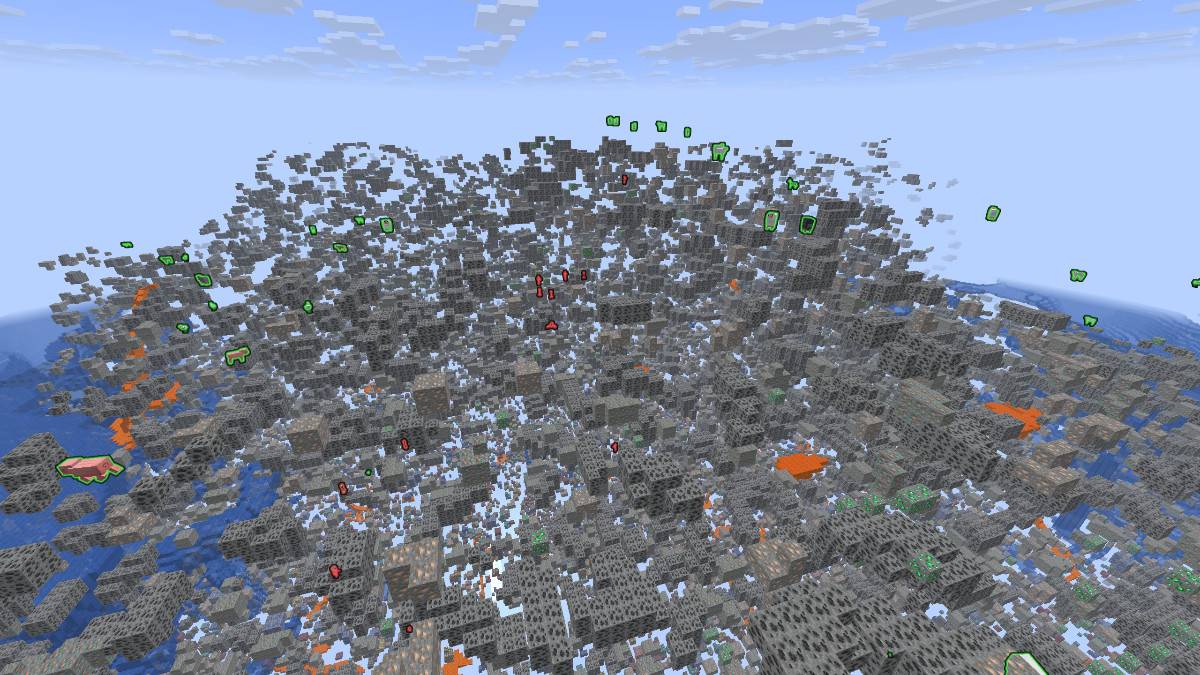 X-ray and ESP enabled X-ray and ESP enabled
 -
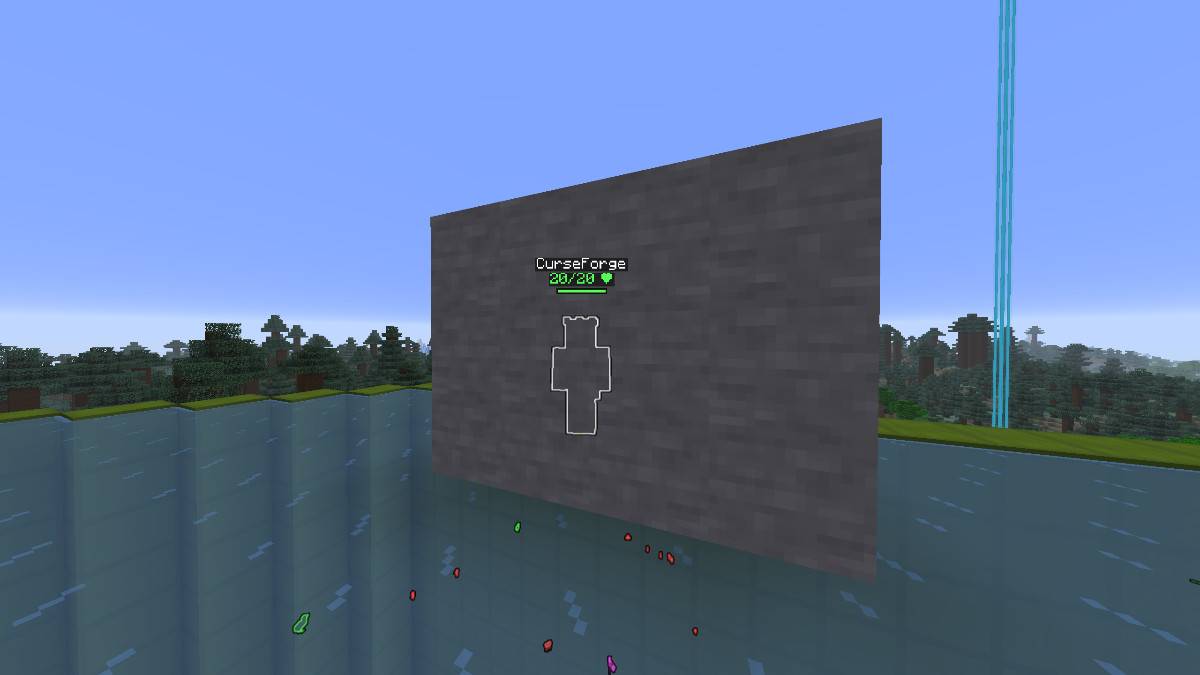 Player ESP Player ESP
 -
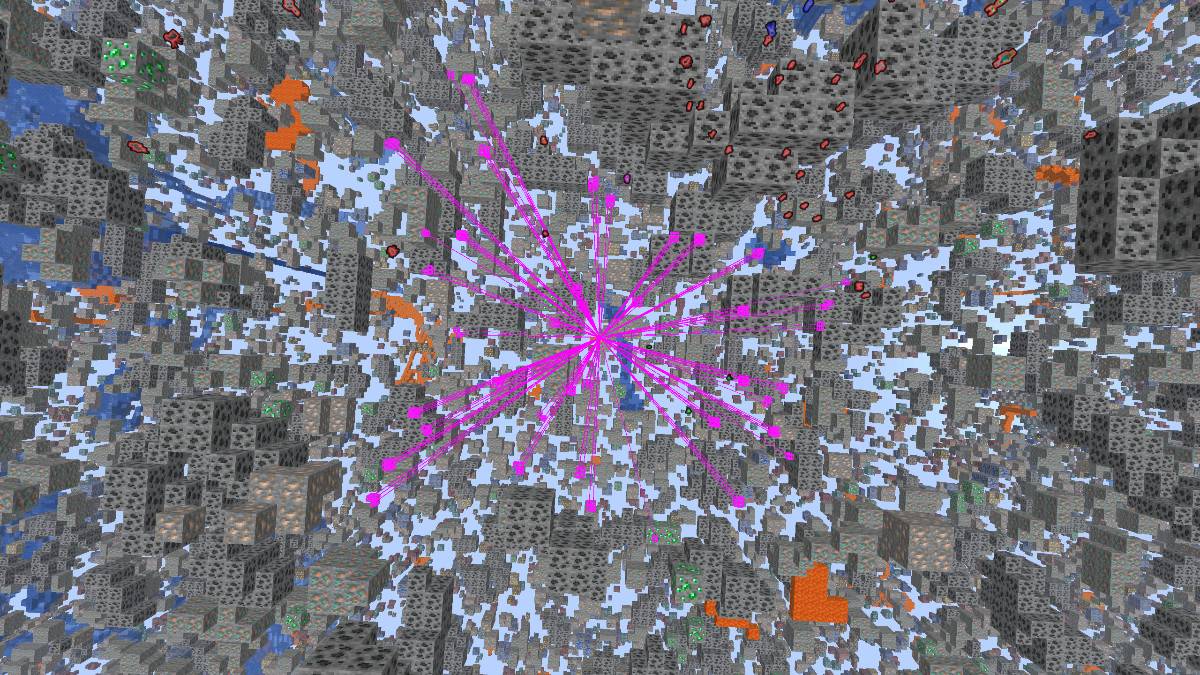 Highlight & Tracers Highlight & Tracers
 -
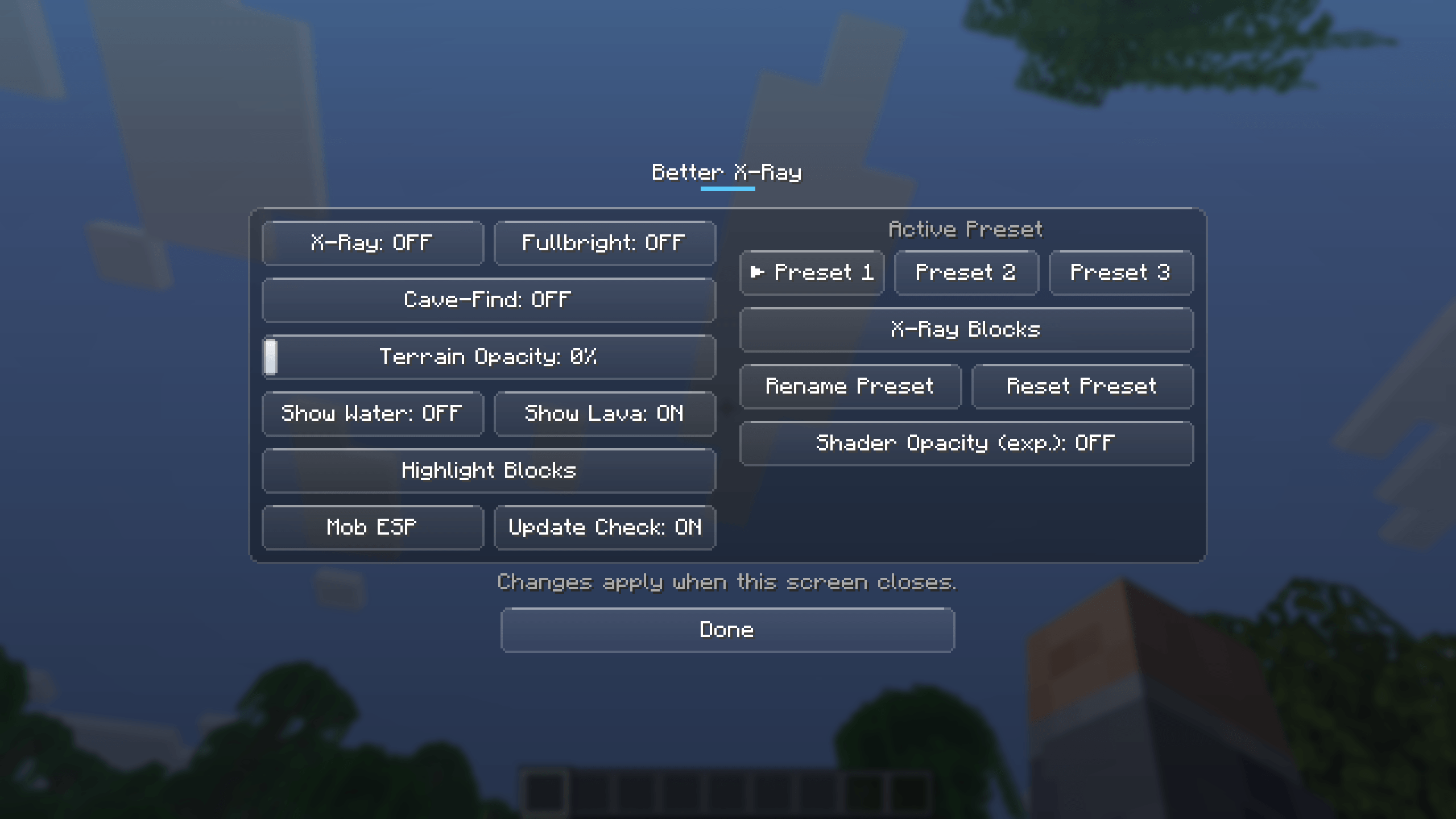 Better X-ray Menu Better X-ray Menu
 -
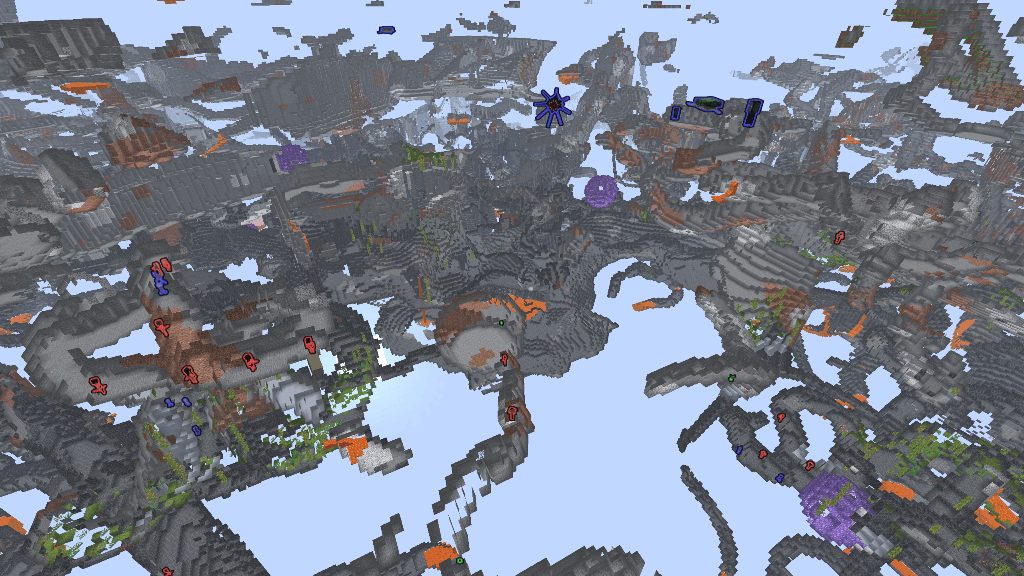 Cavemode Cavemode
Versions
Files
Relations
Project Relations
More like this
Similar Mods
Suggestions use data such as tags, dependencies, dependents, descriptions, titles, and more to rank how much they overlap with this mod.
On ModDex
Community snapshot
By the numbers
Statistics

Get it on
Available Platforms
On ModDex
Community snapshot
By the numbers
Statistics
Resources