
Community listing page, reviews may not be monitored by the author.
BetterInterFace

No reviews yet
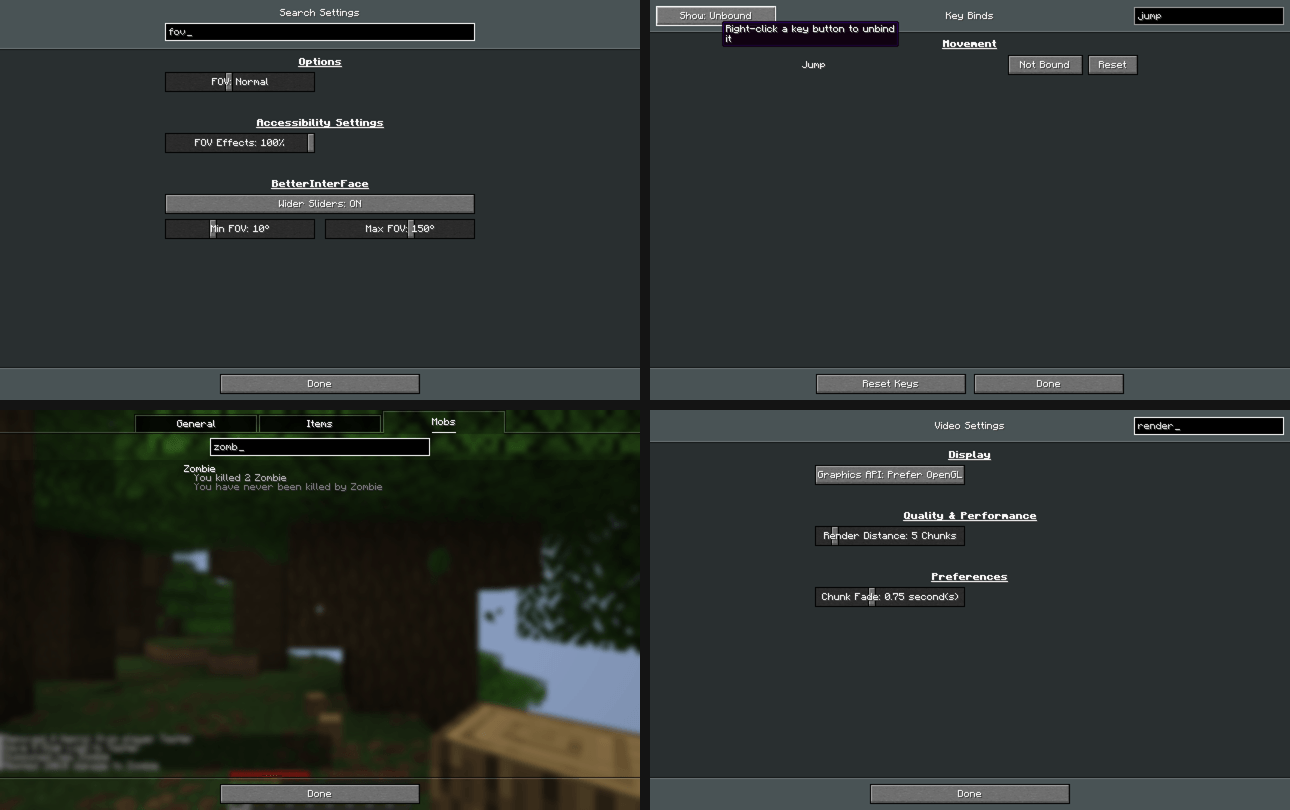
Search in Statistics, Key Binds and all settings, wider sliders, right click to reset or unbind.

Community voices
Reviews
No reviews yet. Be the first to review this project!
Get it on
Available Platforms
About
Project Details
For authors
Embed Badge
If you're the author of this project, you can embed a live badge anywhere that supports HTML or Markdown. It updates automatically whenever ratings change.
Use HTML for any page that supports it, or Markdown for README files and Markdown-based descriptions.
Identifiers
Platform IDs
Resources
External Links
About
Description
BetterInterFace
A client-side mod that adds search to the places where Minecraft doesn't have it and makes the settings more flexible.
Search in Statistics
A search box under the General / Items / Mobs tabs. One search filters all three tabs:
- General stats are found by name.
- Items and mobs are found by name or by ID (for example
oak_log). - Column sorting in Items still works while a filter is active.
Key Binds
- Search by action name, category or by the key itself (type
Qto see everything bound to Q). - Show: All / Conflicts / Changed / Unbound filter button.
- Right click a key button to unbind it.
Search in Settings
- Every settings screen (Video, Sound, Chat, Controls, Accessibility and other mods' screens built the same way) gets a search box that leaves only the matching options.
- The main Options screen gets a search over all settings at once. The results are grouped by screen and include matching key binds. You can change settings right in the results.
- Right click a setting to reset it to its default.
- Type to search: if no text field is focused, just start typing.
Wider sliders
| Setting | Vanilla | With the mod (default) | Max limit in the mod settings |
|---|---|---|---|
| Brightness | 0–100% | 0–500% | up to 1500% |
| FOV | 30–110 | 10–150 | 1–179 |
| Mouse Sensitivity | 0–200% | 0–400% | up to 1000% |
| Entity Distance | 50–500% | 25–1000% | up to 2000% |
Values outside the vanilla range are saved in options.txt and survive a restart. If you remove the mod, the game resets them to normal values.
Settings
Gear button next to the search box in the Options screen, or Mod Menu → BetterInterFace.
Every feature can be turned off, and the slider limits can be changed there. Config file: config/betterinterface.json.
Requirements
- Minecraft 26.3, Fabric Loader 0.19+, Fabric API
- Client only, not needed on the server
- Mod Menu is optional
The mod's code was written with the help of AI (Claude by Anthropic).
Screenshots
Gallery
-
 betterinterface-1.0.0-preview.png betterinterface-1.0.0-preview.png
Versions
Files
Relations
Project Relations
More like this
Similar Mods
Suggestions use data such as tags, dependencies, dependents, descriptions, titles, and more to rank how much they overlap with this mod.
On ModDex
Community snapshot
By the numbers
Statistics

Get it on
Available Platforms
On ModDex
Community snapshot
By the numbers
Statistics
Resources