Community listing page, reviews here may not be monitored by the author.
BetterSpeedHUD


No reviews yet
A Better HUD mod to show your speed on your screen. Highly customizable
Community voices
Reviews
No reviews yet. Be the first to review this project!
Get it on
Available Platforms
Compatibility
Supported Environments
Runs entirely on the client. Works on vanilla servers.
About
Project Details
For authors
Embed Badge
If you're the author of this project, you can embed a live badge anywhere that supports HTML or Markdown. It updates automatically whenever ratings change.
Use HTML for any page that supports it, or Markdown for README files and Markdown-based descriptions.
Identifiers
Platform IDs
About
Description
BetterSpeedHUD
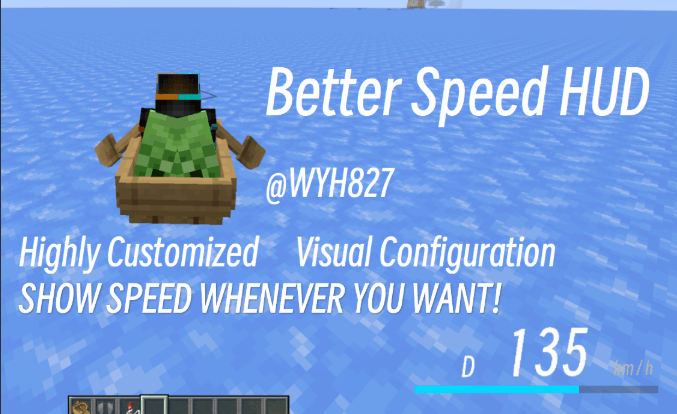
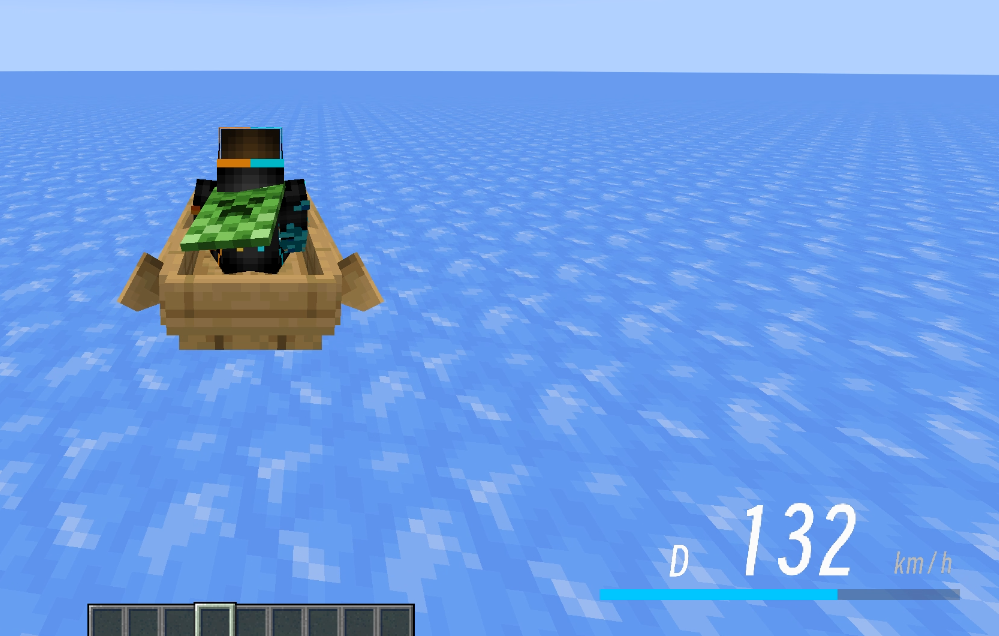
A speed HUD mod for **Minecraft Forge 1.20.1/1.21.1**: displays a sleek speed head-up display (HUD) showing speed, gear, and a speed bar at the bottom‑right corner of the screen when riding a vehicle or gliding with an elytra. All elements can be freely adjusted in‑game.
> A Better HUD mod to show your speed on your screen. Highly customizable. @WYH827
---
## Features
- **Real‑time speed display**: measures speed based on the player's actual coordinate displacement (blocks/second × 72 converted to km/h). Compatible with vanilla vehicles and modded vehicles (e.g., MrCrayfish's vehicle mod). Elytra gliding is also supported.
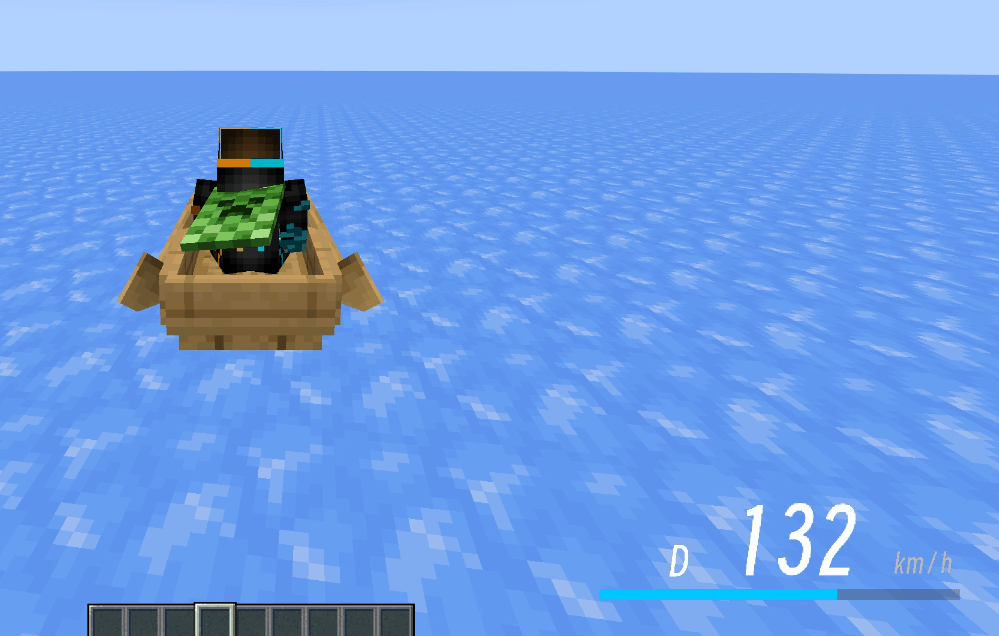
- **Visual HUD**: `D` gear on the left, three‑digit large speed number in the center (leading zeros shown in grey), `km/h` on the right, and a speed bar below.
- **Adjustable max speed** (default 200): the speed bar always displays the percentage of `speed / max speed`, capped at 100% when exceeded.
- **Toggle for actual speed**: when disabled, speed stops increasing once it reaches the max speed (pegs the meter); when enabled, the actual speed is always shown, while the bar still caps at 100% of the max speed.
- **Two fonts**: Minecraft default font / Modern bitmap font (switchable in‑game with one click).
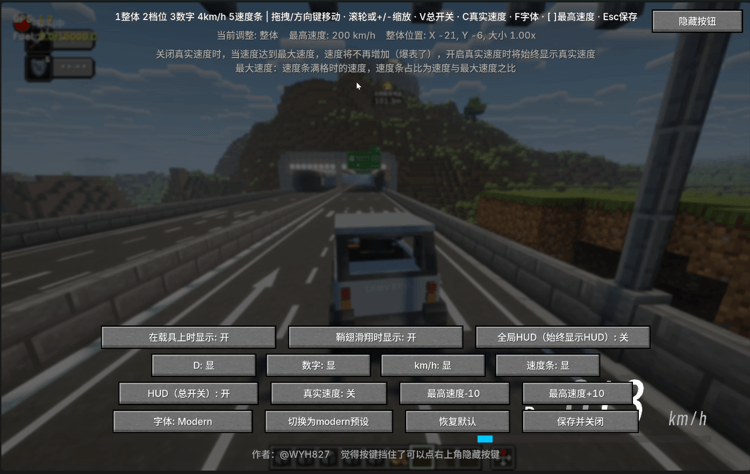
- **In‑game configuration screen** (default key **H**):
- The overall HUD and individual elements (D, digits, km/h, speed bar) each have independent position, size, and visibility controls;
- Adjust via drag‑and‑drop, arrow keys, scroll wheel, or shortcuts;
- A "Hide Buttons" button in the top‑right corner hides all UI buttons for unobstructed viewing and positioning;
- One‑click switch to Modern preset / restore defaults;
- Max speed +/‑ buttons.
- **Display conditions**: show on vehicle / show on elytra / always show (when "always" is enabled, the first two are locked to on).
- **HUD master toggle**: can completely hide the HUD at any time.
- **Safe configuration writing**: dragging and adjustments only modify in‑memory values; the config file is written only when the settings screen is closed, avoiding frequent disk writes.
---
## Installation
1. Requires **Minecraft 1.20.1 + Forge 47.x** (client‑side), Java 17.
2. Place `BetterSpeedHUD-1.1.jar` into the `.minecraft/mods` folder.
3. Launch the game, enter a world, and ride a vehicle or glide with an elytra to see the HUD.
---
## In‑Game Configuration
Press **H** to open the settings screen (can also be accessed via the Mod Menu's "Config" button).
### Key Controls
| Key | Function |
|---|---|
| `1` ~ `5` | Select the element to adjust (Overall / Gear D / Digits / km/h / Speed bar) |
| Arrow keys / Mouse drag | Move the currently selected element |
| Mouse wheel / `+` `-` | Scale the currently selected element |
| `V` | HUD master toggle |
| `C` | Toggle actual speed |
| `F` | Switch font (Minecraft / Modern) |
| `[` `]` | Decrease / Increase max speed (Shift + key adjusts by 25) |
| `Esc` / "Save & Close" | Save configuration and close |
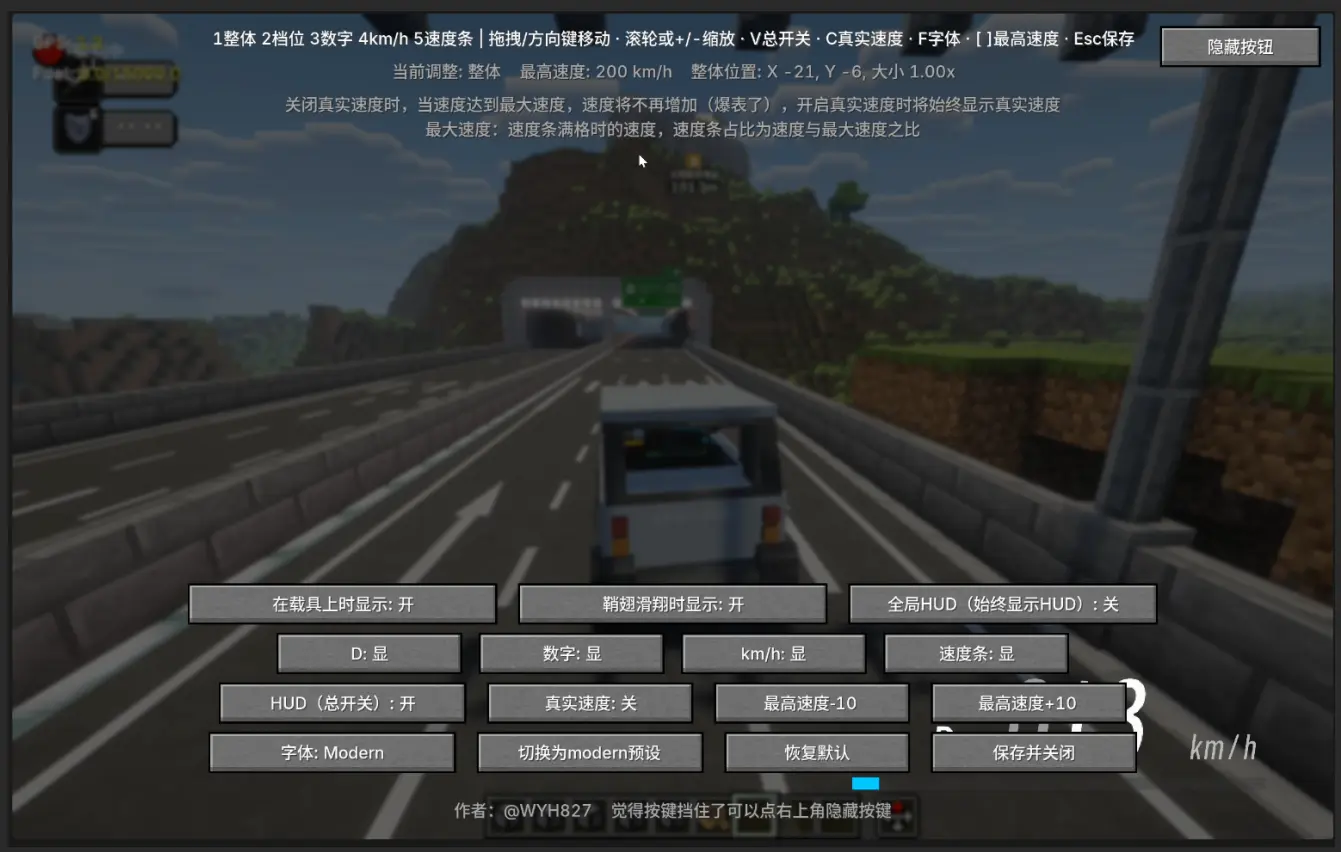
### Button Descriptions
- First row: Show on vehicle / Show on elytra / Global HUD (always show HUD)
- Second row: Toggle visibility for D / Digits / km/h / Speed bar individually
- Third row: HUD (master toggle) / Actual speed / Max speed ‑10 / Max speed +10
- Fourth row: Font / Switch to Modern preset / Restore defaults / Save & Close
- Top‑right corner: Hide Buttons (hides all UI buttons for unobstructed viewing and positioning)
> Note: When actual speed is disabled, speed stops increasing once it hits the max speed (pegs the meter). When enabled, the actual speed is always shown.
>
> Note: Max speed is the speed at which the bar becomes full; the bar's fill ratio is `speed / max speed`.
---
## Configuration File
The configuration file is located at `.minecraft/config/speedhud-client.toml`. Main fields:
```toml
[hud]
xOffset = 0        # Overall horizontal offset (positive = right)
yOffset = 0        # Overall vertical offset (positive = down)
scale = 1.0        # Overall scale
enabled = true     # HUD master toggle
showOnVehicle = true   # Show on vehicle
showOnElytra = true    # Show on elytra
globalHud = false      # Always show
maxSpeed = 200         # Max speed (full bar value)
showActualSpeed = false # Show actual speed
font = "minecraft"     # minecraft / modern

[hud.modules]          # Module visibility
gear = true
speed = true
unit = true
bar = true

[hud.elements.gear]    # D gear position and scale
x = 16
y = 40
scale = 1.0

[hud.elements.speed]   # Speed digits
x = 76
y = 34
scale = 1.0

[hud.elements.unit]    # km/h
x = 176
y = 46
scale = 1.0

[hud.elements.bar]     # Speed bar
x = 0
y = 58
scale = 1.0
```
---
## Modern Font
The Modern font is a custom bitmap font (generated from Smiley Sans Oblique):
- Texture: `assets/speedhud/textures/font/modern.png`, 1152×192, with 18 characters per row, each cell 64×192;
- Character order: `0123456789DKM/Hkmh`;
- Glyphs are aligned to the bottom of the cell (row 192);
- Definition file: `assets/speedhud/font/modern.json` (height 192 / ascent 7).
To replace the font, provide a PNG following the above specifications and replace `assets/speedhud/textures/font/modern.png`.
---
## Open Source License
This project is released under the **MIT License**. See [LICENSE.txt](LICENSE.txt) for details.
Author: @WYH827
BetterSpeedHUD
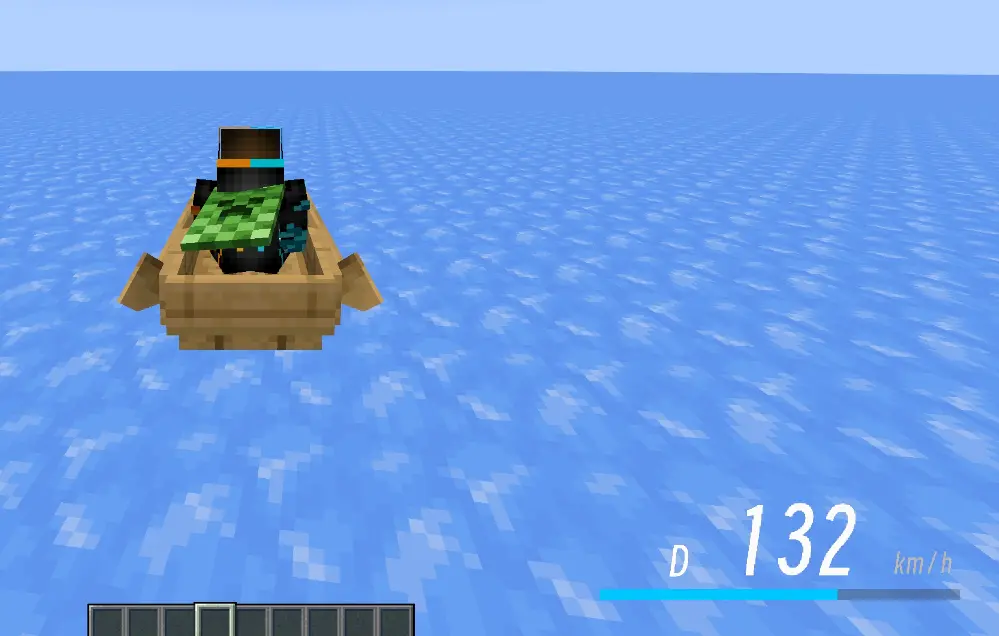
A speed HUD mod for Minecraft Forge 1.20.1/1.21.1: displays a sleek speed head-up display (HUD) showing speed, gear, and a speed bar at the bottom‑right corner of the screen when riding a vehicle or gliding with an elytra. All elements can be freely adjusted in‑game.
A Better HUD mod to show your speed on your screen. Highly customizable. @WYH827
Features
- Real‑time speed display: measures speed based on the player's actual coordinate displacement (blocks/second × 72 converted to km/h). Compatible with vanilla vehicles and modded vehicles (e.g., MrCrayfish's vehicle mod). Elytra gliding is also supported.
- Visual HUD:
Dgear on the left, three‑digit large speed number in the center (leading zeros shown in grey),km/hon the right, and a speed bar below. - Adjustable max speed (default 200): the speed bar always displays the percentage of
speed / max speed, capped at 100% when exceeded. - Toggle for actual speed: when disabled, speed stops increasing once it reaches the max speed (pegs the meter); when enabled, the actual speed is always shown, while the bar still caps at 100% of the max speed.
- Two fonts: Minecraft default font / Modern bitmap font (switchable in‑game with one click).
- In‑game configuration screen (default key H):
- The overall HUD and individual elements (D, digits, km/h, speed bar) each have independent position, size, and visibility controls;
- Adjust via drag‑and‑drop, arrow keys, scroll wheel, or shortcuts;
- A "Hide Buttons" button in the top‑right corner hides all UI buttons for unobstructed viewing and positioning;
- One‑click switch to Modern preset / restore defaults;
- Max speed +/‑ buttons.
- Display conditions: show on vehicle / show on elytra / always show (when "always" is enabled, the first two are locked to on).
- HUD master toggle: can completely hide the HUD at any time.
- Safe configuration writing: dragging and adjustments only modify in‑memory values; the config file is written only when the settings screen is closed, avoiding frequent disk writes.
Installation
- Requires Minecraft 1.20.1 + Forge 47.x (client‑side), Java 17.
- Place
BetterSpeedHUD-1.1.jarinto the.minecraft/modsfolder. - Launch the game, enter a world, and ride a vehicle or glide with an elytra to see the HUD.
In‑Game Configuration
Press H to open the settings screen (can also be accessed via the Mod Menu's "Config" button).
Key Controls
| Key | Function |
|---|---|
1 ~ 5 |
Select the element to adjust (Overall / Gear D / Digits / km/h / Speed bar) |
| Arrow keys / Mouse drag | Move the currently selected element |
Mouse wheel / + - |
Scale the currently selected element |
V |
HUD master toggle |
C |
Toggle actual speed |
F |
Switch font (Minecraft / Modern) |
[ ] |
Decrease / Increase max speed (Shift + key adjusts by 25) |
Esc / "Save & Close" |
Save configuration and close |
Button Descriptions
- First row: Show on vehicle / Show on elytra / Global HUD (always show HUD)
- Second row: Toggle visibility for D / Digits / km/h / Speed bar individually
- Third row: HUD (master toggle) / Actual speed / Max speed ‑10 / Max speed +10
- Fourth row: Font / Switch to Modern preset / Restore defaults / Save & Close
- Top‑right corner: Hide Buttons (hides all UI buttons for unobstructed viewing and positioning)
Note: When actual speed is disabled, speed stops increasing once it hits the max speed (pegs the meter). When enabled, the actual speed is always shown.
Note: Max speed is the speed at which the bar becomes full; the bar's fill ratio is
speed / max speed.
Configuration File
The configuration file is located at .minecraft/config/speedhud-client.toml. Main fields:
[hud]
xOffset = 0 # Overall horizontal offset (positive = right)
yOffset = 0 # Overall vertical offset (positive = down)
scale = 1.0 # Overall scale
enabled = true # HUD master toggle
showOnVehicle = true # Show on vehicle
showOnElytra = true # Show on elytra
globalHud = false # Always show
maxSpeed = 200 # Max speed (full bar value)
showActualSpeed = false # Show actual speed
font = "minecraft" # minecraft / modern
[hud.modules] # Module visibility
gear = true
speed = true
unit = true
bar = true
[hud.elements.gear] # D gear position and scale
x = 16
y = 40
scale = 1.0
[hud.elements.speed] # Speed digits
x = 76
y = 34
scale = 1.0
[hud.elements.unit] # km/h
x = 176
y = 46
scale = 1.0
[hud.elements.bar] # Speed bar
x = 0
y = 58
scale = 1.0
Modern Font
The Modern font is a custom bitmap font (generated from Smiley Sans Oblique):
- Texture:
assets/speedhud/textures/font/modern.png, 1152×192, with 18 characters per row, each cell 64×192; - Character order:
0123456789DKM/Hkmh; - Glyphs are aligned to the bottom of the cell (row 192);
- Definition file:
assets/speedhud/font/modern.json(height 192 / ascent 7).
To replace the font, provide a PNG following the above specifications and replace assets/speedhud/textures/font/modern.png.
Building (Developers)
Environment: JDK 17+, Gradle 8.x.
gradlew build
The built artifact will be at build/libs/BetterSpeedHUD-1.1.jar.
Open Source License
This project is released under the MIT License. See LICENSE.txt for details.
Author: @WYH827
Screenshots
Gallery
-
 settings.png settings.png
 -
 hud.png hud.png
-
 设置界面Setting
 -
Versions
Files
Relations
Project Relations
More like this
Similar Mods
Suggestions use data such as tags, dependencies, dependents, descriptions, titles, and more to rank how much they overlap with this mod.
On ModDex
Community snapshot
By the numbers
Statistics
Want to reach Minecraft players?
We're looking for a server hosting partner to feature here and other parts of the site. Interested? Send us a message!
Get in touchGet it on
Available Platforms
On ModDex
Community snapshot
By the numbers