Community listing page, reviews may not be monitored by the author.


Community voices
Reviews
No reviews yet. Be the first to review this project!
Get it on
Available Platforms
About
Project Details
For authors
Embed Badge
If you're the author of this project, you can embed a live badge anywhere that supports HTML or Markdown. It updates automatically whenever ratings change.
Use HTML for any page that supports it, or Markdown for README files and Markdown-based descriptions.
Identifiers
Platform IDs
Resources
External Links
About
Description
🏔️ BEYOND Y
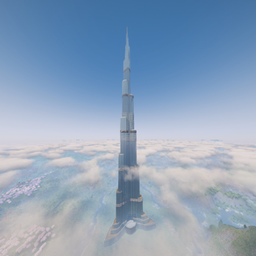
Push the sky higher. Raise the build height of any dimension, vanilla or modded, up to Y 2032.
Want a 1024-block Overworld, a 2032-block End and a vanilla Nether? Just type the numbers in the config screen, and Beyond Y takes care of the rest.
✨ FEATURES
• One height per dimension: each dimension has its own setting, from its normal height up to Y 2032. The bottom of the world never moves, so your terrain stays untouched.
• Modded dimensions supported: The Aether, Twilight Forest, Cosmonautics, Deeper Darker… Every dimension from your installed mods shows up in the config screen, straight from the main menu, before you even create a world.
• Simple in-game config: Mods → Beyond Y → Config. One line per dimension, one number to type. Leave it empty to keep the normal height.
• Per-player dimensions grouped: dimensions created for each player (like Suitcase Dimension pockets) are shown as a single "all players" line.
• Your builds are safe: lower a height and the blocks above are NOT deleted. They stay in your save, hidden, and come back as soon as you raise the height again. Admins get a chat warning with clickable buttons.
• Multiplayer ready: the server sends its settings to every player when they join.
⚡ PERFORMANCE
• No terrain regeneration: only the build limit goes up, the new space is open sky.
• Fast chunk generation: biomes in the new space are copied instead of recalculated.
• Light saves: empty air layers are never written to disk, so chunks save and load quickly and your world stays small.
🛠️ COMMANDS (op)
/beyondy list → see the height of every dimension
/beyondy set <dimension> <height> → change one dimension
/beyondy setmod <modid> <height> → every dimension of a mod
/beyondy setall <height> → every dimension without its own setting
/beyondy reset <rule> → remove a setting
/beyondy ignore <dimension> → hide the "blocks above the limit" warning (nothing is deleted)
Changes apply the next time the world or server starts.
🔗 COMPATIBILITY
• Create Aeronautics / Sable + Dimensional Sable (Cosmonautics): ships travelling between dimensions of different heights arrive at the right altitude instead of crashing the game.
• Suitcase Dimension: every player pocket can be configured in one go, even before your first world.
💡 GOOD TO KNOW
• Install it on both the client and the server.
• Why 2032 and not 2048? Minecraft stores a block's height on 12 bits (from -2048 to 2047), and the lighting engine needs a 16-block margin above the world. Y 2031 is the highest block the game can handle.
• Raising the height of an existing world is safe. Taller worlds mean more work per chunk, so pick the height you really need rather than 2032 everywhere.
• Paintings and item frames hanging above a lowered limit may fall.
• Available in English and French.
📦 Requires Minecraft 1.21.1 and NeoForge 21.1+
📜 MIT License: if you reuse my code, a link back to this page is always appreciated!
Screenshots
Gallery
Versions
Files
Relations
Project Relations
More like this
Similar Mods
Suggestions use data such as tags, dependencies, dependents, descriptions, titles, and more to rank how much they overlap with this mod.
On ModDex
Community snapshot
By the numbers
Statistics

Get it on
Available Platforms
On ModDex
Community snapshot
By the numbers
Statistics
Resources