
Community listing page, reviews here may not be monitored by the author.
beyond:Cmd-Extension

No reviews yet
The mod extends the limited command set of Beyond Dimensions, adding comprehensive network management capabilities and additional utility features.
Community voices
Reviews
No reviews yet. Be the first to review this project!
Get it on
Available Platforms
Compatibility
Supported Environments
Runs entirely on the server. Also works in singleplayer.
Must be installed on both the client and the server.
Varies by version.
About
Project Details
For authors
Embed Badge
If you're the author of this project, you can embed a live badge anywhere that supports HTML or Markdown. It updates automatically whenever ratings change.
Use HTML for any page that supports it, or Markdown for README files and Markdown-based descriptions.
Identifiers
Platform IDs
About
Description
Mod Overview
An auxiliary mod that extends the /bdtools command in the Beyond Dimensions mod with more features and adds some other small utilities. Primarily designed to help server administrators/owners manage the dimension network more easily. Due to a significant discrepancy between the current mod's functionality and its name, this mod has been archived and renamed to Beyond_Integration, aiming to provide greater integration support for Beyond Dimension.
Core Features
Network Management
For OP players (permission level >= 2):
/bdtools network list – List all networks
/bdtools network info – View network information
/bdtools network insert – Insert items into a network
/bdtools network giveTerminal – Give a terminal to a player
/bdtools network batchCreate – Batch create networks
/bdtools network openAny – Open the network GUI of any network
For regular players:
/bdtools open – Open the network GUI
/bdtools addMembers – Add members to a network
/bdtools addManagers – Add managers to a network
/bdtools removePlayers – Remove players from a network
/bdtools myNetworks – View your own networks
Enchantment Book Separation
Automatic separation – When a multi-enchantment book is inserted into the dimension network, it is automatically separated into single-enchantment books (configurable on/off)
Experience cost – The cost of separation is calculated based on enchantment type and level
Configurable formula – Supports custom cost calculation formulas
Tier list system – Different enchantments have different cost multipliers
Language
Default output language: English (en_us)
The language can be changed by modifying the configuration file at:
saves//serverconfig/beyond_cmd_extension-server.toml
Built-in language options: zh_cn (Simplified Chinese) and en_us (English)
Screenshots
Gallery
-
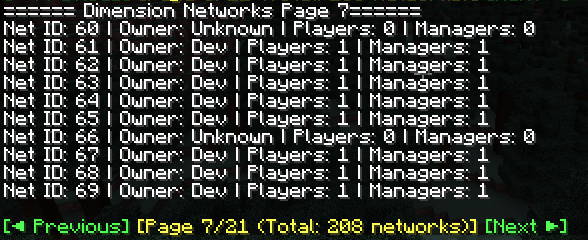 Use /bdtools network list to view the network list
 -
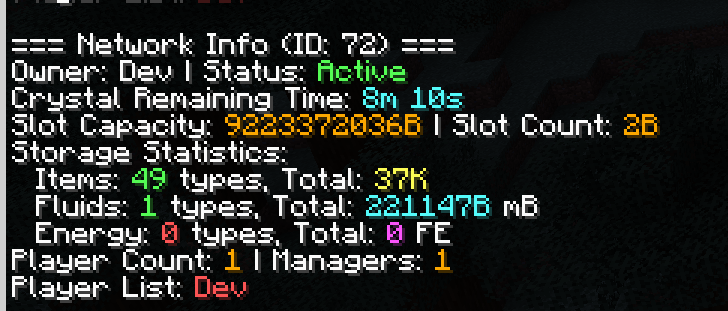 Use /bdtools network info to view network information
Versions
Files
Relations
Project Relations
More like this
Similar Mods
Suggestions use data such as tags, dependencies, dependents, descriptions, titles, and more to rank how much they overlap with this mod.
On ModDex
Community snapshot
By the numbers
Statistics

Want to reach Minecraft players?
We're looking for a server hosting partner to feature here and other parts of the site. Interested? Send us a message!
Get in touchGet it on
Available Platforms
On ModDex
Community snapshot
By the numbers