Community listing page, reviews here may not be monitored by the author.



Community voices
Reviews
No reviews yet. Be the first to review this project!
Get it on
Available Platforms
Compatibility
Supported Environments
Runs entirely on the client. Works on vanilla servers.
About
Project Details
For authors
Embed Badge
If you're the author of this project, you can embed a live badge anywhere that supports HTML or Markdown. It updates automatically whenever ratings change.
Use HTML for any page that supports it, or Markdown for README files and Markdown-based descriptions.
Identifiers
Platform IDs
About
Description
Binders
Binders is a lightweight utility mod and API designed for modpack and mod developers who want to highlight important keybinds to players. No more confusion or hunting through menus to figure out a specific keybind. Binders makes critical keybinds stand out!
Features
📌 On-Screen Keybind Highlights
Show keybinds directly on the screen with customizable icons, labels, and locations.
🧩 Fully Configurable
JSON or in-game configuration support to control what keybinds are shown, when, and how.
🎮 Context-Aware Display
Make keybinds appear only during specific mod contexts (e.g., when flying, while holding a specific item, etc.).
🎨 Custom Styling
Tweak the appearance with colors, fonts, and animations to match your modpack’s theme.
🔄 Dynamic Updates
Automatically responds to key remapping, so your on-screen display always stays accurate.
⌨️ Utility Command
Use /binders dump to paste all keybinds and their keybind IDs into the chat and latest.log
Perfect For
- Modpack creators who want to guide new players.
- Adventure or quest-based modpacks where specific actions are important.
- Tutorials or training scenarios.
- Any experience where highlighting keybinds matters.
Compatibility
- Minecraft Forge (1.20.1)
- (Hopefully) Works alongside most HUD and GUI mods.
Binders
Binders is a lightweight utility mod and API designed for modpack and mod developers who want to highlight important keybinds to players. No more confusion or hunting through menus to figure out a specific keybind. Binders makes critical keybinds stand out!

Features
📌 On-Screen Keybind Highlights Show keybinds directly on the screen with customizable icons, labels, and locations.
🧩 Fully Configurable JSON configuration support to control what keybinds are shown, when, and how. Supports regex matching for advanced users.
🎮 Context-Aware Display Make keybinds appear only during specific situations (e.g., when flying, while holding a specific item, in the Nether, etc.).
🎨 Custom Styling Tweak the appearance with colors, fonts, and animations to match your modpack’s theme.
🔄 Dynamic Updates Automatically responds to key remapping, so your on-screen display always stays accurate.
⌨️ Utility Command
Use /binders dump to log all available keybind IDs to latest.log for easy reference.
Use /binders reload to reload your config without restarting the game.
Configuration Guide
Binders are defined in config/binders/binders_definitions.json.
Example Definition
{
  "keyBinding": "key.jump",
  "label": "Jump",
  "iconItem": "minecraft:feather",
  "context": "always",
  "contextLogic": "OR",
  "color": "#FFFFFF",
  "scale": 1.0,
  "showLabel": true,
  "maxPresses": -1,
  "resetOnLog": false,
  "isRegex": false,
  "dynamicIcon": false
}
Context System
The context field determines when a binder is visible. You can list multiple contexts separated by commas.
Logic:
"contextLogic": "OR"(Default): The binder shows if ANY of the listed contexts are true."contextLogic": "AND": The binder shows only if ALL of the listed contexts are true.
Basic Contexts
always: Always visible.flying: Visible when flying (creative or survival).creative: Visible in Creative mode.survival: Visible in Survival or Adventure mode.sneaking: Visible when crouching.sprinting: Visible when sprinting.swimming: Visible when swimming.on_ground: Visible when standing on solid ground.riding: Visible when riding any entity (horse, boat, etc.).raining: Visible when it is raining.thundering: Visible during a thunderstorm.
Advanced Contexts
- Holding Items:
holding:<item_id>: Holding item in either hand.holding_main:<item_id>: Holding item in main hand.holding_off:<item_id>: Holding item in off hand.
- Wearing Armor:
wearing_head:<item_id>wearing_chest:<item_id>wearing_legs:<item_id>wearing_feet:<item_id>
- World & Player State:
dimension:<dimension_id>: e.g.,dimension:minecraft:the_netherbiome:<biome_id>: e.g.,biome:minecraft:plainshealth_below:<value>: e.g.,health_below:10(Shows when under 5 hearts).hunger_below:<value>: e.g.,hunger_below:6(Shows when under 3 food shanks).
- Looking At:
looking_at_block:<block_id>: e.g.,looking_at_block:minecraft:chestlooking_at_entity:<entity_id>: e.g.,looking_at_entity:minecraft:villagerlooking_at_tag:<tag_id>: e.g.,looking_at_tag:minecraft:logs
Wildcards & Regex
- You can use
*,any, or*:*as a wildcard for items, blocks, or entities.- Example:
looking_at_entity:*(Visible when looking at ANY entity).
- If
"isRegex": true, you can use Regular Expressions for item/block IDs.- Example:
holding:.*_sword(Visible when holding any sword).
- Example:
- Example:
Dynamic Icons
If "dynamicIcon": true, the binder will try to use the item that triggered the context as the icon.
- Example: If context is
holding:minecraft:diamond_sword, the icon will become the Diamond Sword.
Perfect For
- Modpack creators who want to guide new players.
- Adventure maps where specific actions are context-sensitive.
- Tutorials or training scenarios.
Compatibility
- Minecraft Forge (1.20.1)
- Works alongside most HUD and GUI mods.
Screenshots
Gallery
-
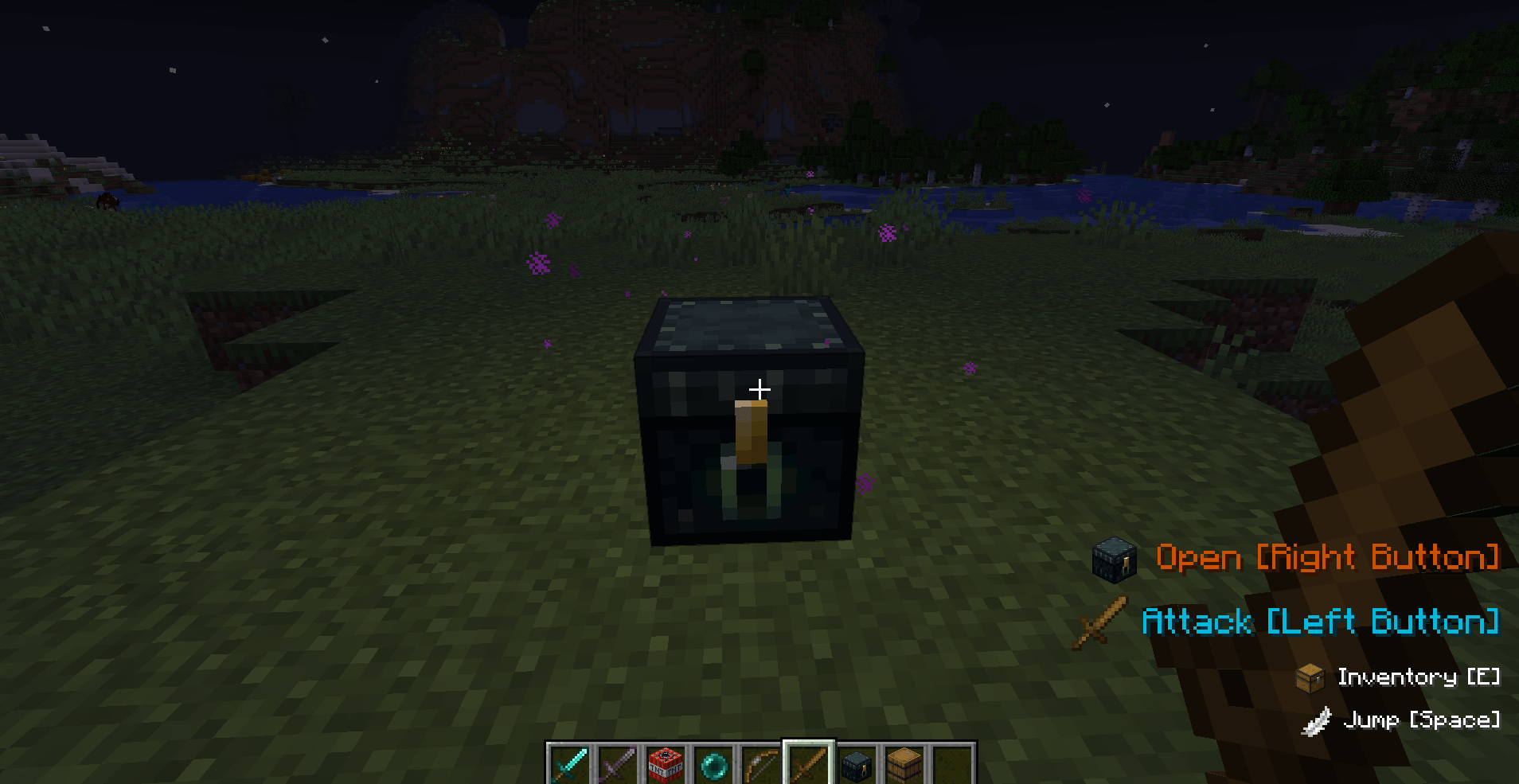 binders.png Binders Example
Versions
Files
Relations
Project Relations
More like this
Similar Mods
Suggestions use data such as tags, dependencies, dependents, descriptions, titles, and more to rank how much they overlap with this mod.
On ModDex
Community snapshot
By the numbers
Statistics
 (opens in a new tab)
Get it on
Available Platforms
On ModDex
Community snapshot
By the numbers