

Biome Editor
Take control of Minecraft's biome generation! Customize biome frequency, size, and placement rules. Disable unwanted biomes, explore an interactive terrain map, and edit vanilla or modded biomes with an easy-to-use in-game editor.
No ratings yet
Be the first to rate it.
Community listing page
Community listing page, reviews may not be monitored by the author.

Community voices
Reviews
No reviews yet. Be the first to review this project!
Get it on
Available Platforms
About
Project Details
For authors
Embed Badge
If you're the author of this project, you can embed a live badge anywhere that supports HTML or Markdown. It updates automatically whenever ratings change.
Use HTML for any page that supports it, or Markdown for README files and Markdown-based descriptions.
Identifiers
Platform IDs
About
Description
🌍 Biome Director — Your World, Your Rules!
Minecraft Java 1.21.11 | NeoForge
Tired of Minecraft generating too many deserts, tiny forests, or biomes you don't want?
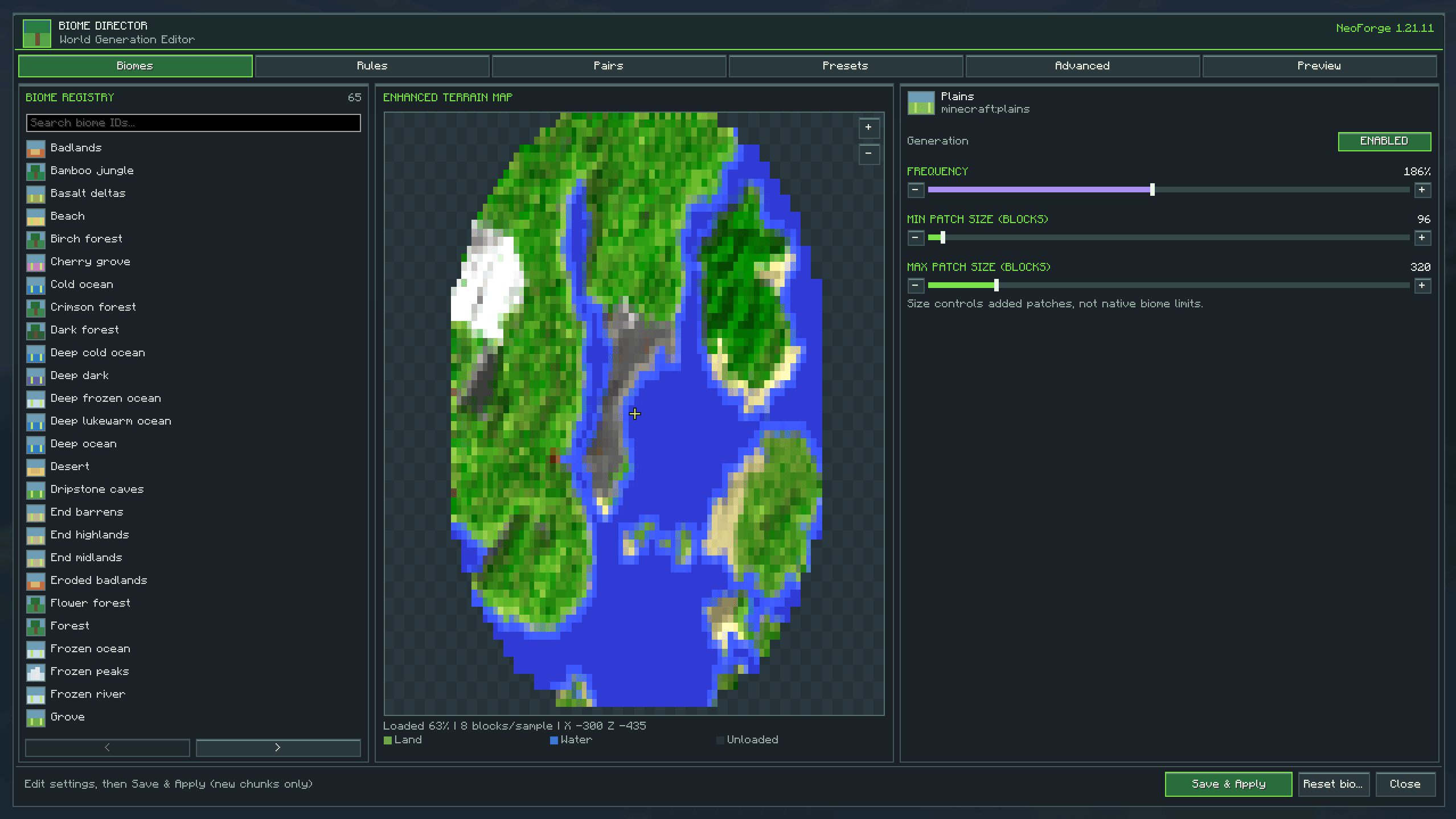
Biome Director gives you greater control over how biomes generate, with an easy-to-use in-game editor and an interactive terrain map.
Whether you're creating a massive survival world, designing a custom modpack, or experimenting with world generation, Biome Director lets you shape how your world develops.
🌲 Customizable Biome Generation
Control Biome Frequency
-
Increase or decrease individual biome generation rates from 0% to 400%.
-
Disable unwanted biomes.
-
Make your favourite environments more common.
-
Customize compatible vanilla and modded biome entries.
Adjust Biome Patch Sizes
-
Configure minimum and maximum additional patch sizes.
-
Create larger stretches of forest or smaller scattered regions.
-
Adjust patch sizes between 32 and 2,048 blocks.
Configure Biome Separation
-
Add rules for biomes you don't want generating beside each other.
-
Create approximate transition areas.
-
Customize biome combinations to suit your world.
🗺️ Interactive Terrain Map
Explore your surroundings through a built-in top-down map!
-
Displays actual terrain from loaded Minecraft chunks.
-
Shows land, water, and elevation shading.
-
Features enhanced map colours and terrain lighting.
-
Zoom in and out using your mouse wheel or on-screen controls.
-
Switch between Terrain, Biomes, and Simulated preview modes.
-
View nearby terrain without forcing distant chunks to load.
🖥️ In-Game Biome Editor
Press B in single-player to open the editor.
Features include:
-
Searchable biome registry.
-
Individual biome settings and sliders.
-
Enable and disable controls.
-
Separation rule management.
-
Custom configuration presets.
-
JSON-based settings.
-
Save and Apply functionality.
🧩 Modded Biome Compatibility
Biome Director discovers registered biomes from installed mods and supports biome placement adjustments for compatible world generators.
Compatibility varies by mod and world-generation system.
⚙️ Important Information
-
Changes apply to newly generated chunks, not existing terrain.
-
Biome size settings affect modified patches, not exact vanilla biome boundaries.
-
Biome separation rules are approximate.
-
The terrain map displays loaded terrain, not a prediction of unexplored areas.
-
The current implementation targets compatible multi-noise biome generators.
🌎 Build the World You Want
More forests. Fewer deserts. Larger biome regions. Customized biome combinations.
Biome Director puts world-generation control in your hands.
Development status: Experimental. Version 1.2.1 has passed offline testing but still requires full build and in-game verification before a public release.
Screenshots
Gallery
-
 Screenshot 2026-11-20 120458.png Screenshot 2026-11-20 120458.png
Versions
Files
Relations
Project Relations
More like this
Similar Mods
Suggestions use data such as tags, dependencies, dependents, descriptions, titles, and more to rank how much they overlap with this mod.
Stats
- Downloads
- <1,000
- Used in
- 0 modpacks
- Followers
- 0
- In stacks
- 0
- Created
- Last synced
-
Nov 21, 2026 8:10 AM UTC
New file updates sync automatically.
When ModDex last fully re-synced this project from CurseForge or Modrinth. A new file release triggers a resync usually within minutes, and every project is also re-synced on a schedule. Edits that don't ship a file, such as a new description or screenshots, are checked every few hours and can appear before this date changes.
How syncing works
External Links

Stats
- Downloads
- <1,000
- Used in
- 0 modpacks
- Followers
- 0
- In stacks
- 0
- Created
- Last synced
-
Nov 21, 2026 8:10 AM UTC
New file updates sync automatically.
When ModDex last fully re-synced this project from CurseForge or Modrinth. A new file release triggers a resync usually within minutes, and every project is also re-synced on a schedule. Edits that don't ship a file, such as a new description or screenshots, are checked every few hours and can appear before this date changes.
How syncing works