Community listing page, reviews may not be monitored by the author.
Biosphere Worlds - Issac Edition

No reviews yet
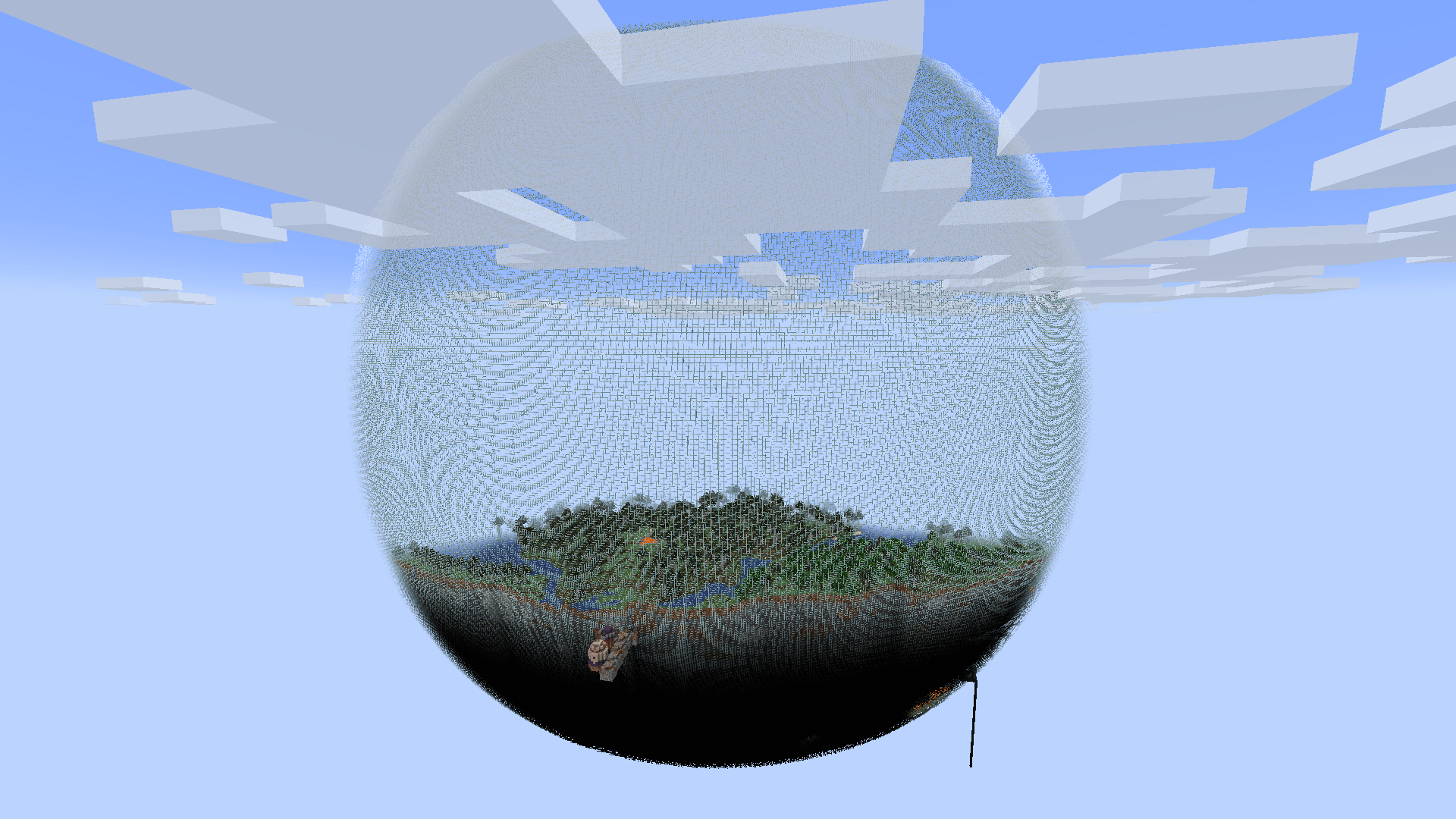
Generates the Overworld as floating glass biospheres surrounded by void, with biomes and structures restricted to each sphere.

Community voices
Reviews
No reviews yet. Be the first to review this project!
Get it on
Available Platforms
About
Project Details
For authors
Embed Badge
If you're the author of this project, you can embed a live badge anywhere that supports HTML or Markdown. It updates automatically whenever ratings change.
Use HTML for any page that supports it, or Markdown for README files and Markdown-based descriptions.
Identifiers
Platform IDs
Resources
External Links
About
Description
Version 2.0 — Explore Solar Systems
Turn the Overworld into floating glass biospheres surrounded by void. Explore isolated worlds filled with biomes, terrain, caves, ores and structures, build routes between them, and reach elevated mineral satellites.
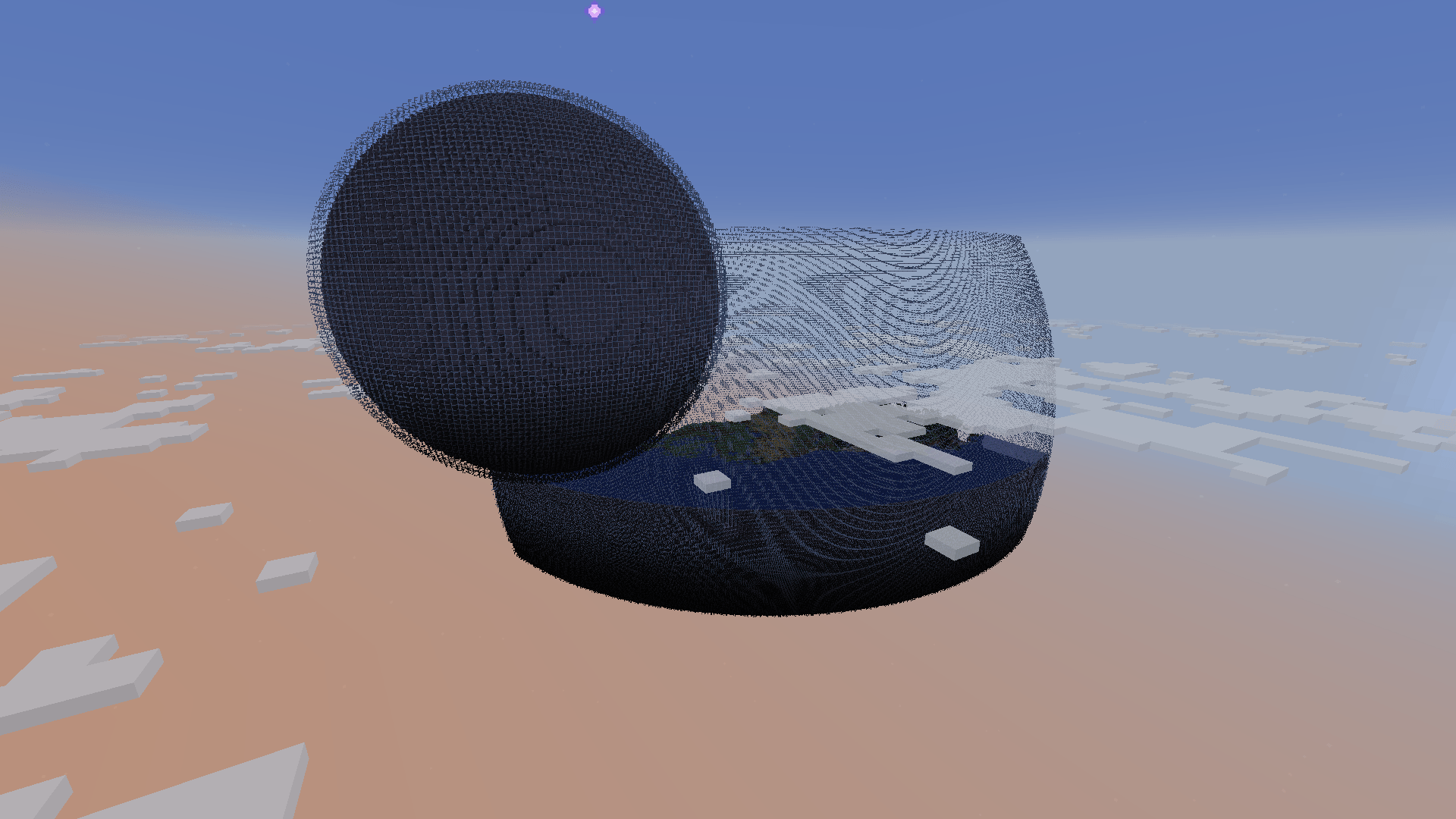
Version 2.0 introduces Solar System generation: a new world preset with orbital planets, temperature gradients, mineral moons and a dangerous central sphere containing a Stronghold.
Choose between two world presets:
- Biospheres - Issac Edition: the classic grid of biospheres, with optional bridges.
- Solar System - Issac Edition: separate solar systems with planets arranged in distinct orbits.
The mod only changes worlds using these presets. Vanilla world presets remain unchanged.
This is a fork of NeoBiosphere by mlus. Credit for the original concept and base code goes to the original author.
What’s new in 2.0?
- Solar System world preset, independent from classic Biospheres.
- Distinct planetary orbits, with configurable planet counts and minimum surface gaps.
- Temperature progression from warm to cold, or cold to warm, across each system.
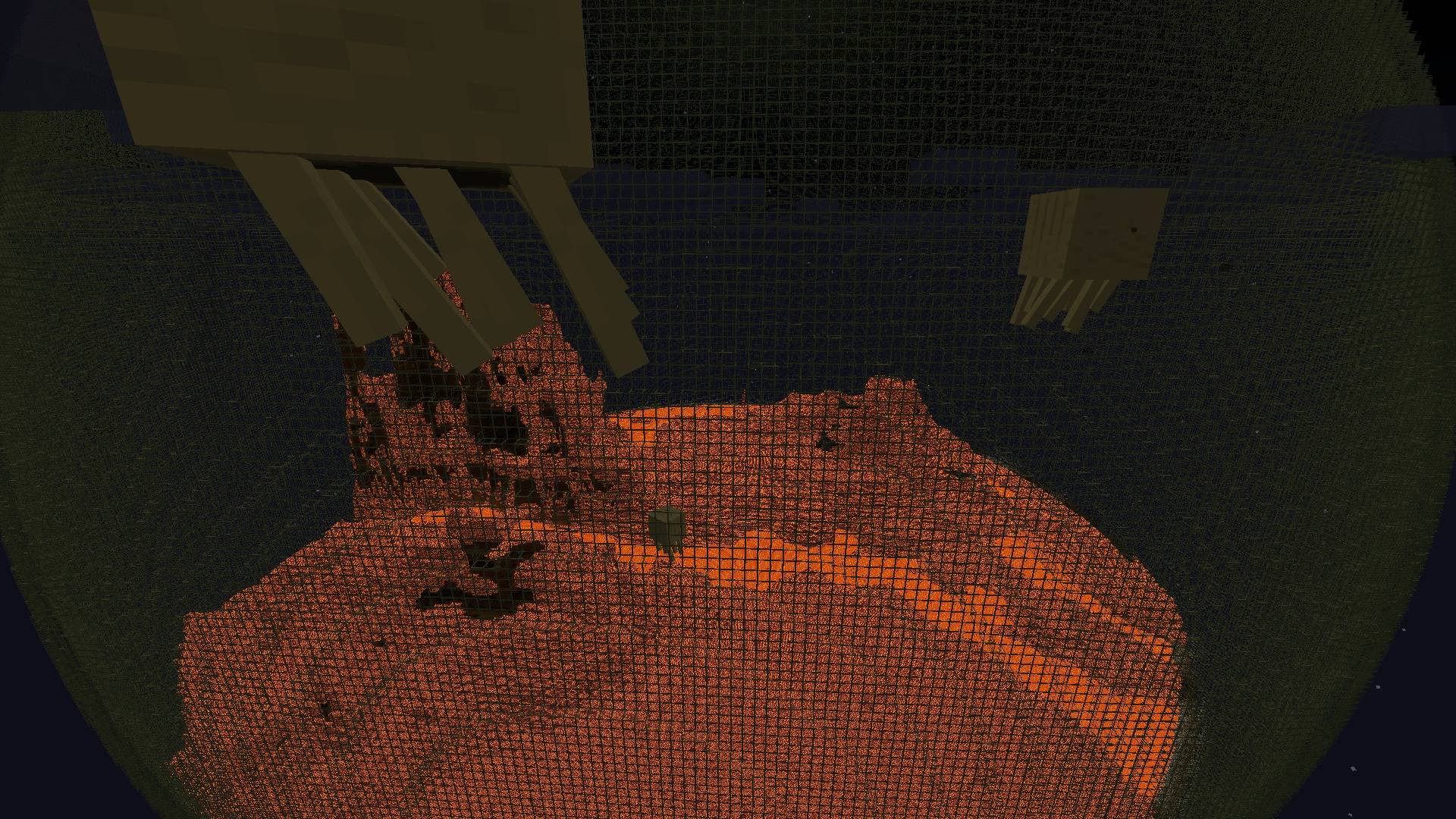
- A central magma-and-lava or packed-ice sphere, depending on the selected climate direction.
- A central Stronghold in each Solar system.
- Optional central guardians, with ghast, blaze and phantom cages.
- A violet guide star pointing toward the current system’s center.
- Mineral moons around orbital planets, with placement adapted to the build ceiling where possible.
- Separate configuration files for classic Biospheres and Solar System.
- Generation settings saved per world, so later config changes do not change the generation recipe of newly created worlds.
- Spawn and respawn correction for players positioned inside sphere-shell blocks.
Classic Biospheres
The original experience: a grid of floating biospheres with configurable sizes, shell blocks and spacing.
Features include:
- Deterministic placement and per-sphere size variation.
- Multiple biomes within spheres.
- Optional bridges between neighboring spheres.
- Optional upper-hemisphere generation.
- Structure restrictions with an adjustable edge margin.
- Optional oceans along the inside of the glass.
- Configurable bedrock behavior.
- Optional flat caps for spheres cut by the build limit.
- Elevated mining satellites.
Outside the generated spheres, the biome becomes minecraft:the_void. Biome searches and biome compasses are restricted to biomes that actually occur inside the spheres.
Solar System
Select Solar System - Issac Edition when creating a world.
Each system has a central sphere surrounded by orbital planets. Every orbital planet occupies its own orbit, while its position around that orbit is determined by the world seed.
The default is 8 orbital planets per system, excluding the central sphere and mineral moons.
Orbits and distances
planet_gapsets the minimum gap between planet surfaces, including the gap from the central sphere to the innermost orbit.system_gapsets the minimum gap between neighboring system envelopes.- The overall system size is calculated automatically.
- Actual gaps may be larger because of the orbital arrangement.
- Automatic bridges are disabled in Solar, so plan your own routes between planets.
Climate progression
Choose the temperature direction with climate_direction:
- 0 — Hot to cold: magma terrain and lava pools at the center, warmer inner planets, temperate middle planets and colder outer planets.
- 1 — Cold to hot: a packed-ice center, colder inner planets, temperate middle planets and warmer outer planets.
The middle orbital band remains temperate. Systems with very few planets still receive at least one temperate orbital planet.
Central Stronghold
The central sphere contains the system’s Stronghold, with its pieces kept beneath the central surface.
Its size and vertical position are managed automatically to make room for the structure. Generate Structures must be enabled when creating a Solar world.
I also tested version 2.0 with YUNG’s Better Strongholds, which overhauls vanilla Strongholds. Solar supports using its redesigned Stronghold inside the central sphere.
The Nether and End retain vanilla generation.
Central guardians
With guardians_enabled enabled, twelve cages are distributed around the central sphere, including its poles.
- Ghasts and blazes can defend the center during the day.
- Phantoms may also spawn at night.
- Spawn rates and guardian populations are limited.
- Peaceful difficulty and
doMobSpawning=falsepause the cages. - Destroyed cages are not rebuilt.
Guide star
A violet, End-themed guide star points toward the center of your current system.
It pulses gently, fades near the system boundary and disappears outside it. Opaque blocks hide it, while glass lets you see it.
You can disable it with:
SolarOrbits.solar_guide_enabled = false
This setting also works in existing worlds. Disabling it on the server turns the guide off for everyone; disabling it on your client hides it locally.
Starting planet
Initial Solar spawn selects a temperate planet in the starting system and uses its natural surface height.
Both presets also check login and respawn positions inside shell blocks and try to move the player onto nearby solid ground with enough headroom. This does not build platforms or clear terrain.
Mining satellites and mineral moons
Classic biospheres can generate elevated mining satellites. Solar planets can generate mineral moons.
Each normally contains:
- A shell using the parent sphere’s shell material.
- An outer stone body.
- A continuous magma layer.
- A stone core mixed with one selected ore.
Very small satellites, with a radius of 6 or less, only receive the shell and stone body.
Ore candidates include vanilla ores and modded ores discovered through the #c:ores_in_ground/stone block tag.
You can customize selection with:
satellites_excluded_oressatellites_included_oressatellites_mod_ore_weightsatellites_mod_ore_density_permille
Exclusions take priority over inclusions. By default, ancient debris, Nether ores and deepslate ores are excluded.
These bodies have no normal biome-based mobs, structures or vegetation, and no automatic bridges.
The configured satellite count is a maximum. Candidates that cannot fit within the available space, world height or collision limits are omitted.
In new Solar worlds, moon candidates above the build ceiling can be lowered while preserving their size and distance from the parent. Candidates that still cannot fit are skipped.
Requirements
- Minecraft 1.21.1
- NeoForge 21.1.216 or newer
- Java 21
Installation
- Install NeoForge for Minecraft 1.21.1.
- Place the mod jar in your
modsfolder. - Launch Minecraft.
- Adjust the configuration before creating your world, if desired.
- Create a new world and select:
- Biospheres - Issac Edition, or
- Solar System - Issac Edition.
- For Solar, leave Generate Structures enabled.
Use a new world to experience the new generation. Existing chunks are not regenerated.
For multiplayer, install the mod on both the server and clients.
Dedicated servers
To generate a new server world, stop the server and select one preset in server.properties.
Classic Biospheres:
level-type=biosphereworlds:biospheresSolar System:
level-type=biosphereworlds:solar_systems
generate-structures=true
Configure the corresponding file in config/biosphereworlds/ before generating the world.
These settings apply when creating a new world. Changing level-type does not convert an existing world. To keep your current world and generate a separate one, choose an unused folder name with level-name.
Configuration
Both configuration files are now located inside:
config/biosphereworlds/
| File | Controls |
|---|---|
BiosphereWorlds.toml |
Classic Biospheres generation. |
SolarSystems.toml |
Solar System generation. |
The two files have independent values. Changing classic Biospheres settings does not change Solar settings.
Old root-level configuration files are copied into the new folder on first start when the destination files do not already exist. The original files are preserved.
General settings
These settings are available to both generators, with independent values in each configuration file.
| Option | Default | Description |
|---|---|---|
radius |
128 |
Maximum main-sphere or orbital-planet radius. |
min_radius |
128 |
Minimum radius. Set below radius for variable sizes. |
center_y |
62 |
Main-sphere or orbital-planet center height. The Solar center is positioned automatically. |
sphere_block |
["minecraft:glass"] |
Shell materials, selected deterministically per sphere. |
close_open_top |
false |
Add a flat shell cap at Y=319 when a sphere extends above the build limit. |
bedrock_mode |
FLOOR |
World-floor bedrock behavior and optional inner lining. |
edge_ocean_enabled |
false |
Lower and flood the band near the inside of the shell. |
edge_ocean_width |
20 |
Ocean-band width as a percentage of sphere radius. |
edge_ocean_depth |
20 |
Ocean-floor depth below sea level, in blocks. |
satellites_enabled |
true |
Enable mining satellites or mineral moons. |
satellites_max_count |
3 |
Maximum satellites per main sphere or orbital planet. |
satellites_min_size_percent / satellites_max_size_percent |
8 / 12 |
Satellite radius as a percentage of the parent radius. |
satellites_min_gap_percent / satellites_max_gap_percent |
25 / 75 |
Surface gap as a percentage of the parent radius. |
satellites_min_gap_blocks |
16 |
Absolute minimum gap in blocks. |
satellites_min_elevation_degrees / satellites_max_elevation_degrees |
30 / 55 |
Satellite elevation-angle range. Solar may lower candidates to fit below the ceiling. |
satellites_excluded_ores |
See config | Ore block IDs or #tags excluded from selection. |
satellites_included_ores |
[] |
Additional ore block IDs or #tags to include. |
satellites_mod_ore_weight |
3 |
Selection weight for each modded ore. |
satellites_mod_ore_density_permille |
20 |
Modded ore density per thousand core blocks. 20 means 2%. |
Keep minimum values less than or equal to their corresponding maximum values.
Classic-only settings
These settings apply to BiosphereWorlds.toml.
| Option | Default | Description |
|---|---|---|
spacing |
500 |
Distance between neighboring sphere centers. |
only_upper_hemisphere |
false |
Generate only the upper hemisphere. |
generate_bridge |
true |
Generate bridges between spheres. |
bridge_block |
minecraft:oak_planks |
Bridge material. |
bridge_radius |
1 |
Bridge radius. |
restrict_structures_to_spheres |
true |
Restrict structure starts to spheres. |
structure_edge_margin |
16 |
Inward margin for structure starts. |
debug_biome_lookups |
false |
Enable debug logging for outside-sphere biome lookups. |
Keep spacing greater than twice the maximum radius to avoid overlapping spheres and terrain cutoffs at cell boundaries.
Solar-specific settings
These settings are under [SolarOrbits] in SolarSystems.toml.
| Option | Default | Range | Description |
|---|---|---|---|
planet_count |
8 |
1–16 | Orbital planets per system, excluding the center and moons. |
planet_gap |
400 |
0–4000 | Minimum surface gap in blocks between planetary orbits, including the central sphere. |
system_gap |
1500 |
0–16000 | Minimum gap in blocks between neighboring system envelopes. |
climate_direction |
0 |
0–1 | 0: hot center to cold exterior. 1: cold center to hot exterior. |
guardians_enabled |
true |
true/false | Generate central guardian cages. |
solar_guide_enabled |
true |
true/false | Runtime toggle for the guide star, including in existing worlds. |
Solar does not use classic grid spacing, automatic bridges or upper-hemisphere mode.
Bedrock modes
- FLOOR: preserve world-floor bedrock where spheres reach it.
- NONE: replace world-floor bedrock with deepslate.
- SHELL: preserve the floor and add a three-block bedrock lining inside the lower shell.
In classic upper-hemisphere mode, SHELL behaves like FLOOR.
The Solar central sphere uses a special lining ceiling at Y=63. Orbital planets use their own center-relative lining.
The Create Diesel Generators pumpjack normally requires bedrock or an oil-deposit block. Removing bedrock can prevent it from working unless another valid deposit is available.
World height and oceans
Spheres remain subject to the Overworld’s build limits.
With center_y = 62:
- A radius of 126 or more reaches the world floor.
- A radius above 258 extends above the build ceiling.
- The default radius of 128 reaches the floor and remains closed at the top.
close_open_top caps the opening; it does not reduce the configured radius.
Edge oceans affect the interior near the shell. In Solar, the central sphere keeps its magma or ice surface instead.
Structures near an edge ocean may end up underwater. In classic Biospheres, increase structure_edge_margin to move structure starts farther inward.
Saved world settings and upgrading
New 2.0 worlds save their generation settings.
For new classic Biospheres worlds, this includes sphere geometry, shell materials, bridges, bedrock, oceans, structure restrictions and the resolved satellite mineral list.
Solar worlds also keep their own saved generation settings.
Editing a TOML file does not update those saved recipes. Create a new world to apply different generation settings. Runtime settings, such as the Solar guide toggle, are exceptions.
Additional upgrade notes:
- Existing classic worlds without a saved recipe retain their previous config-driven behavior.
- Existing Solar worlds keep their saved layout; new orbital and moon-placement changes require a new world.
- Existing chunks are never regenerated automatically.
- Solar resolves its mineral catalog when the world opens.
/reloaddoes not replace that catalog. - Changing installed mods or tags can affect Solar’s resolved minerals after reopening, potentially producing differences across partially generated moons.
Back up your world before updating, including all files inside its data folder.
Compatibility
Biome mods
Classic Biospheres has been verified with:
- TerraBlender 4.1.0.8
- Biomes O’ Plenty 21.1.0.14
Solar includes integration for TerraBlender biome selection and surface rules. Its central sphere deliberately uses a fixed hot or cold biome profile.
Other biome mods are not currently listed as verified. Testing with YUNG’s Better Strongholds is described in the Central Stronghold section above.
Potential conflicts
Mods or datapacks may conflict if they replace the mod’s world presets or noise settings, or heavily modify chunk generation, carvers, aquifers or structure placement.
Solar includes handling for registered Stronghold replacements, but this is not a blanket compatibility guarantee for every structure or portal mod.
A note from the author
Exploring these worlds makes me imagine being inside Dune. That feeling of isolation, huge distances and separate worlds is part of what I want this mod to capture.
I recommend adding a transport mod to make traveling between spheres part of the adventure. Create: Aeronautics is the kind of experience I have in mind, or any transport mod you enjoy that is available for your Minecraft version and mod loader.
Biomes O’ Plenty and Particle Rain can also make these worlds look and feel very different. More varied landscapes and atmospheric weather effects add a lot to the experience.
These are personal suggestions, rather than a list of verified compatible mods.
If you find a bug, please don’t hesitate to report it. Include your mod version, selected preset, world seed, relevant settings and steps to reproduce it. Logs or screenshots are welcome when useful.
I’d also love to receive constructive criticism. Tell me what you enjoy, what feels frustrating and what you think could be improved. Feedback is especially helpful as Solar System develops.
Future ideas
- Datapack support for defining sphere types without writing code.
- Further improvements to Solar System generation and exploration.
- A Forge 1.20.1 version, depending on interest.
Credits and license
Biosphere Worlds – Issac Edition is a fork of NeoBiosphere by mlus.
The original concept and base code belong to the original author. This fork adds features, fixes and its own world-generation modes.
Licensed under GPL-3.0. Original copyright notices are preserved.
Screenshots
Gallery
-
 2026-10-07_21.00.15.png 2026-10-07_21.00.15.png
 -
 2026-10-23_10.53.01.png 2026-10-23_10.53.01.png
 -
 curseforge-presentacion.jpg curseforge-presentacion.jpg
Versions
Files
Relations
Project Relations
More like this
Similar Mods
Suggestions use data such as tags, dependencies, dependents, descriptions, titles, and more to rank how much they overlap with this mod.
On ModDex
Community snapshot
By the numbers
Statistics

Get it on
Available Platforms
On ModDex
Community snapshot
By the numbers
Statistics
Resources