
Community listing page, reviews here may not be monitored by the author.
Bitop Perimeter

No reviews yet
This is a mod used to create perimeters and obtain all the items. It's a great way to avoid building TNT flying machines or mining everything by hand.
Community voices
Reviews
No reviews yet. Be the first to review this project!
Get it on
Available Platforms
Compatibility
Supported Environments
Must be installed on both the client and the server.
About
Project Details
For authors
Embed Badge
If you're the author of this project, you can embed a live badge anywhere that supports HTML or Markdown. It updates automatically whenever ratings change.
Use HTML for any page that supports it, or Markdown for README files and Markdown-based descriptions.
Identifiers
Platform IDs
Resources
External Links
About
Description
What is Perimeter?
Perimeter is a simple mod designed primarily to create perimeters for technical farms that require them.
** This is NOT a Quarry-style mod for automatically collecting resources**. Its purpose is to save you the time and effort of building TNT flying machines, which can be tedious to set up and may cause performance issues on low-end computers.
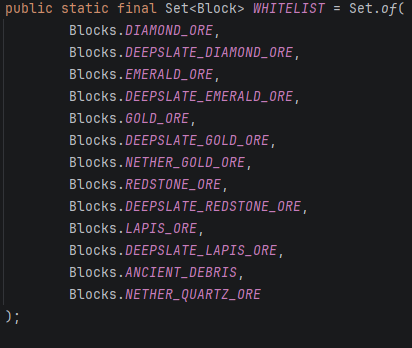
However, a small selection of blocks will be stored automatically when mined. Only the blocks included in the whitelist can be retrieved.
How to use it
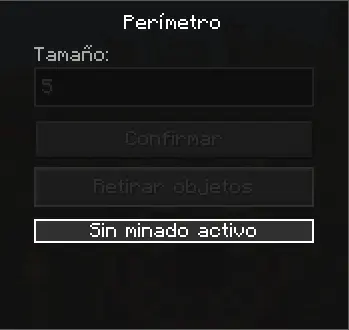
Open the block's GUI by right-clicking it.
First, enter the size of the perimeter. For example:
- Entering 5 will create a 5×5 perimeter.
- Entering 257 will create a 257×257 perimeter.
Then, press "Confirmar" to start excavating the perimeter.
The "Retirar Objetos" button allows you to collect all stored blocks that are included in the whitelist.
Important: If you don't want to collect the stored items, simply break the block. Destroying the block will permanently delete all stored contents.
Crafting
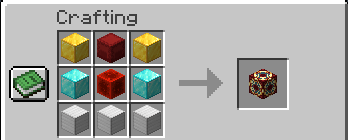
The crafting recipe is simple.
1 Red Shulker Box 1 Redstone Block 2 Gold Blocks 2 Diamond Blocks 3 Iron Blocks
Creative Mode
In Creative Mode, the block can be obtained with the following command:
/give @a perimeter:perimeter
The block can only be obtained through this command or by crafting it.

Screenshots
Gallery
Versions
Files
Relations
Project Relations
More like this
Similar Mods
Suggestions use data such as tags, dependencies, dependents, descriptions, titles, and more to rank how much they overlap with this mod.
On ModDex
Community snapshot
By the numbers
Statistics

Want to reach Minecraft players?
We're looking for a server hosting partner to feature here and other parts of the site. Interested? Send us a message!
Get in touchGet it on
Available Platforms
On ModDex
Community snapshot
By the numbers
Statistics
Resources