
Community listing page, reviews here may not be monitored by the author.
Blame


No reviews yet
Those gosh darn crashlogs not saying which worldgen feature is crashing!
Community voices
Reviews
Filters
Click once to include, again to exclude, again to clear
No reviews yet. Be the first to review this project!
Get it on
Available Platforms
Compatibility
Supported Environments
Runs entirely on the server. Also works in singleplayer.
About
Project Details
For authors
Embed Badge
If you're the author of this project, you can embed a live badge anywhere that supports HTML or Markdown. It updates automatically whenever ratings change.
Use HTML for any page that supports it, or Markdown for README files and Markdown-based descriptions.
Identifiers
Platform IDs


About
Description
Ready to find who to Blame?
Fabric version: https://www.curseforge.com/minecraft/mc-mods/blame-fabric
Blame is a diagnostics tool to be put on only if you are having strange worldgen crashes or commands that break without any stacktrace. But when you have Blame on, it will attempt to gather far more infomation and print the stacktrace to the latest.log file in the logs folder above the mods folder. A much more convenient place with all the info you will need! Keep in mind, Blame only works on singleplayer or on servers. Not on clients connecting to a server.
Note: for better worldgen json parsing help in 1.17+, use Cyanide mod instead: https://www.curseforge.com/minecraft/mc-mods/cyanide-forge
Here's the current list of functionalities that Blame has!
• Prints out the stacktrace for commands that crashed when used.
(Normally, modded commands do not print anything to logs when they crash)
• Will detect and print out all broken commands when starting up a world.
(This will find commands that called an .executes() outside a .then() call because they won't work)
• Prints extra detail for features or structures that crashes during worldgen.
• Logs all ConfiguredFeatures, ConfiguredStructures, ConfiguredCarvers that are not registered.
(Mods that don't register the stuff will cause other mod's stuff to break and not spawn during worldgen)
• Detect if DynamicRegistry is loaded way too early by another mod.
(Doing so causes all other mod's registered worldgen stuff to blow up such as "Unknown Biome ID" issues)
• Logs out exactly which worldgen JSON file is broken from any mod or datapack and shows its JSON too.
• Logs out any missing loot table when the loot is attempted to be generated! Check logs if a chest is empty and this mod might catch why.
• Prints out the name of the crashing structure that has its spacing value set to 0 or if it's separation value is equal to or greater than the spacing value.
(Either one of these condition being true will crash the game.)
• Condense broken Recipe and Loot Table parsing so you can share logs easier and see errors easier.
• Fixes MC-190122 bug so that the actual true number of recipes loaded and stated in logs is correct to help debugging recipes. https://bugs.mojang.com/browse/MC-190122
• Prints out exactly which structure crashed a custom/flat ChunkGenerator because it wasn't added to FlatGenerationSettings.STRUCTURES
• Will print to logs if a Jigsaw Structure attempts to access a non-existent template pool so you know when a structure is not fully generating.
• Will log out if a mod or datapack tries to access a non-existent nbt file for easier debugging.
• Will print out if a mod classloads TagCollectionManager too early and can risk blowing up the tags of other mods that register their tag afterwards.
• Will print out what block, its nbt, and what nbt file crashed a structure processor during structure generation.
If you need to see a registry dump of all stuff in all registries, use this TellMe mod by Masady:
https://www.curseforge.com/minecraft/mc-mods/tellme
FOR MODDERS: USING BLAME IN Forge DEV ENVIRONMENT
In your build.gradle file, add this maven repository. This is where gradle will look for Blame's jar.
repositories {
maven {
url "https://nexus.resourcefulbees.com/repository/maven-public/"
}
}Now add this to the dependency block. Replace <version> with the Blame version you want to use such as `1.16.5-3.2.1-forge`. Check the CurseForge page for what the latest version is.
dependencies {
...
runtimeOnly fg.deobf("com.telepathicgrunt:Blame:<version>")
}Now here's the important part. Add these two properties to both of your run configs in the build.gradle file. These will allow Blame's mixins to work. After you add the properties lines, refresh Gradle and run `genEclipseRuns` or `genIntellijRuns` or `genVSCodeRuns` based on what IDE you are using.
minecraft {
...
runs {
client {
...
property 'mixin.env.remapRefMap', 'true'
property 'mixin.env.refMapRemappingFile', "${projectDir}/build/createSrgToMcp/output.srg"
}server {
...
property 'mixin.env.remapRefMap', 'true'
property 'mixin.env.refMapRemappingFile', "${projectDir}/build/createSrgToMcp/output.srg"
}
}
}Launch the game and Blame should be running! You can tell as Blame will print something like this to the IDE console and latest.log file:
[16:34:10] [modloading-worker-11/ERROR] [co.te.bl.Blame/]: Blame 1.16.5-3.0.1-forge initialized
Discord Link to #telepathicgrunt-mods channel for my mods! :

Ready to find who to Blame?
Forge version: https://www.curseforge.com/minecraft/mc-mods/blame
Blame is a diagnostics tool to be put on only if you are having strange worldgen crashes or commands that break without any stacktrace. But when you have Blame on, it will attempt to gather far more infomation and print the stacktrace to the latest.log file in the logs folder above the mods folder. A much more convenient place with all the info you will need! Keep in mind, Blame only works on singleplayer or on servers. Not on clients connecting to a server.
Note: for better worldgen json parsing help in 1.17+, use Cyanide mod instead: https://www.curseforge.com/minecraft/mc-mods/cyanide-fabric
Here's the current list of functionalities that Blame has!
• Prints out the stacktrace for commands that crashed when used.
(Normally, modded commands do not print anything to logs when they crash)
• Will detect and print out all broken commands when starting up a world.
(This will find commands that called an .executes() outside a .then() call because they won't work)
• Prints extra detail for features or structures that crashes during worldgen.
• Logs all ConfiguredFeatures, ConfiguredStructures, ConfiguredCarvers that are not registered.
(Mods that don't register the stuff will cause other mod's stuff to break and not spawn during worldgen)
• Detect if DynamicRegistry is loaded way too early by another mod.
(Doing so causes all other mod's registered worldgen stuff to blow up such as "Unknown Biome ID" issues)
• Logs out exactly which worldgen JSON file is broken from any mod or datapack and shows its JSON too.
• Logs out any missing loot table when the loot is attempted to be generated! Check logs if a chest is empty and this mod might catch why.
• Condense broken Recipe and Loot Table parsing so you can share logs easier and see errors easier.
• Fixes MC-190122 bug so that the actual true number of recipes loaded and stated in logs is correct to help debugging recipes. https://bugs.mojang.com/browse/MC-190122
• Prints out the name of the crashing structure that has its spacing value set to 0 or if it's separation value is equal to or greater than the spacing value.
(Either one of these condition being true will crash the game.)
• Prints out exactly which structure crashed a custom/flat ChunkGenerator because it wasn't added to FlatGenerationSettings.STRUCTURES
• Will print to logs if a Jigsaw Structure attempts to access a non-existent template pool so you know when a structure is not fully generating.
• Will log out if a mod or datapack tries to access a non-existent nbt file for easier debugging.
• Will print out what block and its nbt crashed a structure processor during structure generation.
FOR MODDERS: USING BLAME IN Fabric DEV ENVIRONMENT
In your build.gradle file, add this maven repository. This is where gradle will look for Blame's jar.
repositories {
maven {
url "https://nexus.resourcefulbees.com/repository/maven-public/"
}
}
Now add this to the dependency block. Replace <version> with the Blame version you want to use such as `1.16.5-3.2.0-fabric`. Check the CurseForge page for what the latest version is.
dependencies {
...
modImplementation "com.telepathicgrunt:Blame-Fabric:1.16.5-3.0.1-fabric"
}
Launch the game and Blame should be running! You can tell as Blame will print something like this to the IDE console and latest.log file:
[18:25:48] [main/ERROR] (Blame) Blame 1.16.5-3.0.1-fabric initialized
Discord Link to #telepathicgrunt-mods channel for my mods! :
Ready to find who to Blame?
Blame is a diagnosis to be put on if you are having strange worldgen crashes or commands that break without any stacktrace. But when you have Blame on, it will attempt to gather far more infomation and print the stacktrace to the latest.log file in the logs folder above the mods folder. A much more convenient place with all the info you will need! Keep in mind, Blame only works on singleplayer or on servers. Not on clients connecting to a server.
Here's the current list of functionalities that Blame has!
• Prints out the stacktrace for commands that crashed when used. (Normally, modded commands do not print anything to logs when they crash)
• Will detect and print out all broken commands when starting up a world. (This will find commands that called an .executes() outside a .then() call because they won't work)
• Prints extra detail for features or structures that crashes during worldgen.
• Logs all ConfiguredFeatures, ConfiguredStructures, ConfiguredCarvers that are not registered. (Mods that don't register the stuff will cause other mod's stuff to break and not spawn during worldgen)
• Detect if DynamicRegistry is loaded way too early by another mod. (Doing so causes all other mod's registered worldgen stuff to blow up such as "Unknown Biome ID" issues)
• Logs out exactly which worldgen JSON file is broken from any mod or datapack and shows its JSON too.
• Logs out any missing loot table when the loot is attempted to be generated! Check logs if a chest is empty and this mod might catch why.
• Prints out the name of the crashing structure that has its spacing value set to 0 or if it's separation value is equal to or greater than the spacing value. (Either one of these condition being true will crash the game.)
• Prints out exactly which structure crashed a custom/flat ChunkGenerator because it wasn't added to FlatGenerationSettings.STRUCTURES
• Condense broken Recipe and Loot Table parsing so you can share logs easier and see errors easier.
• Fixes MC-190122 bug so that the actual true number of recipes loaded and stated in logs is correct to help debugging recipes. https://bugs.mojang.com/browse/MC-190122
• Will print to logs if a Jigsaw Structure attempts to access a non-existent template pool so you know when a structure is not fully generating.
• Will log out if a mod or datapack tries to access a non-existent nbt file for easier debugging
• Will print out what block and its nbt that crashed a structure processor during structure generation.
FOR MODDERS: USING BLAME IN Fabric/Quilt DEV ENVIRONMENT
In your build.gradle file, add this maven repository. This is where gradle will look for Blame's jar.
repositories {maven {
url "https://nexus.resourcefulbees.com/repository/maven-public/"
}
}
Now add this to the dependency block. Replace with the Blame version you want to use such as 1.16.5-3.0.1-fabric. Check the Modrinth page for what the latest version is.
dependencies {...
modImplementation "com.telepathicgrunt:Blame-Forge:5.0.0+1.18.2"
}
Launch the game and Blame should be running! You can tell as Blame will print something like this to the IDE console and latest.log file:
[18:25:48] [main/ERROR] (Blame) Blame 1.18.2-5.0.0-forge initialized
Screenshots
Gallery
-
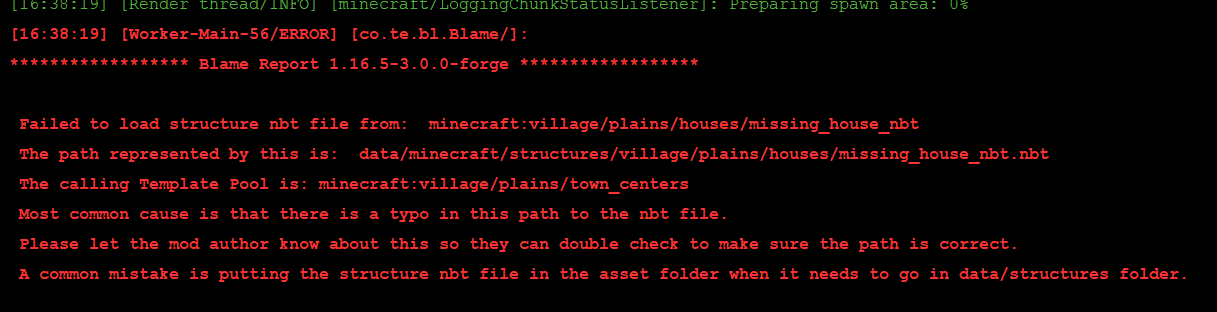 Missing nbt file report If a mod or datapack tries to access a missing nbt file (used often for making structures), Blame will state this so you can let the modders know!
 -
 Extreme template pool weights If a template pool has a weight that is super high, Blame will report that problematic pool since super high weights will actually eat up RAM very fast. And if too high, it can crash the game with an Out of Memory error!
 -
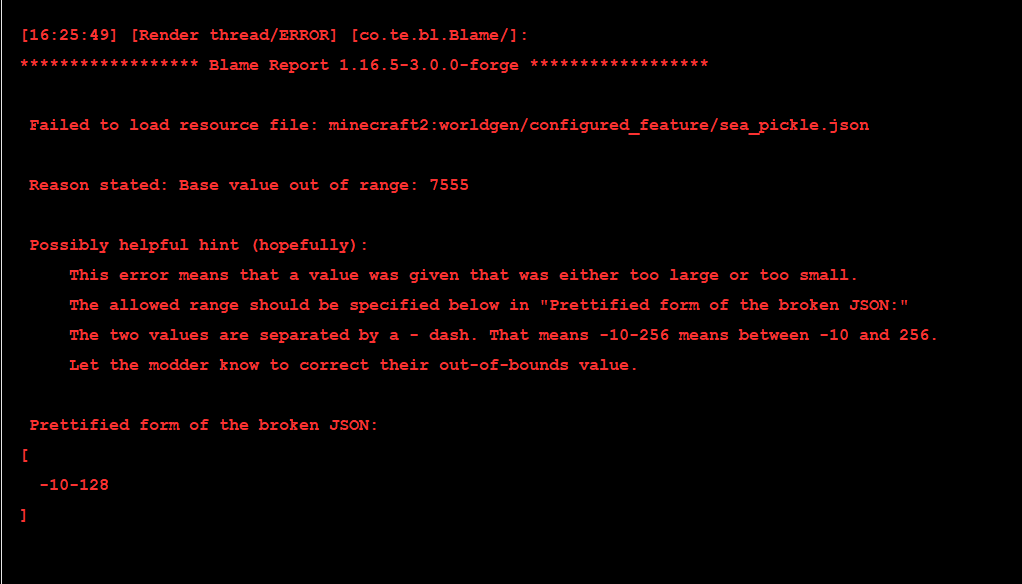 Can find broken ConfiguredFeatures too! Blame can detect if a ConfiguredFeature is broken like the one shown here. This one has a value that is out of the range that it accepts and it shows which ConfiguredFeature it is so it can be fixed!
 -
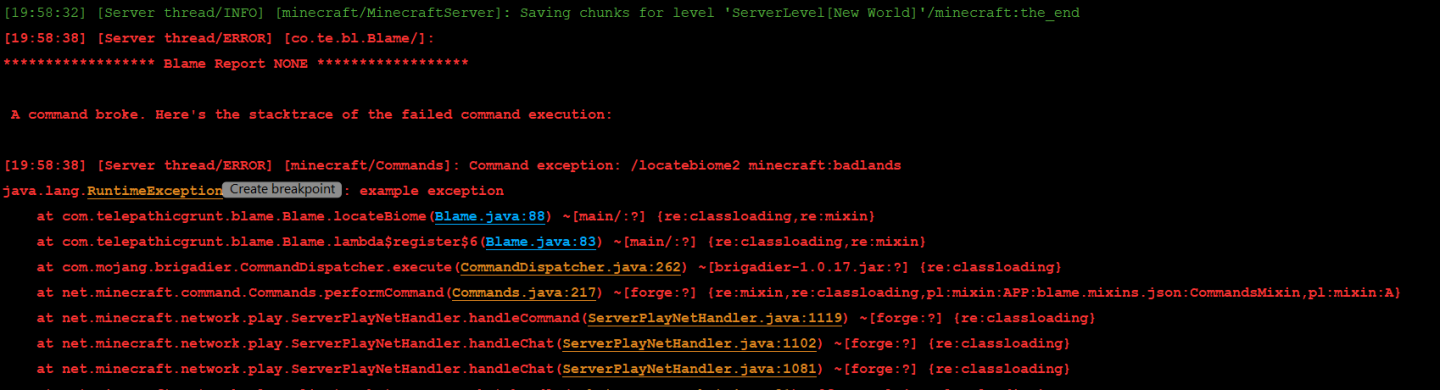 Crashing commands Any command that crashes when used will now print a stacktrace so modders can know why it broke easier! Typical behavior is that the command fails silently which is super bad. That's why Blame aimed to add more info here!
 -
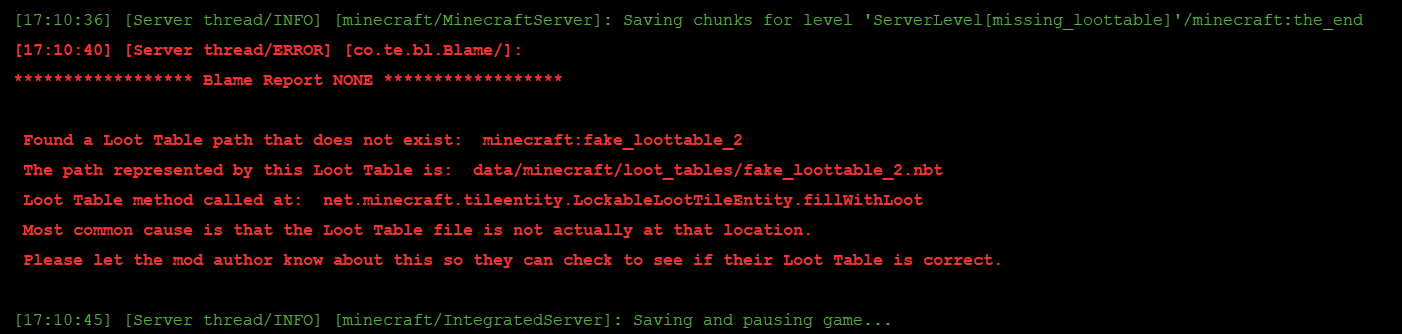 Missing Loot Tables Ever opened a chest and found it was empty? That could be caused by the LootTable in the chest doesn't exist! Blame will detect that when the loot is attempted to be made and print out what the missing loot Table is!
 -
 Unregistered ConfiguredFeature report! Any biome with an unregistered ConfiguredFeature, ConfiguredStructure, or ConfiguredCarver will not get a Blame report that states the JSON of the thing and which biomes are affected! Look at the JSON to try and find which mod the thing came from.
-
 Missing nbt file report If a mod or datapack tries to access a missing nbt file (used often for making structures), Blame will state this so you can let the modders know!
 -
 Extreme template pool weights If a template pool has a weight that is super high, Blame will report that problematic pool since super high weights will actually eat up RAM very fast. And if too high, it can crash the game with an Out of Memory error!
 -
 Can find broken ConfiguredFeatures too! Blame can detect if a ConfiguredFeature is broken like the one shown here. This one has a value that is out of the range that it accepts and it shows which ConfiguredFeature it is so it can be fixed!
 -
 Missing Loot Tables Ever opened a chest and found it was empty? That could be caused by the LootTable in the chest doesn't exist! Blame will detect that when the loot is attempted to be made and print out what the missing loot Table is!
 -
 Unregistered ConfiguredFeature report! Any biome with an unregistered ConfiguredFeature, ConfiguredStructure, or ConfiguredCarver will not get a Blame report that states the JSON of the thing and which biomes are affected! Look at the JSON to try and find which mod the thing came from.
Versions
Files
Relations
Project Relations
More like this
Similar Mods
Suggestions use data such as tags, dependencies, dependents, descriptions, titles, and more to rank how much they overlap with this mod.
On ModDex
Community snapshot
By the numbers
Statistics
Want to reach Minecraft players?
We're looking for a server hosting partner to feature here and other parts of the site. Interested? Send us a message!
Get in touchGet it on
Available Platforms
On ModDex
Community snapshot
By the numbers