Community listing page, reviews here may not be monitored by the author.
Gate Keep


No reviews yet
Allows restricting and scheduling dimension access based on date/time.
Community voices
Reviews
No reviews yet. Be the first to review this project!
Get it on
Available Platforms
Compatibility
Supported Environments
Runs entirely on the server. Also works in singleplayer.
About
Project Details
For authors
Embed Badge
If you're the author of this project, you can embed a live badge anywhere that supports HTML or Markdown. It updates automatically whenever ratings change.
Use HTML for any page that supports it, or Markdown for README files and Markdown-based descriptions.
Identifiers
Platform IDs
About
Description
Gate Keep
Allows server admins to control access to dimensions. With GateKeep, you can completely restrict dimensions or set up time-based restrictions that automatically unlock at specific dates and times.
Features
- Dimension Restriction: Completely block access to any dimension
- Time-Based Restrictions: Schedule dimensions to unlock at specific dates and times
- Customizable Messages: Configure the messages players receive when attempting to access restricted dimensions
- Automated Announcements: Server-wide announcements when time-restricted dimensions become available
Configuration
GateKeep uses a JSON configuration file located at config/gatekeep.json. The config file is created automatically when the mod is first loaded (in-case of a crash or mis-behavior re-check the config and deleting it and generating a fresh one)
Configuration Options
{
  "disabledDimensions": [
    "minecraft:the_end"
  ],
  "announce": true,
  "restrictedDimensionMessage": "&c%dimension% dimension is restricted",
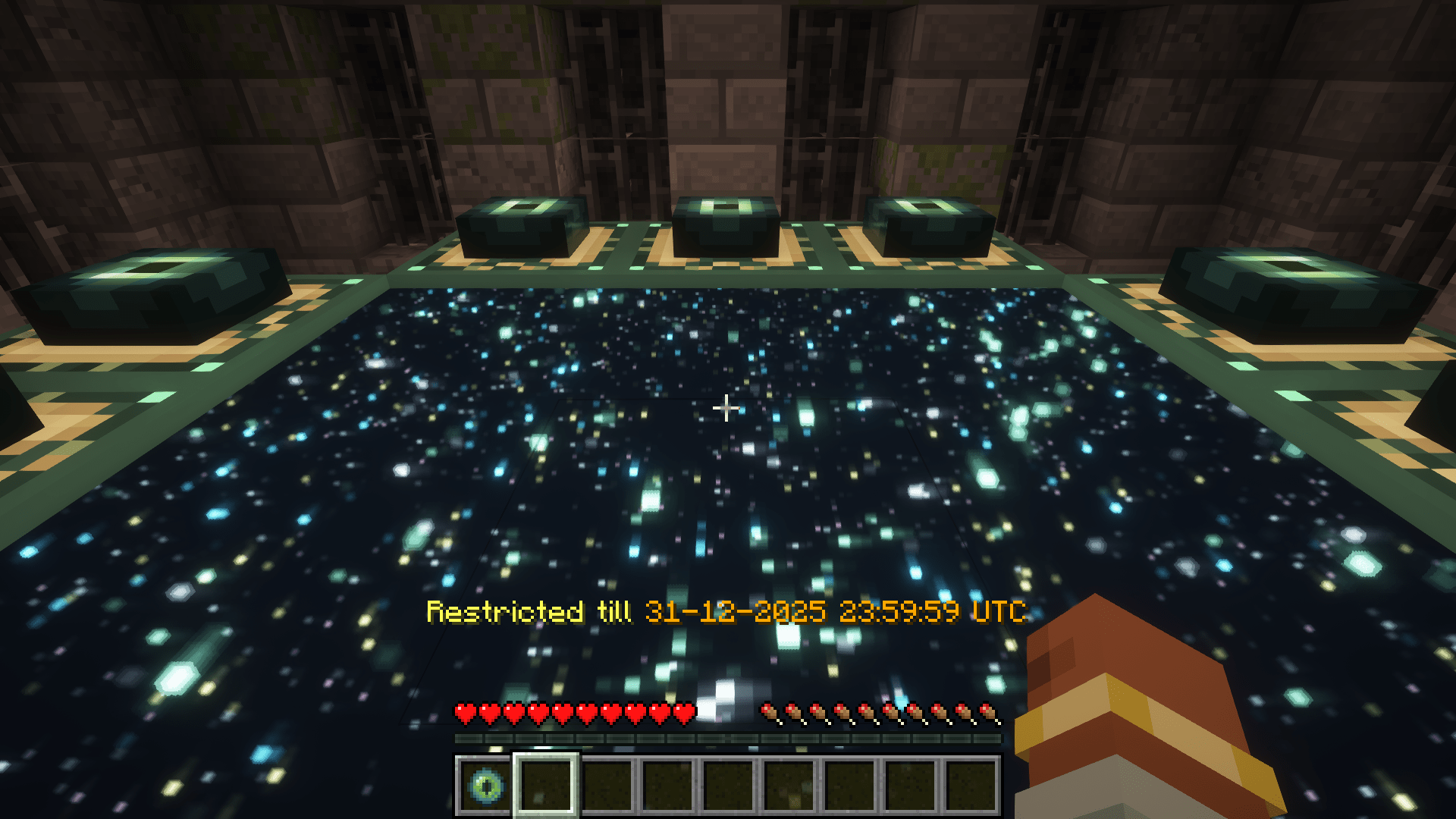
  "timedDimensionRestrictedMessage": "&eRestricted till &6%time%",
  "unrestrictedAnnouncementMessage": "&a%dimension% dimension is now open!",
  "timeRestrictions": {
    "minecraft:the_end": {
      "enabled": true,
      "timeZone": "UTC",
      "unlockDateTime": "2024-12-31T23:59:59"
    }
  }
}
Configuration Explanation
- disabledDimensions: List of dimensions that are completely disabled
- announce: Whether to announce when time-restricted dimensions unlock
- restrictedDimensionMessage: Message displayed when a player tries to access a disabled dimension
- timedDimensionRestrictedMessage: Message displayed when a player tries to access a time-restricted dimension
- unrestrictedAnnouncementMessage: Message announced when a time-restricted dimension becomes available
- timeRestrictions: List of dimensions with time-based restrictions
- enabled: Whether the time restriction is active
- timeZone: Time zone for the unlock time (uses standard time zone IDs)
- unlockDateTime: Date and time when the dimension will unlock (ISO format)
Message Formatting
Messages support Minecraft color codes using the & character:
&0to&9,&ato&f: Colors&k: Obfuscated&l: Bold&m: Strikethrough&n: Underline&o: Italic&r: Reset
In the configuration messages, you can use the following variables:
%dimension%: Will be replaced with the formatted dimension name%time%: Will be replaced with the formatted unlock time (for time-restricted dimensions)
Examples
Basic Setup: Disable The End
{
  "disabledDimensions": ["minecraft:the_end"],
  "announce": true,
  "timeRestrictions": {}
}
Time-Restricted Nether
{
  "disabledDimensions": [],
  "announce": true,
  "timeRestrictions": {
    "minecraft:the_nether": {
      "enabled": true,
      "timeZone": "America/New_York",
      "unlockDateTime": "2024-06-01T12:00:00"
    }
  }
}
Multiple Restrictions
{
  "disabledDimensions": ["minecraft:the_end"],
  "announce": true,
  "timeRestrictions": {
    "minecraft:the_nether": {
      "enabled": true,
      "timeZone": "UTC",
      "unlockDateTime": "2024-05-15T18:00:00"
    },
    "twilightforest:twilight_forest": {
      "enabled": true,
      "timeZone": "UTC",
      "unlockDateTime": "2024-07-22T15:06:20"
    }
  }
}
How It Works
- When a player or entity attempts to change dimensions including through commands or other means that use minecrafts internal code to travel through dimensions, the mod checks if the destination dimension is restricted
- If the dimension is in the
disabledDimensionslist, access is denied - If the dimension has a time restriction that hasn't passed its unlock time, access is denied
- Players with permission level 4 (operators) can bypass all restrictions when in creative mode
- The mod regularly checks if time-restricted dimensions have reached their unlock time, these checks run on a background thread to minimize performance impact
- When a time-restricted dimension becomes available, an announcement is sent to all online players (if enabled)
Compatibility
GateKeep should be compatible with most modded dimensions and forms of dimensional travel.
Gate Keep
Allows server admins to control access to dimensions. With GateKeep, you can completely restrict dimensions or set up time-based restrictions that automatically unlock at specific dates and times.
Features
- Dimension Restriction: Completely block access to any dimension
- Time-Based Restrictions: Schedule dimensions to unlock at specific dates and times
- Customizable Messages: Configure the messages players receive when attempting to access restricted dimensions
- Automated Announcements: Server-wide announcements when time-restricted dimensions become available
Configuration
GateKeep uses a JSON configuration file located at config/gatekeep.json. The config file is created automatically when the mod is first loaded (in-case of a crash or mis-behavior re-check the config and deleting it and generating a fresh one)
Configuration Options
{
  "disabledDimensions": [
    "minecraft:the_end"
  ],
  "announce": true,
  "restrictedDimensionMessage": "&c%dimension% dimension is restricted",
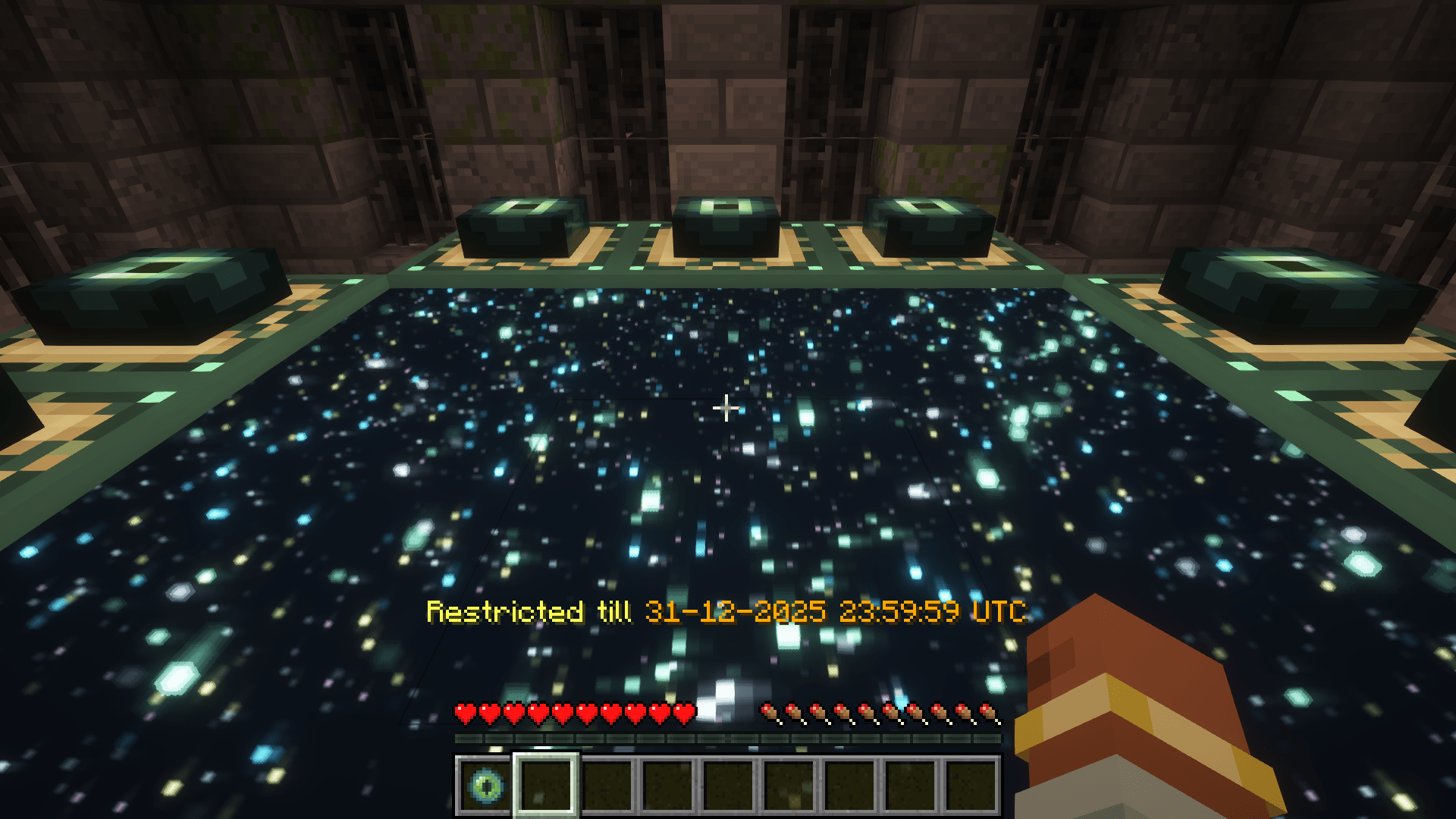
  "timedDimensionRestrictedMessage": "&eRestricted till &6%time%",
  "unrestrictedAnnouncementMessage": "&a%dimension% dimension is now open!",
  "timeRestrictions": {
    "minecraft:the_end": {
      "enabled": true,
      "timeZone": "UTC",
      "unlockDateTime": "2024-12-31T23:59:59"
    }
  }
}
Configuration Explanation
- disabledDimensions: List of dimensions that are completely disabled
- announce: Whether to announce when time-restricted dimensions unlock
- restrictedDimensionMessage: Message displayed when a player tries to access a disabled dimension
- timedDimensionRestrictedMessage: Message displayed when a player tries to access a time-restricted dimension
- unrestrictedAnnouncementMessage: Message announced when a time-restricted dimension becomes available
- timeRestrictions: List of dimensions with time-based restrictions
- enabled: Whether the time restriction is active
- timeZone: Time zone for the unlock time (uses standard time zone IDs)
- unlockDateTime: Date and time when the dimension will unlock (ISO format)
Message Formatting
Messages support Minecraft color codes using the & character:
&0to&9,&ato&f: Colors&k: Obfuscated&l: Bold&m: Strikethrough&n: Underline&o: Italic&r: Reset
In the configuration messages, you can use the following variables:
%dimension%: Will be replaced with the formatted dimension name%time%: Will be replaced with the formatted unlock time (for time-restricted dimensions)
Examples
Basic Setup: Disable The End
{
  "disabledDimensions": ["minecraft:the_end"],
  "announce": true,
  "timeRestrictions": {}
}
Time-Restricted Nether
{
  "disabledDimensions": [],
  "announce": true,
  "timeRestrictions": {
    "minecraft:the_nether": {
      "enabled": true,
      "timeZone": "America/New_York",
      "unlockDateTime": "2024-06-01T12:00:00"
    }
  }
}
Multiple Restrictions
{
  "disabledDimensions": ["minecraft:the_end"],
  "announce": true,
  "timeRestrictions": {
    "minecraft:the_nether": {
      "enabled": true,
      "timeZone": "UTC",
      "unlockDateTime": "2024-05-15T18:00:00"
    },
    "twilightforest:twilight_forest": {
      "enabled": true,
      "timeZone": "UTC",
      "unlockDateTime": "2024-07-22T15:06:20"
    }
  }
}
How It Works
- When a player or entity attempts to change dimensions including through commands or other means that use minecrafts internal code to travel through dimensions, the mod checks if the destination dimension is restricted
- If the dimension is in the
disabledDimensionslist, access is denied - If the dimension has a time restriction that hasn't passed its unlock time, access is denied
- Players with permission level 4 (operators) can bypass all restrictions when in creative mode
- The mod regularly checks if time-restricted dimensions have reached their unlock time, these checks run on a background thread to minimize performance impact
- When a time-restricted dimension becomes available, an announcement is sent to all online players (if enabled)
Compatibility
GateKeep should be compatible with most modded dimensions and forms of dimensional travel.
Screenshots
Gallery
-
restricted-dimension-msg.png restricted-dimension-msg.png
-
The End restricted message
Versions
Files
Relations
Project Relations
More like this
Similar Mods
Suggestions use data such as tags, dependencies, dependents, descriptions, titles, and more to rank how much they overlap with this mod.
On ModDex
Community snapshot
By the numbers
Statistics
Want to reach Minecraft players?
We're looking for a server hosting partner to feature here and other parts of the site. Interested? Send us a message!
Get in touchGet it on
Available Platforms
On ModDex
Community snapshot
By the numbers