Community listing page, reviews here may not be monitored by the author.

Community voices
Reviews
No reviews yet. Be the first to review this project!
Get it on
Available Platforms
Compatibility
Supported Environments
Runs entirely on the server. Also works in singleplayer.
About
Project Details
For authors
Embed Badge
If you're the author of this project, you can embed a live badge anywhere that supports HTML or Markdown. It updates automatically whenever ratings change.
Use HTML for any page that supports it, or Markdown for README files and Markdown-based descriptions.
Identifiers
Platform IDs
About
Description

Blocketing
Blocketing is a Fabric mod for seamless communication between a Discord channel and a Minecraft server, enabling bidirectional message synchronization and command execution.




✨ Features
- ✅ Syncs Minecraft and Discord messages in both directions 💬
- ✅ Join/Leave notifications with player avatars 🖼️
- ✅ Server start/stop announcements 🚀
- ✅ Toggle sending advancement and death messages to Discord 🏆
- ✅ Run Minecraft commands from Discord (permission-based) 🛠️
- ✅ Player chat webhook mode (with avatar & name) 👨
- ✅ In-game configuration via commands 🎮
- ✅ Update notifications for new mod versions 🔔
- ✅ Paginated player list and server status via Discord slash commands 📊
- ✅ Multi-server support to run multiple Minecraft server instances using the same Discord bot token (per-server channel filtering) ♾️
🚀 Installation
🔨 1. Install the Mod
- Download the latest .jar from the Releases Page.
- Place the
.jarfile in your server’smods/folder. - Start the Minecraft server with Fabric.
- Configure the bot using the in-game commands (see below).
🤖 2. Set up the Discord Bot
- Create a new Discord bot application in the Discord Developer Portal.
- Add the bot to your Discord server.
- Copy the
bot tokenfor later configuration.
🛡️ Permissions
- Minecraft:
/blocketingcommands require permission level 4 (OP). - Discord: For
/consolevia Discord, the user must have the configured OP role (if set).
⚙️ Configuration Commands
All configuration is done in-game using /blocketing commands (OP only):
Setup Discord Integration
/blocketing setup token <token>
Set the Discord bot token./blocketing setup guild <guild_id>
Set the Discord server (guild) ID./blocketing setup channel <channel_id>
Set the Discord channel ID for message sync./blocketing setup op_role <role_id>
Set the Discord role ID required to run/consolefrom Discord./blocketing setup webhook_url <url>
Set the Discord webhook URL for player chat webhook mode./blocketing setup
List available setup commands.
Feature Toggles
/blocketing toggle advancements
Enable/disable sending advancement messages to Discord./blocketing toggle deaths
Enable/disable sending death messages to Discord./blocketing toggle player_chat_mode
Enable/disable player chat webhook mode (uses webhook for chat, with player avatar and name)./blocketing toggle update-info
Enable/disable update notifications for new mod versions./blocketing toggle discord_chat_log
Enable/disable logging of Discord chat messages to the server console./blocketing toggle
List available toggles.
Other Commands
/blocketing reload
Reload the configuration and restart the Discord bot.
👥 Discord Slash Commands
/status
Show server status (TPS, MSPT, CPU, RAM, uptime, version)./players
Show online players (paginated, with navigation buttons)./console <command>
Run a Minecraft command from Discord (requires OP role if set).
💬 Player-Chat Webhook Mode
When enabled, Minecraft chat messages are sent to Discord using a webhook, displaying the player's name and avatar.
To enable, set a webhook URL and use /blocketing toggle player_chat_mode.
🔔 Notifications
- Join/Leave: Player join/leave events are announced in Discord with player avatars.
- Advancements/Deaths: Advancement and death messages can be toggled.
- Server Start/Stop: Server start/stop events are announced in Discord.
- Update Info: OPs and Discord can be notified when a new mod version is available.
❓ Need Help?
Feel free to ask questions or open an issue.
Screenshots
Gallery
-
 Minecraft chat with Discord integration Shows a Discord message in Minecraft chat, a normal Minecraft chat message, the activation of webhook chat mode, and a message sent via Discord /command.
 -
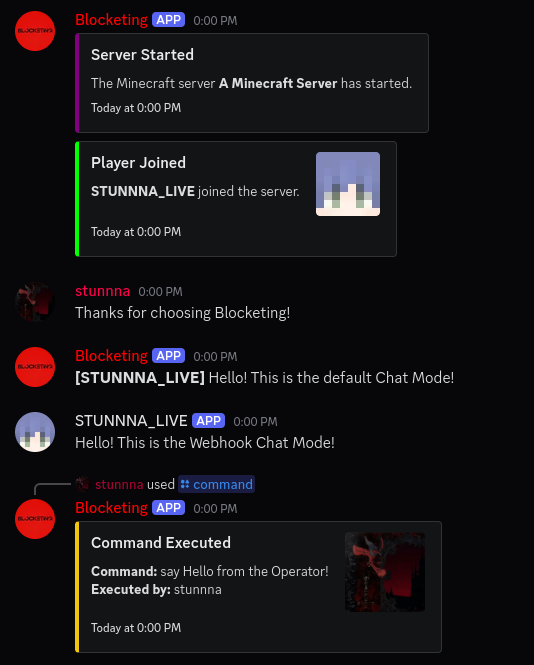 Discord channel with Minecraft events Shows server startup, player joining, a Discord message, Minecraft chat messages (with and without webhook mode), and an executed /command command.
 -
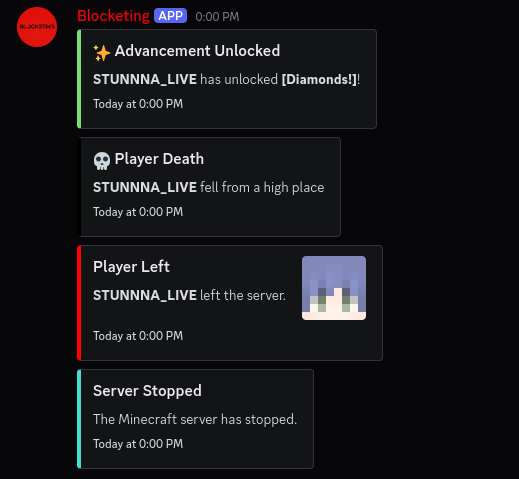 Discord-Channel: Minecraft-Events & Status Displays advancement messages, death messages, player disconnects, and server shutdowns as sent by Minecraft to Discord.
Versions
Files
Relations
Project Relations
More like this
Similar Mods
Suggestions use data such as tags, dependencies, dependents, descriptions, titles, and more to rank how much they overlap with this mod.
On ModDex
Community snapshot
By the numbers
Statistics

Want to reach Minecraft players?
We're looking for a server hosting partner to feature here and other parts of the site. Interested? Send us a message!
Get in touchGet it on
Available Platforms
On ModDex
Community snapshot
By the numbers