
Community listing page, reviews may not be monitored by the author.
BlockKino

No reviews yet
Youtube Cinema Stream Screen

Community voices
Reviews
No reviews yet. Be the first to review this project!
Get it on
Available Platforms
About
Project Details
For authors
Embed Badge
If you're the author of this project, you can embed a live badge anywhere that supports HTML or Markdown. It updates automatically whenever ratings change.
Use HTML for any page that supports it, or Markdown for README files and Markdown-based descriptions.
Identifiers
Platform IDs
Resources
External Links
About
Description
Blockkino – Your Own Cinema in Minecraft
Build a screen out of blocks, paste a YouTube link, and watch together with your friends! Blockkino synchronizes playback through the server, turning your Minecraft world into a Cinema
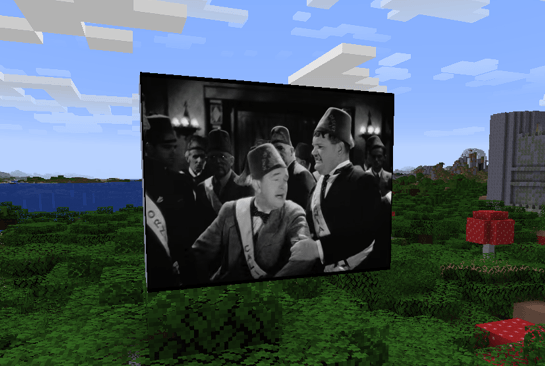
Features
-
Custom-sized screens: Choose the width and height of your rectangular screen. The size limit can be adjusted in the server configuration.
-
Watch together: Play, pause, and seek controls manage shared playback. Viewers who join later receive the current playback position.
-
Dedicated remote control: A craftable item with a custom 3D model opens the cinema controls.
-
YouTube support: Load videos using YouTube, Shorts, Live, or youtu.be links. Timestamps included in links are supported.
-
Automatic player switching: If YouTube blocks a video from being embedded, Blockkino automatically switches to the YouTube webpage view.
-
Built-in ad filter: Toggle it locally using the remote control.
-
Distance-based audio: Volume decreases as you move away from the screen.
-
Persistent screens: Your cinemas remain saved across world and server restarts.
-
Automatic language selection: The menu follows each player’s Minecraft language setting.
Supported languages: German, English, French, Spanish, Italian, Brazilian Portuguese, Polish, and Dutch.
How It Works
-
Build a complete, vertical, rectangular wall using Cinema Screen Blocks.
-
Use the Cinema Remote to click two diagonally opposite corners on the same front face.
-
Paste a YouTube link into the menu and start the video.
-
Sit back and watch with other players!
You can reopen an existing screen’s controls by interacting with its front face using the remote or an empty hand.
Crafting
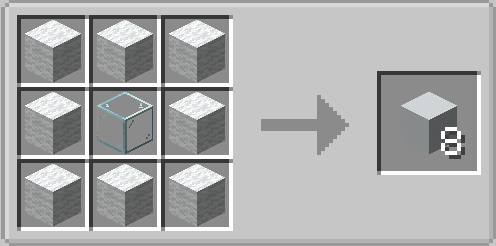
Screen Blocks: Eight white wool blocks surrounding one glass block produce eight Screen Blocks.
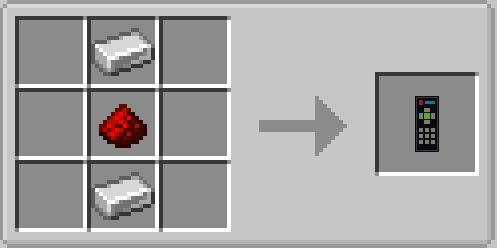
Remote Control: Place an iron ingot, redstone dust, and another iron ingot in a vertical column.
Screenshots
Gallery
Versions
Files
Relations
Project Relations
More like this
Similar Mods
Suggestions use data such as tags, dependencies, dependents, descriptions, titles, and more to rank how much they overlap with this mod.
On ModDex
Community snapshot
By the numbers
Statistics

Get it on
Available Platforms
On ModDex
Community snapshot
By the numbers
Statistics
Resources