Community listing page, reviews here may not be monitored by the author.
Blocky File


No reviews yet
Use blocks to store files in the Minecraft world.
Community voices
Reviews
No reviews yet. Be the first to review this project!
Get it on
Available Platforms
Compatibility
Supported Environments
Runs entirely on the client. Works on vanilla servers.
About
Project Details
For authors
Embed Badge
If you're the author of this project, you can embed a live badge anywhere that supports HTML or Markdown. It updates automatically whenever ratings change.
Use HTML for any page that supports it, or Markdown for README files and Markdown-based descriptions.
Identifiers
Platform IDs
About
Description
BlockyFile
A client-side mod that uses blocks to store files in the Minecraft world. In-game configuration GUI is supported when Cloth Config is installed.
This mod only accesses files explicitly selected by the user in the command argument. Please note that you should not share files containing sensitive personal information!
This mod allows you to store files from your computer into blocks in the Minecraft world and recover those files from those blocks. The mod uses a configurable block palette to map file bits to Minecraft blocks.
With this mod, you can treat Minecraft as a binary file viewer and editor, visualizing the bytes of a file or editing it by changing blocks. You can also save files to game saves, use them as Easter eggs, or as a fun way to transfer files, and even share files with friends in multiplayer mode!
In single-player mode, this mod directly manipulates the server world to place and load blocks. Otherwise, it uses /setblock to place blocks and loads them from the client world.
Supported Minecraft versions:
- Fabric 1.21.4~1.21.11
- NeoForge/Forge 1.21.6~1.21.11
Commands
- Store a file as blocks / Read a file from blocks:
blockyfile file <store|load> <x1> <y1> <z1> <x2> <y2> <z2> <axisOrder> <filename> - Reload the configuration file:
blockyfile config reload - Import block palette from the clipboard / Export block palette to the clipboard:
blockyfile palette <import|export> clipboard - Import block palette from a file / Export block palette to a file:
blockyfile palette <import|export> file <filename> - Import block palette from blocks in the world / Export block palette to blocks in the world:
blockyfile palette <import|export> world <x1> <y1> <z1> <x2> <y2> <z2> <axisOrder>
Thanks
Thanks to Xiamo-vip/WoolFileStorage-1.21.10 for the inspiration.
Its video on Bilibili: 将文件转储在我的世界里_哔哩哔哩bilibili_Minecraft_游戏集锦
BlockyFile
A client-side mod that uses blocks to store files in the Minecraft world. In-game configuration GUI is supported when Cloth Config is installed.
This mod only accesses files explicitly selected by the user in the command argument. Please note that you should not share files containing sensitive personal information!
This mod allows you to store files from your computer into blocks in the Minecraft world and recover those files from those blocks. The mod uses a configurable block palette to map file bits to Minecraft blocks.
With this mod, you can treat Minecraft as a binary file viewer and editor, visualizing the bytes of a file or editing it by changing blocks. You can also save files to game saves, use them as Easter eggs, or as a fun way to transfer files, and even share files with friends in multiplayer mode!
In single-player mode, this mod directly manipulates the server world to place and load blocks. Otherwise, it uses /setblock to place blocks and loads them from the client world.
Supported Minecraft versions:
- Fabric 1.21.4~1.21.11
- NeoForge/Forge 1.21.6~1.21.11
Commands
-
Store a file as blocks / Read a file from blocks:
blockyfile file <store|load> <x1> <y1> <z1> <x2> <y2> <z2> <axisOrder> <filename> -
Reload the configuration file:
blockyfile config reload -
Import block palette from the clipboard / Export block palette to the clipboard:
blockyfile palette <import|export> clipboard -
Import block palette from a file / Export block palette to a file:
blockyfile palette <import|export> file <filename> -
Import block palette from blocks in the world / Export block palette to blocks in the world:
blockyfile palette <import|export> world <x1> <y1> <z1> <x2> <y2> <z2> <axisOrder>
Thanks
Thanks to Xiamo-vip/WoolFileStorage-1.21.10 for the inspiration.
Its video on Bilibili: 将文件转储在我的世界里_哔哩哔哩bilibili_Minecraft_游戏集锦
Screenshots
Gallery
-
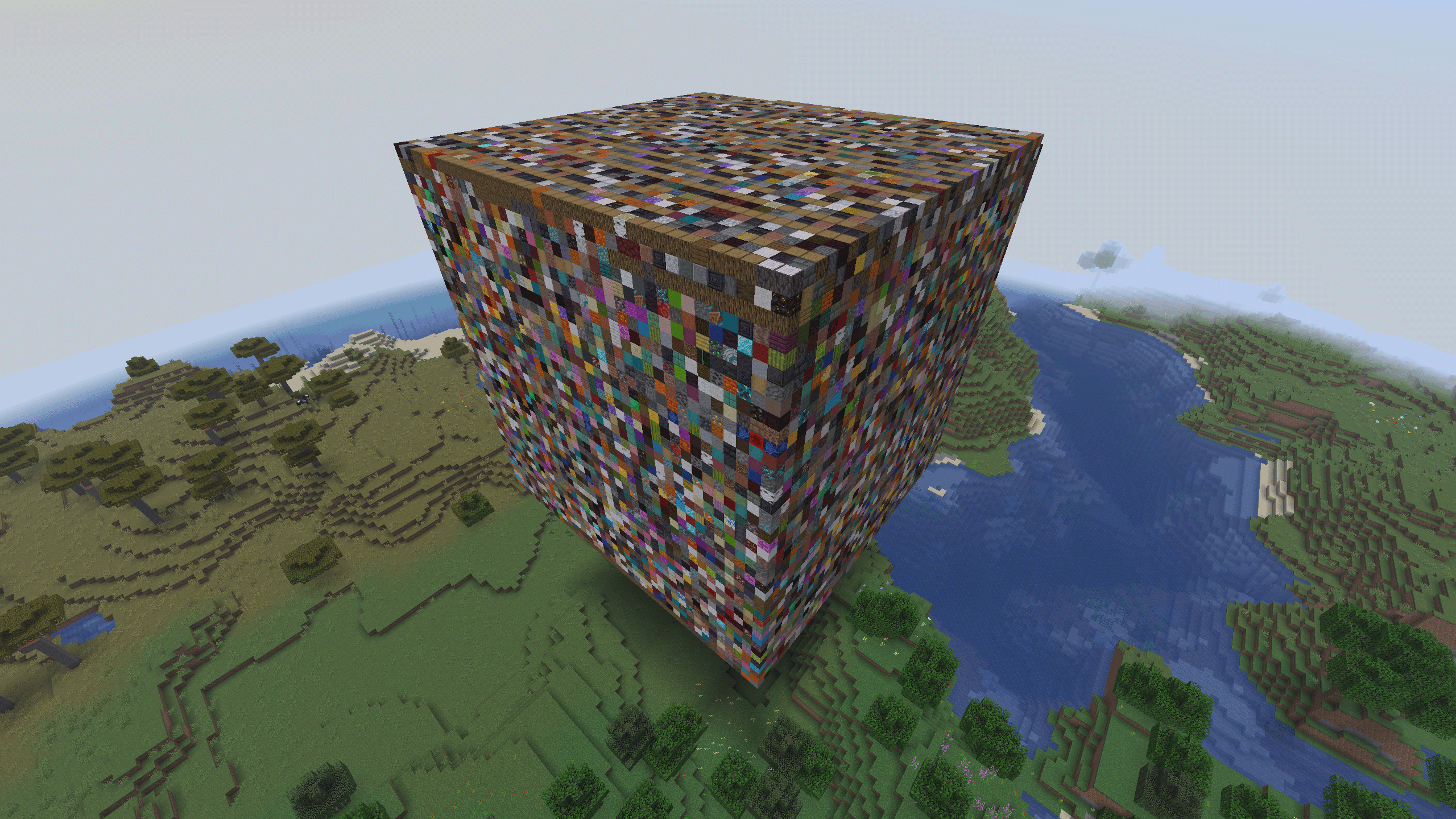 Blocky Mod JAR File The JAR file of v0.1-neoforge-1.21 stored in Minecraft world.
-
 Blocky Mod JAR File The JAR file of v0.1-neoforge-1.21 stored in Minecraft world.
Versions
Files
Relations
Project Relations
More like this
Similar Mods
Suggestions use data such as tags, dependencies, dependents, descriptions, titles, and more to rank how much they overlap with this mod.
On ModDex
Community snapshot
By the numbers
Statistics
Want to reach Minecraft players?
We're looking for a server hosting partner to feature here and other parts of the site. Interested? Send us a message!
Get in touchGet it on
Available Platforms
On ModDex
Community snapshot
By the numbers