
Community listing page, reviews here may not be monitored by the author.
BLZYの自定义进度

No reviews yet
Replaces the vanilla advancement screen with a fully customizable canvas-based achievement system featuring 7 condition types with NBT item matching, prerequisite chains, dimension locking, batch editing, vanilla browsing, and real-time server sync.
Community voices
Reviews
No reviews yet. Be the first to review this project!
Get it on
Available Platforms
About
Project Details
For authors
Embed Badge
If you're the author of this project, you can embed a live badge anywhere that supports HTML or Markdown. It updates automatically whenever ratings change.
Use HTML for any page that supports it, or Markdown for README files and Markdown-based descriptions.
Identifiers
Platform IDs
Resources
External Links
About
Description
Advancement Overhaul is a comprehensive rework of the Minecraft advancement system for version 1.21.1 (NeoForge). It completely replaces the vanilla advancement screen and backend logic with a feature-rich **infinite canvas UI** supporting free zoom, pan, and drag-and-drop editing, **10 condition types**, **prerequisite dependency chains**, **dimension locking**, **vanilla advancement management**, a complete `/adv` command tree, and deep **KubeJS** and **FTB Quests** compatibility. The mod serves both survival players and modpack/map creators, enabling real-time in-game creation, editing, import, and export of custom advancements.
---
### I. Main Features
#### 1.1 Vanilla Advancement Disabling & Management
The mod provides **fine-grained control** over vanilla (and other mods') advancements:
- **Default disabled**: Config option `vanilla.defaultEnabled` defaults to `false` — all vanilla advancements are disabled on first install and must be explicitly enabled.
- **Namespace whitelist**: Use `mods.enabledMods` to auto-enable advancements from specific mod namespaces (e.g. `["minecraft", "create"]`), with auto-generated tabs.
- **Per-advancement toggle**: `/adv vanilla enable <id>` / `/adv vanilla disable <id>` for individual control.
- **Batch operations**: `/adv vanilla enableall` / `/adv vanilla disableall` for one-click enable/disable all.
- **Runtime filtering**: Via `AdvancementManagerMixin`, disabled vanilla advancements are removed from the runtime map during loading — they are completely invisible and untriggerable.
- **Login check**: On player login, all disabled-but-completed advancements are automatically revoked to clean up residual completion state.
- **Server-side interception**: Even if a disabled advancement is somehow triggered (e.g. via command), `ServerEventHandler` immediately revokes it.
**Workflow**:
```
Server startup / reload
└── AdvancementManager.apply()
├── [Mixin HEAD] Cache vanilla JSON → Inject custom advancements
└── [Mixin RETURN] Filter disabled vanilla → Keep only enabled
└── filterDisabledVanillaFromMap()
├── defaultEnabled = false → Remove all not in enabled list
└── defaultEnabled = true → Remove only explicitly disabled
```
#### 1.2 Custom Canvas UI & Tree-Style Parent-Child Display
A brand-new infinite canvas UI completely replaces the vanilla advancement screen:
- **Infinite canvas**: Mouse-wheel zoom (cursor-centered), middle-click/drag panning with smooth inertia.
- **Advancement cards**: Each advancement rendered as a card with icon, name, completion indicator, and condition progress bar.
- **Tree-style dependency lines**:
- **Right-angle tree layout** for prerequisite relationships: parent vertical line → horizontal segment → child vertical line, with rounded connection points at corners.
- Auto-detects three dependency sources: custom advancement prerequisites, vanilla parent relationships, and vanilla advancement linked custom prerequisites (VanillaAdvMeta).
- Color-coded lines by state: normal, completed (green highlight), selected item's prerequisites/successors.
- Selecting an advancement highlights its **direct prerequisites** and **direct children** with distinct card background colors.
- **Tree layout**: BFS traversal of the vanilla advancement parent map computes each advancement's tree depth, grouping them into layers.
- **Auto layout** (`AutoLayout`): Three-phase DAG topological sort algorithm — Phase 1: top-down barycenter heuristic → Phase 2: bottom-up parent centering → Phase 3: final overlap correction. Supports simultaneous layout of custom and vanilla advancements.
- **Tab system**: Multi-tab switching, drag-to-reorder, rename, create/delete custom tabs for organizing advancements.
- **Spatial grid index**: Cards are bucketed into 480px grid cells by world coordinates; rendering only processes cells within the viewport, supporting thousands of cards at high frame rates.
#### 1.3 Cat Paw Achievement Plaque
When a player completes an advancement, an elegant **cat-themed** plaque HUD animation appears at the top of the screen:
- **Visual design**:
- Deep purple background (`#24163E` / `#362058`) with lavender border (`#E8C0FF`)
- Gold title text "✦ Achievement Unlocked ✦"
- Symmetrical **full cat paw prints** (1 main pad + 4 toe pads in fan arrangement, light pink `#FFB6C1`)
- Mini paw decorations flanking the divider line
- Paw trail footprints at the bottom (pairs of tiny paw prints)
- Sparkle stars at the corners
- **Animation**:
- **Slide-in** (400ms): `easeOutBack` overshoot easing, gracefully drops from above
- **Hold** (2400ms): Fully displayed
- **Fade-out** (300ms): `easeInQuad` fade
- **Queue system**: Multiple achievements completed simultaneously are queued and displayed sequentially without overlap.
- **FTB Quest completion**: Also triggers the plaque when an FTB Quests task is completed.
- Implemented as a HUD Overlay, visible regardless of what screen is currently open.
---
### II. Dimension Management
The dimension locking system prevents players from entering specific dimensions until they complete designated advancements:
- **Lock a dimension**: `/adv dimension lock <dim>` — prevents entry
- **Unlock a dimension**: `/adv dimension unlock <dim>` — removes the lock
- **Set unlock condition**: `/adv dimension setcondition <dim> <advId>` — binds an advancement as the unlock requirement
- **Remove unlock condition**: `/adv dimension removecondition <dim>` — removes condition (dimension stays locked but requires no advancement)
**How it works**:
1. When a player attempts to travel to a locked dimension, `ServerEventHandler.onEntityTravelToDimension()` intercepts the teleport event
2. Checks the target dimension's `DimensionLock`: if `disabled = true` and the player hasn't completed the `unlockAdvancementId` advancement
3. Cancels the teleport event, teleports the player to a safe location in the current dimension (prioritizes respawn point, then safe ground near the portal)
4. Sends a notification message to the player
5. 1-second cooldown prevents duplicate messages within the same tick
**Data persistence**: Dimension lock configuration is persisted in `ServerDataStore` as JSON.
---
### III. Custom Images
Add PNG images freely on the infinite canvas for decoration or backgrounds:
- **Image directory**: `config/advancement_overhaul/images/` (manually place PNG files here)
- **Persistence file**: `config/advancement_overhaul/image_elements.json` (stores image positions and properties)
- **Format**: PNG only, max 16MB
- **Operations**:
- Right-click empty canvas → context menu → "Create Image" → select file from images/ directory
- Images can be **dragged** to reposition
- Images can be **scaled** (zoom in 1.25x / zoom out 0.8x), range 0.1x ~ 5.0x
- Images can be **locked** to prevent accidental dragging
- Right-click image to delete
- **Rendering**: Uses `DynamicTexture` + `NativeImage` loaded as Minecraft textures, registered with TextureManager
---
### IV. Config Settings
Config file: `config/advancementoverhaul-common.toml` (NeoForge COMMON type, shared between server and client)
| Setting | Type | Default | Description |
|--------|------|--------|-------------|
| `interface.hideVanilla` | boolean | `false` | Replace vanilla advancements screen with custom Canvas UI |
| `permission.editPermissionLevel` | int (0-4) | `2` | Minimum permission level for edit commands (2 = OP level) |
| `toast.duration` | int (ms) | `3000` | Toast notification display duration (500-30000ms) |
| `performance.playerDataSaveInterval` | int (ticks) | `6000` | Periodic player data save interval (~5 minutes) |
| `vanilla.defaultEnabled` | boolean | `false` | Default state for vanilla/mod advancements (false = disabled by default) |
| `mods.enabledMods` | List\<String\> | `[]` | Namespace whitelist for auto-enabled mods (e.g. `["minecraft", "create"]`) |
---
### V. Command System
Main command is `/adv`, with tiered permissions and tab-completion.
#### Player Operations
| Command | Description |
|------|-------------|
| `/adv complete <id> [player]` | Force-complete an advancement (skips prerequisite checks) |
| `/adv reset <player> <id\|all>` | Reset a player's advancement(s) |
| `/adv give <id> [player]` | Grant an advancement |
| `/adv revoke <id> [player]` | Revoke an advancement |
| `/adv check <id>` | Check advancement status (completed/pending/progress %) |
#### CRUD Operations
| Command | Description |
|------|-------------|
| `/adv delete <id>` | Delete a custom advancement |
| `/adv batchdelete <ids,...>` | Batch delete |
| `/adv setname <id> <name>` | Set display name |
| `/adv setdescription <id> <desc>` | Set description |
| `/adv seticon <id> <icon>` | Set icon (item/entity/block ID) |
| `/adv togglehidden <id>` | Toggle hidden state |
| `/adv setprereq <id> <ids,...>` | Set prerequisites (with circular dependency BFS check) |
| `/adv createjson <json>` | Create advancement from JSON |
| `/adv updatejson <json>` | Update advancement from JSON |
#### Utility Commands
| Command | Description |
|------|-------------|
| `/adv import` | Import data by scanning JSON files from `import/` folder |
| `/adv export` | Export all data to `export/` folder |
| `/adv autolayout` | Run auto-layout on the current tab |
| `/adv reload` | Reload all data and re-sync |
#### Dimension Management
| Command | Description |
|------|-------------|
| `/adv dimension lock <dim>` | Lock a dimension |
| `/adv dimension unlock <dim>` | Unlock a dimension |
| `/adv dimension setcondition <dim> <advId>` | Set unlock condition |
| `/adv dimension removecondition <dim>` | Remove unlock condition |
#### Tab Management
| Command | Description |
|------|-------------|
| `/adv tab add <name>` | Create a new tab |
| `/adv tab delete <name>` | Delete a tab |
| `/adv tab order <name1,name2,...>` | Set tab ordering |
#### Vanilla Advancement Management
| Command | Description |
|------|-------------|
| `/adv vanilla enable <id>` | Enable a single vanilla advancement |
| `/adv vanilla disable <id>` | Disable a single vanilla advancement |
| `/adv vanilla enableall` | Enable all vanilla advancements |
| `/adv vanilla disableall` | Disable all vanilla advancements |
| `/adv vanilla setpos <id> <x> <y>` | Set the advancement's position on canvas |
| `/adv vanilla settab <id> <tab>` | Assign vanilla advancement to a tab |
| `/adv vanilla cleartab <id>` | Clear a vanilla advancement's tab assignment |
| `/adv vanilla save <id>` | Save current configuration for a vanilla advancement |
---
### VI. KubeJS Compatibility
The mod auto-registers as a KubeJS plugin via `kubejs.plugins.txt`, providing two types of integration:
#### 6.1 Script API (Bindings)
Call directly through the `AdvancementOverhaul` object in KubeJS scripts:
```javascript
// Query
AdvancementOverhaul.getAllIds() // Get all custom advancement IDs
AdvancementOverhaul.getName("my_adv") // Get advancement display name
AdvancementOverhaul.isCompleted(event.player, "my_adv") // Check if completed
AdvancementOverhaul.getProgress(event.player, "my_adv") // Progress percentage (0-100)
// Actions
AdvancementOverhaul.complete(event.player, "my_adv") // Force-complete
AdvancementOverhaul.reset(event.player, "my_adv") // Reset
// Creation (fluent builder)
AdvancementOverhaul.builder("my_adv")
.name("My Achievement")
.description("Description")
.tab("Default")
.pos(100, 200)
.hidden(false)
.condition("kill_entity", "minecraft:zombie", 10)
.conditionNbt("kill_entity", "minecraft:skeleton", 20, "{}")
.prerequisite("other_adv_id")
.register()
```
#### 6.2 Event Listening
Listen to mod events in KubeJS scripts:
```javascript
// Advancement completed event
AdvancementOverhaul.completed(event => {
console.log(`Player ${event.player.name} completed ${event.advancementId}`)
console.log(`Achievement name: ${event.advancementName}`)
})
// Progress update event
AdvancementOverhaul.progress(event => {
console.log(`${event.advancementId}: ${event.progress}/${event.total}`)
if (event.completed) {
// completed when progress >= total
}
})
// Advancement reset event
AdvancementOverhaul.reset(event => {
console.log(`${event.advancementId} was reset for ${event.player.name}`)
})
```
---
### VII. FTB Quests Compatibility
The mod implements **deep bidirectional integration** with FTB Quests:
#### 7.1 FTB Quests as Advancement Conditions
- The `FTB_QUEST_COMPLETE` condition type allows FTB quest completion to serve as a prerequisite for custom advancements
- Detects completions via both **Architectury event listening** (real-time) and **Tick polling** (every 20 ticks, as fallback)
- Automatically triggers condition evaluation and cascade release on quest completion
#### 7.2 FTB Advancement Reward Condition Check
- When an FTB quest rewards a custom advancement, `AdvancementRewardMixin` intercepts the `claim()` method **before** `award()` executes
- If the advancement is custom and conditions are not met, the `claim()` call is directly cancelled — **no grant-then-revoke race condition**
- If conditions are met, the call proceeds normally; subsequent events sync to the custom system
#### 7.3 KnownServerRegistries Sync
- Automatically registers custom advancement IDs into FTB's `KnownServerRegistries`, ensuring the FTB team UI correctly displays advancement completion status
- Syncs automatically on client connection; gracefully degrades when FTB Quests is not loaded
- Retrieves FTB Quests version via reflection and logs it
#### 7.4 Attribute Change Notification
- When advancement properties (name, icon, description, hidden state, prerequisites) change, automatically calls `ServerQuestFile.markDirty()` to notify FTB to save
---
### VIII. Technical Details
| Item | Description |
|------|-------------|
| MC Version | 1.21.1 |
| Mod Loader | NeoForge |
| Java Version | 21 |
| Config Type | COMMON (shared server + client) |
| Data Format | JSON (stored in `advancements/`, `players/`, `tabs/`, `vanilla/` directories) |
| Condition Types | 10 (KILL_ENTITY / CRAFT_ITEM / GET_ITEM / BREAK_BLOCK / PLACE_BLOCK / CHANGE_DIMENSION / DEAL_DAMAGE / TAKE_DAMAGE / FISH_ITEM / FTB_QUEST_COMPLETE) |
| Condition Logic | AND (all conditions must be met) |
| Evaluation Modes | Instant (one-shot) / Progress (cumulative) / Stack-aware (GET_ITEM inventory tracking) |
| NBT Match Modes | IGNORE / CONTAINS / EXACT / NONE_EMPTY |
| Cascade Completion | BFS stack traversal, 64-layer limit, circular dependency safe |
| Network Sync | Full sync (GZIP compressed) + Incremental sync (real-time progress) |
| C2S Security | Command whitelist + rate limiting (5/sec) + server-side permission re-verification |
New custom resource replacement system
Resource folder
When starting up, automatically create the folder and README.txt description file in config/advancementoverhaul/resources/.
Replaceable Resources
Resource FileName Format Description
Plaque Texture plaque.png PNG (Recommended size: 240×56) Replace the background of the plaque, with text superimposed on top
Completion Sound Effect chime.wav mp3 PCM Completely replace the default amethyst melody
-----------------------------------------------------------------------------------------------------------------------
dvancement Overhaul 是一款面向 Minecraft 1.21.1(NeoForge)的进度系统全面重构模组。它完全替换原版进度界面与底层逻辑,提供可自由缩放、拖拽、编辑的**无限画布 UI**、**10 种条件类型**、**前置依赖链**、**维度锁定**、**原版进度管理**、完整的 `/adv` 命令树以及 **KubeJS** 和 **FTB Quests** 深度兼容。模组同时面向生存玩家和整合包/地图作者,支持在游戏中实时创建、编辑、导入导出自定义进度。
---
### 一、主要功能
#### 1.1 原版成就的禁用与管理
本模组允许对原版(及其他模组)的成就是进行**精细控制**:
- **默认禁用**:配置项 `vanilla.defaultEnabled` 默认为 `false`,所有原版成就在首次安装时默认禁用,需要手动启用。
- **按命名空间白名单**:通过 `mods.enabledMods` 配置自动启用的模组命名空间列表(如 `["minecraft", "create"]`),该模组下所有成就自动创建分类并启用。
- **单个启用/禁用**:`/adv vanilla enable <id>` / `/adv vanilla disable <id>` 对单个原版成就进行开关。
- **批量操作**:`/adv vanilla enableall` / `/adv vanilla disableall` 一键启用或禁用所有原版成就。
- **运行时过滤**:通过 `AdvancementManagerMixin` 在进度加载阶段将禁用的原版进度从运行时 Map 中移除,禁用进度完全不可见、不可触发。
- **玩家登录检查**:玩家登录时自动撤销所有已被禁用的原版进度,防止残留完成状态。
- **服务端拦截**:即使某些途径(如命令)触发了被禁用的原版进度,`ServerEventHandler` 也会立即撤销。
**工作流程**:
```
服务器启动 / reload
└── AdvancementManager.apply()
├── [Mixin HEAD] 缓存原版 JSON → 注入自定义进度
└── [Mixin RETURN] 过滤禁用的原版进度 → 仅保留启用的
└── filterDisabledVanillaFromMap()
├── defaultEnabled = false → 移除所有不在启用列表中的
└── defaultEnabled = true → 仅移除明确禁用的
```
#### 1.2 自定义画布 UI 与父子成就树形显示
模组提供全新的无限画布 UI,完全取代原版进度界面:
- **无限画布**:支持鼠标滚轮缩放(以光标为中心)、中键/拖拽平移,带平滑惯性动画。
- **成就卡片**:每个进度以卡片形式在画布上展示,包含图标、名称、完成状态指示和条件进度条。
- **树形依赖连线**:
- 采用**直角树状图**风格绘制成就之间的前置依赖关系:父级竖线 → 水平线段 → 子级竖线,拐点处有圆角连接点。
- 自动识别三种依赖来源:自定义进度前置条件、原版 parent 关系、原版进度关联的自定义前置条件(VanillaAdvMeta)。
- 连线颜色区分状态:普通连线、已完成连线(绿色高亮)、选中项的前置/后继连线。
- 选中某个成就时,其**直系前置**和**直系后继**卡片分别以不同背景色高亮显示。
- **树形布局**:通过 BFS 遍历原版进度的 parent 关系计算每个进度的树深度,按层分组排列。
- **自动布局**(`AutoLayout`):基于 DAG 拓扑排序的三阶段布局算法——Phase 1 自顶向下重心启发式 → Phase 2 自底向上父节点居中 → Phase 3 最终重叠修正,支持同时布局自定义和原版进度。
- **标签页系统**:支持多标签页切换、拖拽排序、重命名、创建/删除,可将不同进度分类组织。
- **空间网格索引**:将卡片按世界坐标分桶到 480px 的网格单元,渲染时仅处理视口范围内的单元格,支持千级卡片流畅渲染。
#### 1.3 猫爪成就牌匾
当玩家完成一个成就时,屏幕顶部会出现一个带有**猫咪元素**的精美牌匾 HUD 动画:
- **视觉设计**:
- 深紫色背景(`#24163E` / `#362058`)搭配薰衣草色边框(`#E8C0FF`)
- 金色标题文字 "✦ 成就达成 ✦"
- 左右对称的**完整小猫爪印**(1 个主肉垫 + 4 个趾垫扇形排列,浅粉色 `#FFB6C1`)
- 分隔线两侧各有迷你猫爪装饰
- 底部脚印轨迹(成对的迷你爪印)
- 四角星星闪烁点缀
- **动画效果**:
- **滑入阶段**(400ms):`easeOutBack` 回弹缓出曲线,从屏幕上方优雅落位
- **停留阶段**(2400ms):完全显示
- **淡出阶段**(300ms):`easeInQuad` 渐隐
- **队列系统**:同时完成多个成就时自动排队依次展示,不会重叠
- **FTB 任务完成**:FTB Quests 任务完成时也会触发牌匾显示
- 通过 HUD Overlay 实现,无论当前打开什么界面都能显示
---
### 二、维度管理
通过维度锁定系统,可以在玩家完成指定成就之前阻止其进入特定维度:
- **锁定维度**:`/adv dimension lock <dim>` 阻止玩家进入指定维度
- **解锁维度**:`/adv dimension unlock <dim>` 解除锁定
- **设置解锁条件**:`/adv dimension setcondition <dim> <advId>` 绑定一个成就作为解锁条件
- **移除解锁条件**:`/adv dimension removecondition <dim>` 移除条件(维度保持锁定但无需成就解锁)
**工作机制**:
1. 玩家尝试传送至被锁定的维度时,`ServerEventHandler.onEntityTravelToDimension()` 拦截传送事件
2. 检查目标维度的 `DimensionLock`:如果 `disabled = true` 且玩家未完成 `unlockAdvancementId` 指定的成就
3. 取消传送事件,将玩家传送到当前维度的安全位置(优先重生点,其次传送门周围地面)
4. 向玩家发送提示消息
5. 1 秒冷却防止同一 tick 内多次弹出消息
**数据存储**:维度锁配置持久化在 `ServerDataStore` 中,以 JSON 格式存储。
---
### 三、自定义图片
在无限画布上可以自由添加 PNG 图片作为装饰或背景:
- **图片存放目录**:`config/advancement_overhaul/images/`(手动放入 PNG 文件)
- **持久化文件**:`config/advancement_overhaul/image_elements.json`(保存图片位置和属性)
- **格式限制**:仅支持 `.png`,最大 16MB
- **操作方式**:
- 右键空白画布 → 上下文菜单 → "创建图片" → 从 images/ 目录选择文件
- 图片可**拖动**移动位置
- 图片可**缩放**(放大 1.25x / 缩小 0.8x),缩放范围 0.1x ~ 5.0x
- 图片可**锁定**防止误拖动
- 右键图片可删除
- **渲染**:使用 `DynamicTexture` + `NativeImage` 加载为 Minecraft 纹理,注册到 TextureManager
---
### 四、Config 设置
配置文件路径:`config/advancementoverhaul-common.toml`(NeoForge COMMON 类型,服务端+客户端共享)
| 配置项 | 类型 | 默认值 | 说明 |
|--------|------|--------|------|
| `interface.hideVanilla` | boolean | `false` | 是否用自定义 Canvas UI 替换原版进度界面 |
| `permission.editPermissionLevel` | int (0-4) | `2` | 编辑命令所需的最低权限等级(2 = OP 级别) |
| `toast.duration` | int (ms) | `3000` | Toast 通知显示时长(500-30000ms) |
| `performance.playerDataSaveInterval` | int (ticks) | `6000` | 玩家数据定期保存间隔(约 5 分钟) |
| `vanilla.defaultEnabled` | boolean | `false` | 原版/模组进度的默认启用状态(false = 默认禁用) |
| `mods.enabledMods` | List\<String\> | `[]` | 自动启用的模组命名空间白名单(如 `["minecraft", "create"]`) |
---
### 五、指令系统
主命令为 `/adv`,支持权限分级和 Tab 补全。
#### 玩家操作
| 命令 | 说明 |
|------|------|
| `/adv complete <id> [player]` | 强制完成成就(跳过前置条件检查) |
| `/adv reset <player> <id\|all>` | 重置玩家单个或全部进度 |
| `/adv give <id> [player]` | 授予成就 |
| `/adv revoke <id> [player]` | 撤销成就 |
| `/adv check <id>` | 查看进度状态(完成/待定/进度百分比) |
#### CRUD 操作
| 命令 | 说明 |
|------|------|
| `/adv delete <id>` | 删除自定义成就 |
| `/adv batchdelete <ids,...>` | 批量删除 |
| `/adv setname <id> <name>` | 设置名称 |
| `/adv setdescription <id> <desc>` | 设置描述 |
| `/adv seticon <id> <icon>` | 设置图标(物品/实体/方块 ID) |
| `/adv togglehidden <id>` | 切换隐藏状态 |
| `/adv setprereq <id> <ids,...>` | 设置前置条件(含循环依赖 BFS 检测) |
| `/adv createjson <json>` | 通过 JSON 创建成就 |
| `/adv updatejson <json>` | 通过 JSON 更新成就 |
#### 工具命令
| 命令 | 说明 |
|------|------|
| `/adv import` | 从 `import/` 文件夹扫描 JSON 文件导入数据 |
| `/adv export` | 导出所有数据到 `export/` 文件夹 |
| `/adv autolayout` | 对当前标签页执行自动布局 |
| `/adv reload` | 重载所有数据并重新同步 |
#### 维度管理
| 命令 | 说明 |
|------|------|
| `/adv dimension lock <dim>` | 锁定维度 |
| `/adv dimension unlock <dim>` | 解锁维度 |
| `/adv dimension setcondition <dim> <advId>` | 设置解锁条件 |
| `/adv dimension removecondition <dim>` | 移除解锁条件 |
#### 标签页管理
| 命令 | 说明 |
|------|------|
| `/adv tab add <name>` | 创建新标签页 |
| `/adv tab delete <name>` | 删除标签页 |
| `/adv tab order <name1,name2,...>` | 设置标签页排序 |
#### 原版成就管理
| 命令 | 说明 |
|------|------|
| `/adv vanilla enable <id>` | 启用单个原版成就 |
| `/adv vanilla disable <id>` | 禁用单个原版成就 |
| `/adv vanilla enableall` | 启用所有原版成就 |
| `/adv vanilla disableall` | 禁用所有原版成就 |
| `/adv vanilla setpos <id> <x> <y>` | 设置原版成就在画布上的位置 |
| `/adv vanilla settab <id> <tab>` | 将原版成就分配到指定标签页 |
| `/adv vanilla cleartab <id>` | 清除原版成就的标签页分配 |
| `/adv vanilla save <id>` | 保存原版成就的当前配置 |
---
### 六、KubeJS 兼容
模组通过 `kubejs.plugins.txt` 自动注册为 KubeJS 插件,提供两类集成:
#### 6.1 脚本 API(Bindings)
在 KubeJS 脚本中通过 `AdvancementOverhaul` 对象直接调用:
```javascript
// 查询
AdvancementOverhaul.getAllIds() // 获取所有自定义成就 ID
AdvancementOverhaul.getName("my_adv") // 获取成就显示名称
AdvancementOverhaul.isCompleted(event.player, "my_adv") // 是否已完成
AdvancementOverhaul.getProgress(event.player, "my_adv") // 进度百分比 (0-100)
// 操作
AdvancementOverhaul.complete(event.player, "my_adv") // 强制完成
AdvancementOverhaul.reset(event.player, "my_adv") // 重置
// 创建(链式构建器)
AdvancementOverhaul.builder("my_adv")
.name("我的成就")
.description("描述")
.tab("默认")
.pos(100, 200)
.hidden(false)
.condition("kill_entity", "minecraft:zombie", 10)
.conditionNbt("kill_entity", "minecraft:skeleton", 20, "{}")
.prerequisite("other_adv_id")
.register()
```
#### 6.2 事件监听
在 KubeJS 脚本中监听模组事件:
```javascript
// 成就完成事件
AdvancementOverhaul.completed(event => {
console.log(`Player ${event.player.name} completed ${event.advancementId}`)
console.log(`Achievement name: ${event.advancementName}`)
})
// 进度更新事件
AdvancementOverhaul.progress(event => {
console.log(`${event.advancementId}: ${event.progress}/${event.total}`)
if (event.completed) {
// 完成时 progress >= total
}
})
// 成就重置事件
AdvancementOverhaul.reset(event => {
console.log(`${event.advancementId} was reset for ${event.player.name}`)
})
```
---
### 七、FTB Quests 兼容
模组与 FTB Quests 实现**深度双向集成**:
#### 7.1 FTB 任务作为成就条件
- 条件类型 `FTB_QUEST_COMPLETE` 允许将 FTB 任务完成作为自定义成就的前置条件
- 通过 **Architectury 事件监听**(实时)和 **Tick 轮询**(每 20 tick 兜底)两种方式检测任务完成
- 任务完成时自动触发条件评估和级联释放
#### 7.2 FTB 成就奖励的条件检查
- 当 FTB 任务将自定义成就作为奖励时,`AdvancementRewardMixin` 在 `claim()` 方法执行**之前**拦截检查
- 如果成就是自定义成就且条件未满足,直接取消 `claim()` 调用——**不会先授予后撤销**
- 条件满足才放行,让 FTB 正常授予,后续事件同步到自定义系统
#### 7.3 KnownServerRegistries 同步
- 自动将自定义成就 ID 注册到 FTB 的 `KnownServerRegistries`,确保 FTB 团队界面能正确显示成就完成状态
- 客户端连接时自动同步,FTB 模组未加载时静默降级
- 通过反射获取 FTB Quests 版本号并输出日志
#### 7.4 属性变更通知
- 当成就的名称、图标、描述、隐藏状态等属性变更时,自动调用 `ServerQuestFile.markDirty()` 通知 FTB 存盘
---
### 八、技术信息
| 项目 | 说明 |
|------|------|
| MC 版本 | 1.21.1 |
| 模组加载器 | NeoForge |
| Java 版本 | 21 |
| 配置类型 | COMMON(服务端 + 客户端共享) |
| 数据存储格式 | JSON(分别存储在 `advancements/`、`players/`、`tabs/`、`vanilla/` 目录下) |
| 条件类型 | 10 种(KILL_ENTITY / CRAFT_ITEM / GET_ITEM / BREAK_BLOCK / PLACE_BLOCK / CHANGE_DIMENSION / DEAL_DAMAGE / TAKE_DAMAGE / FISH_ITEM / FTB_QUEST_COMPLETE) |
| 条件逻辑 | AND(所有条件均满足才算完成) |
| 评估模式 | Instant(一次性检测)/ Progress(累积进度追踪)/ Stack-aware(GET_ITEM 背包追踪) |
| NBT 匹配模式 | IGNORE / CONTAINS / EXACT / NONE_EMPTY |
| 级联完成 | BFS 栈遍历,64 层上限,防循环依赖 |
| 网络同步 | 全量同步(GZIP 压缩)+ 增量同步(实时进度更新) |
| C2S 安全 | 命令白名单 + 频率限制(5条/秒)+ 服务端权限二次校验 |
新增自定义资源替换系统
资源文件夹
启动时自动在 config/advancementoverhaul/resources/ 创建文件夹和 README.txt 说明文件。
可替换资源
资源 文件名 格式 说明
牌匾纹理 plaque.png PNG,推荐 240×56 替换牌匾背景,文字叠在上面
完成音效 chime.wav mp3 PCM 完全替换默认紫水晶旋律
Screenshots
Gallery
-
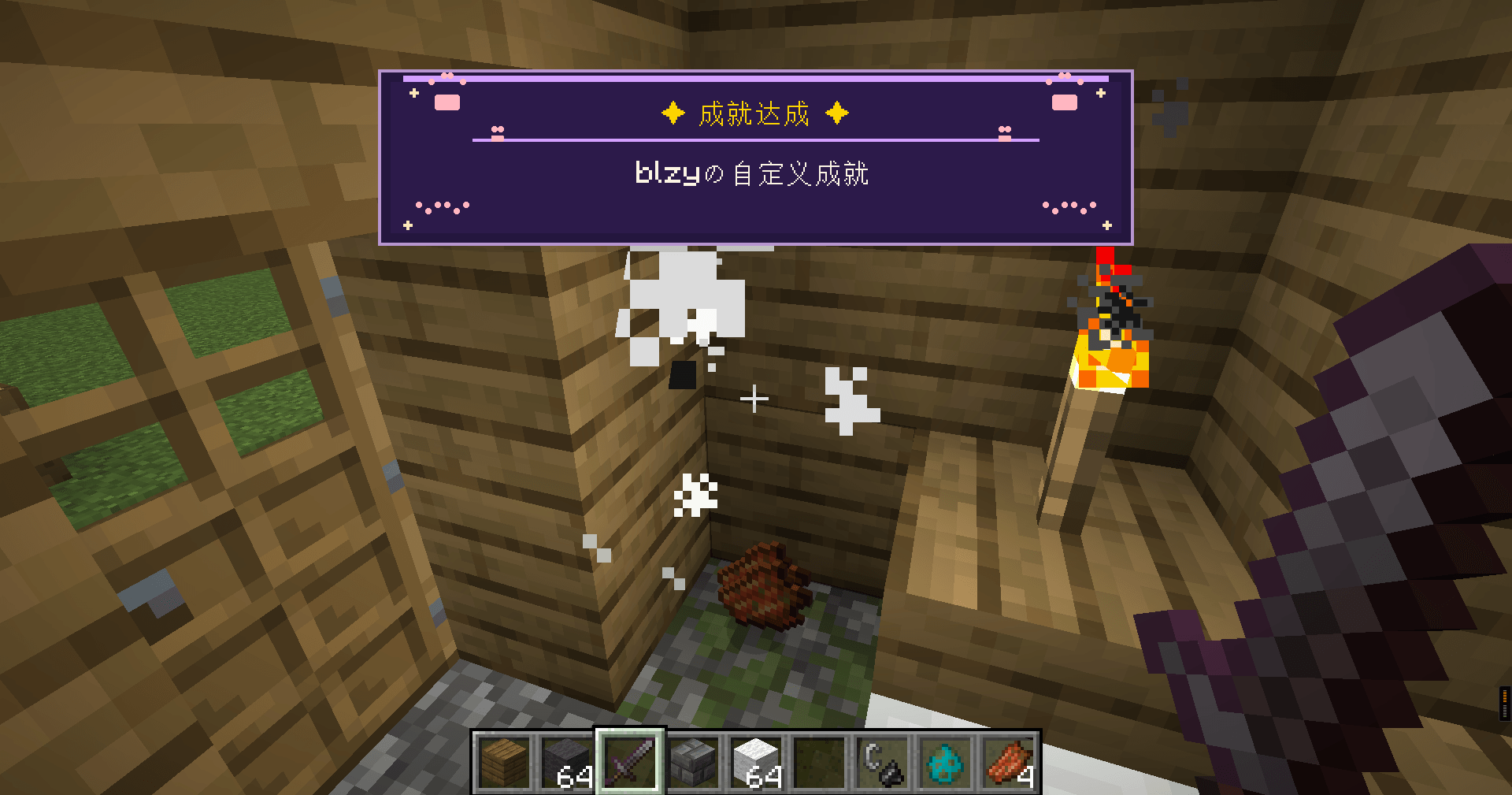 1.png 新成就牌匾,
 -
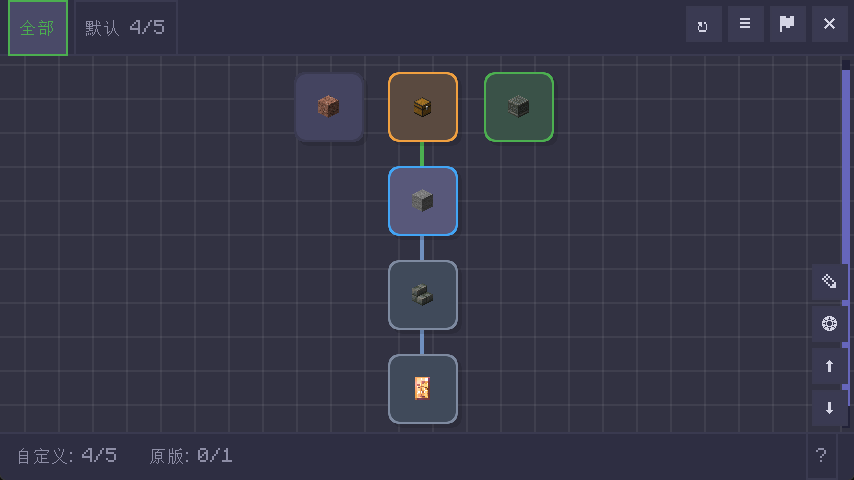 2.png 自定义成就主画布。
Versions
Files
Relations
Project Relations
More like this
Similar Mods
Suggestions use data such as tags, dependencies, dependents, descriptions, titles, and more to rank how much they overlap with this mod.
On ModDex
Community snapshot
By the numbers
Statistics
Want to reach Minecraft players?
We're looking for a server hosting partner to feature here and other parts of the site. Interested? Send us a message!
Get in touchGet it on
Available Platforms
On ModDex
Community snapshot
By the numbers
Statistics
Resources