Community listing page, reviews may not be monitored by the author.
Builder Holograms

No reviews yet
Copy any structure, place it as a hologram, edit it, and build it — by yourself or with your workers.

Community voices
Reviews
No reviews yet. Be the first to review this project!
Get it on
Available Platforms
About
Project Details
For authors
Embed Badge
If you're the author of this project, you can embed a live badge anywhere that supports HTML or Markdown. It updates automatically whenever ratings change.
Use HTML for any page that supports it, or Markdown for README files and Markdown-based descriptions.
Identifiers
Platform IDs
Resources
External Links
About
Description
> This is a new mod!
If you find any bugs or issues, please let me know in the comments and I'll fix them as soon as possible.
# 🏗 Builder Holograms
Copy any build in your world, place it anywhere as a **see-through hologram**, edit it, and build it block by block — or **instantly** if you already have all the materials.
---
## 🪓 Getting the Builder
The **Builder** is a golden axe with special powers, and it **can't be crafted** — the only way to get it is **trading with villagers**:
- Every villager who reaches **Master** level has a small chance to sell it.
- **Smiths** (weaponsmith, toolsmith and armorer) have a much higher chance.
- Price: **12–36 diamonds** — cheap ones are very rare!
| Action | What it does |
|---|---|
| **Right-click** | Opens the **Builder menu** |
| **Sneak + right-click** | Removes the nearest hologram |
---
## 📋 Step 1 – COPY
1. Open the Builder menu and press **+ COPY** — you get a **Marker**.
2. **Right-click two blocks** — the two opposite corners of the area you want to copy.
3. Done! The copy is saved in your **Copies** tab.
*Left-click with the Marker resets the selection.*
---
## 📍 Step 2 – PLACE (Paste)
In the **Copies** tab, press **Place** next to a copy. You get a Marker that shows the hologram in front of you:
| Action | What it does |
|---|---|
| **Left-click** | Rotate the hologram |
| **Right-click** | Place it / confirm |
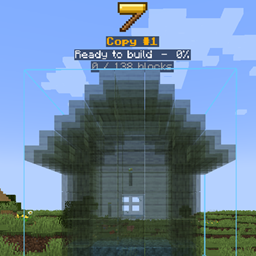
When you confirm, a **golden hammer** sign appears above the hologram, with its name and progress — *"Ready to build – 45%"*.
---
## 🧱 Step 3 – BUILD
- **Instant build:** if you have **all the materials** in your inventory, the whole structure is built **instantly**!
- **Build by hand:** place the blocks yourself — every block you place in the right spot **disappears from the hologram**, so you always see what's left.
- When everything is built, you get a **"Build complete!"** message.
---
## 🗂 The Builder Menu
### Copies tab
| Button | What it does |
|---|---|
| **Place** | Place this copy as a hologram |
| **Name** | Rename the copy |
| **Save edit** | A hologram of this copy was edited — save the changes back into the copy |
### Holograms tab
Every hologram you placed, with its **progress %**.
| Button | What it does |
|---|---|
| **Details** | Progress and a full **materials list** — ✔ what you have, ✘ what's missing |
| **Teleport** | Teleport right next to the hologram, facing it |
| **Name** | Rename the hologram |
| **Edit** | Change the hologram (see below) |
| **Worker** | Give the hologram to one of your builder workers (needs Workers & Warriors) |
| **Delete** | Remove the hologram |
---
## ✏ Editing a Hologram
Press **Edit** on a hologram:
- **EDIT RT (real time)** — edit the hologram right in the world:
- **Hold a block + right-click** → add it to the hologram.
- **Left-click a hologram block** → remove it.
- **Right-click with the Marker** → done.
- **Change** — replace **every** block of one type with another (with a search box).
- **Remove all** — remove every block of that type from the hologram.
Then go back to the **Copies** tab and press **Save edit** to keep the changes in your copy.
---
## 👷 Works with Workers & Warriors (optional)
Install **Workers & Warriors** and let your **builder workers** do the work for you:
1. Press **Worker** on a hologram — you get a Marker.
2. **Right-click one of your builder workers**.
3. He takes the materials from his chest and **builds the whole structure** for you!
Edit the hologram and he **updates his work automatically**. The hologram card shows which worker is building it.
Screenshots
Gallery
Versions
Files
Relations
Project Relations
More like this
Similar Mods
Suggestions use data such as tags, dependencies, dependents, descriptions, titles, and more to rank how much they overlap with this mod.
On ModDex
Community snapshot
By the numbers
Statistics

Get it on
Available Platforms
On ModDex
Community snapshot
By the numbers
Statistics
Resources