Community listing page, reviews may not be monitored by the author.
Builder's Materials HUD

No reviews yet
A MineColonies addon that displays the builder's required materials directly on screen without opening the resource scroll.

Community voices
Reviews
No reviews yet. Be the first to review this project!
Get it on
Available Platforms
About
Project Details
For authors
Embed Badge
If you're the author of this project, you can embed a live badge anywhere that supports HTML or Markdown. It updates automatically whenever ratings change.
Use HTML for any page that supports it, or Markdown for README files and Markdown-based descriptions.
Identifiers
Platform IDs
Resources
External Links
About
Description
👷♂️ ResourceHUD — Builder's Materials HUD
FRANÇAIS
Le compagnon indispensable pour MineColonies. La liste de courses de votre bâtisseur, directement à l'écran — sans rouvrir le Parchemin de Ressources toutes les 30 secondes.
🧐 COMMENT ÇA MARCHE
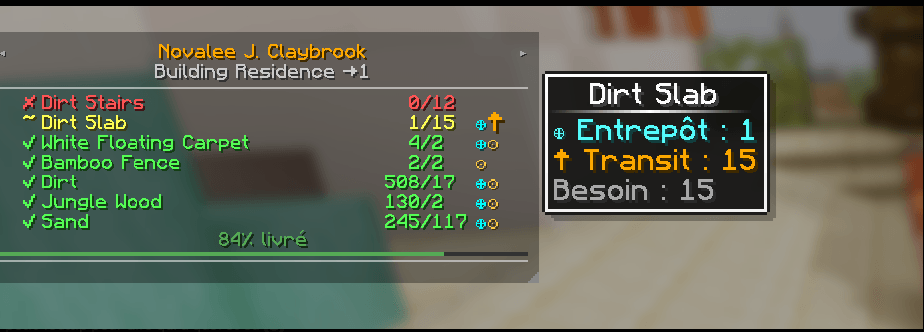
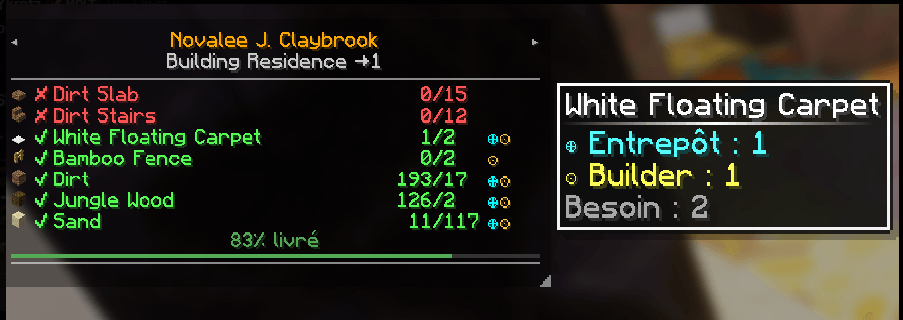
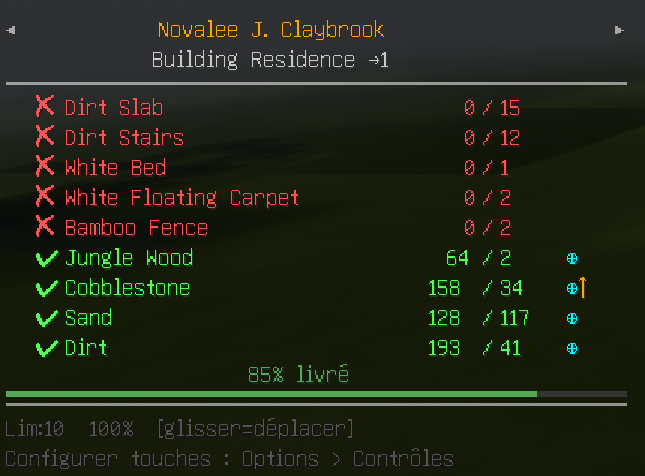
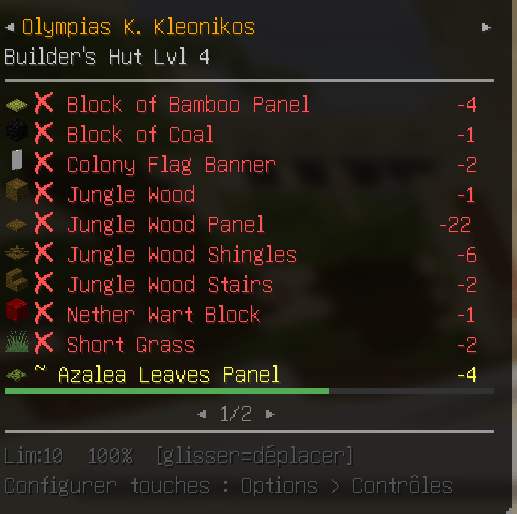
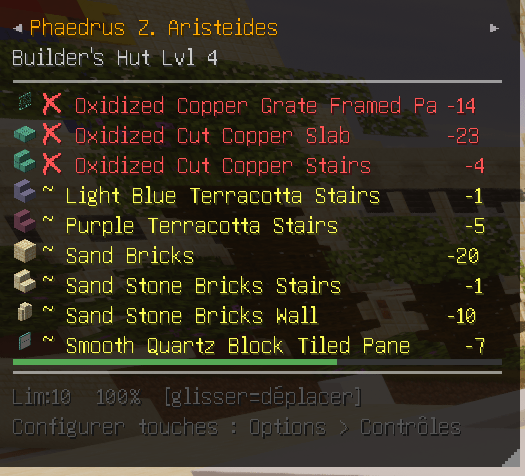
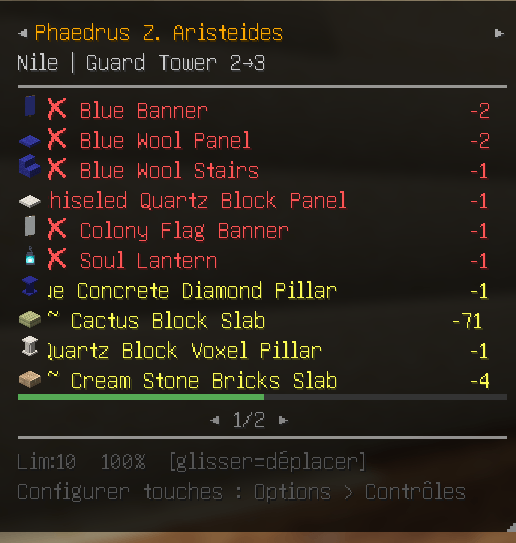
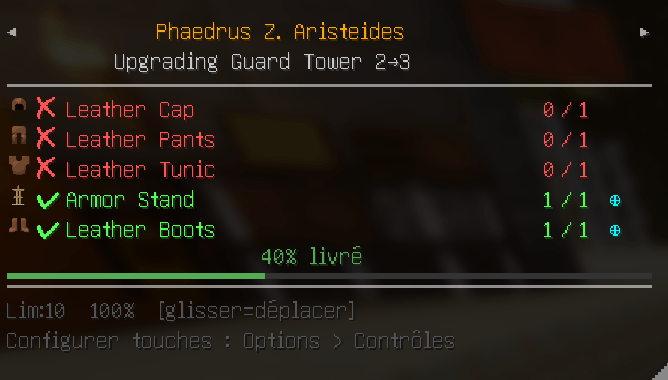
Ouvrez le Parchemin de Ressources d'un bâtisseur une seule fois : ResourceHUD capture la liste. Un overlay compact apparaît alors avec chaque matériau requis, vos stocks réels (inventaire, entrepôt, livreurs, cabane) et l'avancement réel du chantier. Tout se met à jour automatiquement.
📌 FONCTIONNALITÉS
• 📦 Suivi des matériaux — quantités possédées / requises (ex. 8 / 20), avec un code couleur : rouge (manquant), orange (partiel), vert (complet). • 🗂️ 5 onglets — Builder (la liste), Recipe (le livre de recettes de la colonie), Storage (l'entrepôt, avec recherche), Missing (tout ce qui manque, tous chantiers confondus), Research (l'Université). • 🎓 Recherches — consultez les recherches disponibles, leur coût en ressources affiché directement, et lancez-les sans ouvrir l'Université. • 📊 Progression réelle — une barre bleue montre l'avancement bloc par bloc, distincte de la barre verte de livraison des ressources (nécessite le mod côté serveur). • 🏗️ Multi-bâtisseurs — suivez plusieurs chantiers, basculez d'un clic sur les flèches. Excluez ceux qui ne vous intéressent pas. • 🛠️ Masquage intelligent — cachez les ressources déjà livrées pour ne garder que l'essentiel. • 🔍 Intégration JEI — clic droit sur une ligne pour ouvrir sa recette. La recherche du HUD peut aussi être répercutée dans le filtre JEI.
🔍 TOOLTIPS DÉTAILLÉS
Survolez une ligne pour voir d'où vient chaque unité :
• ⊕ Entrepôt • ⊙ Cabane du bâtisseur • ↑ En transit (chez un livreur) • ✋ Votre inventaire
⚙️ ÉCRAN D'OPTIONS
Cliquez le bouton ⚙ dans l'en-tête du HUD (présent sur les 5 onglets) :
• Affichage du HUD, masquage des ressources livrées, synchronisation JEI • Échelle 0,5 → 2,0 • Opacité 7 → 100 % • Largeur 120 → 400 px • Lignes max 0 → 30 (0 = illimité) • Réinitialisation de la position, purge de la liste des chantiers exclus • Raccourci direct vers l'écran des touches
Réglages sauvegardés dans config/resourcehud.json.
⌨️ RACCOURCIS PAR DÉFAUT
Tous modifiables dans Options > Contrôles.
| Touche | Action |
|---|---|
| H | Afficher / masquer le HUD |
| U | Ouvrir le HUD sur l'onglet Recherche |
| K | Limite de lignes visibles |
| L | Échelle du HUD |
| C | Masquer / afficher les ressources complétées |
| O | Opacité du fond |
🖱️ SOURIS (lorsqu'un menu est ouvert)
• Clic gauche + glisser — déplacer le HUD • Coin ◢ — redimensionner la largeur • Molette — changer de page • ◄ / ► — page suivante ou bâtisseur suivant • Clic droit sur une ligne — recette JEI
💾 INSTALLATION
💻 Côté client seul — fonctionne sur n'importe quel serveur, même sans le mod en face. Le HUD se limite alors au parchemin et à votre inventaire.
🔌 Côté serveur (recommandé) — débloque le scan en direct des racks de l'entrepôt, des livreurs, de la cabane, et la progression réelle des ouvriers.
⚠️ Installez la même version des deux côtés. Client et serveur échangent un protocole versionné : en cas d'écart, chacun se comporte comme si l'autre n'avait pas le mod, et les stocks restent vides.
📌 DÉPENDANCES
• NeoForge 1.21.1 • MineColonies — le HUD lit ses données ; sans lui il reste vide • JEI — optionnel, mais recommandé (recettes et synchronisation de recherche)
ENGLISH
The essential MineColonies companion. Your builder's shopping list, right on screen — no more reopening the Resource Scroll every 30 seconds.
🧐 HOW IT WORKS
Open a builder's Resource Scroll once and ResourceHUD captures the list. A compact overlay then shows every required material, what you actually have (inventory, warehouse, transit, builder hut), and the real construction progress — all updated automatically.
📌 FEATURES
• 📦 Material tracking — have / need quantities (e.g. 8 / 20), colour-coded: red (missing), orange (partial), green (complete). • 🗂️ 5 tabs — Builder (the list), Recipe (your colony's recipe book), Storage (warehouse browser with search), Missing (everything still needed, across all builders), Research (University). • 🎓 Research — browse available research with its resource cost shown inline, and start it without opening the University screen. • 📊 Real construction progress — a blue bar tracks actual block-by-block building, separate from the green resource delivery bar (requires the mod server-side). • 🏗️ Multi-builder — track several builds and switch with the header arrows. Exclude the ones you don't care about. • 🛠️ Smart toggle — hide already-delivered resources to keep only what's left. • 🔍 JEI integration — right-click a row for its recipe. The HUD search box can also mirror into the JEI filter.
🔍 DETAILED TOOLTIPS
Hover any row to see where each unit comes from:
• ⊕ Warehouse • ⊙ Builder hut • ↑ In transit (carried by a courier) • ✋ Your inventory
⚙️ OPTIONS SCREEN
Click the ⚙ button in the HUD header (on all 5 tabs):
• HUD visibility, hide delivered resources, JEI sync • Scale 0.5 → 2.0 • Opacity 7 → 100% • Width 120 → 400 px • Max rows 0 → 30 (0 = unlimited) • Reset position, clear the excluded-builder list • Direct shortcut to the keybind screen
Settings are saved to config/resourcehud.json.
⌨️ DEFAULT KEYBINDS
All rebindable in Options > Controls.
| Key | Action |
|---|---|
| H | Toggle HUD |
| U | Open HUD on the Research tab |
| K | Cycle row limit |
| L | Cycle HUD scale |
| C | Toggle hide-complete |
| O | Cycle background opacity |
🖱️ MOUSE (while any menu is open)
• Left-click + drag — move the HUD • ◢ corner — resize width • Scroll — change page • ◄ / ► — next page or next builder • Right-click a row — open JEI recipe
💾 INSTALLATION
💻 Client-only — works on any server, even without the mod installed there. The HUD then falls back to the scroll data and your own inventory.
🔌 Server-side (recommended) — unlocks live scanning of warehouse racks, couriers, builder hut contents, and real worker progress.
⚠️ Install the same version on both sides. Client and server speak a versioned protocol: if they differ, each behaves as though the other doesn't have the mod, and stocks stay empty.
📌 DEPENDENCIES
• NeoForge 1.21.1 • MineColonies — the HUD reads its data; without it the HUD stays empty • JEI — optional but recommended (recipe lookup and search sync)
Screenshots
Gallery
-
 Sans titre.png Sans titre.png
 -
 Sans titre.png Sans titre.png
 -
 Sans titre.png Sans titre.png
 -
 Sans titre.png Sans titre.png
 -
 Sans titre.png Sans titre.png
 -
 Sans titre.png Sans titre.png
 -
 Sans titre.png Sans titre.png
Versions
Files
Relations
Project Relations
More like this
Similar Mods
Suggestions use data such as tags, dependencies, dependents, descriptions, titles, and more to rank how much they overlap with this mod.
On ModDex
Community snapshot
By the numbers
Statistics
 (opens in a new tab)
Get it on
Available Platforms
On ModDex
Community snapshot
By the numbers
Statistics
Resources