
Community listing page, reviews may not be monitored by the author.
Building Copy

No reviews yet
Client-side copy/paste for builds between worlds & servers — select, copy, rotate, preview as a hologram, then paste via /setblock & /fill.

Community voices
Reviews
No reviews yet. Be the first to review this project!
Get it on
Available Platforms
Compatibility
Supported Environments
Runs entirely on the client. Works on vanilla servers.
About
Project Details
For authors
Embed Badge
If you're the author of this project, you can embed a live badge anywhere that supports HTML or Markdown. It updates automatically whenever ratings change.
Use HTML for any page that supports it, or Markdown for README files and Markdown-based descriptions.
Identifiers
Platform IDs
Resources
External Links
About
Description
Building Copy
Client-side mod that lets you select a region of blocks, copy it, and paste it into another world or server — no server-side mod needed.
Features
Select & copy — stand in one corner, then the other, and copy the region into a clipboard (block entities like chests and signs included).
Works across worlds/servers — the clipboard survives disconnecting and joining a different world or server in the same game session, and auto-saves to disk so it survives a game restart too.
Menu-driven, no keybinds required — press Esc, then "Building Copy", for every action. Keybinds are also available (unbound by default) for players who want them.
Hologram preview — see a movable, wireframe preview of the build before committing to a paste. It's pure client-side rendering, so only you ever see it.
Rotate — rotate the clipboard 90, 180, or 270 degrees around the vertical axis before pasting; facing/axis blockstate properties (stairs, logs, torches, etc.) rotate correctly.
Undo — undo the last few pastes; the mod snapshots what was there before overwriting it.
Save/load multiple schematics — name and browse saved builds instead of being limited to one clipboard slot.
How it works
Copying reads blocks directly from your client's already-loaded world. Pasting sends /setblock and /fill commands to the server — the same commands available to any operator. This means you need permission to run /setblock and /fill on the destination server (permission level 2, operator). Being in creative mode alone isn't enough if the server has a permissions plugin restricting commands.
Because pasting only uses vanilla commands, this mod works on any Forge or vanilla server — nothing needs to be installed server-side.
Controls
Open the menu with Esc, then click "Building Copy".
Set Position 1 / 2 — marks a selection corner at your position Copy Selection — copies the selected region to the clipboard Rotate 90 degrees left/right — rotates the clipboard before pasting Preview & Move (hologram) — shows a movable preview; scroll to nudge X/Y/Z (Shift/Ctrl + scroll for X/Z) Paste Here — pastes at your position (or the hologram's position) Undo Last Paste — reverts the last paste Save As... / Load From File... — manage multiple saved schematics
**Requirements ** Minecraft Forge Permission to run /setblock and /fill on whatever server you're pasting into
Screenshots
Gallery
-
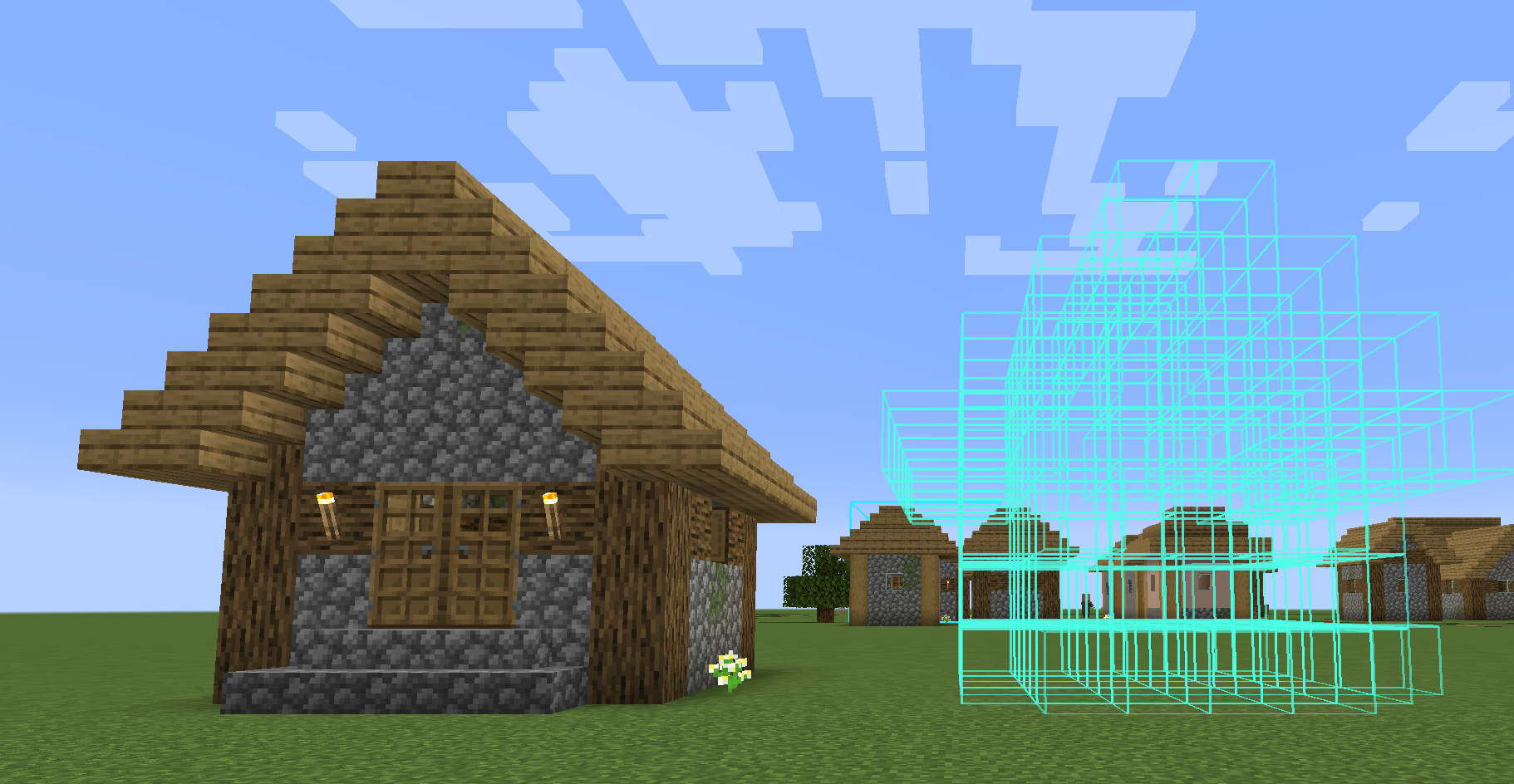 Preview mod
 -
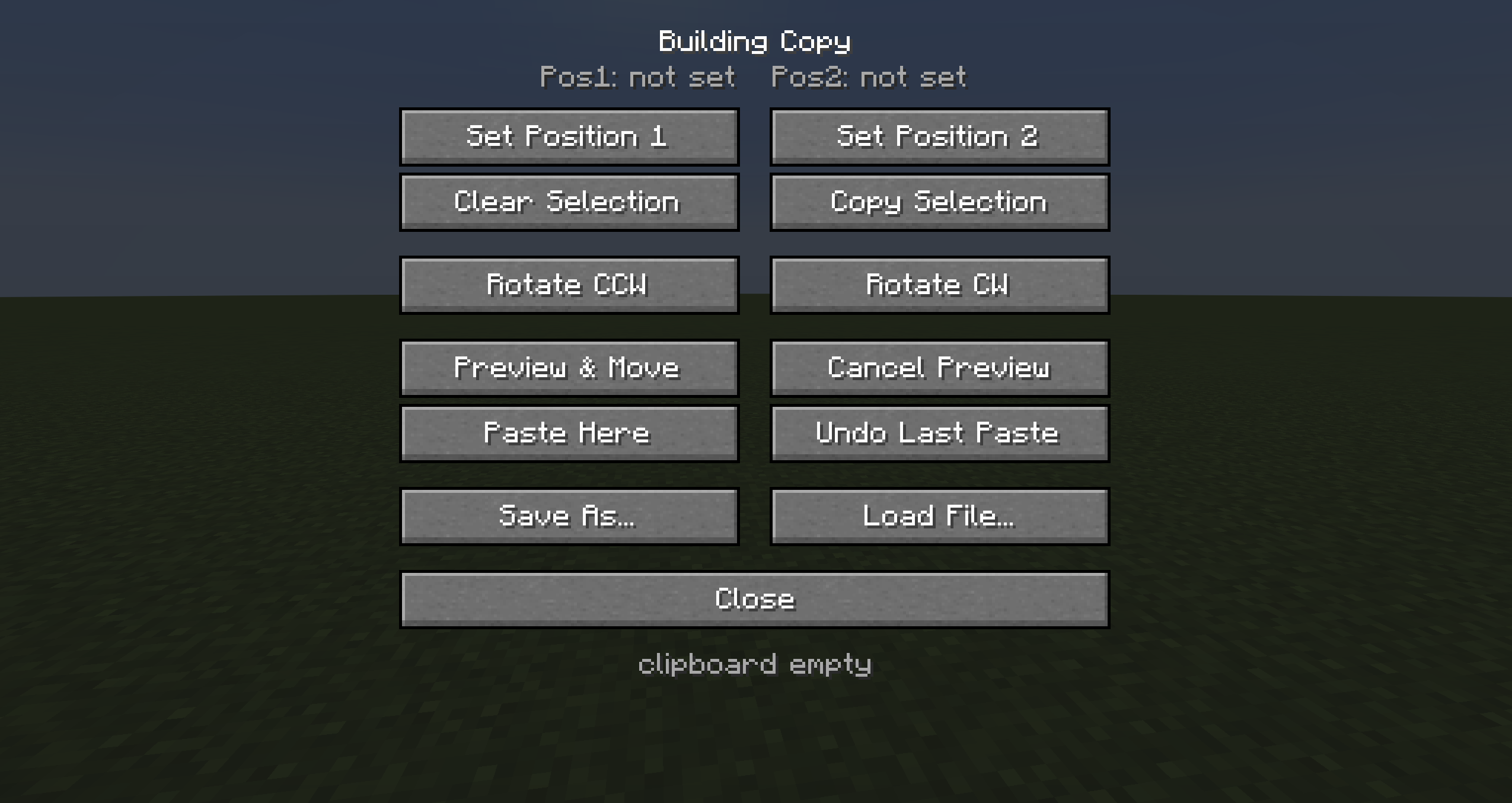 mod menu
Versions
Files
Relations
Project Relations
More like this
Similar Mods
Suggestions use data such as tags, dependencies, dependents, descriptions, titles, and more to rank how much they overlap with this mod.
On ModDex
Community snapshot
By the numbers
Statistics


Get it on
Available Platforms
On ModDex
Community snapshot
By the numbers
Statistics
Resources