Community listing page, reviews here may not be monitored by the author.
BundleInTooltips


No reviews yet
Backports the Minecraft 1.21 bundle tooltip interaction to 1.20.1, scroll through its contents, and pull out the exact stack you want.
Community voices
Reviews
No reviews yet. Be the first to review this project!
Get it on
Available Platforms
Compatibility
Supported Environments
Must be installed on both the client and the server.
About
Project Details
For authors
Embed Badge
If you're the author of this project, you can embed a live badge anywhere that supports HTML or Markdown. It updates automatically whenever ratings change.
Use HTML for any page that supports it, or Markdown for README files and Markdown-based descriptions.
Identifiers
Platform IDs
Resources
External Links
About
Description
Bundle In Tooltip
Backports the Minecraft 1.21 bundle tooltip interaction to Forge 1.20.1 so you can peek inside any bundle, scroll through its contents, and pull out the exact stack you want without dumping everything on the floor first. Version 1.1.0 brings the full modern UI treatment, right down to the slot spacing, capacity bar facelift, and the optional selection banner.
This mod requires Bundle In Creative (or any mod that restores the vanilla bundle recipe)

Features
- Works with vanilla bundles, dyed bundles from Bundle In Palette, and any other item in the
forge:bundlestag. - Three slot layouts: Vanilla (1.21-style rounded cells), Experiment (floating icons), and the Classic 1.20.1 grid.
- Scroll on a bundle tooltip to highlight the stack you plan to grab, then right-click to withdraw it instantly or left-click to keep filling the bundle without dropping it.
- Optional 1.21-inspired selection banner appears once you scroll, showing the highlighted stack’s name above the tooltip.
- Refined capacity bar with rounded edges, grey outlines, and configurable labels (empty/full text, numeric readout, or none).
- Plays nicely in both singleplayer and multiplayer thanks to lightweight networking sync.
What’s new in 1.1.0
- Complete visual refresh that mirrors Minecraft 1.21: rounded slot corners, grey slot fill, and a redesigned capacity bar.
- New Vanilla vs Experiment slot styles plus the untouched Classic layout for nostalgia.
- Optional “selection preview” tooltip that scales to the item name and only shows after you scroll.
- Empty bundles now display the “Can hold a mixed stack of items” helper text with proper wrapping.
- Controls fully match 1.21 behavior: carrying a bundle lets you pick up, swap, or deposit stacks without awkward dragging.


Controls & Flow
- Hover your mouse over a bundle slot inside any inventory screen.
- The tooltip opens, showing the contents grid.
- Mouse Wheel: cycle through stacks in the tooltip; the highlighted slot follows your scroll direction.
- Right-Click: while still hovering the original bundle slot, immediately pull the highlighted stack onto your cursor.
- Left-Click/Drag: behaves like vanilla, letting you move the bundle itself even when it contains items.
Tips:
- You can scroll even while the tooltip is partially off-screen; the last valid slot remains selected.
- The interaction ignores empty bundles automatically, so you won’t accidentally pull “air.”
Configuration

bundleintooltip-client.toml (created after first launch) exposes these client-side options. You can edit it by hand or use an in-game config editor such as Configured to tweak the settings without leaving Minecraft:
tooltip.showCapacityBar— choose whether the capacity display is the modern 1.21 bar (true, default) or the classic numeric fullness line (false).tooltip.capacityLabelMode— controls what text appears inside the bar when it’s visible (defaults toVANILLA):NONE: leave the bar blank, just like the 1.21 snapshots.VANILLA: show the “Empty” / “Full” labels when appropriate.CLASSIC: show the classic24/64fullness number centered inside the bar.HYBRID: mixes both styles (Empty/Full labels at the extremes, numeric in between).VANILLA_REVISED: Empty / Filling / Full labels inspired by the preview UI.
tooltip.slotTextureMode— pick between VANILLA (rounded, grey slots), EXPERIMENT (floating icon prototype), or CLASSIC (1.20.1 grid).tooltip.showSelectionBar— toggles the 1.21-style selection banner that appears after you scroll in a tooltip.
Credits
Created by dmor-me. Inspired by the official 1.21 bundle UX and designed to complement the dyed bundles from Bundle In Palette.
Bundle In Tooltip
Backports the Minecraft 1.21 bundle tooltip interaction to Forge 1.20.1 so you can peek inside any bundle, scroll through its contents, and pull out the exact stack you want without dumping everything on the floor first. Version 1.1.0 brings the full modern UI treatment, right down to the slot spacing, capacity bar facelift, and the optional selection banner.
Features
- Works with vanilla bundles, dyed bundles from Bundle In Palette, and any other item in the
forge:bundlestag. - Three slot layouts: Vanilla (1.21-style rounded cells), Experiment (floating icons), and the Classic 1.20.1 grid.
- Scroll on a bundle tooltip to highlight the stack you plan to grab, then right-click to withdraw it instantly or left-click to keep filling the bundle without dropping it.
- Optional 1.21-inspired selection banner appears once you scroll, showing the highlighted stack’s name above the tooltip.
- Refined capacity bar with rounded edges, grey outlines, and configurable labels (empty/full text, numeric readout, or none).
- Plays nicely in both singleplayer and multiplayer thanks to lightweight networking sync.
What’s new in 1.1.0
- Complete visual refresh that mirrors Minecraft 1.21: rounded slot corners, grey slot fill, and a redesigned capacity bar.
- New Vanilla vs Experiment slot styles plus the untouched Classic layout for nostalgia.
- Optional “selection preview” tooltip that scales to the item name and only shows after you scroll.
- Empty bundles now display the “Can hold a mixed stack of items” helper text with proper wrapping.
- Controls fully match 1.21 behavior: carrying a bundle lets you pick up, swap, or deposit stacks without awkward dragging.
Controls & Flow
- Hover your mouse over a bundle slot inside any inventory screen.
- The tooltip opens, showing the contents grid.
- Mouse Wheel: cycle through stacks in the tooltip; the highlighted slot follows your scroll direction.
- Right-Click: while still hovering the original bundle slot, immediately pull the highlighted stack onto your cursor.
- Left-Click/Drag: behaves like vanilla, letting you move the bundle itself even when it contains items.
Tips:
- You can scroll even while the tooltip is partially off-screen; the last valid slot remains selected.
- The interaction ignores empty bundles automatically, so you won’t accidentally pull “air.”
Configuration
bundleintooltip-client.toml (created after first launch) exposes these client-side options. You can edit it by hand or use an in-game config editor such as Configured to tweak the settings without leaving Minecraft:
tooltip.showCapacityBar— choose whether the capacity display is the modern 1.21 bar (true, default) or the classic numeric fullness line (false).tooltip.capacityLabelMode— controls what text appears inside the bar when it’s visible (defaults toVANILLA):NONE: leave the bar blank, just like the 1.21 snapshots.VANILLA: show the “Empty” / “Full” labels when appropriate.CLASSIC: show the classic24/64fullness number centered inside the bar.HYBRID: mixes both styles (Empty/Full labels at the extremes, numeric in between).VANILLA_REVISED: Empty / Filling / Full labels inspired by the preview UI.
tooltip.slotTextureMode— pick between VANILLA (rounded, grey slots), EXPERIMENT (floating icon prototype), or CLASSIC (1.20.1 grid).tooltip.showSelectionBar— toggles the 1.21-style selection banner that appears after you scroll in a tooltip.
Requirements
- Minecraft 1.20.1
- Forge 47.3.0 or newer in the 1.20.1 line
Installation
- Install the matching Forge build.
- Drop the released jar into your
mods/directory. - Launch the game; “Bundle In Tooltip” should appear on the Mods screen.
Credits
Created by dmor-me. Inspired by the official 1.21 bundle UX and designed to complement the dyed bundles from Bundle In Palette.
Screenshots
Gallery
-
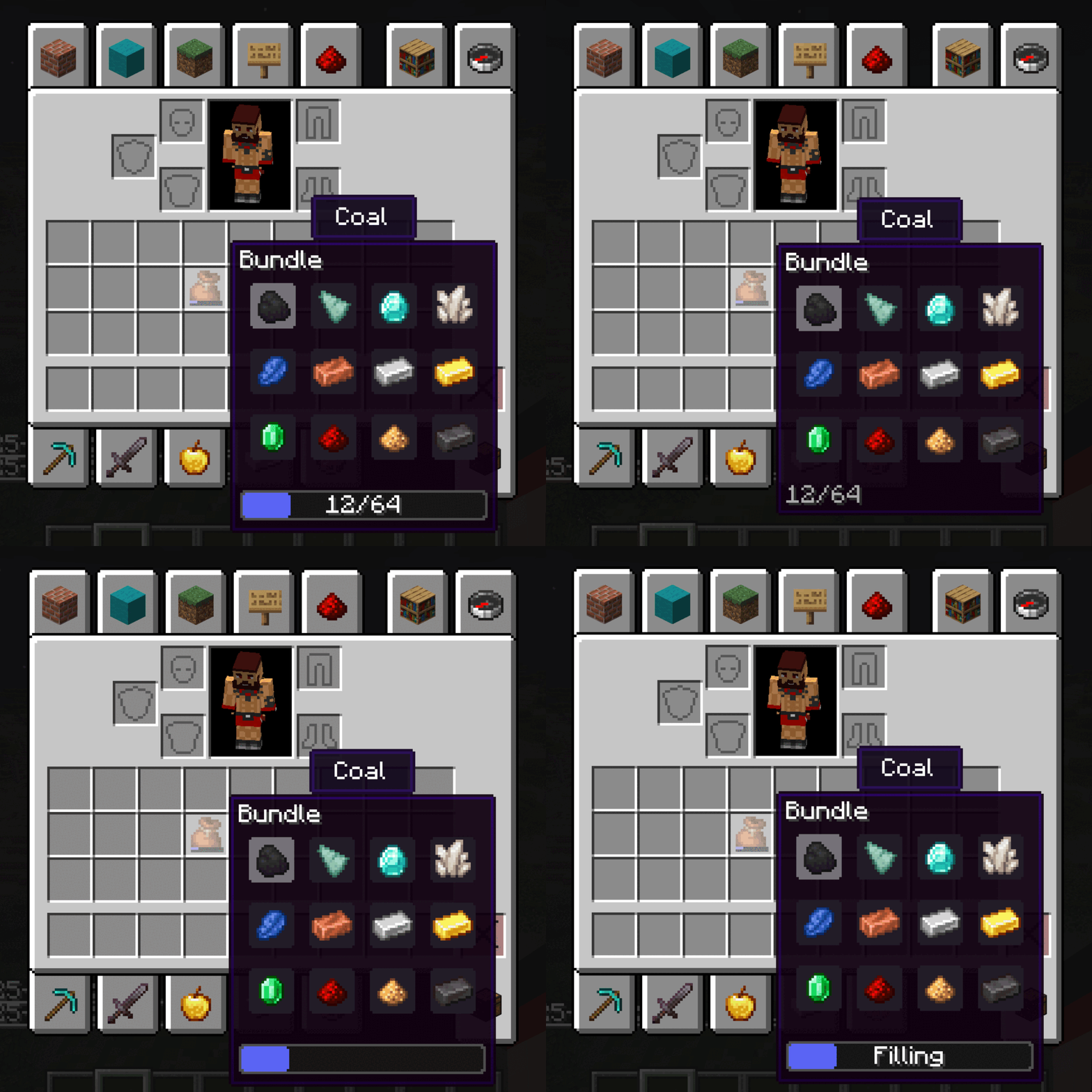 Capacity The Different Configurable Capacities Available Through Configs
 -
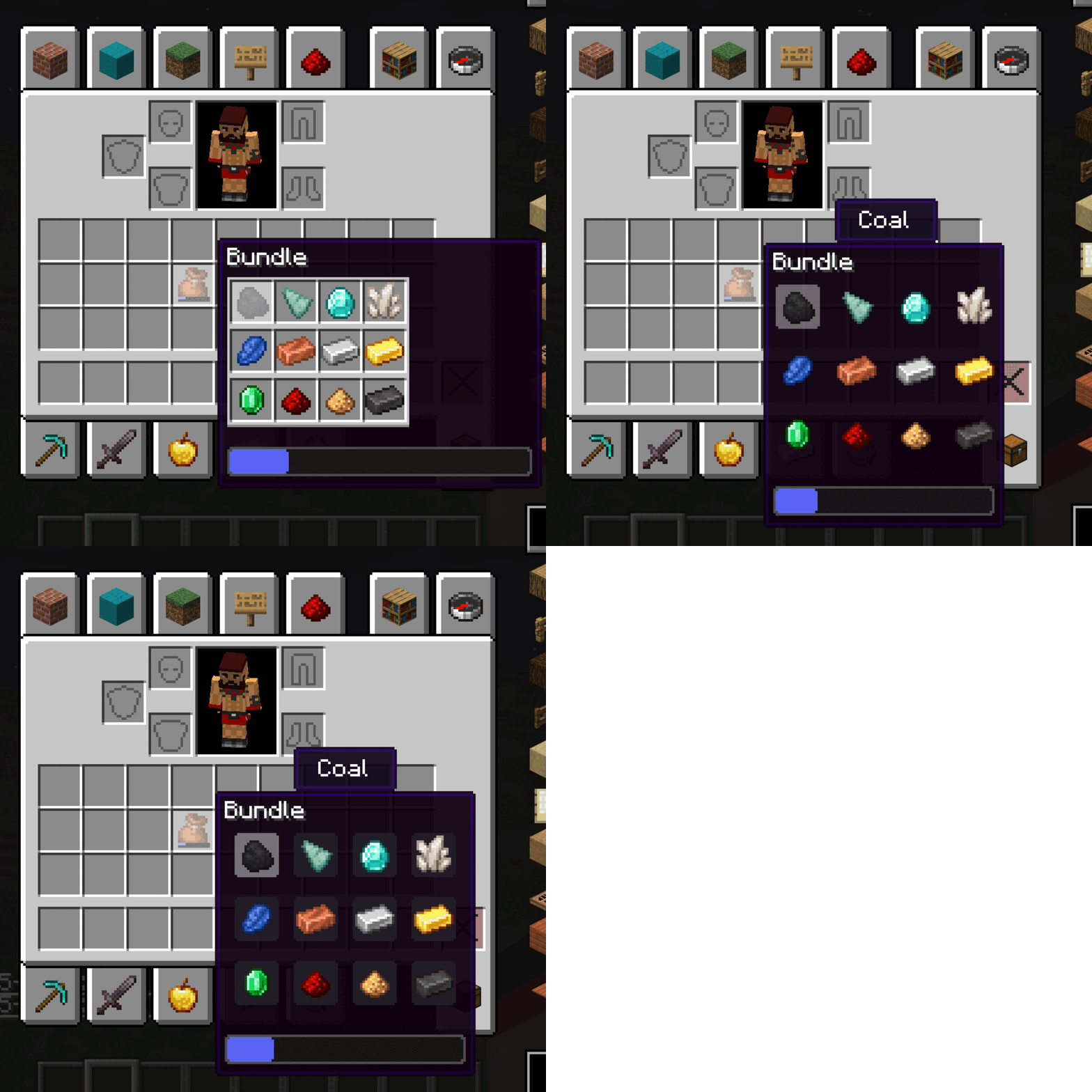 Slots The Different Configurable Slots Available Through Configs
 -
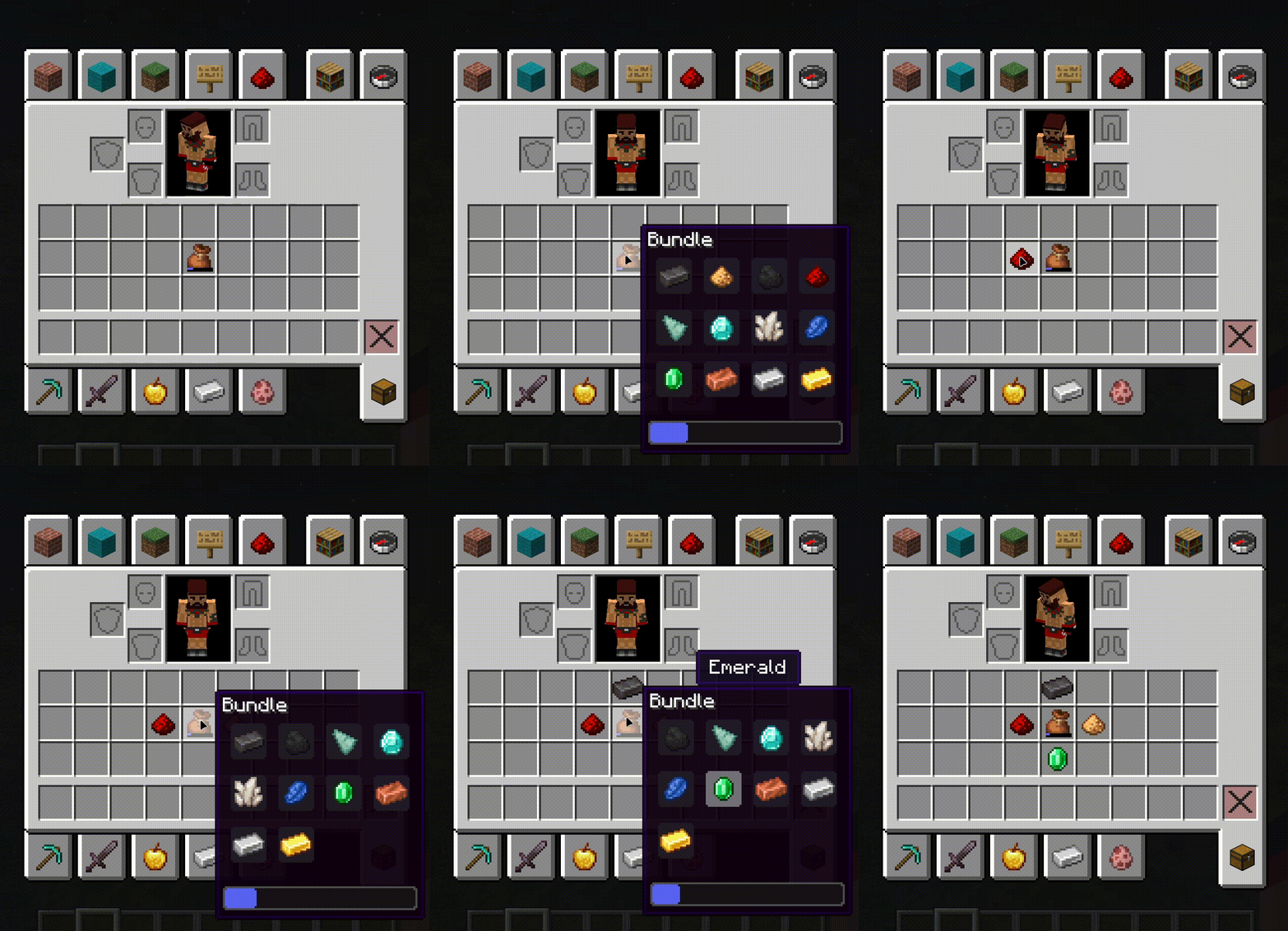 Bundle In Tooltip 1.1.0 New Tooltips Update!
 -
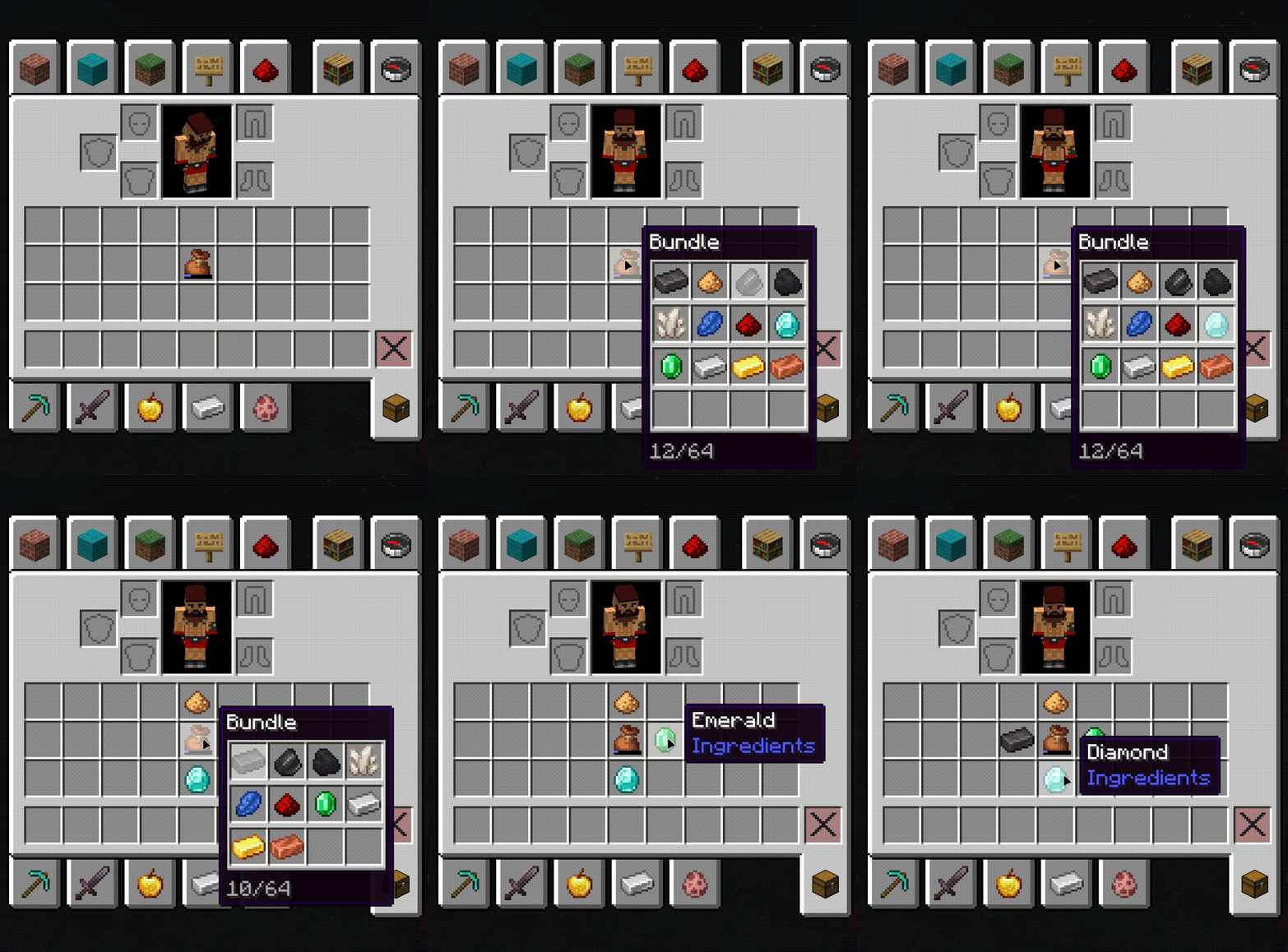 Bundle In Tooltip Old 1.0 Tooltip (Still Available Through Configs)
-
 BundleInTooltip v1.1.0
 -
 BundleInTooltip
 -
 Configurable Slots
 -
 Configurable Capacity
Versions
Files
Relations
Project Relations
More like this
Similar Mods
Suggestions use data such as tags, dependencies, dependents, descriptions, titles, and more to rank how much they overlap with this mod.
On ModDex
Community snapshot
By the numbers
Statistics
Want to reach Minecraft players?
We're looking for a server hosting partner to feature here and other parts of the site. Interested? Send us a message!
Get in touchGet it on
Available Platforms
On ModDex
Community snapshot
By the numbers
Statistics
Resources