
Community listing page, reviews here may not be monitored by the author.
Calibrated Access


No reviews yet
A balanced solution for remote block interaction
Community voices
Reviews
No reviews yet. Be the first to review this project!
Get it on
Available Platforms
Compatibility
Supported Environments
Must be installed on both the client and the server.
About
Project Details
For authors
Embed Badge
If you're the author of this project, you can embed a live badge anywhere that supports HTML or Markdown. It updates automatically whenever ratings change.
Use HTML for any page that supports it, or Markdown for README files and Markdown-based descriptions.
Identifiers
Platform IDs
About
Description
This mod adds four new Remote Accessor items that allow players to calibrate with a block and open its screen from anywhere; with higher tiers, even from different dimensions!
To get started, craft a Calibrator, the central component of all Accessors, by placing an Ender Pearl and some Redstone Dust in a Smithing Table. Craft an Accessor with some casing and antenna materials, sneak-interact with a functional block, and use the remote to open its screen from any distance!
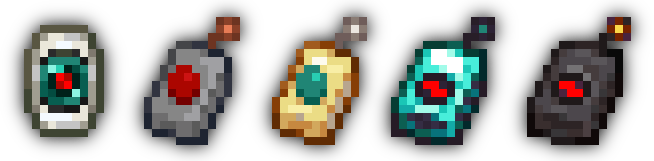
Why?
This mod was created out of a need for an alternative to the keepInventory game rule. Simply put, dying in Minecraft is annoying! Keeping your inventory on death is great when the event was unintentional or unfair. However, it can be easily abused: what's stopping players from careening off a cliff so they can get back to base more easily?
Calibrated Access provides systems accessible to the early-game that, for example, could be used to "bank" items on-the-fly to prevent item loss in case disaster strikes. Concerned about balance? See the Balance section in the details below!
Details
Balance
The first tier of remote, the Novice Accessor, is simple to craft. Indeed, its recipe is designed for the early game. However, the lower tiers of Accessor are quite limited in their functionality. The most effective factor for balance is the number of accesses a specific remote has.
Upon using a calibrated remote, one access point is consumed. Players can only use a remote if it has at least one access point left. The only way to replenish the access counter is to recalibrate with another block. A Novice Accessor has three accesses; this amount is small enough that players will have to stop and think about whether they want to use the remote at a time. A Skilled Accessor has seven accesses; an Expert Accessor has fifteen; an Unlimited Accessor does not have an access counter.
There is also a 15-second grace period that begins when a remote is used. During this period, players can freely open and close the remote without losing another access point. Additionally, the remote will have a "zap" effect on its antenna while the grace period is active. However, an Unlimited Accessor's zap is merely visual.
Another balancing factor is the interdimensional capability of an Accessor. Only the Novice Accessor is unable to open blocks' screens from other dimensions. The second tier of remote, the Skilled Accessor, requires Quartz to craft, requiring players to first venture into a different dimension before they have that extra level of safety.
A final property is the number of remotes that can be used at once. This defaults to just one, though you can change this with a game rule described in the Additional Features section below. Go ahead and try to game the system; this is implemented with a "sessions" system that maps each calibration instance to a UUID. As a side-effect, this makes all calibrated Accessors per-player.
Additional Features
- Four new advancements in the Adventure tab
- An API to add custom behavior when accessing specific blocks. See the wiki for a brief overview
maxRemoteSessionsgame rule to control the number of Accessors that a player can have calibrated at onceallowSyncedIdMismatchgame rule to control whether a remote can try to access a different block type at the same position it was calibrated to
License
MIT © spadeteam
This mod adds four new Remote Accessor items that allow players to calibrate with a block and open its screen from anywhere; with higher tiers, even from different dimensions!
To get started, craft a Calibrator, the central component of all Accessors, by placing an Ender Pearl and some Redstone Dust in a Smithing Table. Craft an Accessor with some casing and antenna materials, sneak-interact with a functional block, and use the remote to open its screen from any distance!
Why?
This mod was created out of a need for an alternative to the keepInventory game rule. Simply put, dying in Minecraft is annoying! Keeping your inventory on death is great when the event was unintentional or unfair. However, it can be easily abused: what's stopping players from careening off a cliff so they can get back to base more easily?
Calibrated Access provides systems accessible to the early-game that, for example, could be used to "bank" items on-the-fly to prevent item loss in case disaster strikes. Concerned about balance? See the Balance section in the details below!
Details
Balance
The first tier of remote, the Novice Accessor, is simple to craft. Indeed, its recipe is designed for the early game. However, the lower tiers of Accessor are quite limited in their functionality. The most effective factor for balance is the number of accesses a specific remote has.
Upon using a calibrated remote, one access point is consumed. Players can only use a remote if it has at least one access point left. The only way to replenish the access counter is to recalibrate with another block. A Novice Accessor has three accesses; this amount is small enough that players will have to stop and think about whether they want to use the remote at a time. A Skilled Accessor has seven accesses; an Expert Accessor has fifteen; an Unlimited Accessor does not have an access counter.
There is also a 15-second grace period that begins when a remote is used. During this period, players can freely open and close the remote without losing another access point. Additionally, the remote will have a "zap" effect on its antenna while the grace period is active. However, an Unlimited Accessor's zap is merely visual.
Another balancing factor is the interdimensional capability of an Accessor. Only the Novice Accessor is unable to open blocks' screens from other dimensions. The second tier of remote, the Skilled Accessor, requires Quartz to craft, requiring players to first venture into a different dimension before they have that extra level of safety.
A final property is the number of remotes that can be used at once. This defaults to just one, though you can change this with a game rule described in the Additional Features section below. Go ahead and try to game the system; this is implemented with a "sessions" system that maps each calibration instance to a UUID. As a side-effect, this makes all calibrated Accessors per-player.
Additional Features
- Four new advancements in the Adventure tab
- An API to add custom behavior when accessing specific blocks.
maxRemoteSessionsgame rule to control the number of Accessors that a player can have calibrated at onceallowSyncedIdMismatchgame rule to control whether a remote can try to access a different block type at the same position it was calibrated to
License
MIT © 2023 spadeteam
Screenshots
Gallery
-
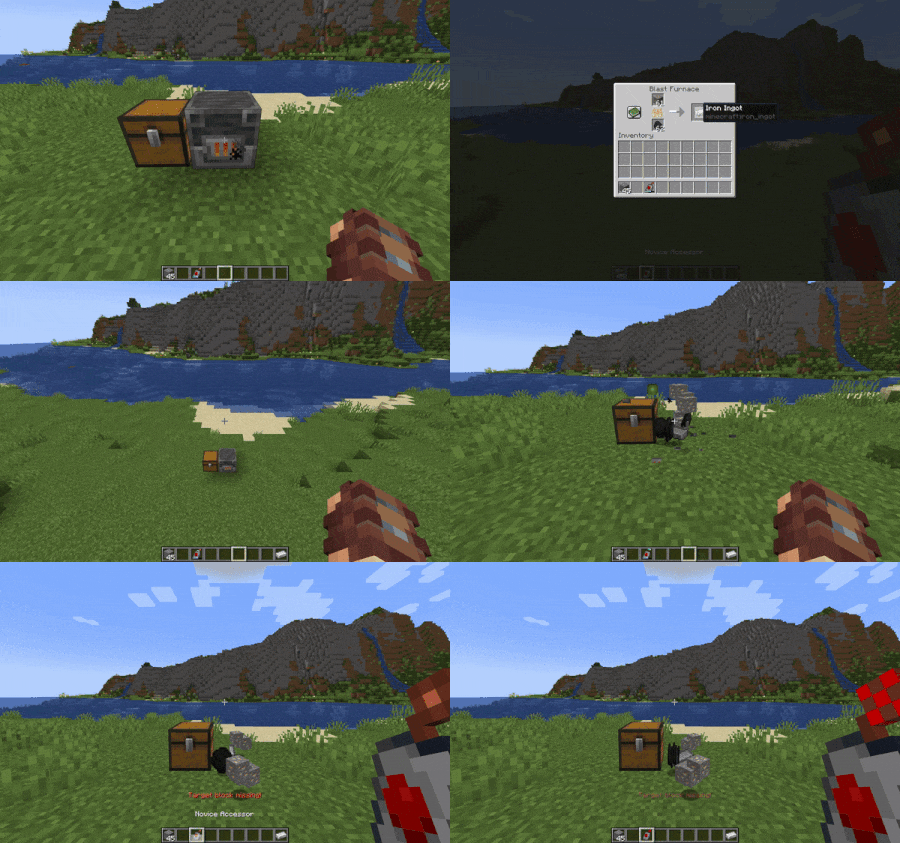 Accessor Failure A successful access followed by a target block desync.
 -
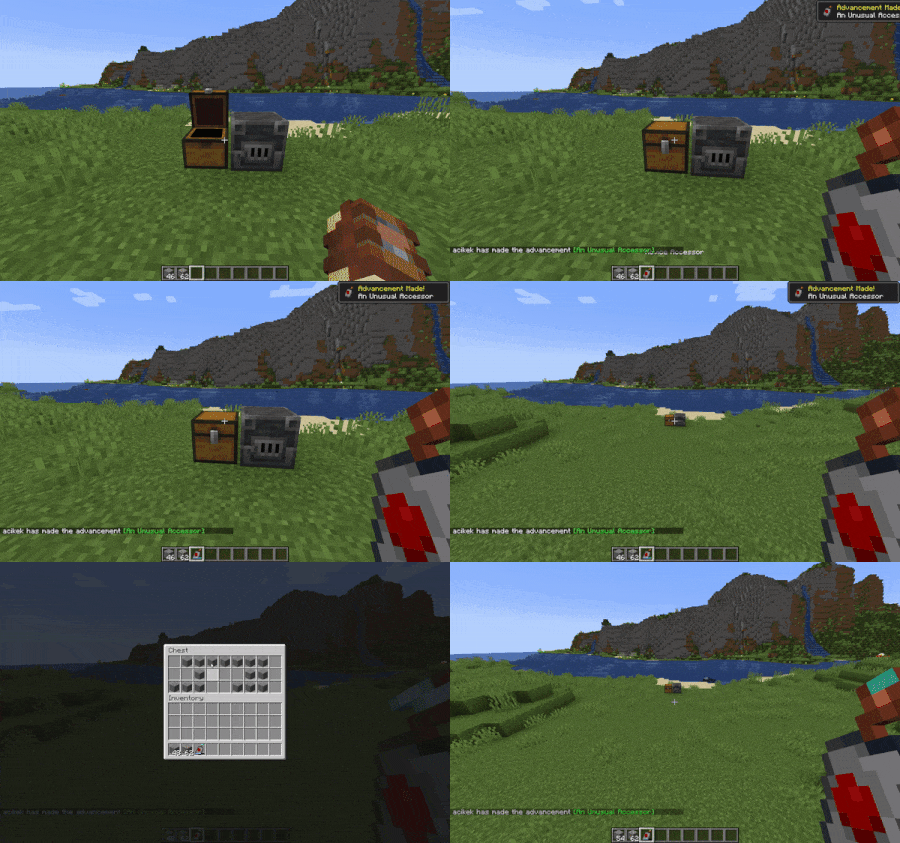 Chest Demo Opening and modifying chest contents from afar.
 -
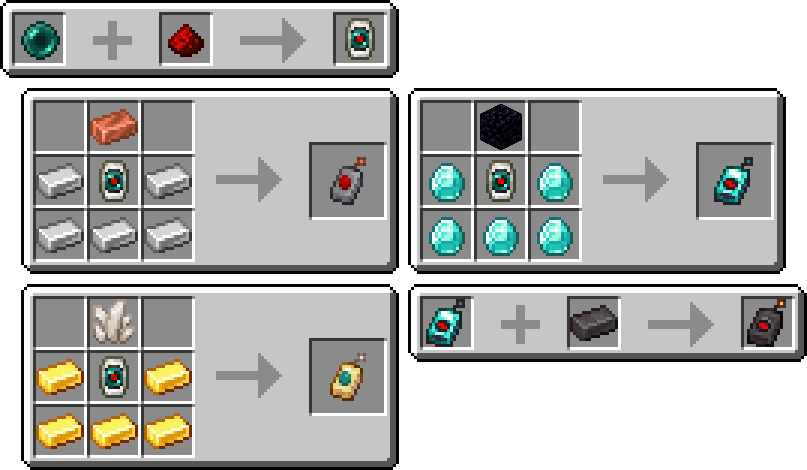 Recipes All the recipes added by Calibrated Access.
 -
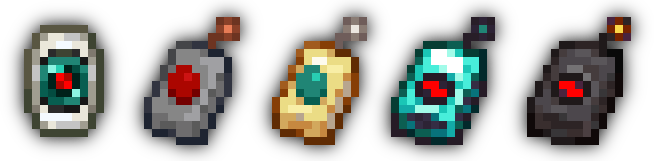 Items All the items added by Calibrated Access. These textures were created by Trudle, a developer for spadeteam! Check out our Discord if you want to talk to him.
 -
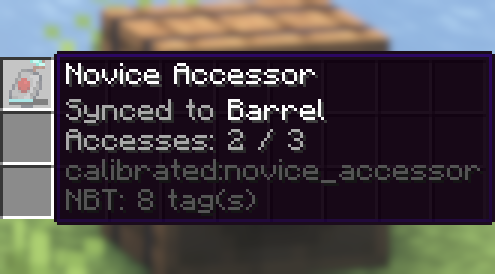 Accessor Tooltip A tooltip of an Accessor mid-use with a backdrop of its target block.
-
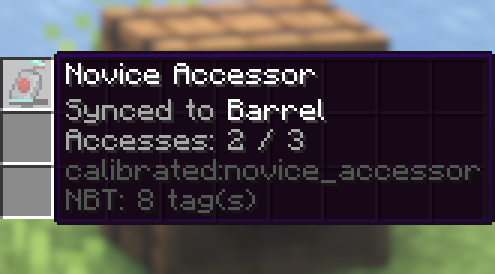 Accessor Tooltip A tooltip of an Accessor mid-use with a backdrop of its target block.
 -
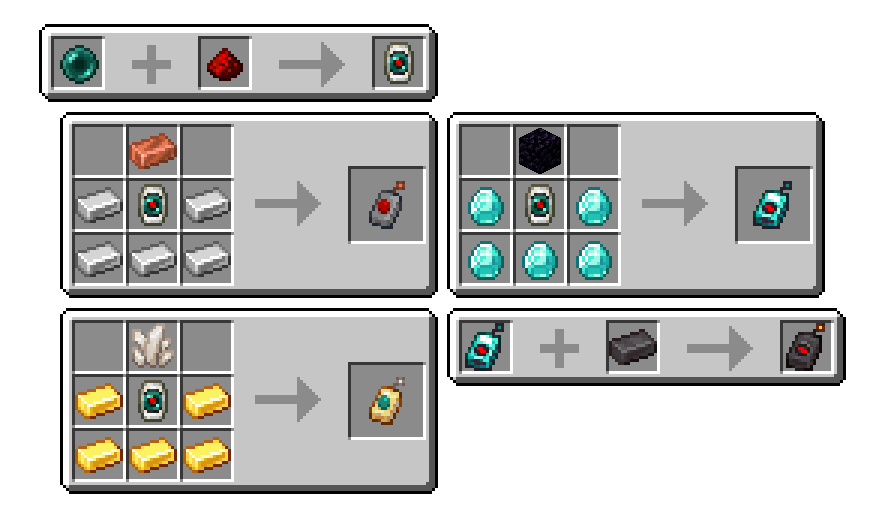 Recipes All the recipes added by Calibrated Access.
 -
Items All the items added by Calibrated Access.
-
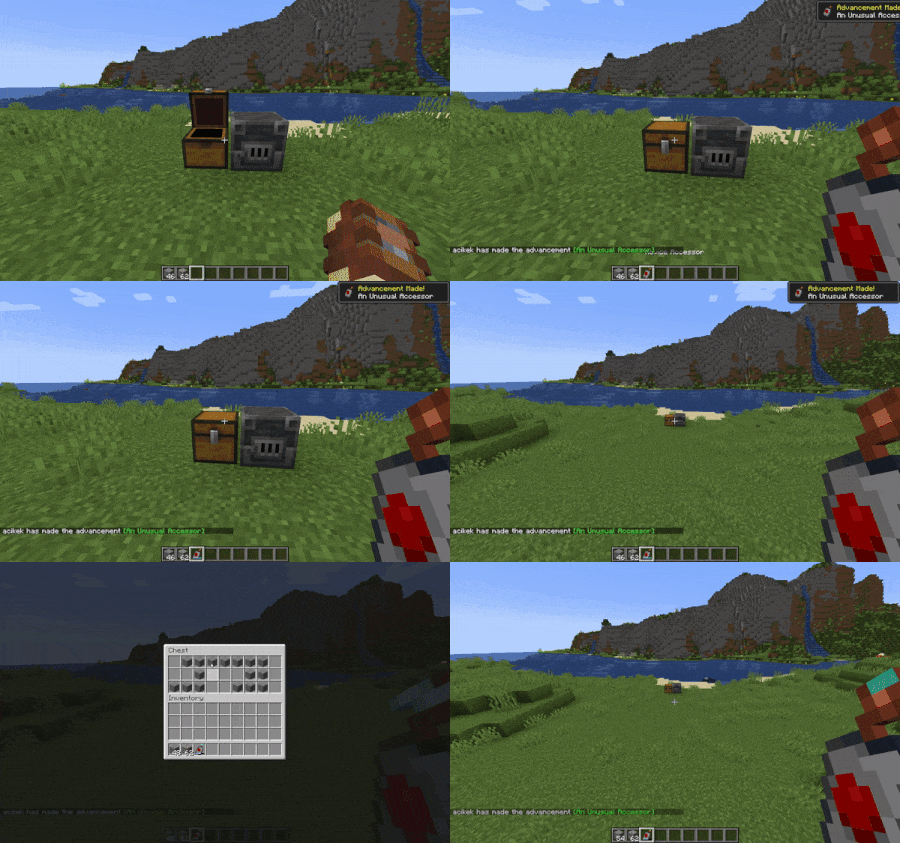 Chest Demo Opening and modifying chest contents from afar.
 -
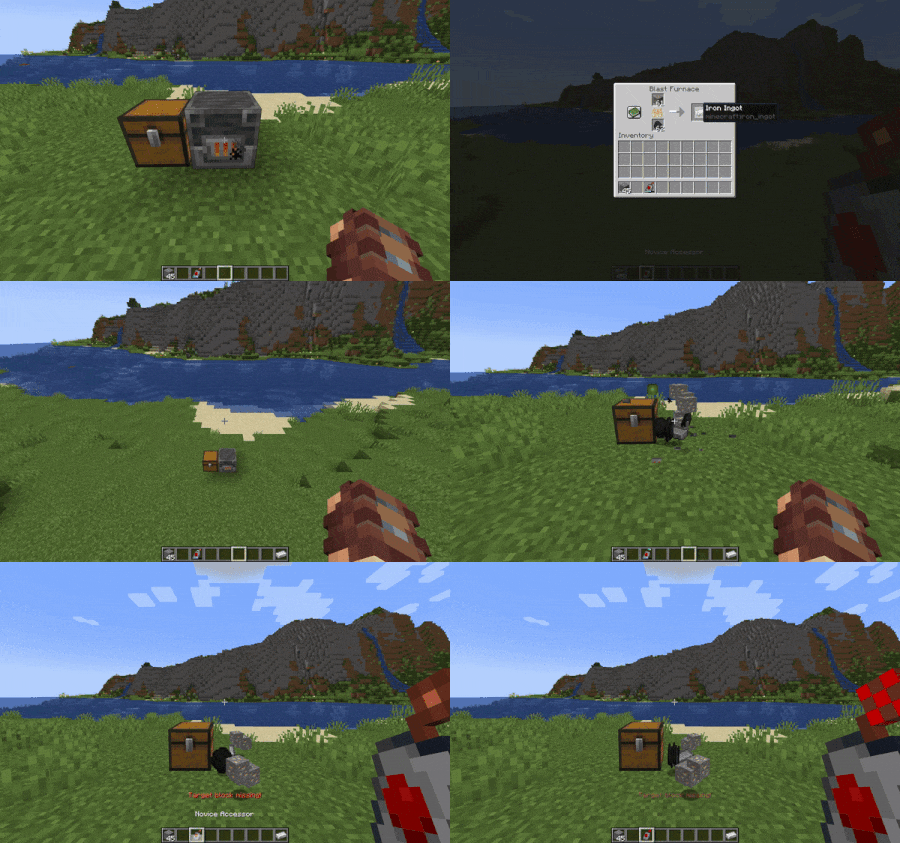 Accessor Failure A successful access followed by a target block desync.
Versions
Files
Relations
Project Relations
More like this
Similar Mods
Suggestions use data such as tags, dependencies, dependents, descriptions, titles, and more to rank how much they overlap with this mod.
On ModDex
Community snapshot
By the numbers
Statistics
Want to reach Minecraft players?
We're looking for a server hosting partner to feature here and other parts of the site. Interested? Send us a message!
Get in touchGet it on
Available Platforms
On ModDex
Community snapshot
By the numbers