
Community listing page, reviews here may not be monitored by the author.
Call You By Your Name


No reviews yet
Call Your Friends By Theirs Name
Community voices
Reviews
No reviews yet. Be the first to review this project!
Get it on
Available Platforms
Compatibility
Supported Environments
Must be installed on both the client and the server.
About
Project Details
For authors
Embed Badge
If you're the author of this project, you can embed a live badge anywhere that supports HTML or Markdown. It updates automatically whenever ratings change.
Use HTML for any page that supports it, or Markdown for README files and Markdown-based descriptions.
Identifiers
Platform IDs
Resources
External Links
About
Description
Call You By Your Name 🎯
A Forge 1.20.1 chat enhancement mod that makes @-mentions loud, clear, and friendly. 💬
Feature Highlights ✨
Ping teammates instantly: Mention a player with @playerName to deliver a highlighted notification and a click-to-reply suggestion that pre-fills chat with their name, plus an optional bell sound.
- Share what you're holding: Drop
@iteminto your message to broadcast your main-hand item with its rarity color, hover tooltip, and (optionally) an inline icon rendered directly in chat. - Point friends to your location: Use
@spotto insert a green "Spot" marker; hovering shows the XYZ of where you were standing when you sent the message. - Ready-made group calls: Rally everyone in your dimension with
@hereor nearby allies with@near; additional groups can be provided by other mods through the built-in registry hook and sync automatically to clients. - Client-side clarity: Color-coded highlighting for players, groups, and special tokens pairs with smart autocompletion, keeping mentions readable and fast to type without interfering with slash commands.

Requirements 📦
- Minecraft: Java Edition 1.20.1
- Loader: Forge
47.4.10or newer on both client and server
Installation 🛠️
- Install a compatible Forge profile for Minecraft 1.20.1.
- Place the CallYouByYourName JAR in your
mods/folder. - Restart Minecraft (or your dedicated server) to load the mod.
Using Mentions 📚
| Token | What it does | Notes |
|---|---|---|
@playerName |
Pings a single player with a golden reminder and clickable reply prompt. | You cannot ping yourself; duplicates are ignored politely. |
@here |
Notifies every other player in your current dimension. | Always available to all players. |
@near |
Calls allies within a ~32 block radius. | Range checks run per dimension to avoid cross-world noise. |
@item |
Shares your held item with tooltip info (and an inline icon if enabled). | Cancels the message and warns you if your hand is empty. |
@spot |
Inserts a highlighted "Spot" link that shows your XYZ on hover. | Great for pointing friends to your current location. |
💡 Tip: The chat will tell you how many seconds remain if you hit the mention cooldown.
Client Experience 🌈
- Mention colors adapt to players, groups, shared items, and spot markers so you can scan conversations at a glance.
- Autocomplete surfaces group tokens, custom registry entries, and online players, but hides automatically while you type commands that start with
/. - Item mentions can render a scaled version of the item icon inline with the chat line while preserving hover hitboxes for easy inspection.
- Mention tokens from servers (or other mods) are synchronized automatically when you join, keeping everyone in step without a restart.
Configuration ⚙️
The first launch creates config/CallYouByYourName-common.toml. Tweak the following options:
mentionCooldownMs– Minimum delay between mentions sent by the same player (default5000). Set to0to disable the check.enableMentionSound– Whether to play the bell sound when a player is pinged (defaulttrue).renderItemTextures– Toggle rendering of inline item icons in chat (defaulttrue).
Reload the config or restart Minecraft to apply changes.
Troubleshooting 🧰
- "I can't use a group mention" – Some third-party groups may require extra permissions; you'll receive a red warning if access is denied.
- "Why don't I see suggestions?" – Mention autocomplete only appears in standard chat and hides during command input.
- "Item sharing failed" – Make sure something is in your main hand before typing
@item; the mod cancels the message otherwise.
Have fun calling your friends by their names! 🎉
Call You By Your Name 🎯
A Forge 1.20.1 chat enhancement mod that makes @-mentions loud, clear, and friendly. 💬
Feature Highlights ✨
Ping teammates instantly: Mention a player with @playerName to deliver a highlighted notification and a click-to-reply suggestion that pre-fills chat with their name, plus an optional bell sound.
- Share what you're holding: Drop
@iteminto your message to broadcast your main-hand item with its rarity color, hover tooltip, and (optionally) an inline icon rendered directly in chat. - Point friends to your location: Use
@spotto insert a green "Spot" marker; hovering shows the XYZ of where you were standing when you sent the message. - Ready-made group calls: Rally everyone in your dimension with
@hereor nearby allies with@near; additional groups can be provided by other mods through the built-in registry hook and sync automatically to clients. - Client-side clarity: Color-coded highlighting for players, groups, and special tokens pairs with smart autocompletion, keeping mentions readable and fast to type without interfering with slash commands.

Requirements 📦
- Minecraft: Java Edition 1.20.1
- Loader: Forge
47.4.10or newer on both client and server
Installation 🛠️
- Install a compatible Forge profile for Minecraft 1.20.1.
- Place the CallYouByYourName JAR in your
mods/folder. - Restart Minecraft (or your dedicated server) to load the mod.
Using Mentions 📚
| Token | What it does | Notes |
|---|---|---|
@playerName |
Pings a single player with a golden reminder and clickable reply prompt. | You cannot ping yourself; duplicates are ignored politely. |
@here |
Notifies every other player in your current dimension. | Always available to all players. |
@near |
Calls allies within a ~32 block radius. | Range checks run per dimension to avoid cross-world noise. |
@item |
Shares your held item with tooltip info (and an inline icon if enabled). | Cancels the message and warns you if your hand is empty. |
@spot |
Inserts a highlighted "Spot" link that shows your XYZ on hover. | Great for pointing friends to your current location. |
💡 Tip: The chat will tell you how many seconds remain if you hit the mention cooldown.
Client Experience 🌈
- Mention colors adapt to players, groups, shared items, and spot markers so you can scan conversations at a glance.
- Autocomplete surfaces group tokens, custom registry entries, and online players, but hides automatically while you type commands that start with
/. - Item mentions can render a scaled version of the item icon inline with the chat line while preserving hover hitboxes for easy inspection.
- Mention tokens from servers (or other mods) are synchronized automatically when you join, keeping everyone in step without a restart.
Configuration ⚙️
The first launch creates config/CallYouByYourName-common.toml. Tweak the following options:
mentionCooldownMs– Minimum delay between mentions sent by the same player (default5000). Set to0to disable the check.enableMentionSound– Whether to play the bell sound when a player is pinged (defaulttrue).renderItemTextures– Toggle rendering of inline item icons in chat (defaulttrue).
Reload the config or restart Minecraft to apply changes.
Troubleshooting 🧰
- "I can't use a group mention" – Some third-party groups may require extra permissions; you'll receive a red warning if access is denied.
- "Why don't I see suggestions?" – Mention autocomplete only appears in standard chat and hides during command input.
- "Item sharing failed" – Make sure something is in your main hand before typing
@item; the mod cancels the message otherwise.
Have fun calling your friends by their names! 🎉
Screenshots
Gallery
-
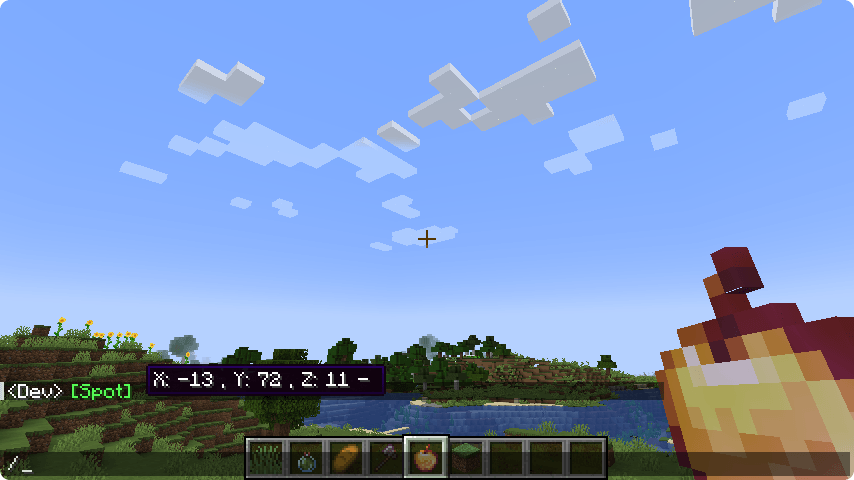 @spot.png @spot.png
 -
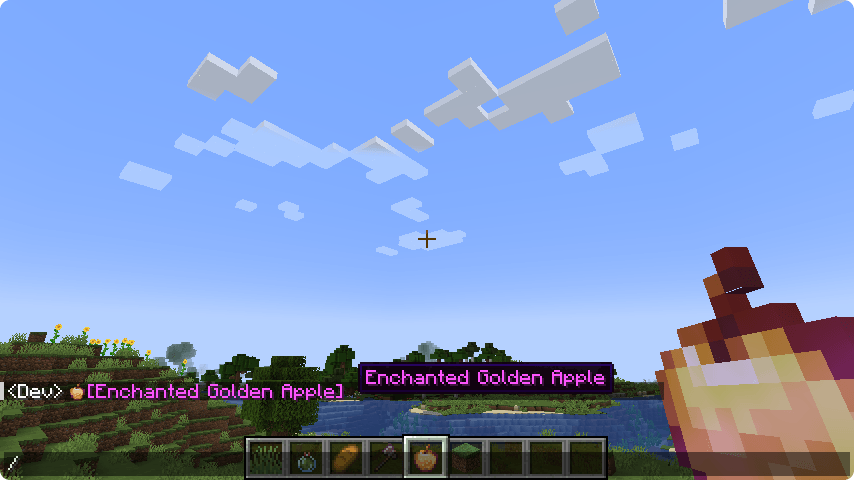 @item.png @item.png
 -
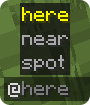 callyoubyyourname.png callyoubyyourname.png
-
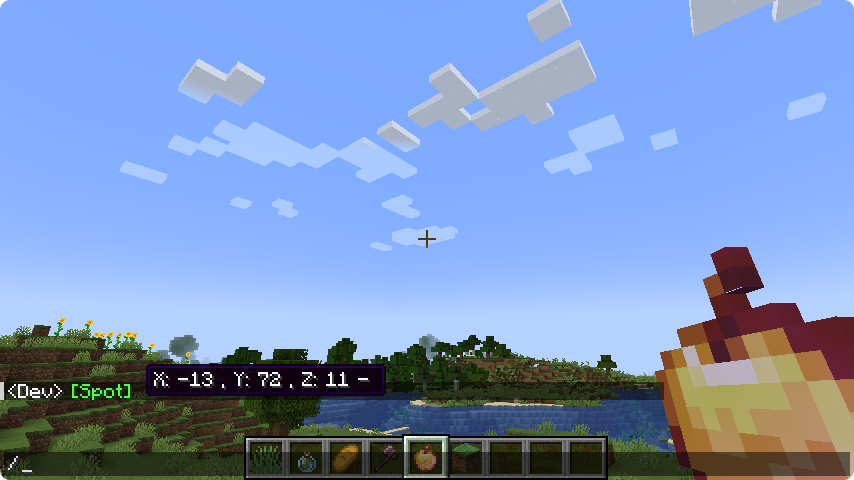 Show your location
 -
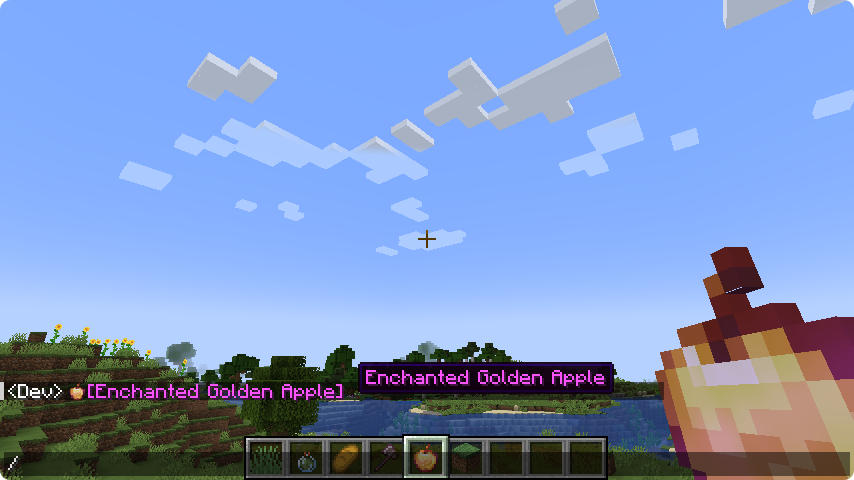 Show Item with its texture
 -
 Cover
Cover
Versions
Files
Relations
Project Relations
More like this
Similar Mods
Suggestions use data such as tags, dependencies, dependents, descriptions, titles, and more to rank how much they overlap with this mod.
On ModDex
Community snapshot
By the numbers
Statistics
Want to reach Minecraft players?
We're looking for a server hosting partner to feature here and other parts of the site. Interested? Send us a message!
Get in touchGet it on
Available Platforms
On ModDex
Community snapshot
By the numbers
Statistics
Resources