Community listing page, reviews here may not be monitored by the author.
Chapter Cards UI with Spacing

No reviews yet
Chapter Cards UI with Spacing - FTB Quests Unofficial Addon
Community voices
Reviews
No reviews yet. Be the first to review this project!
Get it on
Available Platforms
About
Project Details
For authors
Embed Badge
If you're the author of this project, you can embed a live badge anywhere that supports HTML or Markdown. It updates automatically whenever ratings change.
Use HTML for any page that supports it, or Markdown for README files and Markdown-based descriptions.
Identifiers
Platform IDs
Resources
External Links
About
Description
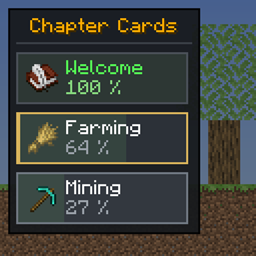
Chapter Cards UI with Spacing (Fabric/Forge)
A client-side mod that makes the FTB Quests (2001.x / 2100.x / 2101.x) UI easier to read.
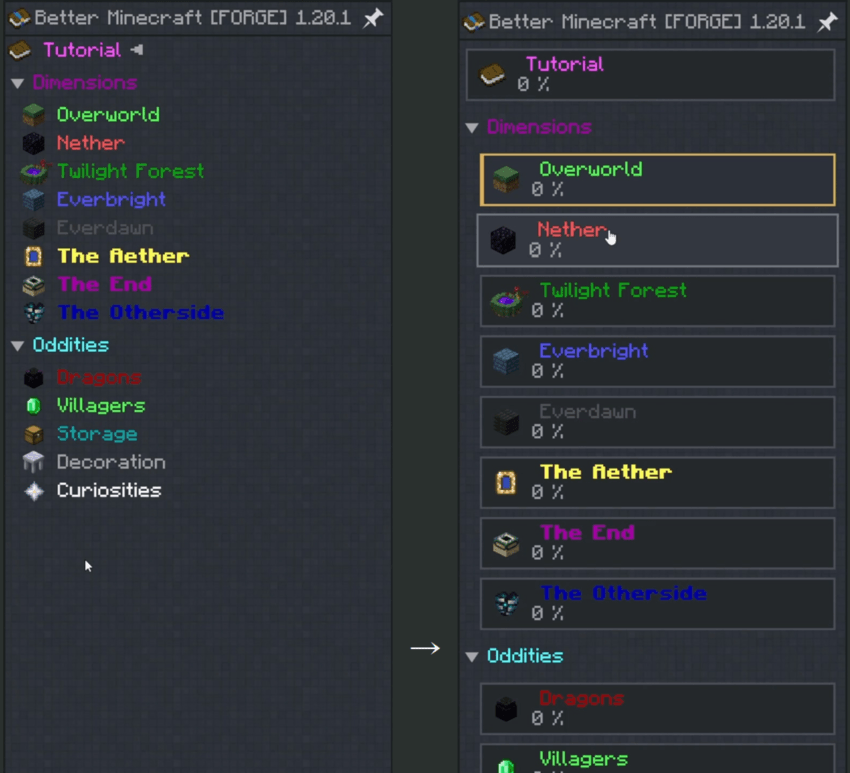
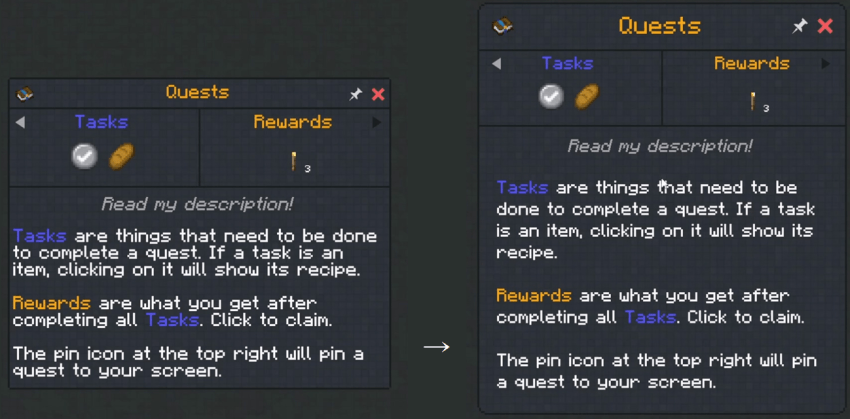
- Examples (Better MC 4)
Features
- Quest description line spacing — replaces the hardcoded
setSpacing(9)(default 12); the gap between description paragraphs (paragraph-gap) is adjustable separately - Card-style chapter list — each chapter is a bordered card with a vertically centered icon and a completion percentage under the title (green when complete); the selected chapter gets a gold border and a left accent bar
- Title / subtitle size — scales the quest title and subtitle text (title defaults to 1.35×)
- Title vertical padding — adjusts the space above and below the title, and vertically centers the title-row icons (quest icon, pin/close)
- Description padding — adjusts the left/right/top/bottom margins of the subtitle and description area (applied to the window height, so no scrollbar appears)
- Arrow inset — moves the ◄► dependency/dependant arrows inward from the window edges
- Title-row icon x padding — moves the title-row icons (quest icon, pin/close) inward from the window edges
- Auto-fit window height / minimum height — recalculates the window height for the title size and padding (prevents scrolling and clipping), with a minimum height for short quests
Configuration (config/ftbq-linespacing.properties)
The config file is created only when it doesn't exist, with the defaults below grouped by section and a comment describing each key. The mod never rewrites an existing file, so your edits and comments are kept, and any key missing from the file uses its default. To get options and descriptions added in a newer version, delete the file and restart the game.
| Section | Key | Default | Description |
|---|---|---|---|
| Quest window: title | title-scale | 1.35 | Quest title text scale (0.5–2.0, 1.0 = FTBQ default) |
| title-padding-y | 8 | Vertical padding above and below the title, px (0–20, FTBQ default 4) | |
| title-icon-padding-x | 4 | Inset of the title-row icons (quest icon, pin/close) from the window edges, px (0–30) | |
| Quest window: subtitle & description | subtitle-scale | 1.0 | Quest subtitle text scale (0.5–2.0, 1.0 = FTBQ default) |
| line-spacing | 12 | Line spacing of the description text (9–20) | |
| paragraph-gap | 0 | Extra px between description paragraphs, added on top of line-spacing (0–12, 0 = same as a line break) | |
| desc-word-wrap | true | Wrap the subtitle and description only at spaces (keeps CJK text such as Korean from looking justified). false uses FTBQ's default wrapping | |
| desc-padding-x | 8 | Left/right margin of the subtitle and description area, px (0–40) | |
| desc-padding-top | 2 | Top margin of the subtitle and description area, px (0–40) | |
| desc-padding-bottom | 8 | Bottom margin of the subtitle and description area, px (0–40, FTBQ default 2) | |
| Quest window: frame | window-corner-radius | 6 | Corner radius of the quest window, px (0–16, 0 = square corners) |
| min-window-height | 120 | Minimum quest window height, px (0–400, 0 = off). Keeps short quests without a subtitle or description from being cut off | |
| arrow-padding-x | 4 | Inset of the ◄► arrows from the window edges, px (0–30) | |
| Chapter list: cards | chapter-cards | true | Card-style chapter list on/off (when false, all chapter list options below are ignored) |
| card-height | 26 | Card height (20–40) | |
| card-gap | 4 | Gap between cards (0–10) | |
| card-min-width | 170 | Minimum card width, px (100–400; the panel widens if it is narrower) | |
| show-progress | true | Show the completion percentage | |
| progress-bar | true | Draw a subtle progress bar across the card background | |
| Chapter list: animation | transition-ms | 120 | Duration of hover/click and slide animations, ms (0–500, 0 = instant / off) |
| card-scale | true | Cards scale up slightly on hover and dip on click (when transition-ms > 0) | |
Supported versions
| Minecraft | Loader | FTB Quests | FTB Library | Java |
|---|---|---|---|---|
| 1.20.1 | Fabric Loader 0.14.21+ | 2001.1.4 – 2001.4.x | 2001.1.4 – 2001.2.x | 17+ |
| 1.20.1 | Forge 47+ | 2001.1.4 – 2001.4.x | 2001.1.4 – 2001.2.x | 17+ |
| 1.21.1 | Fabric Loader 0.16.0+ | 2100.1.0 – 2101.1.x | 2100.1.0 – 2101.1.x | 21+ |
With an FTB version outside these ranges, the loader reports the incompatibility before the game starts. Use the Forge jar (ftbq-linespacing-forge-…) in Forge packs — Forge silently ignores Fabric jars.
Screenshots
Gallery
Versions
Files
Relations
Project Relations
More like this
Similar Mods
Suggestions use data such as tags, dependencies, dependents, descriptions, titles, and more to rank how much they overlap with this mod.
On ModDex
Community snapshot
By the numbers
Statistics
Want to reach Minecraft players?
We're looking for a server hosting partner to feature here and other parts of the site. Interested? Send us a message!
Get in touchGet it on
Available Platforms
On ModDex
Community snapshot
By the numbers
Statistics
Resources