Community listing page, reviews here may not be monitored by the author.
CharTillA

No reviews yet
This mod replace text into symbol by config...
Community voices
Reviews
No reviews yet. Be the first to review this project!
Get it on
Available Platforms
About
Project Details
For authors
Embed Badge
If you're the author of this project, you can embed a live badge anywhere that supports HTML or Markdown. It updates automatically whenever ratings change.
Use HTML for any page that supports it, or Markdown for README files and Markdown-based descriptions.
Identifiers
Platform IDs
Resources
External Links
About
Description
What does CharTillA do?
The mod allows you to add your own character combinations, which will be replaced anywhere available with characters from the Unicode table or config.
By default, the following matches are defined in the config:
niao=9ce5
ren=4eba
xiang=8c61
mao=8c93
gou=72d7
Here the '=' sign is a separator, so it must always be present.
Before '=' you must specify any character set you want. This is the text that will be replaced by the desired character from the Unicode table.
After '=' you must insert the hex representation of the desired character from the Unicode table. It must be exactly 4 characters long.
This way the word “niao” will be replaced by the character '鳥' in chat, books, langs, and anywhere else available.
But what about characters that are not in the Unicode table?
It's simple: you can add your own thanks to free spaces in “unicode_page” (minecraft.jar\assets\minecraft\textures\font).
What it takes:
1. The symbol to be added must be an image in .png format.
2. Place it in the glyphs folder (.minecraft\config\CharTillA).
3. In the minecraft.jar\assets\minecraft\textures\font directory, select the “unicode_page” file that has enough free indexes for your characters.
4. Rename image file according to the rules already known from the niao=9ce5 example, with one exception…
In this case, the 4 characters after the '=' are divided into 2 groups of 2 characters each:
— the first group is the last two characters in the name of each “unicode_page” file after '_';
— the second group is the index of a free character in the “unicode_page” file in hex representation. The index is counted from 0 and ends with 255 ('00' to 'ff' in hex).
Example (based on “CharTillA toki pona cfg” in additional files):
1. Let's take the first .png file — “a=1a20”, representing the letter 'a!' in sitelen pona.
2. We place it in the glyphs folder.
3. In the minecraft.jar\assets\minecraft\textures\font directory, we choose the “unicode_page_1a” file because it is the first file with enough free indexes.
4. As we can see, the character we are adding (“a=1a20”) is renamed according to the rules:
— 'a' is the letter before '=', which will be automatically replaced by the character we add;
— '=' is our separator, leave it alone;
— '1a' is our first group of characters after '=', which corresponds to the last 2 characters of the file name “unicode_page_1a”;
— '20' is our second group of characters after '=', which corresponds to the hex representation of the first free index in file “unicode_page_1a”. This is the 32nd index. There are already 32 characters in the file, but we remember that the index count starts at 0, so technically the 32nd character is the 31st.
Here's what it will look like in the game:

If you are not happy that some text in the game is “broken” due to automatic text replacement, you can enable the 'replaceOnlyInBrackets' parameter in “CharTillA.cfg”.
In this case, only the text inside bracket symbols will be replaced (can be changed to any characters using the 'bracketStart' and 'bracketEnd' parameters in “CharTillA.cfg”).
Screenshots
Gallery
-
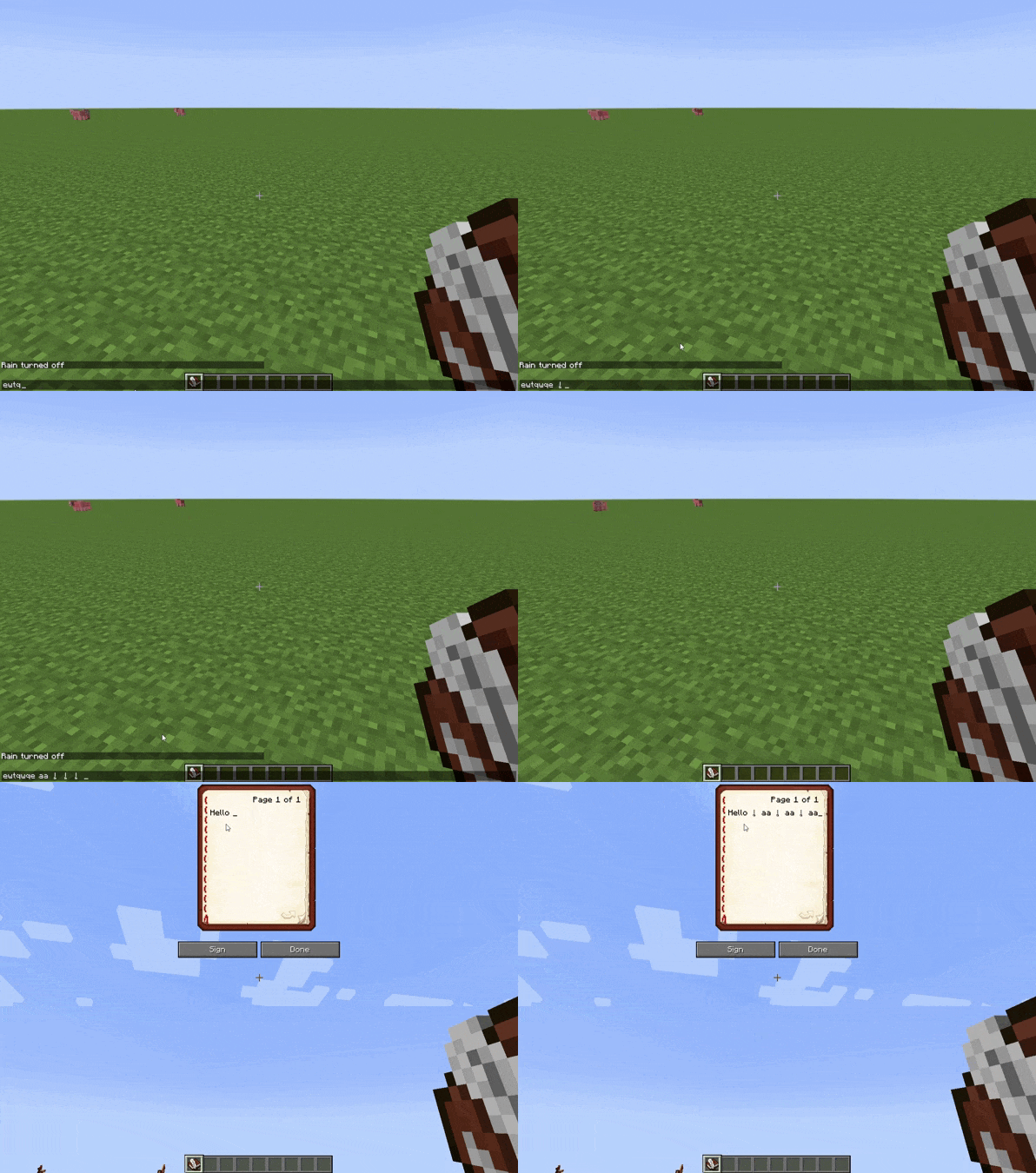 CharTillA Demo The input letter 'a' turns into 'a!' from sitelen pona
Versions
Files
Relations
Project Relations
More like this
Similar Mods
Suggestions use data such as tags, dependencies, dependents, descriptions, titles, and more to rank how much they overlap with this mod.
On ModDex
Community snapshot
By the numbers
Statistics
Want to reach Minecraft players?
We're looking for a server hosting partner to feature here and other parts of the site. Interested? Send us a message!
Get in touchGet it on
Available Platforms
On ModDex
Community snapshot
By the numbers
Statistics
Resources