Community listing page, reviews may not be monitored by the author.
Chat Calculator Boost


No reviews yet
A powerful Minecraft calculator mod that turns your chat into a private math workspace. Calculate expressions, define variables, perform matrix operations, and more - all without leaving the game.

Community voices
Reviews
No reviews yet. Be the first to review this project!
Get it on
Available Platforms
Compatibility
Supported Environments
Runs entirely on the server. Also works in singleplayer.
About
Project Details
For authors
Embed Badge
If you're the author of this project, you can embed a live badge anywhere that supports HTML or Markdown. It updates automatically whenever ratings change.
Use HTML for any page that supports it, or Markdown for README files and Markdown-based descriptions.
Identifiers
Platform IDs
About
Description
Chat Calculator Boost | 聊天计算器增强
Minecraft 1.12.2 Forge Mod
English
Mod Information
| Property | Description |
|---|---|
| Version | Minecraft 1.12.2 |
| Loader | Forge |
| Installation | Server required, client optional (Recommend both) |
| Dependency | Expression-Parser 1.4.0 |
Overview
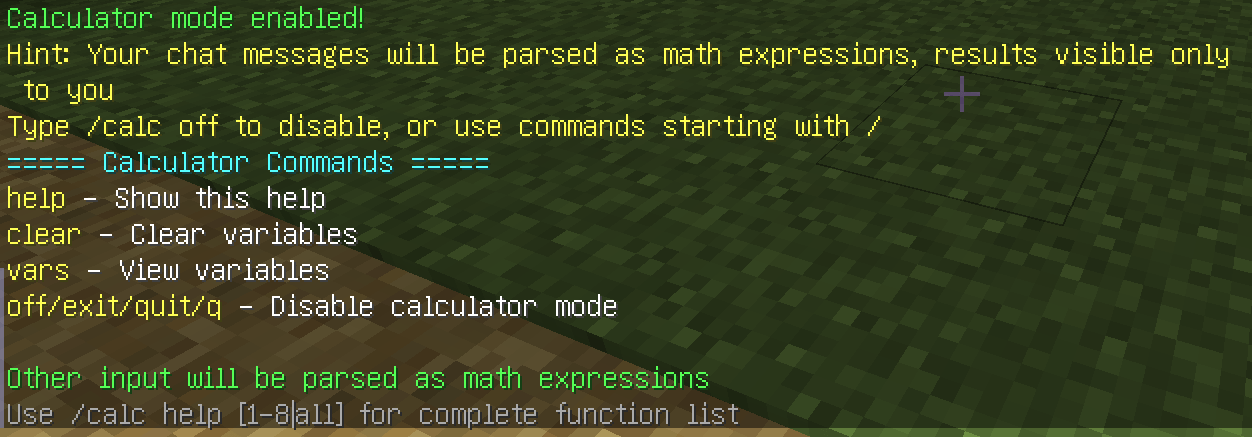
Chat Calculator Boost is a powerful Minecraft server-side mod that allows players to perform complex mathematical calculations through the chat interface. The mod provides two usage modes:
- Calculator Mode - When enabled, normal chat messages are automatically parsed as mathematical expressions
- Command Mode - Single calculations via
/calc <expression>
Core Features
1. Calculator Mode (Private Calculations)
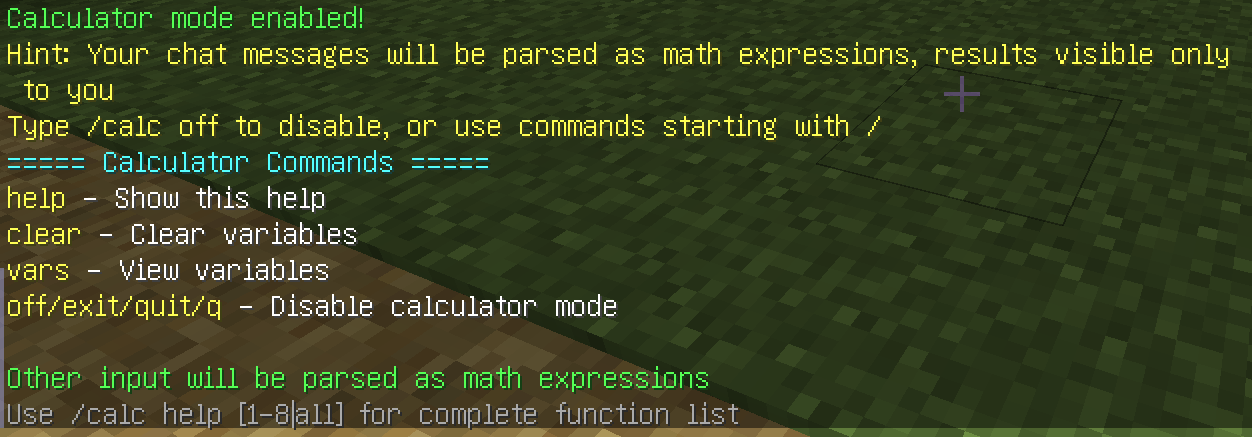
- When enabled, player chat is intercepted and parsed as mathematical expressions
- Other players cannot see your calculations or results
- Calculation results can be clicked to copy to chat box
- Context data is automatically cleared when player logs out
2. Rich Mathematical Operations
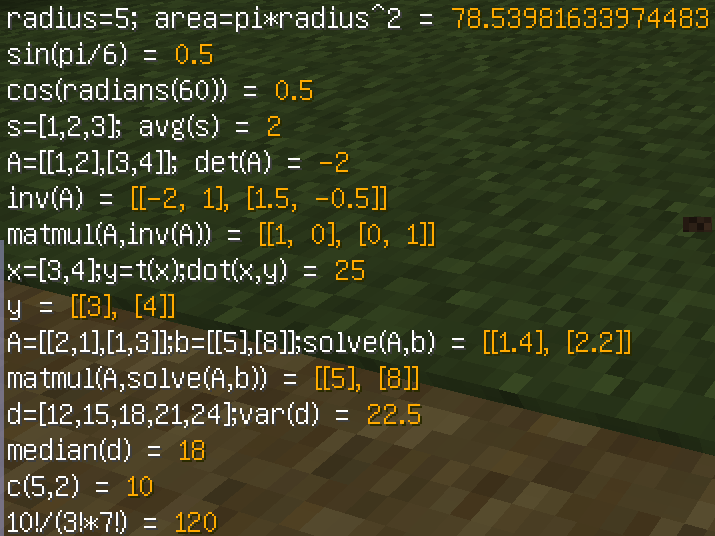
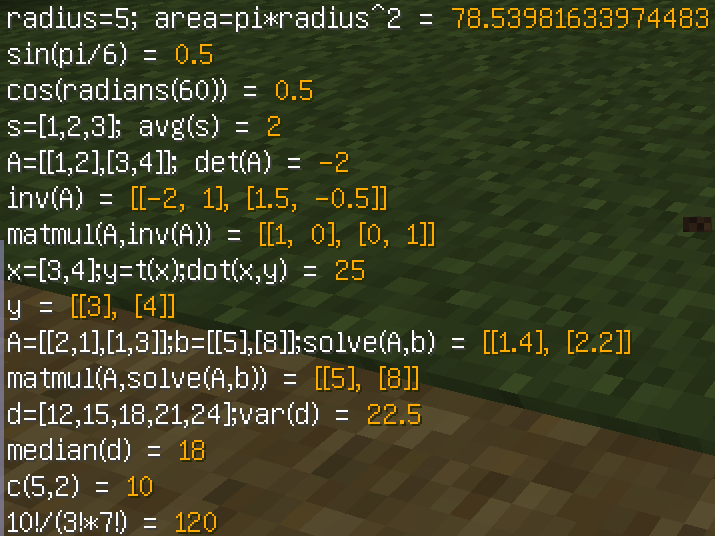
- Basic Operations: Addition, subtraction, multiplication, division, modulo, power, factorial
- Trigonometric: sin, cos, tan, asin, acos, atan
- Hyperbolic: sinh, cosh, tanh
- Exponential & Logarithm: exp, ln, log10, pow
- Statistics: Average, median, variance, standard deviation, covariance, correlation
- Vector Operations: Dot product, Euclidean distance, Manhattan distance
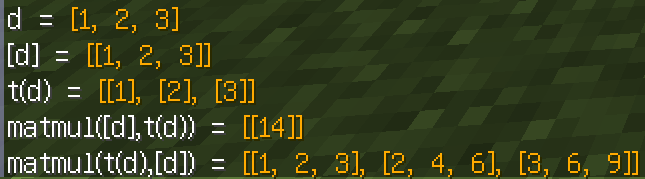
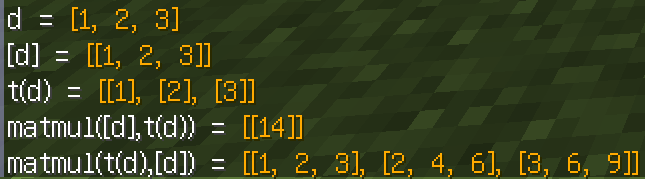
- Matrix Operations: Transpose, determinant, matrix multiplication, inverse, solve linear equations
- Combinatorics: Permutations, combinations
3. Variable System
- Custom variable support (e.g.,
x = 10) - Multi-statement support (semicolon separated, e.g.,
a=5;b=3;a+b) - Automatic save of last result to
ansvariable - Variables are valid only during current session (cleared after logout)
4. Arrays & Matrices
- 1D arrays:
[1, 2, 3] - 2D matrices:
[[1,2], [3,4]] - Array variable assignment and operations
5. Implicit Multiplication
2PI->2 * PI3(4+5)->3 * (4+5)2sqrt(4)->2 * sqrt(4)
Command List
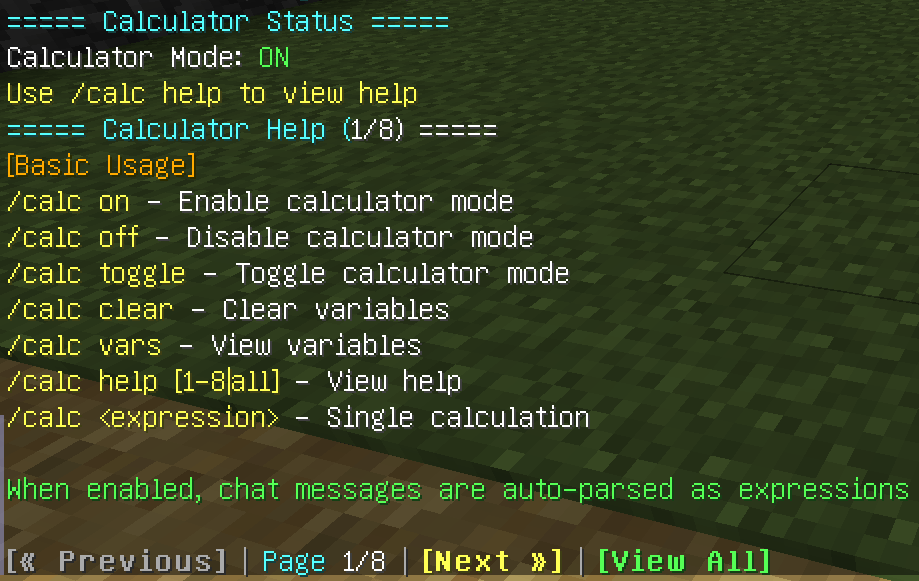
| Command | Description |
|---|---|
/calc |
View current calculator status |
/calc on |
Enable calculator mode |
/calc off |
Disable calculator mode |
/calc toggle |
Toggle calculator mode |
/calc clear |
Clear all variables (keep ans) |
/calc vars |
View defined variables |
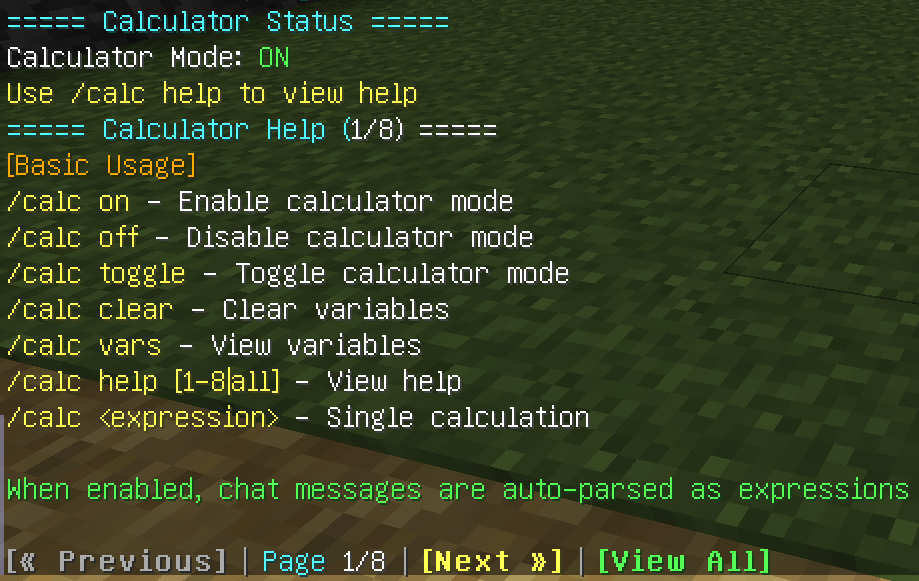
/calc help [1-8\|all] |
View help (paginated or full) |
/calc <expression> |
Single expression calculation |
Usage Examples
Example 1: Basic Calculations
/calc 2 + 3 * 4
Result: 14
Example 2: Variable Usage
/calc on
Enable calculator mode

x = 10
Define variable x = 10

y = 20
Define variable y = 20

x + y
Result: 30

a=5;b=3;a*b
Result: 15
Example 3: Function Calls
/calc sin(PI/2)
Result: 1

/calc sqrt(16) + pow(2, 3)
Result: 12

/calc 5!
Result: 120
Example 4: Arrays & Statistics
/calc scores=[85, 92, 78, 96, 88]
Define array

/calc avg(scores)
Result: 87.8

/calc max(scores)
Result: 96
Example 5: Matrix Operations
/calc A=[[1,2],[3,4]]
Define matrix

/calc det(A)
Result: -2

/calc transpose(A)
Result: [[1, 3], [2, 4]]
Example 6: Using Last Result
/calc 10 + 5
Result: 15

/calc ans * 2
Result: 30 (uses last result ans = 15)
Internationalization
The mod includes bilingual support:
- Chinese (Simplified):
zh_cn.lang - English (US):
en_us.lang
Note:
- When installed on both sides, automatically displays the corresponding language based on client language settings
- With server-only installation, clients will display translation keys (e.g.,
calc.mode.on) instead of normal text
Technical Dependencies
This mod uses Expression-Parser as the mathematical expression parsing engine:
- Based on recursive descent parsing technology
- Supports scalar, vector, and matrix operations
- Provides rich mathematical function library
- Supports implicit multiplication and complex expressions
Installation
Installation Requirements
- Must be installed on server, otherwise the mod will not work
- Client installation is optional, but recommended for full experience
Server + Client Installation (Recommended)
- Download the mod JAR file
- Place in both server and client
modsfolders - Start the server and client
- All text displays normally (Chinese/English based on client language settings)
Server-side Only
- Calculation functions work normally
- But clients will display translation keys (e.g.,
calc.mode.on) instead of normal text - Recommend installing on client as well for best experience
Client-side Only
- Will not work, mod functions require server-side support
- Except for single-player games (single player world), where client is also the server
中文
模组信息
| 属性 | 说明 |
|---|---|
| 适用版本 | Minecraft 1.12.2 |
| 加载器 | Forge |
| 安装类型 | 必须服务端安装,客户端可选(推荐双端安装) |
| 依赖 | Expression-Parser 1.4.0 |
功能概述
聊天计算器增强是一个功能强大的 Minecraft 服务器端模组,允许玩家通过聊天界面进行复杂的数学计算。模组提供了两种使用模式:
- 计算模式 - 开启后,玩家的普通聊天消息会被自动解析为数学表达式
- 指令模式 - 通过
/calc <表达式>进行单次计算
核心功能
1. 计算模式(隐私计算)
- 开启后,玩家的聊天内容会被拦截并解析为数学表达式
- 其他玩家看不到你的计算过程和结果
- 计算结果可以点击复制到聊天框
- 玩家退出后自动清理上下文数据
2. 丰富的数学运算
- 基本运算:加、减、乘、除、取模、幂运算、阶乘
- 三角函数:sin, cos, tan, asin, acos, atan
- 双曲函数:sinh, cosh, tanh
- 指数对数:exp, ln, log10, pow
- 统计函数:平均值、中位数、方差、标准差、协方差、相关系数
- 向量操作:点积、欧氏距离、曼哈顿距离
- 矩阵运算:转置、行列式、矩阵乘法、求逆、解线性方程组
- 组合数学:排列、组合
3. 变量系统
- 支持自定义变量(如
x = 10) - 多语句支持(分号分隔,如
a=5;b=3;a+b) - 自动保存上次计算结果到
ans变量 - 变量仅在当前会话期间有效(退出后清空)
4. 数组与矩阵
- 一维数组:
[1, 2, 3] - 二维矩阵:
[[1,2], [3,4]] - 数组变量赋值和运算
5. 隐式乘法
2PI->2 * PI3(4+5)->3 * (4+5)2sqrt(4)->2 * sqrt(4)
指令列表
| 指令 | 说明 |
|---|---|
/calc |
查看当前计算器状态 |
/calc on |
开启计算模式 |
/calc off |
关闭计算模式 |
/calc toggle |
切换计算模式 |
/calc clear |
清除所有变量(保留 ans) |
/calc vars |
查看已定义的变量 |
/calc help [1-8\|all] |
查看帮助(支持分页和完整显示) |
/calc <表达式> |
单次计算表达式 |
使用示例
示例 1:基本计算
/calc 2 + 3 * 4
结果:14
示例 2:变量使用
/calc on
开启计算模式

x = 10
定义变量 x = 10

y = 20
定义变量 y = 20

x + y
结果:30

a=5;b=3;a*b
结果:15
示例 3:函数调用
/calc sin(PI/2)
结果:1

/calc sqrt(16) + pow(2, 3)
结果:12

/calc 5!
结果:120
示例 4:数组与统计
/calc scores=[85, 92, 78, 96, 88]
定义数组

/calc avg(scores)
结果:87.8

/calc max(scores)
结果:96
示例 5:矩阵运算
/calc A=[[1,2],[3,4]]
定义矩阵

/calc det(A)
结果:-2

/calc transpose(A)
结果:[[1, 3], [2, 4]]
示例 6:使用上次结果
/calc 10 + 5
结果:15

/calc ans * 2
结果:30(使用上次结果 ans = 15)
国际化支持
模组内置中英文双语支持:
- 中文(简体):
zh_cn.lang - 英文(美国):
en_us.lang
注意:
- 双端安装时,根据客户端语言设置自动显示对应语言
- 仅服务端安装时,客户端显示翻译键(如
calc.mode.on)而非正常文本
技术依赖
本模组使用 Expression-Parser 作为数学表达式解析引擎:
- 基于递归下降解析技术
- 支持标量、向量、矩阵运算
- 提供丰富的数学函数库
- 支持隐式乘法和复杂表达式
安装说明
安装要求
- 必须在服务端安装,否则模组无法工作
- 客户端可选安装,但推荐双端安装以获得完整体验
服务端 + 客户端安装(推荐)
- 下载模组 JAR 文件
- 同时放入服务端和客户端的
mods文件夹 - 启动服务端和客户端
- 所有文本提示正常显示(中文/英文根据客户端语言设置)
仅服务端安装
- 计算功能可以正常使用
- 但客户端会显示翻译键(如
calc.mode.on)而非正常文本 - 建议同时安装客户端以获得最佳体验
仅客户端安装
- 无法使用,模组功能需要服务端支持
- 单人游戏(单人存档)除外,此时客户端即服务端
License
This mod is licensed under MIT License.
Chat Calculator Boost | 聊天计算器增强
Minecraft 1.12.2 Forge Mod
English
Mod Information
| Property | Description |
|---|---|
| Version | Minecraft 1.12.2 |
| Loader | Forge |
| Installation | Server required, client optional (Recommend both) |
| Dependency | Expression-Parser 1.4.0 |
Overview
Chat Calculator Boost is a powerful Minecraft server-side mod that allows players to perform complex mathematical calculations through the chat interface. The mod provides two usage modes:
- Calculator Mode - When enabled, normal chat messages are automatically parsed as mathematical expressions
- Command Mode - Single calculations via
/calc <expression>
Core Features
1. Calculator Mode (Private Calculations)
- When enabled, player chat is intercepted and parsed as mathematical expressions
- Other players cannot see your calculations or results
- Calculation results can be clicked to copy to chat box
- Context data is automatically cleared when player logs out
2. Rich Mathematical Operations
- Basic Operations: Addition, subtraction, multiplication, division, modulo, power, factorial
- Trigonometric: sin, cos, tan, asin, acos, atan
- Hyperbolic: sinh, cosh, tanh
- Exponential & Logarithm: exp, ln, log10, pow
- Statistics: Average, median, variance, standard deviation, covariance, correlation
- Vector Operations: Dot product, Euclidean distance, Manhattan distance
- Matrix Operations: Transpose, determinant, matrix multiplication, inverse, solve linear equations
- Combinatorics: Permutations, combinations
3. Variable System
- Custom variable support (e.g.,
x = 10) - Multi-statement support (semicolon separated, e.g.,
a=5;b=3;a+b) - Automatic save of last result to
ansvariable - Variables are valid only during current session (cleared after logout)
4. Arrays & Matrices
- 1D arrays:
[1, 2, 3] - 2D matrices:
[[1,2], [3,4]] - Array variable assignment and operations
5. Implicit Multiplication
2PI->2 * PI3(4+5)->3 * (4+5)2sqrt(4)->2 * sqrt(4)
Command List
| Command | Description |
|---|---|
/calc |
View current calculator status |
/calc on |
Enable calculator mode |
/calc off |
Disable calculator mode |
/calc toggle |
Toggle calculator mode |
/calc clear |
Clear all variables (keep ans) |
/calc vars |
View defined variables |
/calc help [1-8|all] |
View help (paginated or full) |
/calc <expression> |
Single expression calculation |
Usage Examples
Example 1: Basic Calculations
/calc 2 + 3 * 4
Result: 14
Example 2: Variable Usage
/calc on
Enable calculator mode

x = 10
Define variable x = 10

y = 20
Define variable y = 20

x + y
Result: 30

a=5;b=3;a*b
Result: 15
Example 3: Function Calls
/calc sin(PI/2)
Result: 1

/calc sqrt(16) + pow(2, 3)
Result: 12

/calc 5!
Result: 120
Example 4: Arrays & Statistics
/calc scores=[85, 92, 78, 96, 88]
Define array

/calc avg(scores)
Result: 87.8

/calc max(scores)
Result: 96
Example 5: Matrix Operations
/calc A=[[1,2],[3,4]]
Define matrix

/calc det(A)
Result: -2

/calc transpose(A)
Result: [[1, 3], [2, 4]]
Example 6: Using Last Result
/calc 10 + 5
Result: 15

/calc ans * 2
Result: 30 (uses last result ans = 15)
Internationalization
The mod includes bilingual support:
- Chinese (Simplified):
zh_cn.lang - English (US):
en_us.lang
Note:
- When installed on both sides, automatically displays the corresponding language based on client language settings
- With server-only installation, clients will display translation keys (e.g.,
calc.mode.on) instead of normal text
Technical Dependencies
This mod uses Expression-Parser as the mathematical expression parsing engine:
- Based on recursive descent parsing technology
- Supports scalar, vector, and matrix operations
- Provides rich mathematical function library
- Supports implicit multiplication and complex expressions
Installation
Installation Requirements
- Must be installed on server, otherwise the mod will not work
- Client installation is optional, but recommended for full experience
Server + Client Installation (Recommended)
- Download the mod JAR file
- Place in both server and client
modsfolders - Start the server and client
- All text displays normally (Chinese/English based on client language settings)
Server-side Only
- Calculation functions work normally
- But clients will display translation keys (e.g.,
calc.mode.on) instead of normal text - Recommend installing on client as well for best experience
Client-side Only
- Will not work, mod functions require server-side support
- Except for single-player games (single player world), where client is also the server
中文
模组信息
| 属性 | 说明 |
|---|---|
| 适用版本 | Minecraft 1.12.2 |
| 加载器 | Forge |
| 安装类型 | 必须服务端安装,客户端可选(推荐双端安装) |
| 依赖 | Expression-Parser 1.4.0 |
功能概述
聊天计算器增强是一个功能强大的 Minecraft 服务器端模组,允许玩家通过聊天界面进行复杂的数学计算。模组提供了两种使用模式:
- 计算模式 - 开启后,玩家的普通聊天消息会被自动解析为数学表达式
- 指令模式 - 通过
/calc <表达式>进行单次计算
核心功能
1. 计算模式(隐私计算)
- 开启后,玩家的聊天内容会被拦截并解析为数学表达式
- 其他玩家看不到你的计算过程和结果
- 计算结果可以点击复制到聊天框
- 玩家退出后自动清理上下文数据
2. 丰富的数学运算
- 基本运算:加、减、乘、除、取模、幂运算、阶乘
- 三角函数:sin, cos, tan, asin, acos, atan
- 双曲函数:sinh, cosh, tanh
- 指数对数:exp, ln, log10, pow
- 统计函数:平均值、中位数、方差、标准差、协方差、相关系数
- 向量操作:点积、欧氏距离、曼哈顿距离
- 矩阵运算:转置、行列式、矩阵乘法、求逆、解线性方程组
- 组合数学:排列、组合
3. 变量系统
- 支持自定义变量(如
x = 10) - 多语句支持(分号分隔,如
a=5;b=3;a+b) - 自动保存上次计算结果到
ans变量 - 变量仅在当前会话期间有效(退出后清空)
4. 数组与矩阵
- 一维数组:
[1, 2, 3] - 二维矩阵:
[[1,2], [3,4]] - 数组变量赋值和运算
5. 隐式乘法
2PI->2 * PI3(4+5)->3 * (4+5)2sqrt(4)->2 * sqrt(4)
指令列表
| 指令 | 说明 |
|---|---|
/calc |
查看当前计算器状态 |
/calc on |
开启计算模式 |
/calc off |
关闭计算模式 |
/calc toggle |
切换计算模式 |
/calc clear |
清除所有变量(保留 ans) |
/calc vars |
查看已定义的变量 |
/calc help [1-8|all] |
查看帮助(支持分页和完整显示) |
/calc <表达式> |
单次计算表达式 |
使用示例
示例 1:基本计算
/calc 2 + 3 * 4
结果:14
示例 2:变量使用
/calc on
开启计算模式

x = 10
定义变量 x = 10

y = 20
定义变量 y = 20

x + y
结果:30

a=5;b=3;a*b
结果:15
示例 3:函数调用
/calc sin(PI/2)
结果:1

/calc sqrt(16) + pow(2, 3)
结果:12

/calc 5!
结果:120
示例 4:数组与统计
/calc scores=[85, 92, 78, 96, 88]
定义数组

/calc avg(scores)
结果:87.8

/calc max(scores)
结果:96
示例 5:矩阵运算
/calc A=[[1,2],[3,4]]
定义矩阵

/calc det(A)
结果:-2

/calc transpose(A)
结果:[[1, 3], [2, 4]]
示例 6:使用上次结果
/calc 10 + 5
结果:15

/calc ans * 2
结果:30(使用上次结果 ans = 15)
国际化支持
模组内置中英文双语支持:
- 中文(简体):
zh_cn.lang - 英文(美国):
en_us.lang
注意:
- 双端安装时,根据客户端语言设置自动显示对应语言
- 仅服务端安装时,客户端显示翻译键(如
calc.mode.on)而非正常文本
技术依赖
本模组使用 Expression-Parser 作为数学表达式解析引擎:
- 基于递归下降解析技术
- 支持标量、向量、矩阵运算
- 提供丰富的数学函数库
- 支持隐式乘法和复杂表达式
安装说明
安装要求
- 必须在服务端安装,否则模组无法工作
- 客户端可选安装,但推荐双端安装以获得完整体验
服务端 + 客户端安装(推荐)
- 下载模组 JAR 文件
- 同时放入服务端和客户端的
mods文件夹 - 启动服务端和客户端
- 所有文本提示正常显示(中文/英文根据客户端语言设置)
仅服务端安装
- 计算功能可以正常使用
- 但客户端会显示翻译键(如
calc.mode.on)而非正常文本 - 建议同时安装客户端以获得最佳体验
仅客户端安装
- 无法使用,模组功能需要服务端支持
- 单人游戏(单人存档)除外,此时客户端即服务端
License
This mod is licensed under MIT License.
Screenshots
Gallery
-
 4.png 4.png
 -
 3.png 3.png
 -
 2.png 2.png
 -
 1.png 1.png
Versions
Files
Relations
Project Relations
More like this
Similar Mods
Suggestions use data such as tags, dependencies, dependents, descriptions, titles, and more to rank how much they overlap with this mod.
On ModDex
Community snapshot
By the numbers
Statistics
 (opens in a new tab)
Get it on
Available Platforms
On ModDex
Community snapshot
By the numbers