Community listing page, reviews may not be monitored by the author.
Chat Colours Modified

No reviews yet
This is a modified Version of chat Colours with no anvil limits and the removal of <> around players names

Community voices
Reviews
No reviews yet. Be the first to review this project!
Get it on
Available Platforms
About
Project Details
For authors
Embed Badge
If you're the author of this project, you can embed a live badge anywhere that supports HTML or Markdown. It updates automatically whenever ratings change.
Use HTML for any page that supports it, or Markdown for README files and Markdown-based descriptions.
Identifiers
Platform IDs
About
Description
Chat Colours - Modified
Overhauls the game's 13-year-old text formatting syntax.
Markdown-like syntax
This mod allows you to use markdown-like syntax to format your text in Minecraft:
*italic text*→ italic text**bold text**→ bold text***bold + italic***→ bold + italic__underline__→ underline~~strikethrough~~→ strikethrough
Examples:
this **is** bold→ this is boldthis __underline *is* multiple things__→ this is multiple things
The terminating set of symbols is optional, e.g. **hello will still be bold.
If you put a star at the start of the name of an item in an anvil, it will cancel out the italics.
Hex codes / custom colours
This mod allows you to colour your text with custom colours:
[#ff0000]red text→ red text[#ff00FF]pink text→ pink text**[#00ff00]bold green text**or[#00ff00]**bold green text**→ bold green text
The codes are case-insensitive.
Gradient text
You can create smooth gradients between two colours using this syntax:
[gradient:#RRGGBB:#RRGGBB:text]
Examples:
[gradient:#FF0000:#0000FF:This is a gradient!]→ text transitions from red to blue***[gradient:#FFAA00:#00AAFF:Bold Italic Gradient!]***→ gradient text with bold + italic styles
Gradient text works with markdown-like formatting, so you can combine bold, italic, underline, etc.
Extended format syntax
This feature has been replaced by new syntax but still works.
You can use named colours instead of the normal single letters:
- white, black, blue, green, aqua (or cyan), red, purple, gray, yellow
The names are case-insensitive.
To use the dark version of the colour (except white and black), put d, dark or deep before or after the name. You can optionally use a space or underscore between the name and the prefix/suffix.
Examples:
§[dark_blue],§[deepblue],§[blue d],§[dblue]→ dark blue text§[gold]→ gold text (dark yellow also supported)
Bold, underline, italics, etc.
You can also use:
§[s]→ strikeout text§[b]→ bold text§[o]→ obfuscated text§[u]→ underlined text§[r]→ reset
Multiple style options
Format options can be chained without needing multiple §s.
Example:§[red][u][i]text → red, underlined, italic text
Note: Colours should always come first. Minecraft resets some styles when a colour code is applied.
Chat Enhancements
- Removes
< >around player names for a clean, modern chat look, regardless of texture or language packs. - Removes anvil rename limits on both clients and servers (unless other mods interfere).
- Known incompatibility: mods that completely replace the Anvil GUI and hard-set the limit.
Server Usage
To use on servers:
- Install the mod on the server, or
- Ensure the server allows
§codes in chat.
Otherwise, the server may kick you when using formatting.
Screenshots
Gallery
-
 Nicknames in Chat Using FTB Essentials
 -
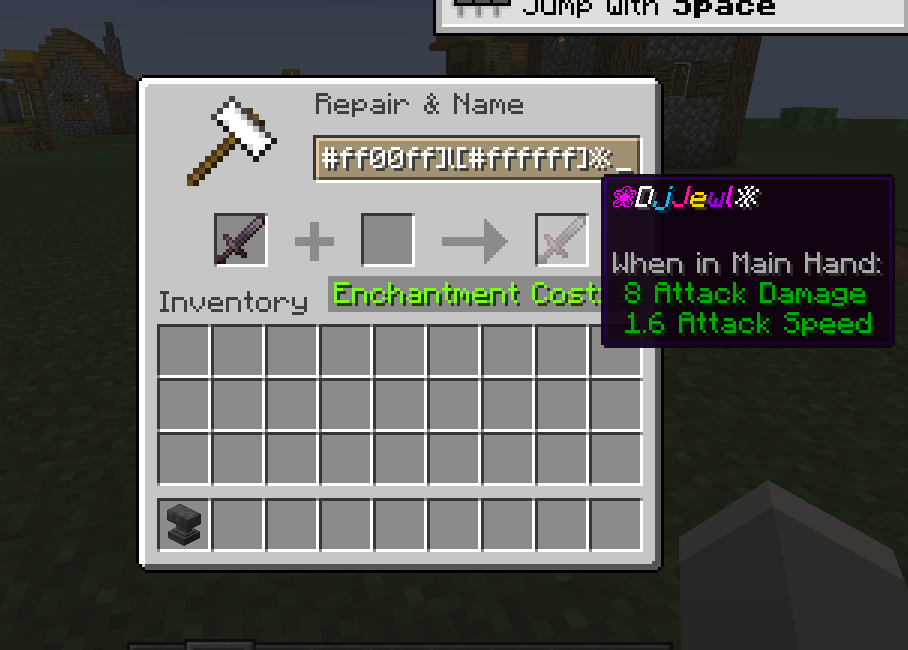 Anvil Limits Bypass Example of Surpassing the Anvil Limits
 -
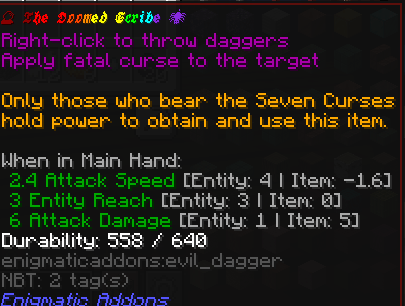 Renamed Item Example Image of what can be done with this mod in anvils, As there is No Limit on it. (this is a example and the Enigmatic legacy breaks the anvil expansion but Can be done with a /rename command instead)
Versions
Files
Relations
Project Relations
More like this
Similar Mods
Suggestions use data such as tags, dependencies, dependents, descriptions, titles, and more to rank how much they overlap with this mod.
On ModDex
Community snapshot
By the numbers
Statistics
 (opens in a new tab)
Get it on
Available Platforms
On ModDex
Community snapshot
By the numbers