Community listing page, reviews here may not be monitored by the author.
CheckYourChest


No reviews yet
CheckYourChest is a Minecraft mod that lets you track chest contents in real-time and receive automated updates via Discord webhook.
Community voices
Reviews
No reviews yet. Be the first to review this project!
Get it on
Available Platforms
Compatibility
Supported Environments
Runs entirely on the server. Also works in singleplayer.
About
Project Details
For authors
Embed Badge
If you're the author of this project, you can embed a live badge anywhere that supports HTML or Markdown. It updates automatically whenever ratings change.
Use HTML for any page that supports it, or Markdown for README files and Markdown-based descriptions.
Identifiers
Platform IDs
Resources
External Links
About
Description
CheckYourChest
...is a Minecraft utility mod designed for both servers and single-player worlds, perfect for players managing farms or automated item systems. The mod allows players to mark specific chests, track their contents in real-time, and receive detailed inventories via a webhook directly to a Discord server.
Whether you're away from your base or want to monitor your storage, CheckYourChest provides a seamless way to stay updated on what's happening in your chests.
Features
- Mark Any Chest Mark any single or double chest in your world and monitor its contents.
- Track Single and Double Chests Automatically handle both single and double chests with ease.
- Real-Time Updates Monitor chest contents in real-time and automatically send updates at specified intervals.
- Discord Integration via Webhook Send detailed inventory reports directly to a Discord channel using a webhook.
- Ideal for Automated Systems Perfect for automation, farms, and large storage systems where keeping track of resources is essential.
How It Works
- Marking a Chest Use a custom item (Marking Stick) to mark any chest. When a chest is marked, its contents will be tracked and updated at regular intervals.
- Chest Monitoring Track the chest's contents in real-time. The mod works with both single and double chests, ensuring comprehensive tracking for all your storage needs.
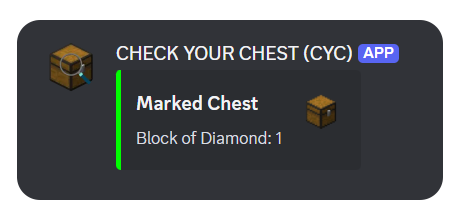
- Automatic Webhook Updates At each interval (defined in the config), the contents of the marked chest(s) are sent to your designated Discord webhook, providing a detailed list of items and their quantities.
Configuration
- Webhook Setup To set up a Discord webhook, follow these steps:
- Go to your Discord channel settings.
- Under the "Integrations" tab, create a new webhook and copy its URL.
- Paste the webhook URL into the mod's configuration file (
config/checkyourchest-common.toml).
Additionally, you can set the interval dynamically in-game using the following command:/cyc setWebhookURL "<webhookURL>"
- Interval Settings You can customize how often chest updates are sent to the webhook by adjusting the
checkIntervalin the config file. This value is in minutes. For example:
checkInterval = 60 #Sends updates every hourAdditionally, you can set the interval dynamically in-game using the following command:
/cyc setCheckInterval <minutes>Usage
- Command to Get the Marking Stick Use the
/cyccommand in the game to get the Marking Stick. This special item allows you to mark chests for monitoring. - Marking a Chest To mark a chest, hold the Marking Stick and sneak right-click on the chest you want to track. The mod will start monitoring the contents of the chest and send updates to your webhook at the configured interval.
- Unmarking a Chest To unmark a chest, simply sneak right-click on the marked chest or any other block with the Marking Stick, and the chest will be unmarked.
Made with Love ❤️
CheckYourChest
CheckYourChest is a Minecraft utility mod designed for both servers and single-player worlds, perfect for players managing farms or automated item systems. The mod allows players to mark specific chests, track their contents in real-time, and receive detailed inventories via a webhook directly to a Discord server.
Whether you're away from your base or want to monitor your storage, CheckYourChest provides a seamless way to stay updated on what's happening in your chests.

Features🛠️
-
Mark Any Chest
Mark any single or double chest in your world and monitor its contents. -
Track Single and Double Chests
Automatically handle both single and double chests with ease. -
Real-Time Updates
Monitor chest contents in real-time and automatically send updates at specified intervals. -
Discord Integration via Webhook
Send detailed inventory reports directly to a Discord channel using a webhook. -
Ideal for Automated Systems
Perfect for automation, farms, and large storage systems where keeping track of resources is essential.
How It Works
-
Marking a Chest
Use a custom item (Marking Stick) to mark any chest. When a chest is marked, its contents will be tracked and updated at regular intervals. -
Chest Monitoring
Track the chest's contents in real-time. The mod works with both single and double chests, ensuring comprehensive tracking for all your storage needs. -
Automatic Webhook Updates
At each interval (defined in the config), the contents of the marked chest(s) are sent to your designated Discord webhook, providing a detailed list of items and their quantities.
Installation
-
Requirements
- Minecraft Forge (Version 1.20.1 or above)
- Download the latest release of the mod
-
Install the Mod
- Place the downloaded
.jarfile into your Minecraftmodsfolder. - Ensure you have the correct Forge version installed.
- Place the downloaded
Configuration🔧
-
Webhook Setup
To set up a Discord webhook, follow these steps:- Go to your Discord channel settings.
- Under the "Integrations" tab, create a new webhook and copy its URL.
- Start the server / client world once.
- Now you can either enter the command
/cyc setWebhookURL <URL>or paste the URL in the mod's configuration file (config/checkyourchest-common.toml). - Restart the server.
-
Interval Settings
You can customize how often chest updates are sent to the webhook by adjusting thecheckIntervalin the config file. This value is in minutes. For example:checkInterval = 60 # Sends updates every hourAdditionally, you can set the interval dynamically in-game using the following command:
/cyc setCheckInterval <minutes>
Usage
-
Command to Get the Marking Stick
Use the/cyccommand in the game to get the Marking Stick. This special item allows you to mark chests for monitoring. -
Marking a Chest
To mark a chest, hold the Marking Stick and sneak right-click on the chest you want to track. The mod will start monitoring the contents of the chest and send updates to your webhook at the configured interval. -
Unmarking a Chest
To unmark a chest, simply sneak right-click on the marked chest or any other block with the Marking Stick, and the chest will be unmarked.
Force Load Chunks
You can also use the /cyc forceload <true|false> command to enable or disable chunk force loading for marked chests. This ensures that the chunk where the chest is located remains loaded, even if no players are nearby.
Additionally, you can configure this setting in the mod's configuration file (config/checkyourchest-common.toml). For example:
forceLoadChunks = true # Ensures marked chests' chunks are always loaded
By default, chunk force loading is disabled. If enabled, chunks containing marked chests will remain loaded to guarantee uninterrupted monitoring and updates.
Made with Love ❤️
Screenshots
Gallery
-
 CheckYourChest
Versions
Files
Relations
Project Relations
More like this
Similar Mods
Suggestions use data such as tags, dependencies, dependents, descriptions, titles, and more to rank how much they overlap with this mod.
On ModDex
Community snapshot
By the numbers
Statistics
Want to reach Minecraft players?
We're looking for a server hosting partner to feature here and other parts of the site. Interested? Send us a message!
Get in touchGet it on
Available Platforms
On ModDex
Community snapshot
By the numbers
Statistics
Resources