Community listing page, reviews may not be monitored by the author.
Chest Hub

No reviews yet
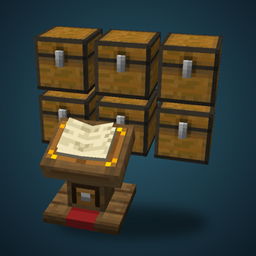
A lectern that links every chest around it and opens them all as one big searchable, sortable chest.

Community voices
Reviews
No reviews yet. Be the first to review this project!
Get it on
Available Platforms
About
Project Details
For authors
Embed Badge
If you're the author of this project, you can embed a live badge anywhere that supports HTML or Markdown. It updates automatically whenever ratings change.
Use HTML for any page that supports it, or Markdown for README files and Markdown-based descriptions.
Identifiers
Platform IDs
Resources
External Links
About
Description
Chest Hub
Chest Hub is a lectern, craftable in every wood, that links all the chests around it and opens them as one big scrollable chest. No more walking from chest to chest looking for that one stack of iron.
How it works
Place a Chest Hub near your chests. It searches an invisible area around itself (15x15x15 by default) and links every chest, trapped chest, barrel and shulker box it finds. Right-click the hub and every linked container opens as a single window. The storage is your own chests: nothing is infinite, nothing is stored anywhere else.
Want more space? Place more chests next to the linked ones and they join automatically, even outside the area. A small hub next to a long wall of chests links the whole wall.
The area screen
Sneak and right-click the hub to open a simple, vanilla-style screen:
Quick buttons for 15x15, 7x7 and 3x3.
Sliders for width, height and length, so the area fits your room exactly.
A "Chain across gaps" button: chests separated from the chain by 1 or 2 empty blocks can still join.
Changes apply right away, and the area and its linked chests are outlined so you can see what gets linked.
The window
Items always come first, wherever their chest is, and empty slots come after.
Four sort orders: by category (the creative inventory order), by name, by amount or by mod. Your choice is remembered.
Category filters on the side: building blocks, natural blocks, functional, redstone, tools, combat, food and ingredients. Right-click a category to always keep it on top.
Search by item name, enchantment or potion effect, in your own language. Use @name to search by mod and #name to search by tag.
Ctrl + click an item to highlight the chest it is in, even through walls.
Buttons to store your whole inventory, or only the items the storage already has (the hotbar is never touched).
Shift + click the sort button to physically organize the items inside your chests.
The window grows with your screen, from 3 to 9 rows.
Crafting Filter
Craft a Crafting Filter and put it in the hub's filter slot to add a crafting grid to the window. After each craft the grid refills itself from your storage, so shift-clicking the result crafts as much as you have materials for.
More
Several hubs whose areas reach the same storage share it.
Sneak while placing it against a block to hang it on the wall as a clipboard.
Every wood has its own Chest Hub, with its own creative tab.
Hoppers and pipes can use the whole storage through the hub, and a comparator reads how full it is.
Rename it in an anvil to give the window a name.
Containers locked with the vanilla lock are never linked.
Recipes
Chest Hub: three slabs on top, a chest in the middle and a slab at the bottom, like a lectern. The hub is made of the wood of the slabs.
Crafting Filter: string in the corners, sticks on the sides and a crafting table in the middle.
Configuration
config/chesthub.properties lets you change the default and maximum area size, chaining, the gap allowed between chained chests, sharing between hubs, the container limit, linking any block with an inventory, and hopper access.
Screenshots
Gallery
Versions
Files
Relations
Project Relations
More like this
Similar Mods
Suggestions use data such as tags, dependencies, dependents, descriptions, titles, and more to rank how much they overlap with this mod.
On ModDex
Community snapshot
By the numbers
Statistics

Get it on
Available Platforms
On ModDex
Community snapshot
By the numbers
Statistics
Resources