Community listing page, reviews here may not be monitored by the author.
Chisels & Bytes

No reviews yet
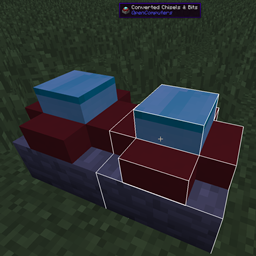
Chisels & Bytes is an addon for Chisels & Bits by AlgorithmX2. The mod allows you to export a Chisels & Bits block as a descriptive file for the OpenComputers 3d printer and works client-side only.
Community voices
Reviews
No reviews yet. Be the first to review this project!
Get it on
Available Platforms
About
Project Details
For authors
Embed Badge
If you're the author of this project, you can embed a live badge anywhere that supports HTML or Markdown. It updates automatically whenever ratings change.
Use HTML for any page that supports it, or Markdown for README files and Markdown-based descriptions.
Identifiers
Platform IDs
About
Description
Chisels & Bytes
Chisels & Bytes is an addon for Chisels & Bits by AlgorithmX2. The mod allows you to export Chisels & Bits blocks or designs (since v0.4) as a descriptive file for the OpenComputers 3D printer and works client-side only.
There are two prominent advantages of a 3D print over the Chisels & Bits block:
- Since the 3D printer is available in OpenComputers for Minecraft 1.7.10, this mod allows you, within limits, to port your Chisel & Bits creations back to 1.7.10.
- 3D prints have some features C&B blocks don't. First and foremost, they can have two states. Depending on the settings, you can emulate the behaviour of a door, switch or button. Second they can be set to emit light, no matter what they are made from. Finally you can set collision for each state. For more information install the print3d-examples package via oppm and look at the example file (/usr/share/models/example.3dm).
This mod requires Java 8.
Usage
After installing the mod, hold a Chisels & Bits block in your hand and (by default) press the Next/Page Up key. The script will be copied to your clipboard and can be directly pasted into the in-game OpenComputers Editor or, out of game, into your favourite text editor for adjustment. The data is formatted for use with the print3d program available via the OpenComputers package manager oppm.
If you have a Chisels & Bits block in the hotbar slot to the right of your active item (or offhand since v0.4), it will be used as the active state for the 3D print.
Version 0.4 adds limited fluid support. Sneaking toggles between using the still and flowing texture for fluid bits. Also if the C&B block/design contains light emitting bits, the respective option will be set in the descriptive file.
Limits
- By default the OpenComputers 3D printer only allows 24 shapes. The mod tries to minimize the number of shapes, but complex blocks will probably go beyond that easily. The limit can be changed in the OpenComputers configuration file (maxShapes in the printer section).
- If you port a design to 1.7.10 you will probably have to manually adjust the textures in the file. Textures are also not guaranteed to work 1.9 -> 1.8.
- [1.9+] Minecraft 1.9 removed the method I used to read the color of FlatColoredBlocks blocks, so I now have to specifically code for the mod. This can break at any update to FlatColoredBlocks but shouldn't cause crashes, only missing tint specification.
- [v0.4] Partial fluid bit support is now available. This is limited by the capabilities of 3d prints, the fluid will not be semi-transparent and you can only use either the still or flowing texture.
- [v0.4] Designs are now supported for export, rotation is ignored though. Negative Designs are intentionally disabled, for the purposed of this mod they hold no useful information.
Screenshots
Gallery
Versions
Files
Relations
Project Relations
More like this
Similar Mods
Suggestions use data such as tags, dependencies, dependents, descriptions, titles, and more to rank how much they overlap with this mod.
On ModDex
Community snapshot
By the numbers
Statistics
Want to reach Minecraft players?
We're looking for a server hosting partner to feature here and other parts of the site. Interested? Send us a message!
Get in touchGet it on
Available Platforms
On ModDex
Community snapshot
By the numbers