
Community listing page, reviews here may not be monitored by the author.
Mine and Slash Damage Tracker

No reviews yet
This mod is used to track damage dealt while playing with the Mine And Slash mod.
Community voices
Reviews
No reviews yet. Be the first to review this project!
Get it on
Available Platforms
About
Project Details
For authors
Embed Badge
If you're the author of this project, you can embed a live badge anywhere that supports HTML or Markdown. It updates automatically whenever ratings change.
Use HTML for any page that supports it, or Markdown for README files and Markdown-based descriptions.
Identifiers
Platform IDs
Resources
External Links
About
Description
Damage Tracker (Mine and Slash)
===============
What It Is
===============
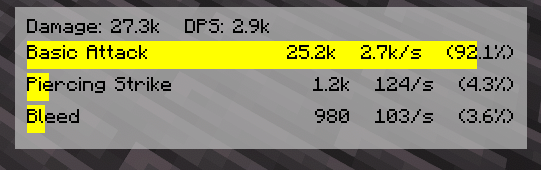
A client-side DPS overlay for Mine and Slash. It parses the combat log in real time and renders a compact, movable HUD showing Total, DPS, and your top abilities with element-colored bars.
===============
Features
===============
> Live overlay HUD
> Measure by rolling time frame or manually cleared sample (configurable)
> Per-ability data rows show Total, DPS, % of Overall damage, and a progress bar tinted to the damage element.
> Draggable (Move/Edit key) with snap + bounds clamp; configurable position and padding.
> Background panel with configurable color + opacity; optional per-row bar backgrounds.
> Smart parsing:
-Regex-driven capture (configurable profile) for Mine and Slash output lines
-Heuristics to normalize skill names/elements and pick up common variants (“applied” vs “dealt”, multi-element, etc.).
-Duplicate suppression (prevents repeated lines from double counting).
-Target Dummy filtering (prevents Target Dummy display outputs from polluting the meter data).
-Idle Freeze (optional): pauses the rolling window timer after X ms of no new damage.
>Details & reporting
-Quick Report screen (keybind) with a 15-row breakdown and last-hit details per skill.
-Tooltip/details API for future expansion (e.g., crit rate, avg hit, etc., as chat exposes it).
>Cosmetics & Colors
-Defaults (editable):
-Physical = Orange
-Lightning = Yellow
-Cold = Light Blue
-Fire = Red
-Chaos/Shadow = Purple
-Multi-Element = Violet
*You can theme every element color in config.
>Keybinds (defaults)
-Toggle Overlay: /
-Move/Edit Overlay: - (also Shift+- to reset position to center)
-Clear Data: * (Numpad Multiply)
-Report: Unbound (set your favorite)
>Using the overlay
-Press / to toggle the HUD.
-Press - to enter Move/Edit mode, then drag the window; Esc to exit.
-(Hold Shift while pressing - to reset position to screen center.)
Press * to clear the current sample (if you set manual clear mode).
===============
Permissions
===============
Modpacks: Allowed. Please credit and link the project page.
Redistribution: Link the CurseForge or GitHub release; don’t rehost binaries.
===============
Links
===============
Source & Issues: GitHub (Damage Tracker)
Screenshots
Gallery
-
DPS Meter Overlay
Versions
Files
Relations
Project Relations
More like this
Similar Mods
Suggestions use data such as tags, dependencies, dependents, descriptions, titles, and more to rank how much they overlap with this mod.
On ModDex
Community snapshot
By the numbers
Statistics
Want to reach Minecraft players?
We're looking for a server hosting partner to feature here and other parts of the site. Interested? Send us a message!
Get in touchGet it on
Available Platforms
On ModDex
Community snapshot
By the numbers
Statistics
Resources