
Community listing page, reviews here may not be monitored by the author.
(Sodium) Chloride


Gives to Sodium (and Embeddium for 1.20.1) additional Performance and Quality features for a tasteful experience
Community voices
Reviews
No reviews yet. Be the first to review this project!
Get it on
Available Platforms
Compatibility
Supported Environments
Runs entirely on the client. Works on vanilla servers.
About
Project Details
For authors
Embed Badge
If you're the author of this project, you can embed a live badge anywhere that supports HTML or Markdown. It updates automatically whenever ratings change.
Use HTML for any page that supports it, or Markdown for README files and Markdown-based descriptions.
Identifiers
Platform IDs
About
Description



🧂 CHLORIDE MOD
Chloride is a performance addon/mod for Sodium that aims to improve
the performance of the game and the quality of sodium itself.
Offers a lot of features to customize and improve your experience with sodium, making it
a tasteful experience (NaCl).

🔧 FEATURES
⚡ PERFORMANCE
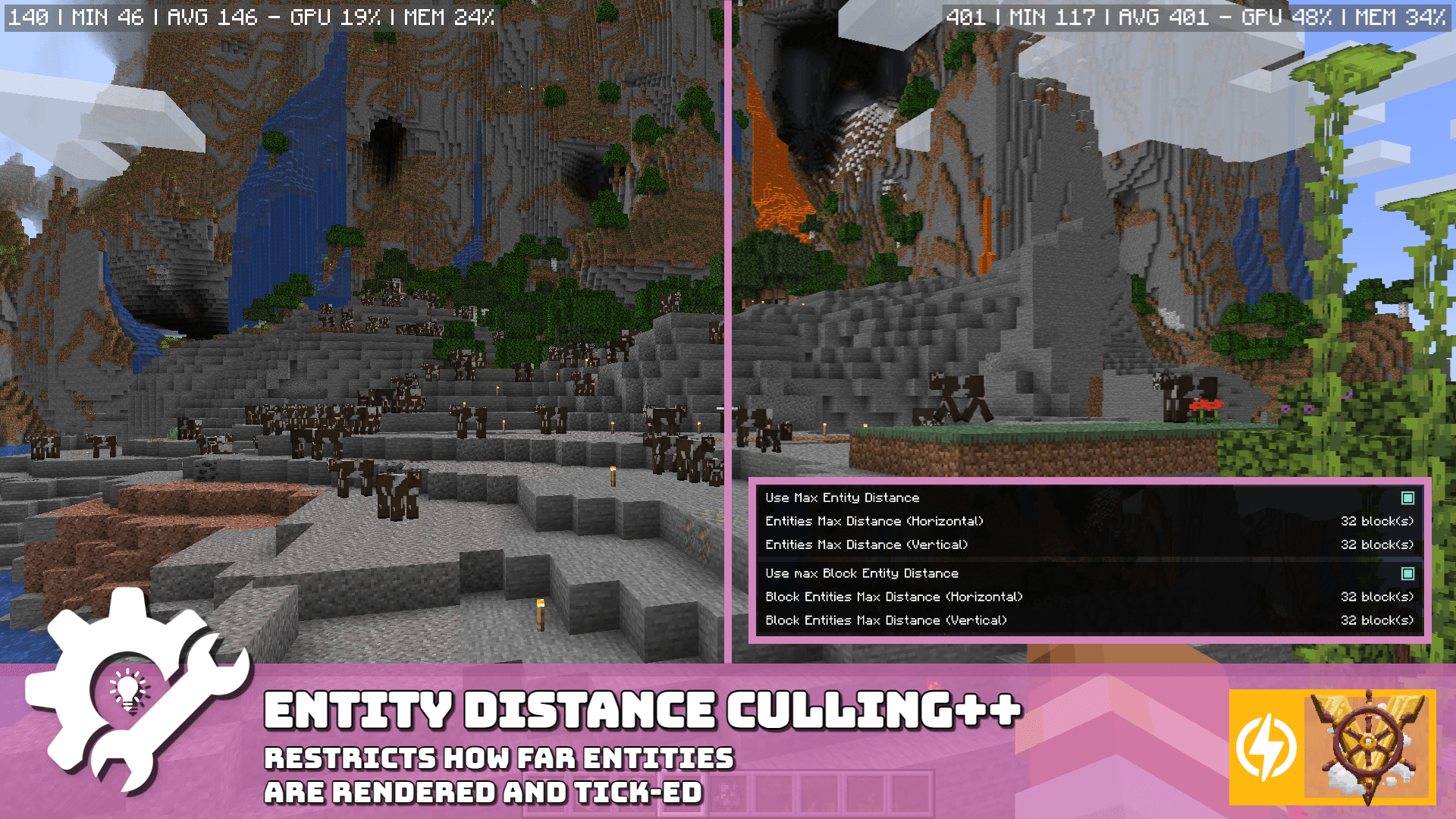
🐄 ENTITY DISTANCE CULLING
- 📐 Avoid rendering/ticking Entities and Block Entities from far away.
- 📋 Features a whitelist, letting important entities (such as ender dragon or ghast)
- ✨ Example:
minecraft:batculls bats,alexsmobs:allculls all Alex's Mobs entities.
[🌿] LEAVES CULLING
- 📐 Reduce the number of rendered faces in a group of the same type of leaves
- 📋 Features a slider to set how many leaves you want to cull
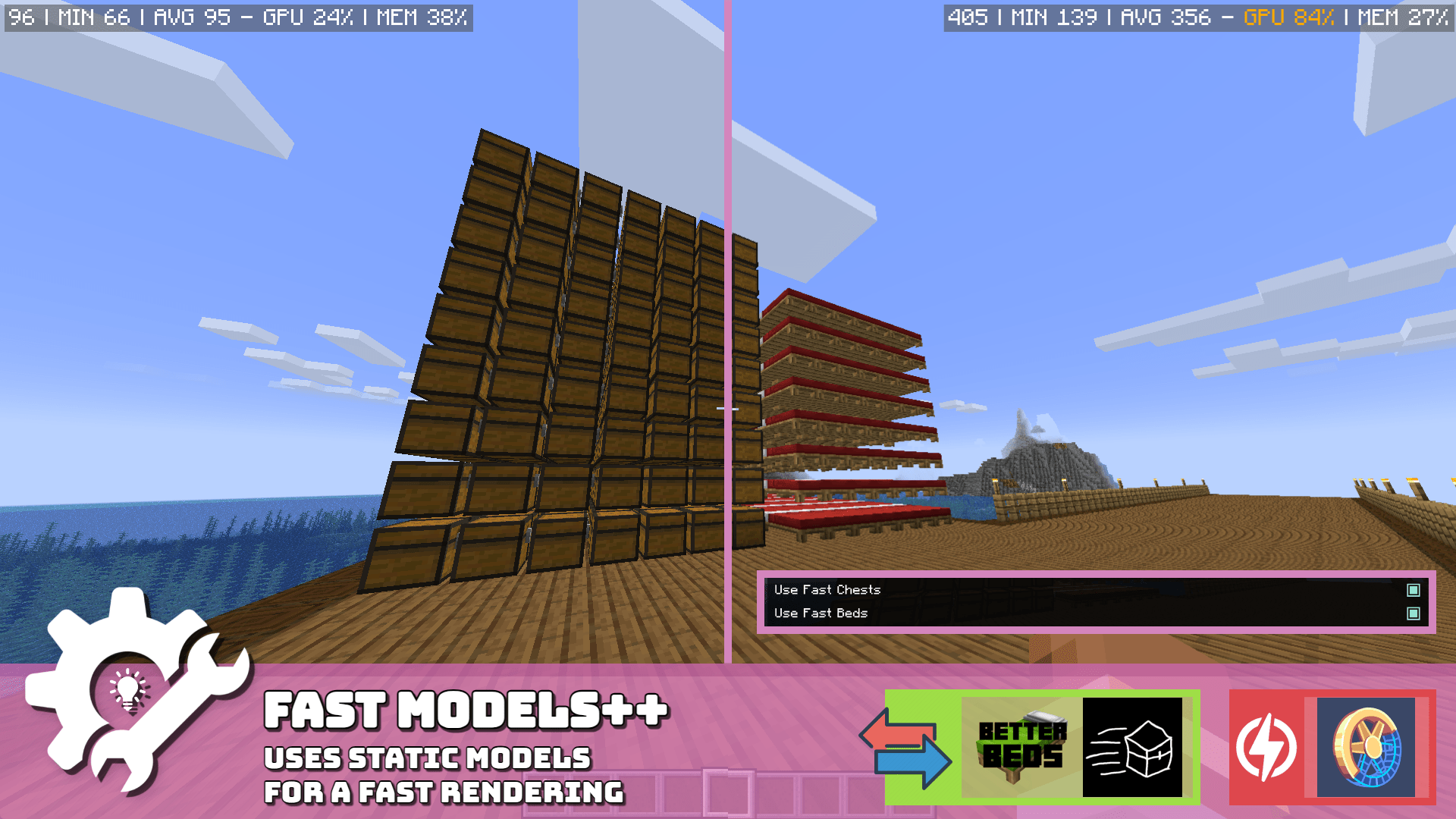
[👟] FAST MODELS
- 📐 Replaces suboptimal animated Chest and Bed (below mc26.2) models to use solid models
- 📋 Toggle each individually
[🔦] HIDE JEI/REI/EMI OVERLAY
- 📐 Hides JEI/REI/EMI overlays until you type anything in their search bars
- ✨ Show a small meessag indicating you must search something to show the overlay
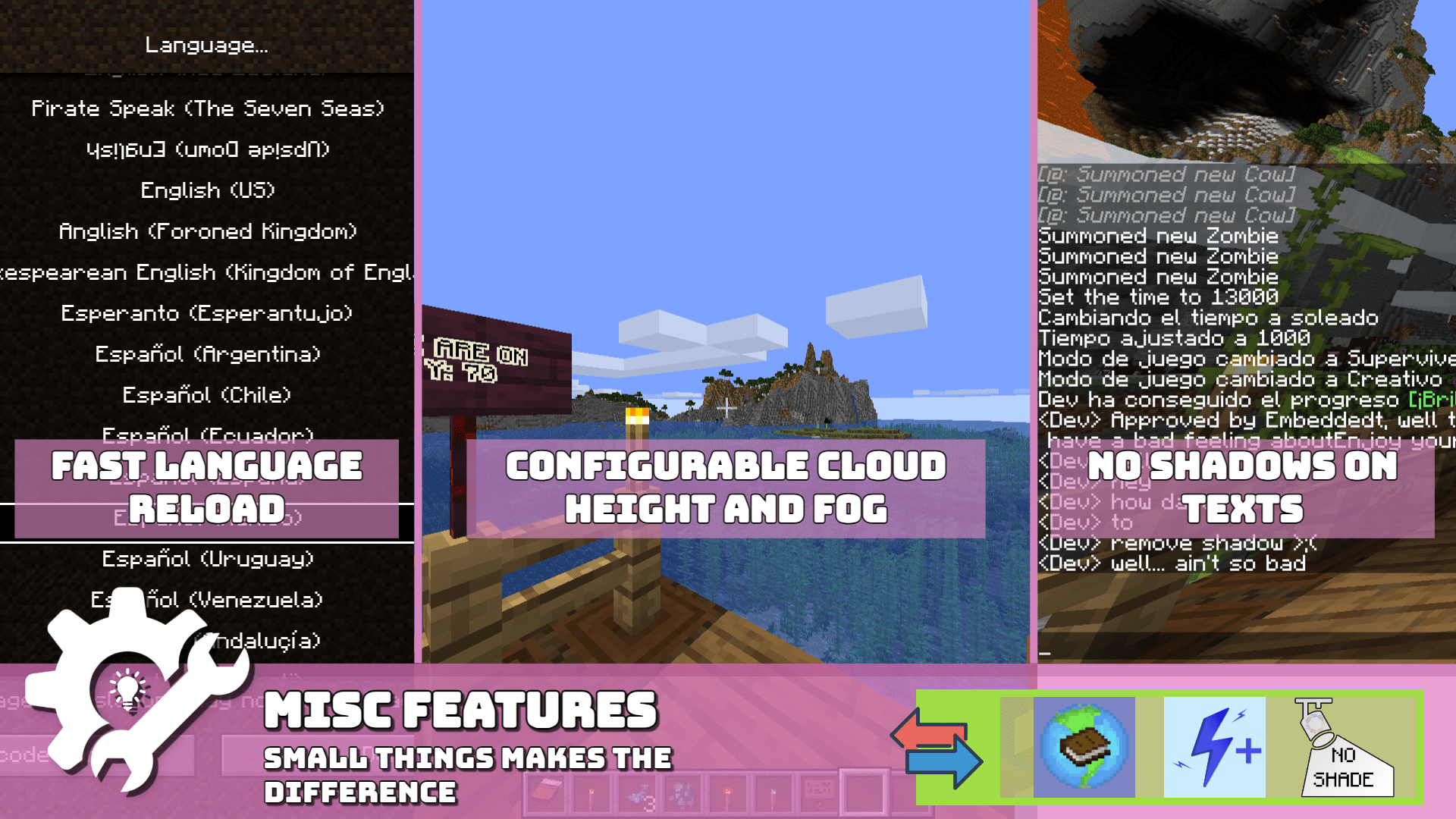
[🌎] FAST LANGUAGE RELOAD
- 📐 Reload quick as possible the language (less than 1 second).
[🔁] [26.2] ENGINE HOTSWAP (VK/GL)
- 📐 Enables hotswap of rendering engines (GL/VK) in-game.
- 📋 Disabled by default, can be enabled, compatible with sodium, incompatible with iris.
- ✨ No need to restart the game, perfect to compare instantly the game perf.
🛠️ VISUAL UTILITY
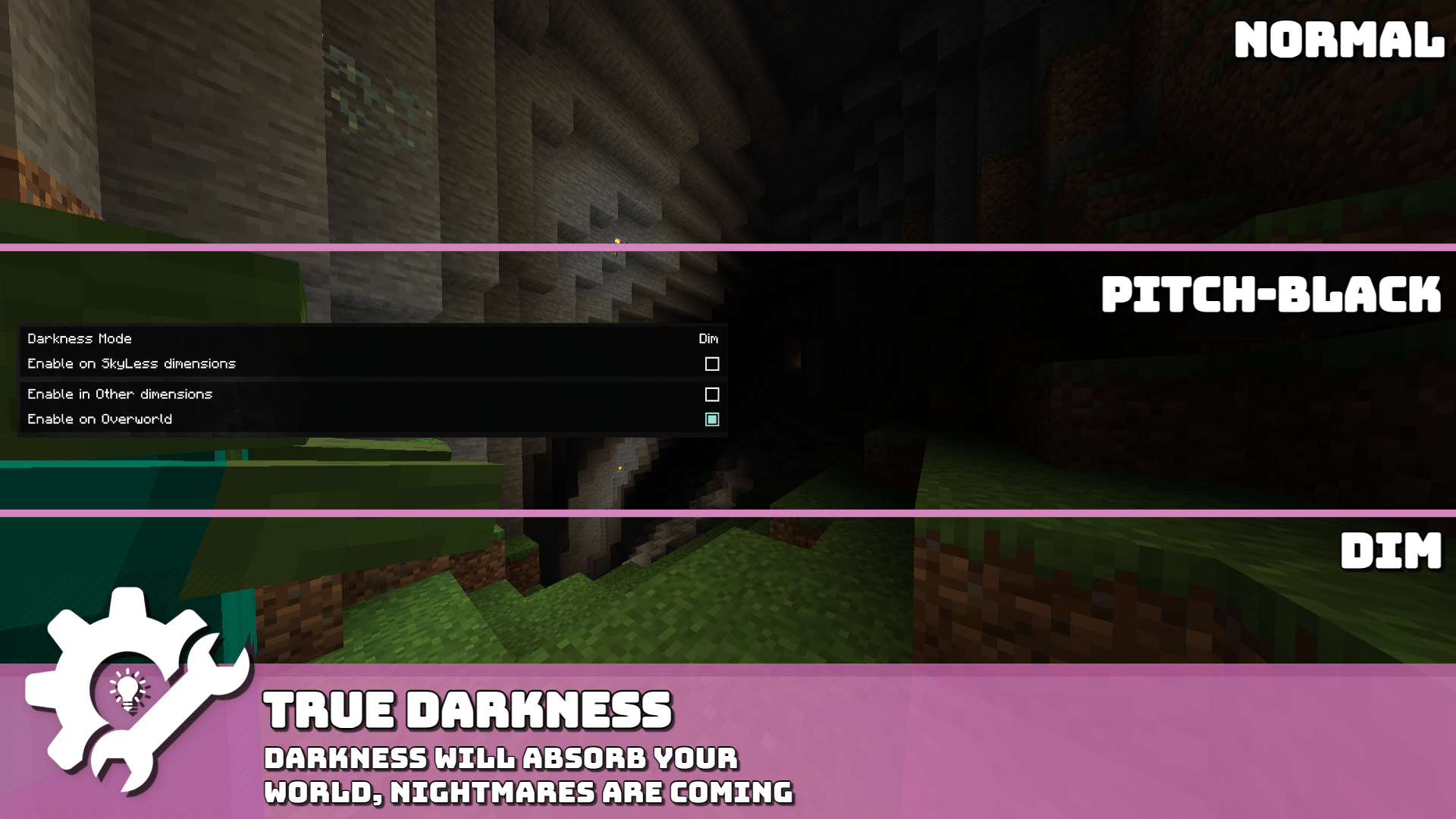
[🕯️] TRUE DARKNESS
- 📐 Adds MANY darkness levels to the game, making it more realistic (and darker)
- 📋 Toggles between DIM, DARK, DARKNESS, BLACK and BLACKNESS
- ✨ Moonlight and blocklights can affect the darkness level
[🏷️] NAMETAG HIDING
- 📐 Removes nametag rendering for everyone like players, entities and item frames. (what's your name?)
- 📋 Toggle each individually
[🔍] ZOOM KEY
- 📐 Adds a simple immediate zoom key to the game, allowing you to zoom in and out
- 📋 Can configure min and max distance and can be disabled
- ✨ You can scroll to zoom in and out while zooming
👓 QUALITY
[🌁] FOG/BLUEBAND SETTINGS
- 📐 Configure the distance (start, end), and the visibility of the fog and the blueband.
- 📋 Toggle each individually
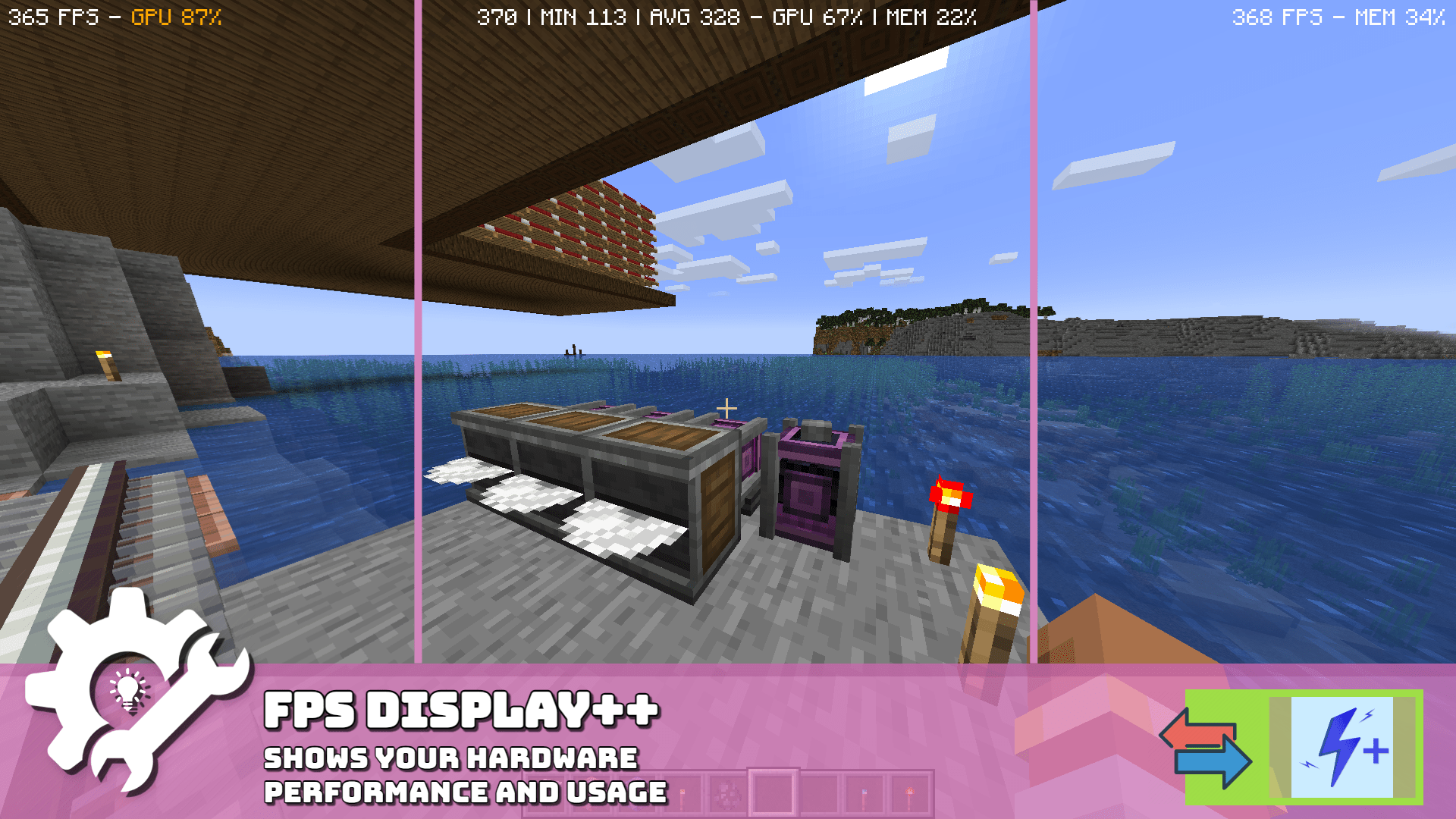
[🧮] FPS DISPLAY
- 📐 Shows your average, min and current FPS, Memory usage percent and GPU usage percent.
- ✨ You can place it anywhere on the screen, even above your hotbar
[🖥️] BORDERLESS FULLSCREEN:
- 📐 Adds borderless fullscreen to the game, adding quick-tab switching, image-in-imag support and no more black screen
- ✨ Fullscreen key (F11) can also switch to Borderless FullScreen (can be disabled or override)
[🔳] TEXT SHADOWS TOGGLE
- 📐 Disables font shadows, sometimes increases the FPS on screens with a lot of text
[👁️] CHUNK FADE IN- Will be back in future updates
✨ MISC
- [🔒] SETTINGS LOCKER
- 📐 Hides all visual utility settings, making it impossible to change them
👥 SUPPORT AND QUESTIONS
Join to my community in Discord to ask anything about the mod, ask me permission to do odd things with the mod or do fancy suggestion to improve in the mod.



🧂 CHLORIDE MOD
Chloride is a performance addon/mod for Sodium that aims to improve
the performance of the game and the quality of sodium itself.
Offers a lot of features to customize and improve your experience with sodium, making it
a tasteful experience (NaCl).
🔧 FEATURES
⚡ PERFORMANCE
- 🐄 ENTITY DISTANCE CULLING
- 📐 Avoid rendering/ticking Entities and Block Entities from far away.
- 📋 Features a whitelist, letting important entities (such as ender dragon or ghast)
- ✨ Example:
minecraft:batculls bats,alexsmobs:allculls all Alex's Mobs entities.
- [🌿] LEAVES CULLING
- 📐 Reduce the number of rendered faces in a group of the same type of leaves
- 📋 Features a slider to set how many leaves you want to cull
- [👟] FAST MODELS
- 📐 Replaces suboptimal animated Chest and Bed (below mc26.2) models to use solid models
- 📋 Toggle each individually
- [🔦] HIDE JEI/REI/EMI OVERLAY
- 📐 Hides JEI/REI/EMI overlays until you type anything in their search bars
- ✨ Show a small meessag indicating you must search something to show the overlay
- [🌎] FAST LANGUAGE RELOAD
- 📐 Reload quick as possible the language (less than 1 second).
- [🔁] [26.2] ENGINE HOTSWAP (VK/GL)
- 📐 Enables hotswap of rendering engines (GL/VK) in-game.
- 📋 Disabled by default, can be enabled, compatible with sodium, incompatible with iris.
- ✨ No need to restart the game, perfect to compare instantly the game perf.
🛠️ VISUAL UTILITY
- [🕯️] TRUE DARKNESS
- 📐 Adds MANY darkness levels to the game, making it more realistic (and darker)
- 📋 Toggles between DIM, DARK, DARKNESS, BLACK and BLACKNESS
- ✨ Moonlight and blocklights can affect the darkness level
- [🏷️] NAMETAG HIDING
- 📐 Removes nametag rendering for everyone like players, entities and item frames. (what's your name?)
- 📋 Toggle each individually
- [🔍] ZOOM KEY
- 📐 Adds a simple immediate zoom key to the game, allowing you to zoom in and out
- 📋 Can configure min and max distance and can be disabled
- ✨ You can scroll to zoom in and out while zooming
👓 QUALITY
- [🌁] FOG/BLUEBAND SETTINGS
- 📐 Configure the distance (start, end), and the visibility of the fog and the blueband.
- 📋 Toggle each individually
- [🧮] FPS DISPLAY
- 📐 Shows your average, min and current FPS, Memory usage percent and GPU usage percent.
- ✨ You can place it anywhere on the screen, even above your hotbar
- [🖥️] BORDERLESS FULLSCREEN:
- 📐 Adds borderless fullscreen to the game, adding quick-tab switching, image-in-imag support and no more black screen
- ✨ Fullscreen key (F11) can also switch to Borderless FullScreen (can be disabled or override)
- [🔳] TEXT SHADOWS TOGGLE
- 📐 Disables font shadows, sometimes increases the FPS on screens with a lot of text
[👁️] CHUNK FADE IN- Will be back in future updates
✨ MISC
- [🔒] SETTINGS LOCKER
- 📐 Hides all visual utility settings, making it impossible to change them
👥 SUPPORT AND QUESTIONS
Join to my community in Discord to ask anything about the mod, ask me permission to do odd things with the mod or do fancy suggestion to improve in the mod.
Screenshots
Gallery
-
 chloride_banner.png chloride_banner.png
 -
 emb++badged-explain-min.png emb++badged-explain-min.png
 -
 fps-display-min.png fps-display-min.png
 -
 entity-distance-culling-plus-min.png entity-distance-culling-plus-min.png
 -
 fast-models-plus-min.png fast-models-plus-min.png
 -
 true-darkness-min.png true-darkness-min.png
 -
 misc-features-min.png misc-features-min.png
 -
 emb++thefuture-min.png emb++thefuture-min.png
-
 Cover Main cover
Versions
Files
Relations
Project Relations
More like this
Similar Mods
Suggestions use data such as tags, dependencies, dependents, descriptions, titles, and more to rank how much they overlap with this mod.
On ModDex
Community snapshot
By the numbers
Statistics
Want to reach Minecraft players?
We're looking for a server hosting partner to feature here and other parts of the site. Interested? Send us a message!
Get in touchGet it on
Available Platforms
On ModDex
Community snapshot
By the numbers